
Your Support Team Is Working With a Blindfold On
Here is the situation we walk into at least 3 out of every 5 new client onboardings:
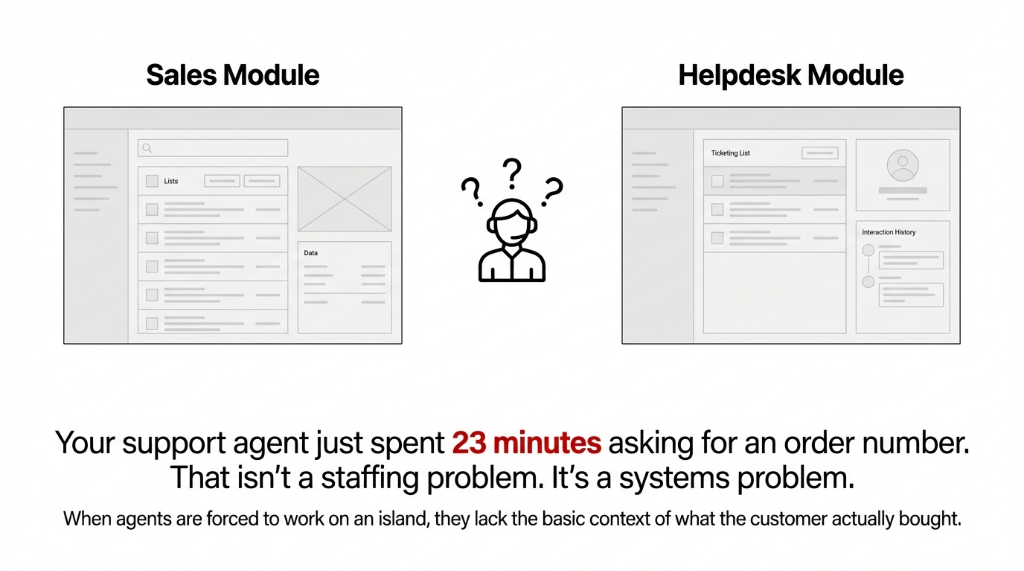
The sales team is in the Sales module. The ops team is in Inventory. And the helpdesk team is on their own little island, copy-pasting order numbers from customer emails into a separate browser tab just to understand the context of a complaint.
The $3,100/Month Blindfold Tax
Real client data: A $4.2M D2C brand in Texas had four helpdesk agents. Each one was spending an estimated 41 minutes per day toggling between Odoo's Sales module and their Helpdesk queue just to manually cross-reference order data.
2.87 hours of dead time per agent, per day
Total: $3,100/month in wasted labor — just for context that should have been one click away
And that is the visible cost. The invisible cost? Over 60% of customers will switch to a competitor after more than one poor interaction. When your agent asks a customer "Can you resend your order number?" on the second ticket about the same shipment, that is strike two. You are not just wasting time — you are actively pushing customers toward whoever else sells what you sell.
Why "Just Train Your Agents Better" Is the Wrong Answer
We hear this constantly. Founders and ops managers assume that if agents just used Odoo better, the problem would go away. No. That advice ignores what the tool is actually capable of.
The real issue is that most Odoo implementations treat Helpdesk as a standalone inbox. It gets configured, tickets come in, agents reply. Nobody sets up the Sales Order Smart Button integration, nobody activates the "Sales Order Items" field on the ticket form, and nobody connects the bi-directional ticket-order link that makes Odoo Helpdesk genuinely useful.
The Dirty Secret Your Implementation Partner Won't Admit
Here is what nobody tells you upfront: Odoo's Helpdesk module, out of the box on Enterprise edition, allows direct linking between Helpdesk tickets and Sales Orders. But you have to configure it. The default install does not automatically wire your sales data into every ticket.
If your implementation partner set it up in 3 days and called it done, they skipped this step. This is the difference between a support team that resolves tickets in 8 minutes versus 31 minutes.
How the Odoo Helpdesk–Order History Link Actually Works
Once properly configured, here is exactly what changes inside Odoo Helpdesk:
On the Ticket Form
Agents see a "Sales Order Items" field where they can pull the exact order(s) associated with the customer's complaint. The moment a ticket is linked to a sales order, a Sales Order Smart Button appears at the top of the ticket, showing the count of linked orders. One click opens the full order view — line items, delivery status, invoice state, payment status, everything.
From the Sales Order Side
Your sales team or ops managers can click a "Create Ticket" button directly inside a sale order and generate a helpdesk ticket that is pre-linked to that order from birth. That ticket automatically shows the correct customer, the correct order reference, and tags the order for reverse lookup. No copy-paste. No tab-switching. No "let me ask the support team what ticket number that was."
The Bidirectional View
A support agent opening a ticket sees the linked orders. A sales manager opening an order sees linked tickets. Your post-sales workflow stops being a game of telephone between departments and starts being a single source of truth.
Access Control Built In
Only users with the "Sale Helpdesk Ticket" access right enabled in their user profile can create orders from tickets or vice versa — which means you control who touches what without building a complicated permission wall.
What Changes on Day One After You Set This Up
We deployed this for a $7.8M B2B wholesale brand in California. On the first Monday after go-live, their lead support agent said the following verbatim: "I didn't have to ask a single customer for their order number today."
That sounds small. Here is what it actually meant in practice:
Day-One Impact: $7.8M B2B Brand, California
Resolution Time
Dropped from 29 minutes to 11 minutes per ticket
Agent Escalations
Dropped by 63% in the first month — agents now had order context to resolve issues themselves
Stalled Ticket Backlog
47 stalled tickets (waiting on customers to resend order info) cleared in under three days
Customer Satisfaction
Moved from 3.1 to 4.4 out of 5 within six weeks
The SLA Penalty Credits Nobody Talks About
The brand was running SLA policies in Odoo Helpdesk. With order history visible inside each ticket, agents could now correctly assess whether a complaint was tied to a late shipment (priority 1 SLA breach) or a general product question (standard queue).
Before this setup, everything was treated as equal priority because nobody had context. That alone stopped at least $2,300/month in SLA penalty credits they were issuing unnecessarily.
The Implementation Reality (Don't Let Anyone Tell You This Takes Months)
Enabling the Helpdesk–Sales Order link in Odoo is not a six-week project. On a standard Odoo 16, 17, or 18 Enterprise implementation, the native integration is already available inside the module. The configuration work — enabling the setting, assigning user rights, adding the Sales Order field to the ticket form, training agents on the Smart Button workflow — takes between 2 to 4 business days if your Odoo instance is already live.
Day 1: Enable & Configure
Activate the Sales Order Items field on the ticket form, enable the Smart Button integration, configure the "Sale Helpdesk Ticket" access right for appropriate user roles.
Days 2–3: Test & Train
Run test tickets with real order data, train support agents on the Smart Button workflow, train sales team on the "Create Ticket" button inside sale orders.
Day 4: Go Live & Monitor
Switch to live tickets, monitor adoption for the first week, reinforce the behavioral shift: check Odoo first, not Slack.
If you are running Odoo Community edition, you will need the OCA module "Helpdesk Sale Order", which is open-source and available from the Odoo Community Association. It mirrors the Enterprise functionality, though the Smart Button behavior may differ slightly depending on your version.
The harder part is not technical. It is organizational. Your sales team needs to understand that when a customer calls in about an order, the first thing they should do is open the order in Odoo and check whether a ticket already exists — not fire off a Slack message to the support manager. That behavioral shift takes about two weeks of consistent reinforcement.
(Yes, we know your sales team still uses Slack for everything. That is a separate conversation.)
The Part Nobody Budgets For — But Should
Your agents are not just losing time when they lack order history on a ticket. They are making wrong decisions.
When an agent cannot see that a customer placed 3 orders in the last 90 days totaling $14,700, they treat that customer like a one-time buyer. They offer a standard apology template and move on.
The $58,000/Year Customer Your Agent Just Mishandled
With order history linked to the ticket, that same agent immediately sees the LTV signal, escalates the issue to a senior rep, offers a proactive credit, and retains a customer worth $58,000/year in projected revenue.
This is not a hypothetical. We have seen this exact scenario play out in two separate implementations — once for a SaaS-adjacent brand in New York and once for a manufacturing parts supplier in Ohio.
Increasing retention by just 5% can boost profits by up to 25%. The Odoo Helpdesk order history link is not a ticketing feature. It is a retention tool.
The Cost of Keeping Your Agents in the Dark
| Cost Category | Monthly Loss |
|---|---|
| Agent labor wasted on manual order lookups (4 agents) | $3,100/month |
| Unnecessary SLA penalty credits issued | $2,300/month |
| Estimated churn from repeat poor interactions (LTV loss) | $4,800–$9,700/month |
| Total Monthly Leakage | $10,200–$15,100/month |
Not from bad products. Not from understaffing. From a configuration toggle your implementation partner skipped during setup.
FAQ
Can I link one Helpdesk ticket to multiple sales orders in Odoo?
Yes. Odoo's Helpdesk–Sales Order integration supports multiple orders linked to a single ticket. The Smart Button on the ticket form displays the total count of linked orders, and clicking it opens a filtered view of all associated sales orders. This is especially useful for bundled complaints or repeat-order issues.
Does this work on Odoo Community or only Enterprise?
Native linking is available on Odoo Enterprise. Community users can install the OCA "Helpdesk Sale Order" module, which provides comparable bidirectional Smart Button functionality. The feature set is nearly identical, though some UI elements and SLA-related features remain Enterprise-only.
How do we control which agents can create sales orders from tickets?
Odoo handles this through user access rights. Only users with the "Sale Helpdesk Ticket" permission enabled in their profile can create or link sales orders from within a ticket. Agents without that right can still view linked orders but cannot generate new ones, keeping your sales pipeline protected.
Will linking tickets to orders affect our SLA tracking?
It improves it. When agents can instantly see order details and shipment status inside a ticket, they can correctly categorize priority levels. This reduces mis-categorized tickets, which are one of the top causes of unnecessary SLA breaches. Odoo's SLA success rate reports in version 17 and 18 directly reflect this improvement.
How long does it take to set up the Helpdesk–Sales Order link on an existing Odoo instance?
For a live Odoo Enterprise instance, full configuration including user rights setup, field activation, and agent training takes 2 to 4 business days. Community edition with the OCA module may add 1 to 2 days depending on version compatibility and any custom ticket form modifications already in place.
Stop Letting Your Agents Solve Tickets With Zero Context
If your support team is manually hunting for order data on every customer call, you are paying 3.4x more per ticket resolution than you should be — and you are one bad experience away from losing customers who have spent $10,000+ with you. Book a free 15-Minute Operations Audit. We will identify your biggest support-to-sales gap in the first call.