
Why Tally-to-Odoo Migrations Break (Before You Even Start)
Frankly, Tally and Odoo do not speak the same language — and nobody tells you that upfront.
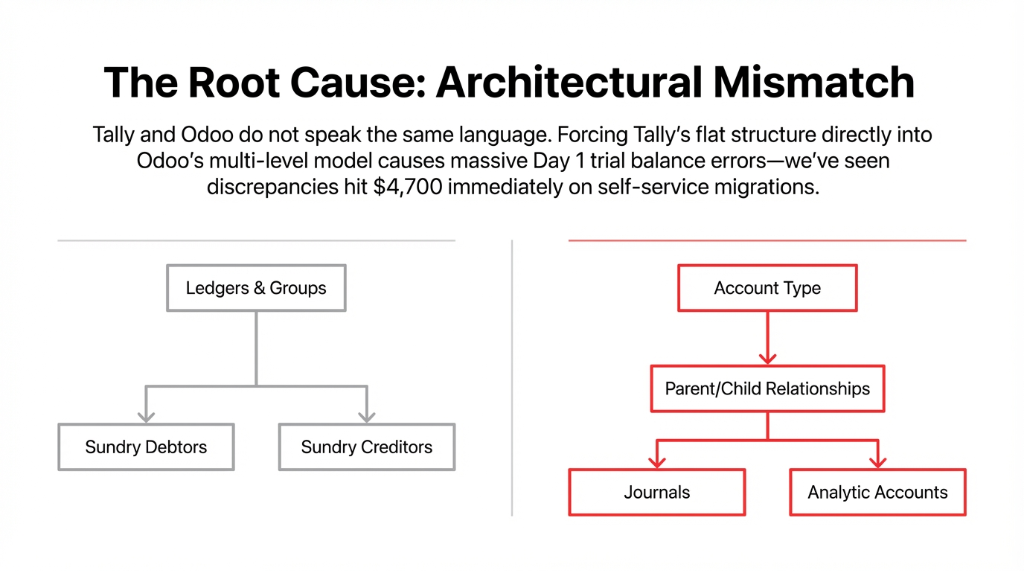
In Tally, your financial universe lives in Ledgers and Groups — Sundry Debtors, Sundry Creditors, Duties & Taxes, all nested under a flat two-level hierarchy. In Odoo, the Chart of Accounts is multi-level, structured around account types with parent-child relationships, journals, and analytical accounts.
The Day 1 Trial Balance Nightmare
When your team tries to shove Tally’s “Ledger → Group” structure directly into Odoo’s account model without proper mapping, you end up with a trial balance that is off by $4,700 on Day 1 of go-live. (We have seen this exact number at a $2.3M US wholesale distributor who tried a self-service migration.)
The voucher mismatch is equally brutal. Tally’s Sales Vouchers, Purchase Vouchers, Receipt Vouchers, Payment Vouchers, Journal Vouchers, and Contra Vouchers each map differently to Odoo’s invoice types and journal entries. Miss one mapping, and six months of transaction history imports into the wrong journal.
Here is the ugly truth: Odoo data migration from Tally is not a CSV upload. It is a data engineering project.
The 7-Step Migration Playbook We Actually Use
Step 1 — Audit Before You Export Anything
Do not touch the Export button in Tally until you have completed a full data audit. We run a 3-part audit:
Volume Check
How many active customers, vendors, products, ledger accounts, and open invoices exist? A US manufacturing client came to us thinking they had 1,200 vendors — the actual count was 2,847, including 600+ duplicates with mismatched PAN and address entries.
Quality Check
Look for blanks in critical fields — missing HSN codes on products, vendor records without addresses, accounts with zero-movement for 36+ months.
Scope Decision
Decide whether you are doing a full migration (all historical transactions) or a cutover migration (opening balances only + fresh start in Odoo).
For businesses running $500K–$5M ARR, we almost always recommend a cutover migration — it cuts the project timeline from 11 weeks to roughly 4 weeks.
Step 2 — Export Tally Data in the Right Format
Tally exports in XML by default. Odoo imports CSV or Excel. This single mismatch is where 43% of DIY migrations stall for weeks.
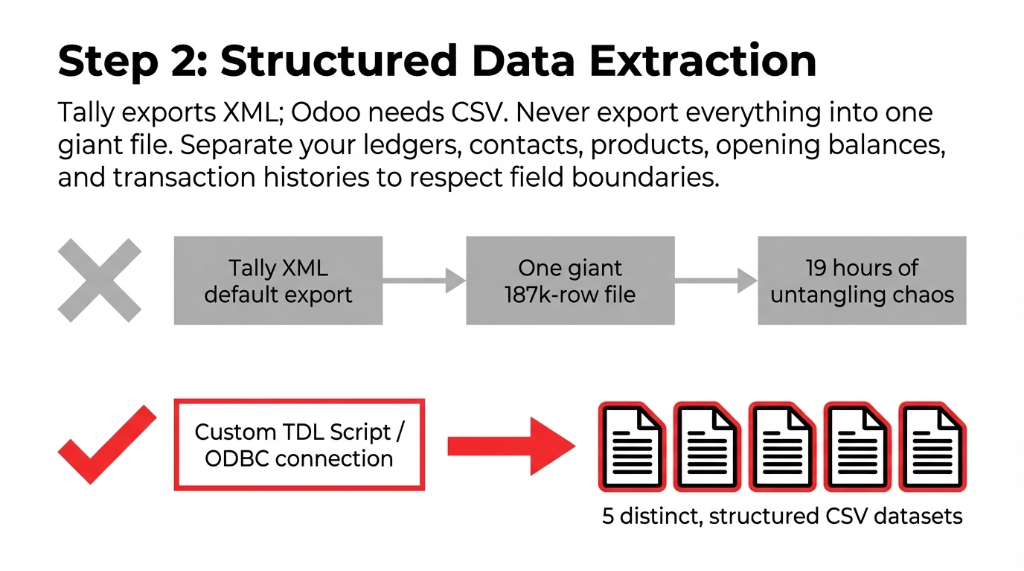
The right approach is to use Tally’s ODBC connection or the Tally XML export with a custom TDL (Tally Definition Language) script to extract data into a structured CSV that respects field boundaries. Export these datasets separately:
- Chart of Accounts (Ledgers + Groups)
- Customers and Vendors (with GSTIN, contact details, credit limits)
- Products/Stock Items (with HSN codes, units of measure, reorder levels)
- Opening Balances (as of your cutover date)
- Transaction History (if doing a full migration — invoices, payments, journal entries)
⚠ Do not export everything into one giant file. We had a client send us a 187,000-row Tally export dump that mixed customers, vendors, products, and transactions into a single sheet. It took our team 19 hours just to untangle the structure before a single record could be mapped.
Step 3 — Build Your Field Mapping Document
This is the most critical step — and the one most partners skip or rush. Build a mapping document where every Tally field is matched to its Odoo equivalent.
| Tally Field | Odoo Equivalent | Risk if Missed |
|---|---|---|
| Ledger Group | Account Type | Trial balance will not match |
| Voucher Type (Contra) | Odoo Bank Journal Entry | Double-counted cash entries |
| Stock Item (Godown) | Warehouse Location | Inventory variance on Day 1 |
| Party Ledger | res.partner (Customer + Vendor) | Duplicate contacts created |
| Opening Balance | Odoo Opening Entry (Journal) | Balance sheet discrepancy |
| Cost Center | Analytic Account | P&L by department breaks |
Tally’s “Godown” concept — where physical warehouse locations are stored — maps to Odoo’s multi-warehouse structure. If you are running 3 warehouses in Tally, you need to pre-configure those locations in Odoo before importing a single inventory record.
Step 4 — Configure Odoo First, Import Second
This is the rule most US businesses break. They import data into a vanilla Odoo instance and then try to configure it around the data. Wrong order. Always configure Odoo first.
Configure Before You Import
✓ Set up the Chart of Accounts matching your mapped Tally ledgers
✓ Configure tax rules (US sales tax or multi-state if applicable)
✓ Set up warehouses, locations, and stock routes
✓ Configure payment terms, currencies, and journals
✓ Set user access levels and approval workflows
Trying to reconfigure Odoo after a 50,000-row import is like trying to rewire a building after the walls are drywalled.
Step 5 — Run a Test Migration on 10% of Your Data
Before touching your production Odoo instance, spin up a staging environment and import a representative 10% sample — a slice of customers, products, and a few hundred transactions.
Validate three things:
1. Trial balance match — Does the Odoo Balance Sheet match Tally’s as of the cutover date? Even a $1 discrepancy means a mapping error exists.
2. Inventory on-hand match — Does Odoo’s stock count match Tally’s godown-level balances?
3. Open invoice aging — Do outstanding receivables and payables match aging reports from Tally?
The Test Run Reality
In our last 12 Tally-to-Odoo migrations for US clients, we found an average of 23 mapping errors in the test run.
Better to find them on a 5,000-row test than a 50,000-row live import.
Step 6 — Full Data Import Into Production
Once the test passes, execute the full import in this exact sequence:
Import Sequence (Follow This Order)
1. Chart of Accounts
Foundation layer — everything else references this
2. Partners
Customers and Vendors share the same res.partner model in Odoo
3. Products & Stock Items
HSN codes, UoM, and reorder levels
4. Opening Balances
Via a single Opening Entry journal
5. Historical Transactions
Invoices, bills, payments — if doing full migration
6. Inventory Quantities
Via an Inventory Adjustment
Use Odoo’s native Import Tool for master data. For transactional data — especially anything over 10,000 rows — use Odoo’s base_import module with batch processing, or write a Python migration script using the xmlrpc API.
Real Migration Speed
A $4.1M US consumer goods brand we migrated had 78,000 historical transactions. Using batch API imports in groups of 500 records, the full import took 6.5 hours — versus the 3 days their previous partner had estimated for manual entry.
Step 7 — Validate, Reconcile, and Go Live
Post-import validation is not optional. Run these checks before you switch off Tally:
✓ 3-way balance check: Opening Balance + Transactions = Closing Balance in both systems
✓ Vendor statement reconciliation on your top 20 vendors by spend
✓ Customer aging comparison — Tally vs. Odoo, penny-for-penny
✓ Physical inventory count against Odoo’s imported stock quantities
Block out a 5-business-day parallel run where both Tally and Odoo are live simultaneously. All new transactions go into Odoo; Tally becomes read-only. This is the safety net that catches the edge cases no test migration would have revealed.
The Numbers You Should Expect Post-Migration
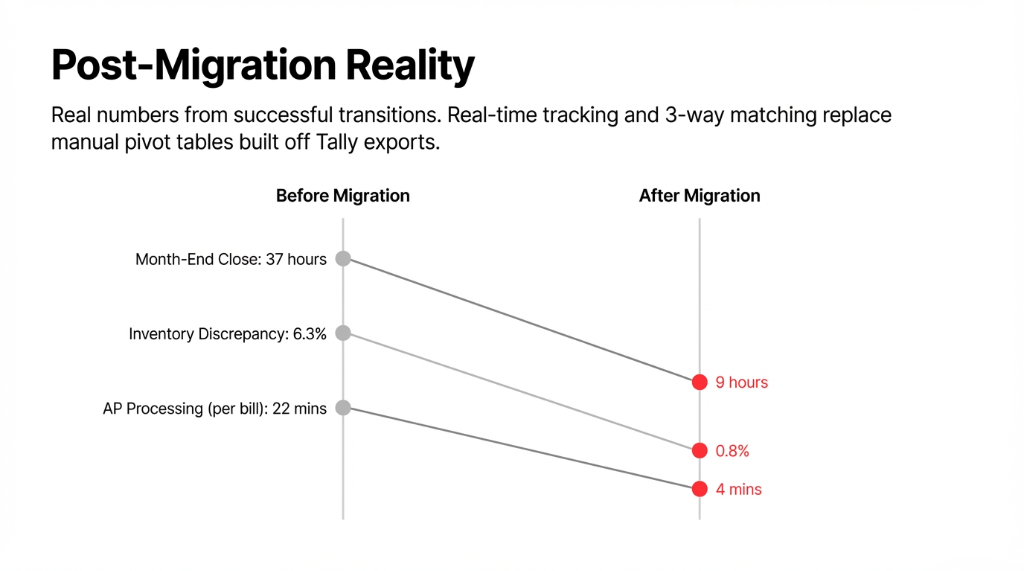
We are not going to promise magic. Here is what our US clients realistically see after a successful Tally-to-Odoo migration:
| Metric | Before (Tally) | After (Odoo) |
|---|---|---|
| Month-end close | 37 hours | 9 hours |
| Inventory discrepancy rate | 6.3% | 0.8% |
| Manual report generation | 14.5 hours/week | Automated dashboards |
| AP processing time (per bill) | 22 minutes | 4 minutes |
The One Thing Your Odoo Partner Will Not Tell You
Tally’s Opening Balances Are Notoriously Dirty
In 9 out of 12 US-based migrations we have handled, the Tally Balance Sheet had unadjusted rounding differences, suspended entries in a “Difference in Opening Balance” ledger, and tax accounts that had not been reconciled in 18+ months.
Your Odoo partner will import these dirty numbers exactly as they exist — because cleaning them requires an accountant, not a developer.
Budget $2,000–$4,500 for a CPA review of your Tally books before migration begins. It saves you $15,000+ in post-migration rework.
The Odoo native import tool can handle simple master data. But a full Tally-to-Odoo migration covering 3+ years of transaction history, multi-warehouse inventory, and US tax configurations is not a weekend project. We have seen teams at $3M ARR brands spend 11 weeks on a DIY migration — and still roll it back because the balance sheet would not reconcile.
Do not let a botched migration cost you five figures. Contact Braincuber today — we will audit your Tally data structure, scope your migration timeline, and give you a fixed-cost quote in the first call. No vague estimates. No surprises at go-live.
FAQ
How long does Odoo data migration from Tally take?
For a cutover migration (opening balances + master data only), expect 3 to 5 weeks from audit to go-live. A full historical migration covering 2 to 3 years of transactions typically runs 7 to 9 weeks. Timeline depends on data volume, quality of your Tally books, and how quickly your team reviews and signs off on test migration results.
Will I lose historical transaction data from Tally during migration?
No — if the migration is executed correctly. Both full historical data (all invoices, payments, journal entries) and summarized opening balances can be migrated to Odoo. The risk of data loss only arises when the migration is done without proper field mapping, test validation, and a parallel run period.
Can I migrate Tally inventory data (stock items, godowns) to Odoo?
Yes. Tally stock items map to Odoo products, and Tally godowns map to Odoo warehouse locations. HSN codes, units of measure, and reorder levels transfer with proper mapping. You must configure your Odoo warehouse structure before importing inventory, or stock quantities will land in the wrong locations.
What Tally data cannot be migrated to Odoo?
Tally-specific configurations like TDL customizations, payroll data (if managed in Tally), and some statutory compliance formats do not have a direct Odoo equivalent. These require reconfiguration in Odoo natively. Tally’s Cost Centre structure may also require re-mapping to Odoo’s Analytic Accounts with some restructuring.
Do I need to stop using Tally immediately after migration to Odoo?
No — and you should not. Run a parallel period of 5 business days minimum where both systems are live. Enter new transactions in Odoo only, but keep Tally as a read-only reference. This gives you a safety net to catch any missed records or balance discrepancies before you formally retire Tally.
Stop Bleeding Hours on a Botched Migration
Book a free 15-Minute Migration Audit with Braincuber. We will audit your Tally data structure, scope your migration timeline, and give you a fixed-cost quote in the first call. No vague estimates. No surprises at go-live.