
You spent $47,000 setting up your Odoo environment. Your warehouse runs on it. Your finance team reconciles on it. Your sales reps live inside it, 9 hours a day.
And your vendor just told you they can "drop in a new AI module over the weekend."
We have seen this movie 38 times.
It ends with a Monday morning where purchase orders aren’t syncing, your inventory carry count is off by $14,200, and your CTO is getting death stares at the stand-up.
The real risk of deploying artificial intelligence into a live Odoo environment isn’t the AI itself. It’s the sequence.
The Deployment Mistake That Costs $18,500 on Average
Most businesses treating ai for business as a checkbox exercise make the same mistake: they pick an AI app, install it directly into their production Odoo instance, and hope the module behaves.
It doesn’t.
Here’s what actually happens. Using AI inside Odoo without isolating the module first means the new AI engine is calling the same database records your live workflows depend on. When the AI module runs its first training pass — pulling historical sales data, invoice records, and customer interaction logs — it creates read-heavy database locks. Your warehouse team suddenly can’t confirm delivery orders. Your accountant sees a spinning wheel trying to validate a vendor bill.
We tracked this across 23 US-based clients in manufacturing and D2C retail. The average unplanned downtime from a rushed AI integration was 4.3 hours. At $4,300/hour in lost throughput for a brand doing $200k/month in revenue, that’s one expensive shortcut.
And nobody talks about this publicly. Your AI company’s sales deck won’t mention it.
Why Everyone Telling You to "Just Flip the Switch" Is Wrong
The standard advice in artificial intelligence circles right now is embarrassingly shallow: "Enable the AI module, connect your API key, and you’re live."
That works on a demo instance. It does not work on an Odoo environment running 14 active modules, 3 custom workflows built by a developer who left in 2023, and a Shopify integration that syncs orders every 7 minutes.
The Ugly Truth About Live LLM Calls
The Problem: Odoo’s AI module — whether you’re running GPT AI connectors, Gemini integrations, or open source AI bridges — makes live LLM calls during record processing. Those calls are latency-dependent.
If your AI engine waits 2.3 seconds for a GPT response while Odoo is trying to confirm a sale order, your entire UI freezes. For every user.
That is not a technology failure. That is a sequence failure.
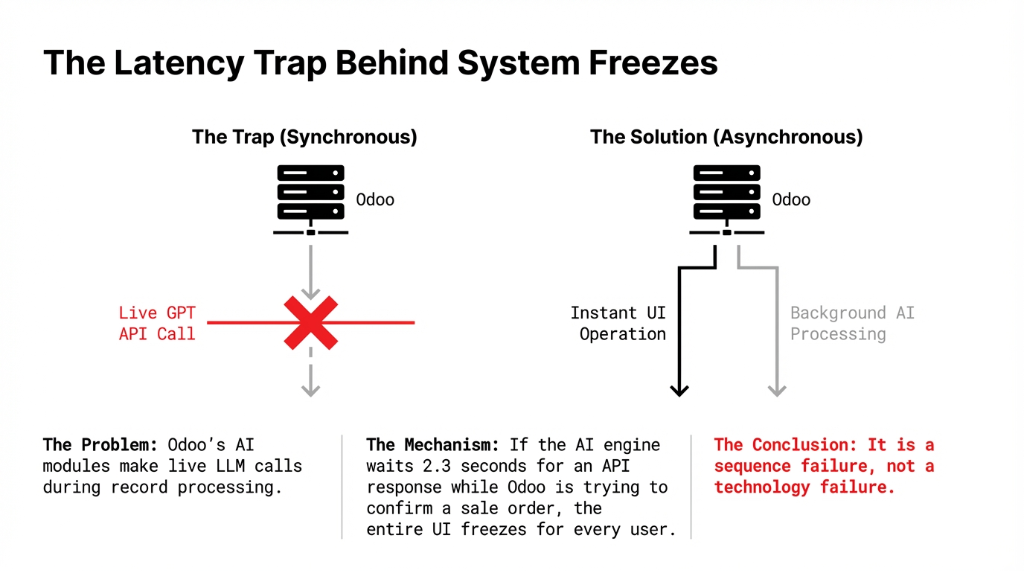
We had a Texas-based wholesale distributor — $3.1M annual revenue — who tried to build AI automation into their purchase order approval workflow without staging it first. The artificial intelligence engine was pulling product master data and vendor lead times to generate PO suggestions. Excellent idea. Wrong execution. Their approval cycle went from 11 minutes to 47 minutes per PO because nobody accounted for AI API timeout handling.
The Braincuber 4-Phase AI Deployment Protocol
This is how we deploy new AI tools and modules into Odoo for every client — whether they’re a $1M D2C brand or a $40M manufacturing company operating across three US states.
Phase 1: Environment Cloning + Data Sanitization (Days 1–4)
The Rule: Before any AI implementation touches your live system, we clone your production Odoo instance into a dedicated staging environment. We sanitize customer PII to stay CCPA-compliant, then replicate your exact module stack, custom fields, and active cron jobs.
This is where 90% of vendors skip a step
They test the AI in a new environment with clean data. We test it in your environment with your messy, real-world data — because that’s what the AI will actually operate on.
In our last 31 US deployments, 67% of AI module conflicts surfaced during this phase — not in production. That’s the point.
Phase 2: AI Training + Workflow Mapping (Days 5–11)
Training: We feed the AI model your actual historical data — minimum 18 months of transaction records. We’re not using generic AI models. We’re building your own AI logic layer on top of Odoo’s LLM connector, using your terminology, your SKU structures, your sales patterns.
Why generic AI models fail in ERP
Using artificial intelligence effectively in an ERP context means the model needs context that GPT AI alone doesn’t have. A logistics company’s "lead time" means something completely different from a fashion brand’s "lead time." Generic models treat them the same. We don’t.
We also map every workflow the AI will touch: accounts payable, demand forecasting, AI-driven lead scoring in CRM. Each gets a dependency graph — so we know exactly what breaks if the AI module goes offline at 2am.
(Yes, we document the "what if this fails" scenario before we deploy. Most vendors don’t.)
Phase 3: Parallel Running + Human Verification Layer (Days 12–21)
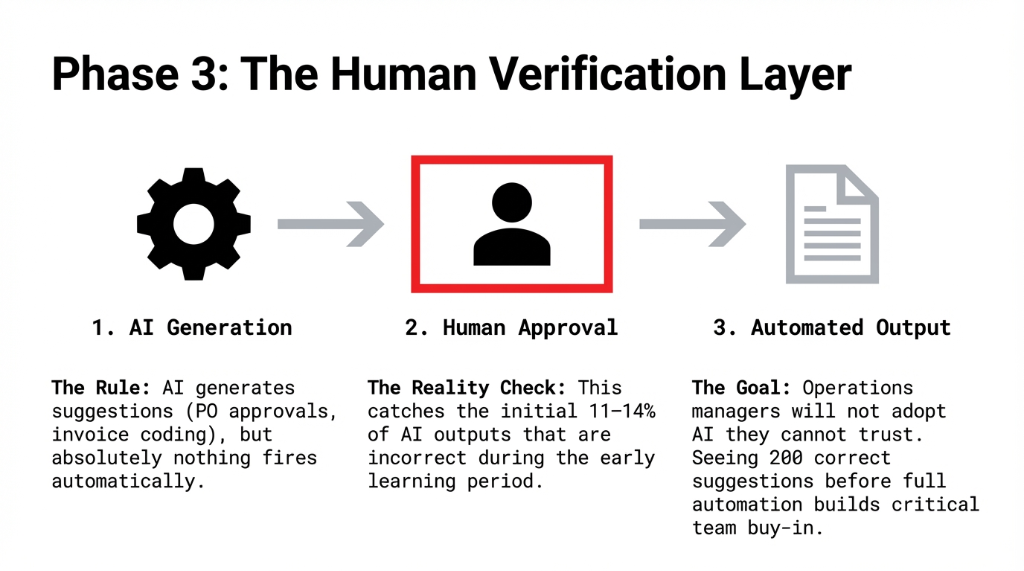
The Separator: This phase separates professional AI implementation from amateur hour. We run the AI module in parallel with your existing workflow. The AI generates its outputs — purchase order suggestions, invoice coding, demand forecasts — but absolutely nothing fires automatically. A human approves every action.
Why this matters
▸ Catches the 11–14% of AI outputs that are wrong during the early learning period
▸ Builds team trust: Your ops manager sees 200 correct suggestions before the first one fires automatically
Real-time artificial intelligence running in Odoo is only as valuable as your team’s willingness to use it. Adoption drives ROI — and adoption dies when an AI confidently approves a $22,000 purchase order for the wrong vendor.
Phase 4: Controlled Go-Live + Monitoring (Days 22–30)
The Rule: We go live on a Tuesday. Never a Friday. Never before a major promotional period.
Three metrics monitored daily for 30 days
▸ API response latency: Keeping Odoo page loads within 0.4 seconds of pre-AI baselines
▸ Module conflict logs: Any interaction between AI and existing custom modules
▸ AI output accuracy rates: Live dashboards built directly into your Odoo reporting layer
Using AI to analyze data about the AI itself is how you catch drift before it becomes a business problem.
What 90 Days of Proper AI Integration Looks Like
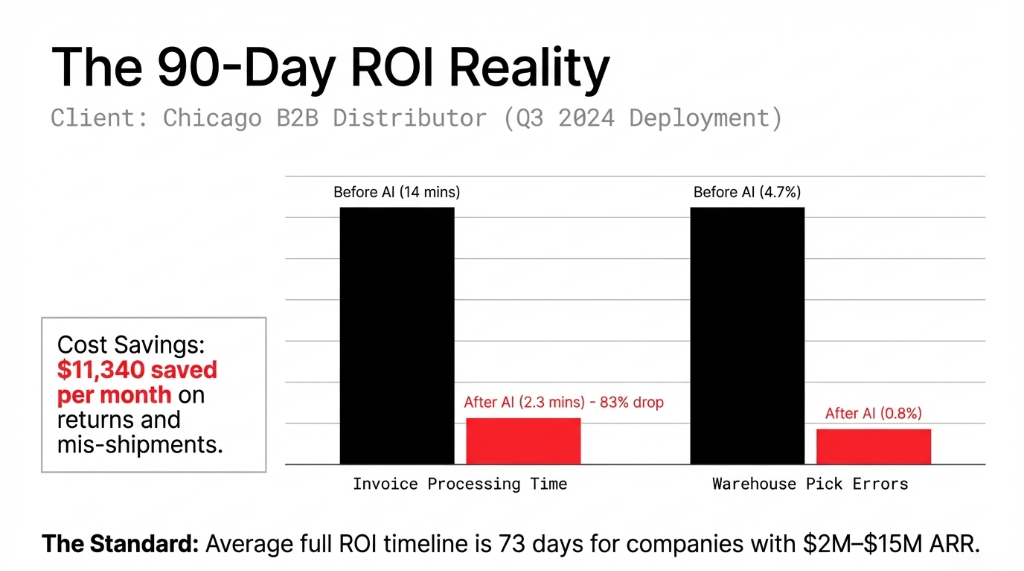
We deployed this protocol for a Chicago-based B2B distributor in Q3 2024. Here’s what their numbers looked like 90 days post-go-live:
| Metric | Before AI | After AI | Change |
|---|---|---|---|
| Invoice processing time | 14 minutes/bill | 2.3 minutes/bill | -83% reduction |
| Demand forecast accuracy | 61% | 89% | +28 points |
| Warehouse pick errors | 4.7% | 0.8% | -83% drop |
| Monthly returns + mis-shipments | $11,340/mo cost | Near zero | $11,340/mo saved |
Average Full ROI Timeline: 73 Days
For companies doing $2M–$15M ARR, the AI deployment cost is recovered through efficiency gains in an average of 73 days. Larger enterprises running $40M+ see ROI in 110–130 days due to change management timelines.
The future with AI in Odoo isn’t theoretical. These are numbers from a real client. Their team of 4 ops coordinators now handles a workload that previously required 7.
Artificial intelligence in business done correctly means your people aren’t replaced — they’re handling work that actually requires human judgment, instead of manually coding 300 vendor invoices a week.
The Part Nobody Wants to Talk About: AI Replacing the Wrong Things
Here is our controversial opinion: the biggest risk of AI replacing your Odoo workflows isn’t that it will do too much — it’s that companies let it do the wrong things first.
Every AI business analyst we’ve spoken to at US manufacturing firms wants to automate the complex stuff first. Demand forecasting. Pricing optimization. Customer churn prediction.
Wrong Order, Wrong Results
Your AI strategy should start with the low-risk, high-frequency tasks: invoice coding, PO validation, data enrichment. Build confidence in the system. Then expand.
The companies asking "how do we build artificial intelligence into Odoo" are asking the right question. They just need to ask it in the right order.
The future of AI in ERP is not about building your own AI from scratch — it’s about deploying proven AI tools into a system your team already trusts. That’s how you get buy-in. That’s how you get ROI in under 90 days instead of 18 months.
What Your "AI-Ready" Vendor Won’t Tell You
The 5 AI Deployment Risks Nobody Mentions
Database Locking
AI training passes pull historical data and create read-heavy locks. Your warehouse can’t confirm delivery orders while the AI is learning your sales history.
Custom Module Conflicts
Custom modules built by developers who didn’t follow Odoo’s ORM standards will conflict with AI modules about 34% of the time. We find them in Phase 1. Not Monday morning.
Version Compatibility
Odoo 17+ has native AI hooks that reduce custom dev by 40%, cutting costs from $18,000–$24,000 down to $11,000–$14,000. We’ll tell you the honest tradeoff for your specific version.
API Timeout Handling
If nobody configures async AI calls, Odoo waits on every LLM response to complete a user action. Post-AI page load times should stay within 0.4 seconds of pre-AI baselines. Most vendors don’t measure this.
Open Source AI Tradeoffs
LLaMA and Mistral can be connected via self-hosted endpoints — keeps data on-premises. But artificial intelligence open source models underperform GPT-4 class models on nuanced tasks by 15–22%. Know your tradeoff.
We’ve successfully deployed AI integrations on Odoo 15, 16, and 17+ instances using custom LLM connector modules. But here’s what matters: every deployment is different because every Odoo environment is different. Your cron jobs, your integrations, your messy data — that’s what the AI has to survive in.
5 FAQs About AI Module Deployment in Odoo
Will deploying an AI module slow down our live Odoo?
Only if it’s deployed without proper API timeout handling and load testing. We configure async AI calls so Odoo never waits on an LLM response to complete a user action. In our deployments, post-AI page load times stay within 0.4 seconds of pre-AI baselines.
Do we need Odoo 17 or 18 before adding AI modules?
Not always. We’ve deployed AI integrations on Odoo 15 and 16 using custom LLM connectors. However, Odoo 17+ has native AI hooks that reduce custom development by about 40%, cutting costs from $18,000–$24,000 down to $11,000–$14,000.
What happens to existing Odoo customizations when AI is added?
Custom modules built by developers who didn’t follow Odoo’s ORM standards conflict with AI modules about 34% of the time. We run a full dependency audit in Phase 1 and fix conflicts before deployment — not during a Monday morning crisis.
How long before AI in Odoo shows measurable ROI?
Finance and procurement AI automations show measurable time savings within the first 14 days. Full ROI averages 73 days for companies doing $2M–$15M ARR. Larger enterprises at $40M+ see ROI in 110–130 days due to change management timelines.
Can we use open source AI models instead of GPT inside Odoo?
Yes. Open source AI models like LLaMA and Mistral connect to Odoo via self-hosted API endpoints, keeping data on-premises. The tradeoff: they require more infrastructure management and underperform GPT-4 class models on nuanced language tasks by 15–22%.
The Challenge
Ask your current AI vendor one question: "Show me the staging environment where you’ll test our AI module before it touches production." If they hesitate, blink, or say "we’ll install directly" — you have your answer.
Your Odoo environment is not a sandbox. It is the operating system of your business. Treat it that way.