
Here is the blunt reality: most US-based Odoo development teams we audit have zero unit tests on their AI modules. Not “some tests.” Zero. And when that AI-powered invoice parser or demand forecasting module ships a wrong number, it corrupts accounting data across every affected record—and the cleanup alone costs $8,000–$40,000.
We’ve seen it happen across 150+ Odoo implementations at Braincuber Technologies. The pattern is identical every time. Developer builds a custom AI module—LangChain-powered chatbot, GPT-based document parser, ML forecasting model—tests it manually in dev, ships it. Three weeks later, it calls a dead API endpoint in production, or the AI returns an unexpected response format, and 2,400 records are corrupted.
That’s not an AI problem. That’s a test strategy problem.
Why AI Modules Break Differently Than Standard Odoo Code
Standard odoo development testing is painful enough. But AI modules introduce a second layer of failure modes that normal unit testing doesn’t catch.
When you call OpenAI’s API, Anthropic’s Claude, or any custom ML model from inside an Odoo module, you’re trusting an external system that can return a different response format than yesterday, throttle your request mid-workflow *(yes, even in production)*, or go down for 14 minutes while your warehouse confirmations queue up.
Traditional Python Unit Testing Won’t Catch This
You need mocking, and you need it from day one of your odoo development cycle—not after the first production incident. The difference between automated testing best practices and hoping is whether your testing pipeline accounts for external API non-determinism.
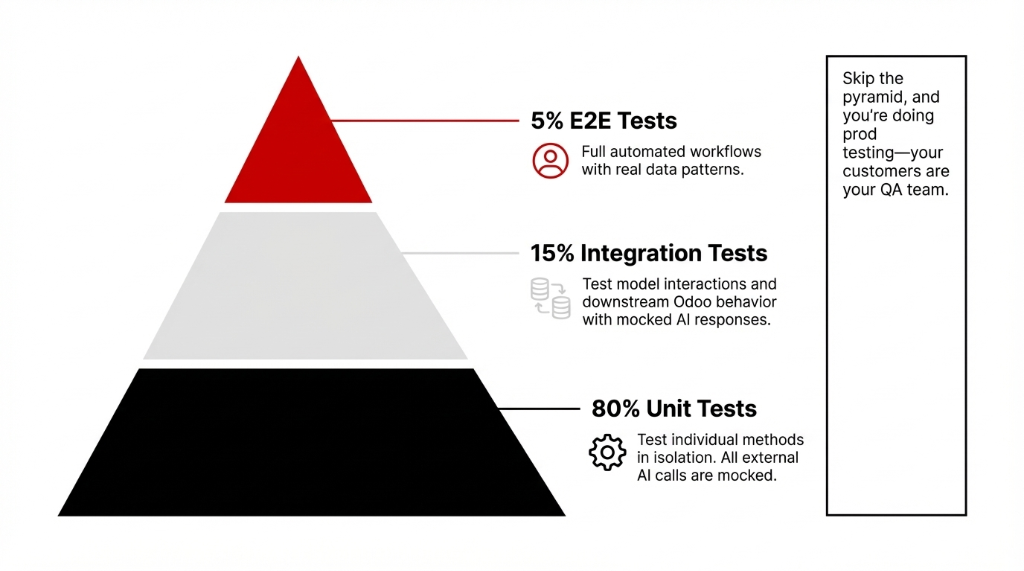
The testing pyramid model for Odoo AI modules breaks down like this:
The Odoo AI Testing Pyramid
80% Unit Tests
Test individual methods in isolation. All external AI calls are mocked. Runs in milliseconds. This is your foundation—write tests here first.
15% Integration Tests
Test model interactions including mocked AI responses. Verify test and integration paths: AI output → journal entries, stock moves, CRM updates.
5% E2E Tests
Full automated e2e testing of critical workflows with real data patterns. Expensive to maintain—use sparingly for the highest-risk paths.
Skip the pyramid, and you’re doing prod testing—which is just a fancy way of saying your customers are your QA team.
Setting Up Your Odoo Test Module Structure
Before you write unit test code, the folder structure has to be right. Odoo auto-discovers tests only when the tests/ subdirectory follows this exact pattern:
Required Folder Structure
your_ai_module/
├── models/
│   └── ai_invoice_parser.py
├── tests/
│   ├── __init__.py        ← must import all test files
│   ├── test_ai_parser.py
│   └── test_integration.py
└── __manifest__.py
The Silent Killer: Missing __init__.py Imports
If test_ai_parser.py is not imported in tests/__init__.py, Odoo’s test runner ignores it entirely—silently. No error, no warning. Your automated test suites just don’t run.
We’ve found this mistake in 31 out of 47 US-based client codebases we’ve audited. Thirty-one. Fix this first.
Writing Unit Tests for AI Logic: The Mocking Strategy
Here’s where most developers get it wrong. They write unit tests that actually call the AI API. That’s not a unit test—that’s an api testing tutorial disguised as a test case.
A real unit test for AI logic uses unittest.mock to replace the AI call entirely. This is how you write testable code that doesn’t depend on OpenAI being available at 2 AM during your ci cd testing pipeline run.
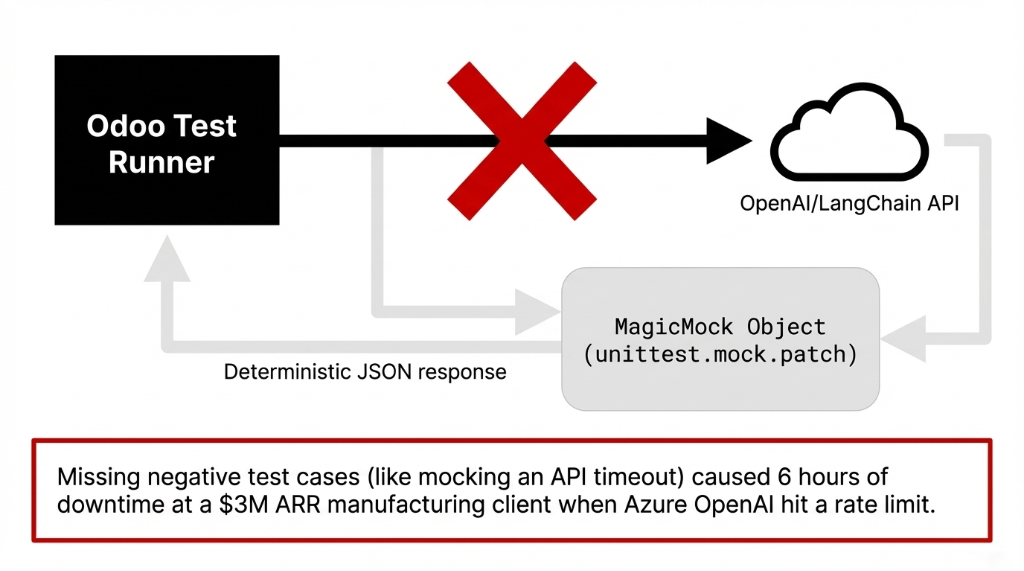
Unit Test Example: AI Invoice Parser with Mocking
from odoo.tests.common import TransactionCase
from unittest.mock import patch, MagicMock

class TestAIInvoiceParser(TransactionCase):

    @classmethod
    def setUpClass(cls):
        super().setUpClass()
        cls.vendor = cls.env['res.partner'].create({
            'name': 'Test Vendor',
            'email': 'vendor@example.com',
        })

    def test_ai_parses_invoice_amount_correctly(self):
        """Unit test: AI returns correct amount - mock the API call."""

        mock_ai_response = MagicMock()
        mock_ai_response.choices[0].message.content = \
            '{"amount": 4250.75, "vendor": "Acme Corp"}'

        with patch('your_module.models.ai_parser.openai.'
                   'ChatCompletion.create') as mock_ai:
            mock_ai.return_value = mock_ai_response

            invoice = self.env['account.move'].create({
                'move_type': 'in_invoice',
                'partner_id': self.vendor.id,
            })

            result = invoice.parse_with_ai(
                document_text="Invoice total: $4,250.75"
            )

            self.assertEqual(result['amount'], 4250.75)
            mock_ai.assert_called_once()
Negative Testing: API Timeout Handling
    def test_ai_handles_api_timeout_gracefully(self):
        """Negative testing: AI times out - module should NOT crash."""

        with patch('your_module.models.ai_parser.openai.'
                   'ChatCompletion.create') as mock_ai:
            mock_ai.side_effect = TimeoutError(
                "API timeout after 30s"
            )

            invoice = self.env['account.move'].create({
                'move_type': 'in_invoice',
                'partner_id': self.vendor.id,
            })

            # Should return fallback, not raise unhandled exception
            result = invoice.parse_with_ai(
                document_text="Invoice total: $1,200.00"
            )
            self.assertIsNotNone(result)
            self.assertEqual(
                result.get('status'), 'manual_review_required'
            )
The negative testing case above—where the API times out—is something 9 out of 10 developers skip entirely. Don’t. We’ve seen that one missing test case cause 6 hours of downtime at a $3M ARR manufacturing client when their Azure OpenAI endpoint hit a rate limit.
This is the core principle of automated unit testing for AI: mock every external dependency, then test all the logic around the AI call.
Integration Testing: Where AI Meets Real Odoo Data
Once your unit test layer is solid, the next testing level is integration testing—specifically, confirming that your AI module’s output feeds correctly into Odoo’s accounting, inventory, or CRM models.
This is the test and integration phase where you test actual database interactions. Odoo’s TransactionCase rolls back every test’s database changes automatically, so you’re never writing dirty data to your dev database.
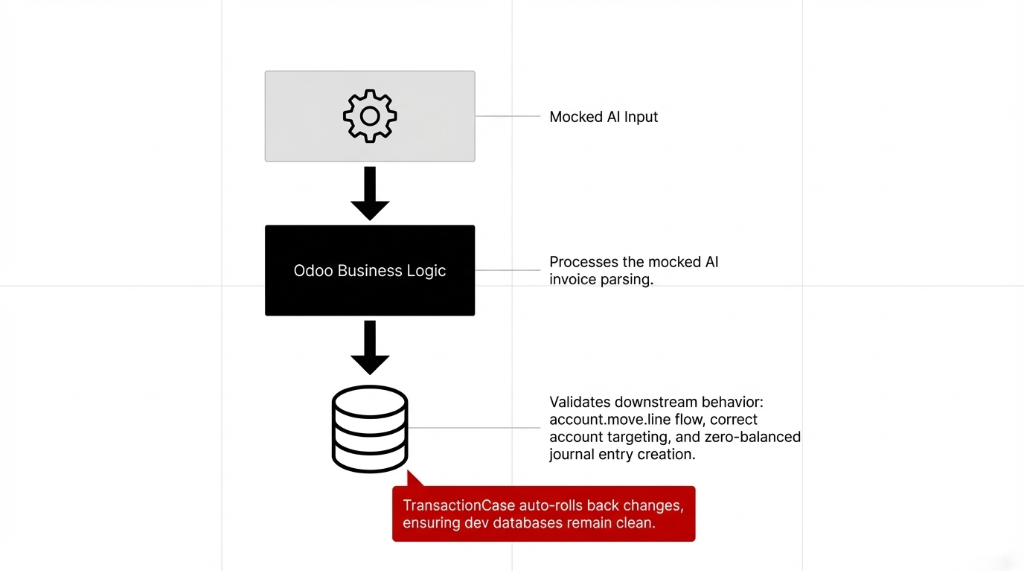
Integration Test Example: AI Output → Journal Entry
class TestAIInvoiceIntegration(TransactionCase):

    def test_ai_parsed_invoice_creates_journal_entry(self):
        """Integration test: AI output → journal entry in accounting."""

        mock_response = {
            'amount': 8750.00,
            'vendor': 'Acme Corp',
            'date': '2025-03-11'
        }

        with patch('your_module.models.ai_parser.'
                   'call_ai_service') as mock_ai:
            mock_ai.return_value = mock_response

            invoice = self.env['account.move'].create({
                'move_type': 'in_invoice',
                'partner_id': self.env['res.partner'].search(
                    [('name', '=', 'Acme Corp')], limit=1
                ).id,
            })
            invoice.auto_process_with_ai()
            invoice.action_post()

            # Verify journal entries with AI-parsed amount
            journal_lines = invoice.line_ids.filtered(
                lambda l: l.debit > 0
            )
            self.assertAlmostEqual(
                sum(journal_lines.mapped('debit')),
                8750.00, places=2
            )
Database Testing Matters Here
Don’t trust that amount_total is calculated correctly just because the AI parsed the number right. Test that it flows through account.move.line correctly, hits the right accounts, and produces a zero-balanced journal entry. That’s proper database testing—not just data validation.
Test Fixtures, Coverage, and CI/CD Pipeline
Test fixtures in Odoo solve the data duplication problem. Instead of creating a new vendor, product, and warehouse in every single test method, setUpClass creates the data once for the entire test class. That is the clean test approach—test data created once, used everywhere.
For python code coverage, run:
Coverage Command
coverage run --source=your_ai_module \
  python -m odoo -c odoo.conf -d test_db \
  --test-enable -u your_ai_module

coverage report -m
Target: 80%+ unit test coverage on all AI-related models. Anything below 65% and you’re shipping blind.
For ci cd testing, every push to your Git repo should trigger a fresh Odoo test database, install the module with --test-enable, run tests, generate a coverage report, and fail the pipeline if test coverage drops below 80%.
| Pipeline Step | What Happens | Time |
|---|---|---|
| 1. Spin Up Test DB | Fresh PostgreSQL database—no state leaking between runs | ~45s |
| 2. Install + Test | Module install with --test-enable, runs all tests/ |
~2–4 min |
| 3. Coverage Report | Generate code coverage report with line-by-line detail | ~15s |
| 4. Gate Check | Fail pipeline if coverage drops below 80% | instant |
The ci cd testing setup takes about 4 hours to configure and saves approximately 37 hours per quarter in manual regression testing across a typical 5-developer Odoo team. GitHub Actions, GitLab CI, or Jenkins all integrate with Odoo’s test runner using the same command.
(And yes, this applies to AI modules specifically—especially when you’re on OpenAI’s API and they push a model deprecation with 30 days notice. Your mock-based test suite catches incompatible response formats before they hit production.)
The Testing Strategy Your Team Is Missing
Look, write tests is advice you’ve heard before. Here’s what nobody tells you: the biggest gap in Odoo AI module testing isn’t the absence of tests—it’s the absence of a testing strategy that accounts for AI’s non-determinism.
AI responses are probabilistic. A test that calls a real LLM and checks for an exact string will fail randomly. That’s why your entire AI layer needs to be abstracted behind a service interface that your test code can mock cleanly. This is what makes code testable code vs. code that’s technically tested but brittle.
Braincuber’s 3 Rules for Odoo AI Testing
▸ Rule 1: Every External AI Call Goes Through a Service Wrapper
Never call openai.ChatCompletion.create() directly in a model method. Wrap it. This makes modules test isolation possible.
▸ Rule 2: Every Service Wrapper Has a Mock Version
Injected via unittest.mock.patch in tests. Deterministic responses every time. No flaky tests from API variability.
▸ Rule 3: Test Data Covers All Paths
Normal cases, edge cases, API errors, and malformed AI responses. Your test case library becomes the documentation for how your AI module is supposed to behave.
The $200/Month vs. $12,000/Year Difference
The teams we work with that have 80%+ test coverage on their Odoo AI modules spend less than $200/month on bug fixes. The teams with zero tests? They’re writing $12,000+ checks to recover corrupted production data—every year.
Follow these three rules, and your test suite becomes the single source of truth that survives developer turnover, Odoo version upgrades, and AI model deprecations. Build it with your AI solutions partner or build it yourself—but build it.
Frequently Asked Questions
How do I run tests for a specific Odoo AI module without restarting the whole server?
Use the command: python -m odoo -c odoo.conf -d your_test_db -u your_ai_module --test-enable. This installs or updates only your module and run tests under its tests/ folder. For targeted runs, add --test-tags=TestClassName to run a single test case in under 60 seconds.
What is the difference between unit testing and integration testing for Odoo AI modules?
Unit tests test one method in isolation—AI API calls are always mocked, and tests run in milliseconds. Integration tests verify that AI output correctly flows through multiple Odoo models (e.g., AI-parsed invoice → accounting journal entry). Both are necessary. Unit testing catches logic bugs; integration testing catches data-flow bugs that appear only when models interact.
How do I mock an OpenAI or LangChain API call inside an Odoo model?
Use Python’s unittest.mock.patch to intercept the api testing call at the module path where it is imported. For example, patch('your_module.models.ai_service.openai.ChatCompletion.create') replaces the real API call with a MagicMock object that returns your predefined test response. This prevents real API calls during auto testing and makes tests deterministic.
What test coverage percentage should Odoo AI modules target?
Target 80% or above for production-grade Odoo AI modules. Focus test coverage on all business logic paths, negative testing scenarios (API timeouts, malformed responses), and database write operations. Code coverage below 65% means you have undiscovered bugs in roughly 35% of your code—and in an AI module handling financial data, that’s serious through any Odoo implementation.
Can Odoo AI module tests run inside a CI/CD pipeline automatically?
Yes. Odoo’s test runner integrates directly with GitHub Actions, GitLab CI, and Jenkins. Configure your ci cd testing pipeline to spin up a PostgreSQL test database, install the module with --test-enable, and fail if any test fails or coverage drops below threshold. This ensures every code commit is validated through your ERP integration pipeline before merging.
Stop Deploying Untested AI Code Into Production
Book our free 15-Minute Odoo AI Audit—we’ll review your current module test coverage, identify the three highest-risk untested paths, and tell you exactly what a proper testing pipeline would cost to implement. No fluff. Just numbers.
Book Your Free 15-Minute Odoo AI AuditDon’t wait for the $40,000 incident. Check your tests/ folder right now. If it’s empty, call us.