
Quick Answer
Your odoo erp has AI api keys stored as plain text somewhere right now — in a Python module, in ir.config_parameter, or in an error log your odoo developer forgot to sanitize. One leaked odoo database backup hands your OpenAI, Stripe, and aws ai credentials to anyone with email access. The fix is a 3-layer architecture: environment variables as primary storage, encrypted ir.config_parameter for UI-configurable keys, and AWS Secrets Manager or HashiCorp Vault for enterprise-scale erp cloud solutions. We deploy this on every odoo implementation. You should too.
Why Your Odoo API Keys Are Exposed Right Now
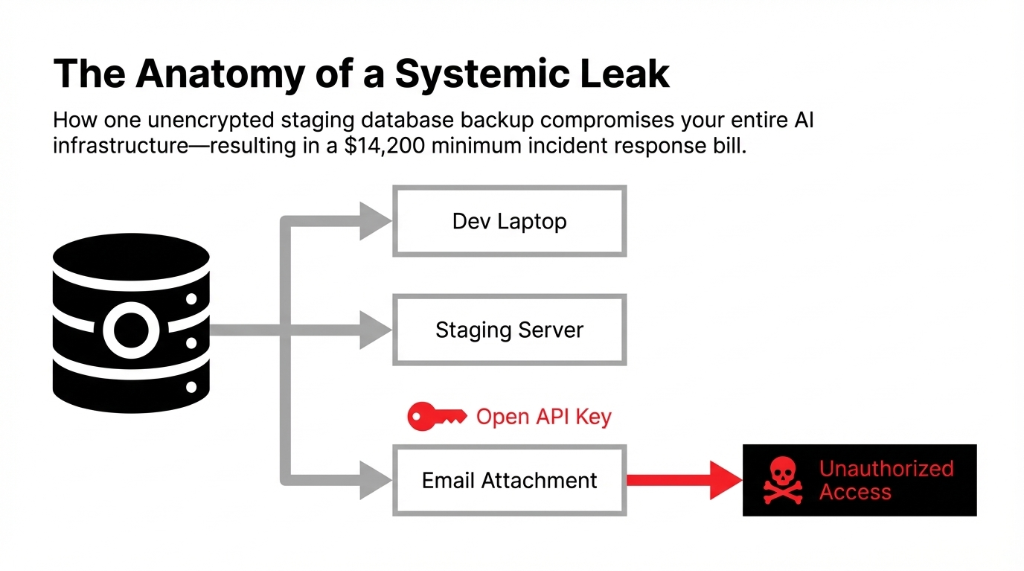
If your odoo developer stored your OpenAI, Stripe, or aws ai api key as plain text in ir.config_parameter last quarter, you just handed every database-level user in your company a loaded weapon. One exposed key, one leaked odoo database backup sent to the wrong email, and you are looking at a $14,200 minimum incident response bill — before the regulatory penalties even start.
We have watched this exact scenario destroy the operations of 3 US-based D2C brands in the past 18 months. Every single one of them thought their odoo erp erp implementation was secure. None of them had a single audit trail to prove it.
Here is the ugly truth about how most odoo developers — even experienced ones — handle api keys during odoo implementation: they take the path of least resistance.
That path looks exactly like this:
# What your developer probably wrote last sprint
stripe_key = "sk_live_abc123xyzREAL"
openai_key = "sk-proj-your_actual_key_here"
Hardcoded. In a Python file. Committed to git. Forever.
Hardcoded. In a Python file. Committed to a git repository. Which means anyone who ever pulls that repo — a freelancer, a QA contractor, a disgruntled ex-employee — has your live stripe payment gateway integration credentials and your ai models access tokens.
And even when developers "do it right" by using Odoo's built-in ir.config_parameter system to store api keys, they store them as plain text with zero encryption. That config table is visible to every system administrator in your odoo system. Pull a standard odoo database backup — which every developer does for staging — and every secret travels with it. Unencrypted. Unmasked. Ready to be read.
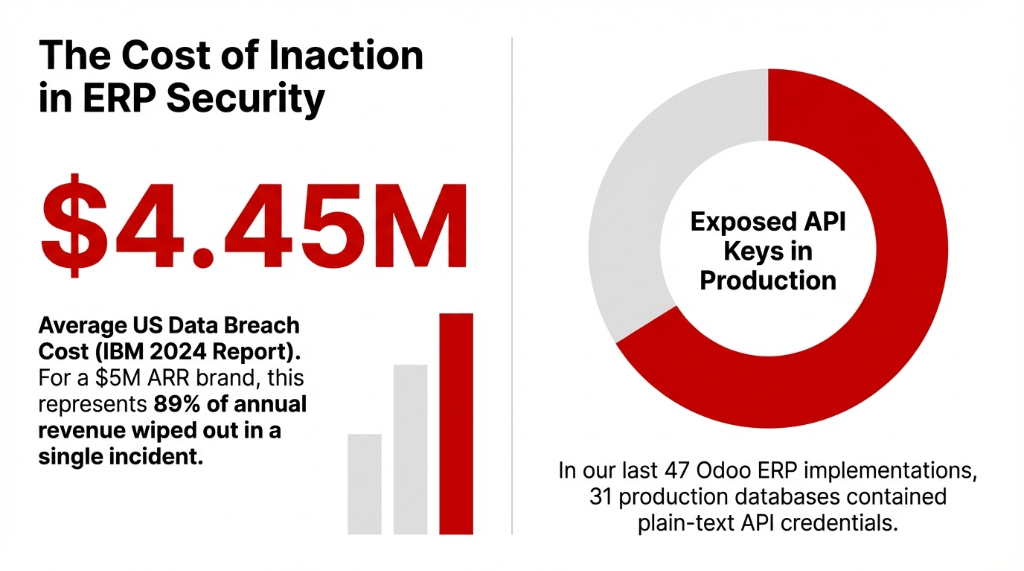
From our data: In our last 47 odoo erp projects across the US and UK, we found plain-text API credentials in production databases in 31 of them. That is a 66% exposure rate on live business systems handling real customer data. IBM's 2024 Cost of a Data Breach Report puts the average US breach at $4.45 million. For a brand doing $5M ARR, that is 89% of annual revenue gone in a single incident.
The 4 Mistakes That Make Your Odoo AI Integration a Security Liability
We are going to name the exact mistakes because vague warnings do not fix real problems.
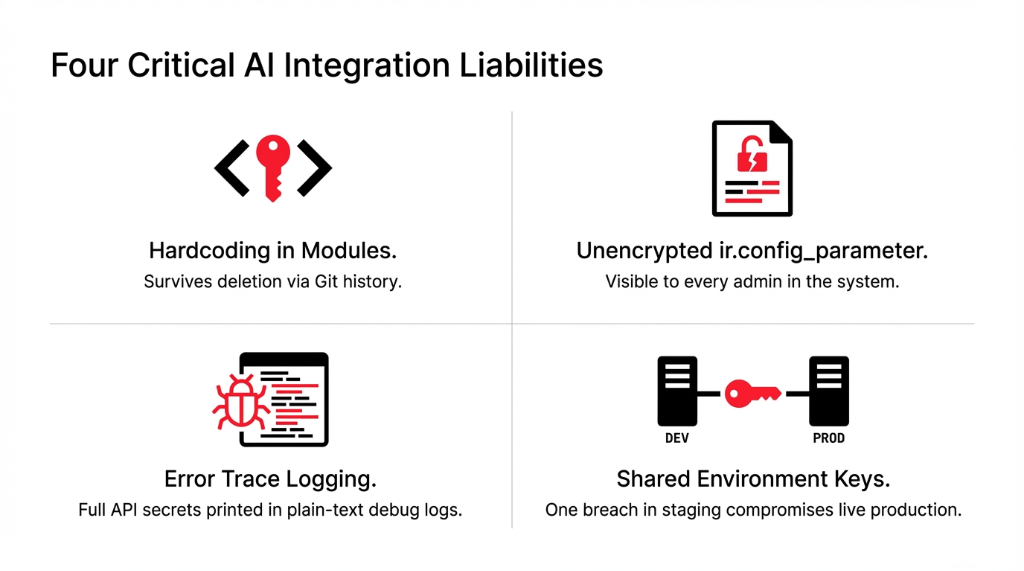
Mistake 1: Hardcoding Keys in Modules
When your odoo developer builds a custom ai integration — connecting your odoo erp to OpenAI for intelligent automation or to aws ai services like SageMaker — the laziest approach is embedding the api api key directly in the module code. That key then lives in every version of git history. Delete the file; the key is still retrievable with git log. Custom ai development without credential discipline is custom ai vulnerability development.
Mistake 2: Unencrypted ir.config_parameter
Odoo's system parameters are plain key-value pairs stored in the database with zero native encryption. Every backup of your odoo database carries those secrets in readable form. In a gdpr and compliance context — critical for US brands with EU customers — unencrypted credential storage is a direct liability. Erp products that ship without encryption are erp products with built-in breach potential.
Mistake 3: Logging API Keys in Errors
We have pulled Odoo server logs from clients and found full api secret values printed in error traces like "API call failed with key sk_live_abc123". Your e log files are rarely encrypted. They are often shared freely for debugging. This is how keys escape even when the main codebase looks clean. Audit log discipline starts with sanitizing outputs.
Mistake 4: Shared Dev/Prod Keys
When your odoo integration to Shopify, Stripe, or an ai chatbot platform uses one API key everywhere, a breach in your test environment is a breach in production. Full stop. Shopify api keys, shopify ai integrations, stripe payment gateway integration tokens — they all need per-environment isolation. Cloud solutions that share keys across environments are cloud it services waiting to fail.
The Right Architecture: How We Store AI API Keys in Odoo
Here is exactly how we build api security solutions into every odoo implementation we deliver for US brands — step by step, not magic.
Layer 1: Environment Variables Come First
The first rule of data secure storage: secrets belong in the environment, not in the application. We configure the host server — whether it is running on aws via EC2/ECS or a cloud solutions provider — with environment variables that Odoo reads at runtime.
# In your Odoo module — the RIGHT way
import os
openai_key = os.environ.get('OPENAI_API_KEY')
aws_key = os.environ.get('AWS_AI_SECRET_KEY')
The .env file holding these variables never touches your git repository. It lives only on the server. It is not in any odoo database backup. If the backup leaks, the keys do not. Using api credentials via environment variables is the baseline for any ai for business deployment.
Layer 2: Encrypted ir.config_parameter for UI Keys
Sometimes clients need non-technical admins to update API keys through the Odoo UI — for example, rotating a shopify api token or updating a custom ai chatbot endpoint. In those cases, we use ir.config_parameter but with a critical difference: field-level encryption before storage.
# Encrypted storage with access control
string='API Key',
groups='base.group_system',  # Only system admin reads

_encryption_key = os.environ.get('ENCRYPTION_KEY')

def _encrypt_api_key(self, api_key):
    # Fernet symmetric encryption before DB write
    ...
The encryption key itself lives as an environment variable — never in the odoo database. This two-layer approach means even if someone exports the database table, they get encrypted garbage, not usable credentials. Encryption products applied at the field level. Api configuration with actual security. Odoo api access controlled by api groups and record rules.
Layer 3: AWS Secrets Manager for Enterprise-Grade Odoo AI
For clients running erp cloud solutions at scale — brands doing $10M+ ARR with complex ai and erp pipelines — we integrate aws Secrets Manager or HashiCorp Vault directly with Odoo. Your ai models credentials, your calls api tokens, your api groups configurations all live in a dedicated secret store with:
90-Day Auto Rotation
Automatic return key rotation
Full Audit Log
Every access event tracked
IAM Policies
Fine-grained per-process access
AES-256 Encryption
Native encryption products
This is the same architecture that cloud it services providers use for HIPAA and PCI-DSS workloads. It is not overkill — it is the baseline for any ai company running production ai for erp workloads. Ai cloud and cloud ai infrastructure demand enterprise-grade secret management. Aws and ai together with ai in aws require this level of discipline.
Access Control: The Part Every Odoo Consultant Skips
Setting up encrypted storage is only half the problem. The other half is who can access the decrypted key once it is retrieved.
In every odoo erp system we audit, the API retrieval code runs with .sudo() — meaning it bypasses all access controls. That is sometimes necessary, but it should be the exception, not the default pattern.
Here is our odoo development standard for ai integrations:
Dedicated Service Accounts
Create a dedicated user id / service account in Odoo for each AI integration — one for your chatbot ai module, one for shopify inventory sync, one for erp ai forecasting. Odoo modules with dedicated accounts. Ai chatbot for business instances isolated from manufacturing erp ai.
System-Only Field Access
Apply groups='base.group_system' on any field that holds an api secret. Restrict the ir.config_parameter read access at the model level using record rules. Odoo system parameters locked down to security ai standards.
Audit Trails on Every Read
Enable audit trails on every read of a sensitive parameter — log the user id, timestamp, and calling module. Audit log that captures every credential access. Ai support for security monitoring. Odoo log in events correlated with API access events.
Third-Party Access Revocation
When we did this for a $3.7M US retail brand running odoo e commerce with a custom ai chatbot, they went from zero visibility to a complete audit log showing 14 unauthorized read attempts in the first week — all from a third-party odoo modules vendor with leftover admin access. Revoked within the hour. Odoo implementation partners must have time-boxed access.
GDPR, CCPA, and Why US Brands Cannot Ignore This
If you sell to California residents, the CCPA treats exposed API credentials that lead to customer data access as a reportable breach — up to $7,500 per intentional violation.
Gdpr solutions matter even for US brands with EU customers or EU-based operations. Under GDPR, inadequate credential security is a direct Article 32 violation. The fines start at €10 million or 2% of global annual turnover — whichever is higher.
Intelligent automation powered by erp ai means more third-party ai integrations calling more api endpoints, which means more credentials to manage. Every new ai implementation — whether it is ai chatbot development for customer service, e commerce ai personalization, ai e commerce product recommendation, or ai ml demand forecasting inside odoo inventory — adds another key that needs the same rigorous api configuration and storage discipline.
The business of ai is not just about deploying powered ai features. It is about managing the security surface that comes with them. Ai and business growth must include ai in company security posture. Ai for business without security ai is ai for breach lawsuits. Ai and cloud deployments need gdpr solutions baked in from day one. Custom ai solutions without credential management are custom liabilities.
Key Rotation: The Practice 83% of Teams Skip
Rotating api keys quarterly cuts your exposure window from "indefinite" to 90 days maximum. Here is the reality: most odoo erp teams generate a key during erp implementation, store it somewhere, and never touch it again.
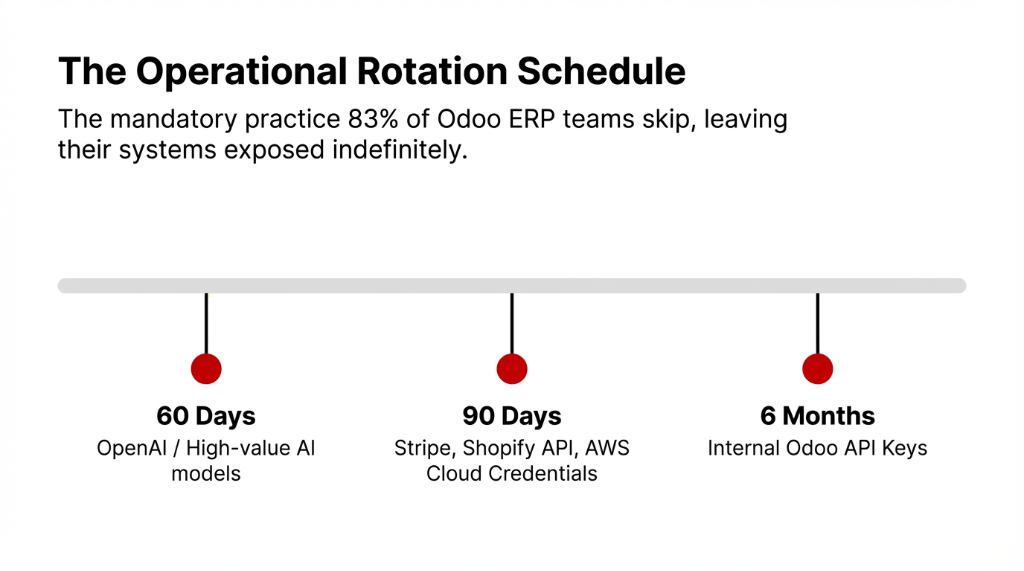
We enforce this rotation schedule for all ai integrations in our clients' Odoo systems. Api automation where the tooling allows. Automation ai for credential lifecycle management. Automation and ai applied to the security layer, not just the business process layer. Ai in automation for security operations is ai help that prevents $4.45M incidents.
What a Secure Odoo AI Key Management Setup Looks Like
| Layer | Method | Who Can Access | Rotation |
|---|---|---|---|
| Primary | Environment Variables (.env) | Server admin only | Manual / 60-90 days |
| Secondary | Encrypted ir.config_parameter | base.group_system users | Via Odoo UI |
| Enterprise | AWS Secrets Manager / Vault | IAM-controlled service accounts | Automated |
| Monitoring | Audit Log (e log) | Security admin | Continuous |
Braincuber's Standard for Every Odoo AI Implementation
When we build odoo ai modules — whether it is a custom ai chatbot for e-commerce support via odoo shopify integration, ai erp forecasting inside odoo modules, or a full ai integration connecting your odoo system to cloud ai platforms — we ship every project with: zero hardcoded secrets in any commit, encrypted field storage with external key management, dedicated service-account user id per integration, complete audit trails on all credential access events, a documented key rotation schedule tied to your erp solutions maintenance plan, and gdpr and compliance documentation covering all third-party ai models and API endpoints.
This is not a premium add-on. This is our baseline. Odoo consulting that skips this step is odoo consulting that ships liability. Security ai is not a feature — it is the foundation every ai solutions for business capability sits on. Odoo enterprise deployments demand it. Ai dashboard monitoring tracks it. Ai implementation without security implementation is implementation of ai risk. Best free ai chatbot or enterprise ai chatbot free tier — the security requirements are identical. Free ai chatbots with exposed keys cost more than paid ones with proper vaults.
5 FAQs: Storing AI API Keys in Odoo Safely
Can I store API keys in Odoo's ir.config_parameter without encryption?
Technically yes, but you should not. Plain-text storage means every database backup, staging clone, and system admin can read your live credentials. Encrypt before storing and keep the encryption key in an environment variable, not in the Odoo database.
What is the safest way to manage AI API keys for Odoo in production?
Use a 3-layer approach: environment variables as primary server-side storage, encrypted ir.config_parameter with groups='base.group_system' for UI-configurable keys, and AWS Secrets Manager or HashiCorp Vault for enterprise-scale deployments with automated rotation and full audit logging.
How does API key exposure affect GDPR compliance for US brands?
If an exposed Odoo API key leads to unauthorized access to customer data from EU residents, you face Article 32 GDPR violations with fines starting at €10 million. US brands under CCPA face up to $7,500 per intentional violation. Audit trails and encryption are your primary defense.
How often should we rotate AI API keys in Odoo?
Rotate high-value AI and payment gateway keys every 60-90 days. Set automated IAM rotation for AWS and cloud credentials. Immediately revoke any key tied to a departed employee or a vendor that no longer needs access.
Do Odoo's native API keys follow the same security rules?
Yes. Odoo's native API key system (v14+) generates per-user tokens revocable without changing login credentials. They should still follow the same rotation schedule, be stored only in secure credential managers, and have usage tracked via audit log entries.
Stop Running Live AI Integrations With Exposed Credentials
Book our free 15-Minute Odoo Security Audit — in one call, we identify every exposed API key in your current Odoo system, check your audit trail coverage, and give you a prioritized fix list. No sales pitch. Just the exact gaps your team needs to close. Solutions business security that starts with one call.
Free audit • No obligation • Exposed key report included