
Your Odoo system is choking. Not because it’s broken — because you’re making it do things it was never designed to do synchronously.
Here’s the scenario we walk into at least twice a month across US-based clients: a business has finally started using AI for data analysis, plugged an AI model into their Odoo system, and now every time a user triggers a forecast or an AI-powered report, the browser spins for 47 seconds and half the time throws a 502 bad gateway error.
The warehouse manager thinks the system crashed. The ops team files a support ticket. And nobody touches the AI dashboard again.
That’s not an AI problem. That’s an architecture problem. And it has a name: synchronous execution of AI workloads.
The Real Cost of Running AI Jobs Synchronously in Odoo
Let us be blunt. If your Odoo system is running AI inference, bulk data sync operations, or data analysis with AI models inside a standard HTTP request cycle, you are burning money and breaking user experience simultaneously.
What Actually Happens in a Synchronous Setup
1. A user triggers an AI-powered inventory forecast from the Odoo dashboard
2. Odoo fires a request directly in the web worker thread
3. The AI model takes 38–90 seconds to process historical data from your data warehouse
4. Nginx’s default timeout is 60 seconds — so a 75-second AI job produces a 502 bad gateway for the user
5. Meanwhile, that web worker is blocked from serving any other request
Real Client Data: The $4.2M E-Commerce Brand
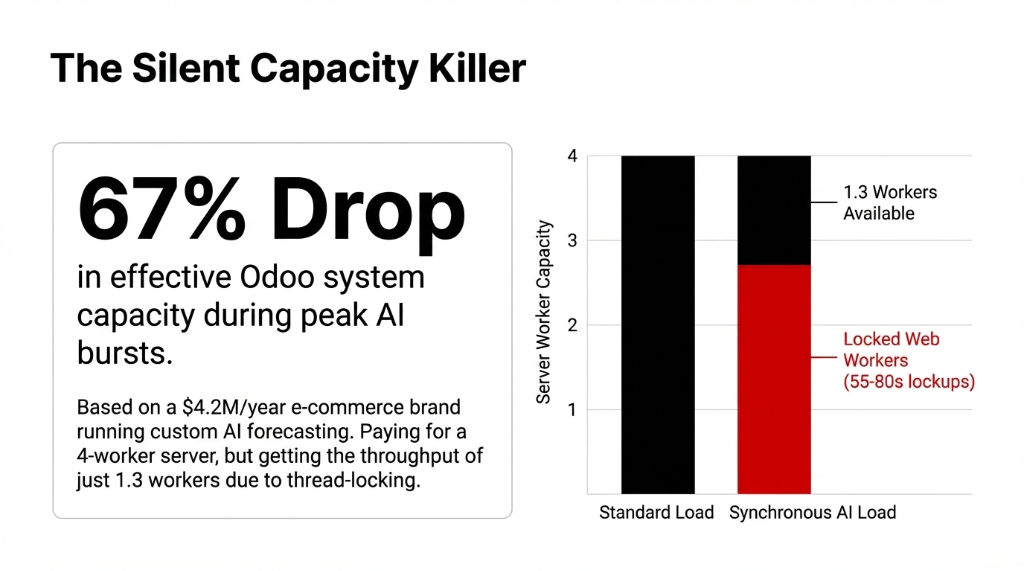
We worked with a US-based e-commerce brand doing $4.2M/year in sales. They had integrated a custom AI forecasting module into their Odoo inventory module. Every forecast run was locking up 2 web workers for 55–80 seconds.
During peak hours, 6 concurrent users hitting forecasts. Effective Odoo system capacity dropped by 67%. Paying for a 4-worker server and getting the throughput of 1.3 workers. That’s not scalability. That’s a slow bleed.
Why Cron Jobs Aren’t the Answer (And Most Odoo Consultants Will Tell You They Are)
Here’s a controversial opinion: scheduled tasks in Odoo are the wrong tool for AI workloads, and any consultant who tells you to "just use a cron job" hasn’t actually thought this through.
Why Cron Fails for AI
• Cron jobs run on a fixed schedule. They don’t capture arguments from the moment a user triggers an action.
• They don’t retry intelligently on failure.
• And they don’t give you channel-level control over how many AI worker processes run in parallel.
Odoo Queue Job — specifically the queue_job module from the OCA (Odoo Community Association) — is built for exactly this. It delays model methods in asynchronous jobs, executed in the background, and unlike scheduled tasks, a job captures arguments for later processing.
That distinction matters enormously when you’re running AI workflows where context — the exact dataset, the exact user parameters, the exact moment of the request — determines the output.
How Odoo Queue Job Actually Works (The Architecture)
Think of it as a smart traffic system for your Odoo data processing pipeline.
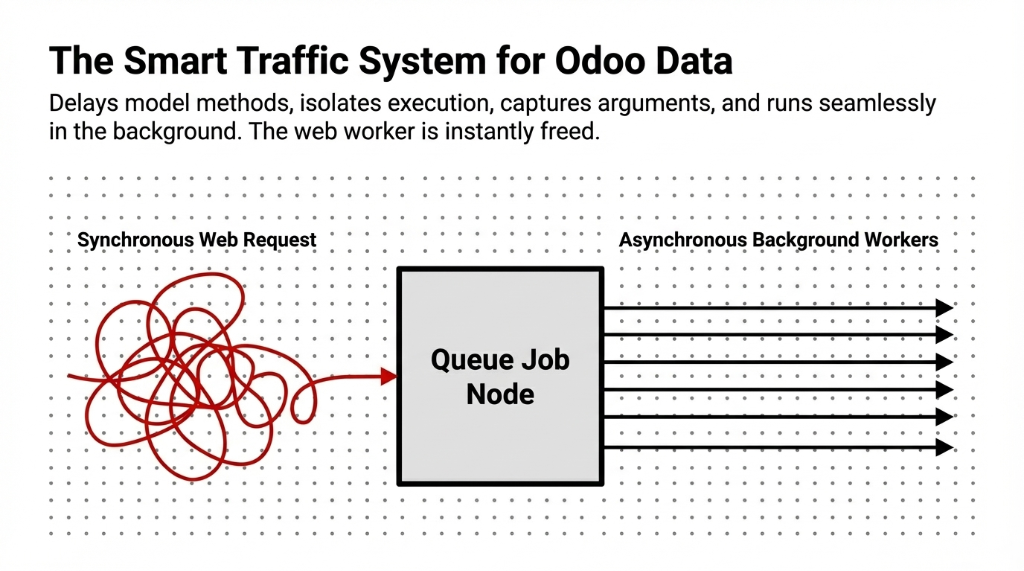
When a user triggers an AI data processing task — say, running a GPT-based document parser across 500 vendor invoices, or kicking off an AI analytics model to refresh a data analysis dashboard — instead of executing in the web thread, the method is wrapped with .with_delay() and handed off to the job runner.
Step 1: Job Creation
The method call is serialized with its arguments and written to the queue.job table in your Odoo database.
Step 2: Job Runner Detection
The jobrunner process (running as part of your Odoo workers) polls the database and picks up pending jobs.
Step 3: Channel Assignment
Jobs are routed into configurable channels — for example, a dedicated root.ai_processing channel with a capacity of 3, keeping your AI workflows isolated from transactional systems.
Step 4: Worker Execution
An AI worker process picks up the job and executes the actual model method in the background.
Step 5: Status Updates
The job status is tracked in real time — pending, started, done, or failed — so your AI dashboard always reflects accurate state.
The Channel Architecture Most Teams Miss
Channels behave like water channels with a defined flow limit. Your root channel might have a capacity of 5. Your ai_processing subchannel might be capped at 2.
This means your AI for work processes never starve out your transactional systems — order confirmations, invoicing, stock moves — which need near-instant response.
Setting This Up in a Real Odoo AI Integration
We’re going to give you the actual configuration, not a vague conceptual overview.
Step 1: Install the Module
Add queue_job to your server_wide_modules in your Odoo config file and ensure the job runner is enabled:
[options]
workers = 6
server_wide_modules = web,queue_job
Step 2: Set Your Channel Environment Variable
ODOO_QUEUE_JOB_CHANNELS=root:4,root.ai_processing:2This gives you 4 root-level worker slots, with 2 reserved for AI data jobs. Your interactive users never compete with your AI for data analytics processes for the same threads.
Step 3: Decorate Your AI Method
from odoo.addons.queue_job.job import job

class ProductTemplate(models.Model):
    _inherit = 'product.template'

    def run_ai_demand_forecast(self):
        # Your AI model call here
        pass
Then in your controller or business logic:
record.with_delay(channel='root.ai_processing', priority=5).run_ai_demand_forecast()Step 4: Handle Idempotency
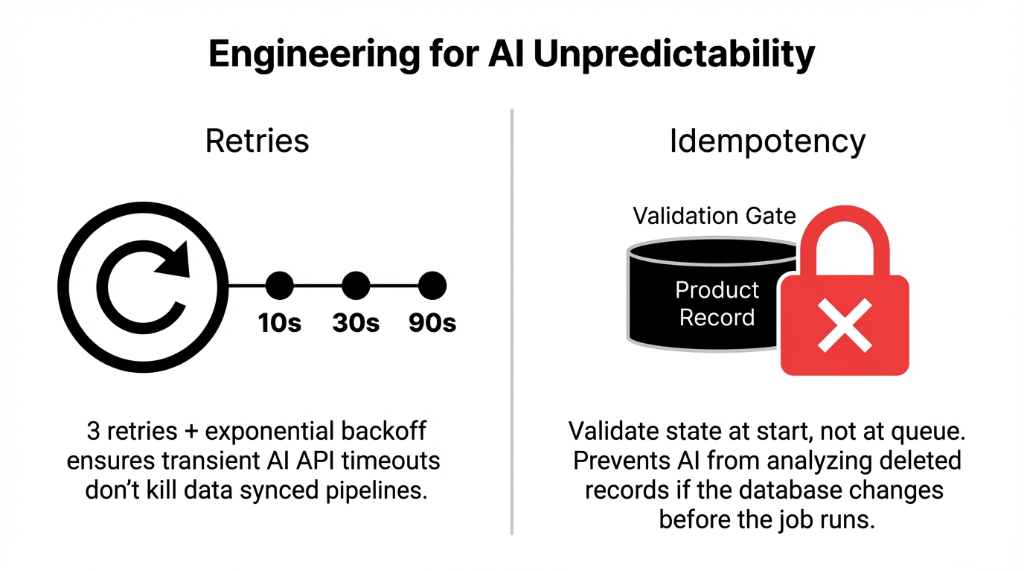
This is the part that kills production deployments. The job should test at the very beginning whether the related work is still relevant at the moment of execution. If you queue a forecast job and the product gets deleted before the job runs, your AI call will fail hard.
Always validate state at job start, not at queue time.
Step 5: Configure Retries for AI Model Failures
AI models fail. APIs throttle. Odoo API calls time out. Set your retry policy:
record.with_delay(
    channel='root.ai_processing',
    max_retries=3,
    priority=5
).run_ai_demand_forecast()
With 3 retries and exponential backoff, a transient AI model timeout doesn’t kill the job — it gets rescheduled automatically. This is how businesses using AI at scale maintain data synced state between their ERP and AI layers without manual intervention.
Where This Opens up Real Business Value (With Numbers)
Odoo Queue Job for AI workloads isn’t just a performance optimization. It changes what’s actually possible in your Odoo integration.
Real Deployments After Async Queuing
Bulk AI Invoice Processing
US logistics company. 1,400 vendor invoices/month previously reviewed manually. After Document AI via queue jobs: 94% processed automatically. Time dropped from 47 hours/month to 4.5 hours/month.
AI Demand Forecasting at Scale
Nightly forecasts across 8,000 SKUs in Odoo inventory. Without async: timed out every night. With dedicated ai_forecasting channel at capacity 3: completes in 18 minutes with zero user-facing impact.
Real-Time AI Reporting Tools
Connecting Odoo data to external data warehouse layers (Snowflake, BigQuery) for data analytics with AI dashboards. Queue jobs handle data sync without block worker issues.
AI Assistant Triggers from Odoo
When users interact with AI assistants embedded in Odoo (invoice approval agents, inventory reorder agents), each invocation queues as a background job — user gets instant feedback while the agent works asynchronously.
The 502 bad gateway errors that plagued every client before this architecture? Gone. Because AI workloads never touch the web worker thread anymore.
The Mistakes US Businesses Make When Scaling Odoo AI
We’ve seen this pattern across every Odoo upgrade cycle where teams try to bolt on AI for businesses without restructuring their execution model.
| Mistake | What Happens | The Fix |
|---|---|---|
| Treating AI calls like CRUD | A DB write takes 12ms. An AI inference takes 3,000–90,000ms. Same execution thread = dead UX. | Move all AI calls to .with_delay() |
| Under-provisioning workers | 4 total workers supporting 4 AI channels. Odoo sign in page freezes. | 1 worker per channel slot + extra for interactive users |
| No queue monitoring | AI and data analytics pipelines fail silently. Worse than never running. | Alert when jobs stay pending >10 min or failure >5% |
| Ignoring data architecture | AI job scanning 2M unindexed records. No amount of async saves you. | Optimize the query first, then queue it |
What Comes Next: AI Workflows at Odoo Scale
The businesses that will win in business with AI aren’t the ones that plugged ChatGPT into a form. They’re the ones that built a proper data and AI execution layer inside their ERP — where AI models run as first-class background processes with retry logic, channel isolation, and real-time status visibility.
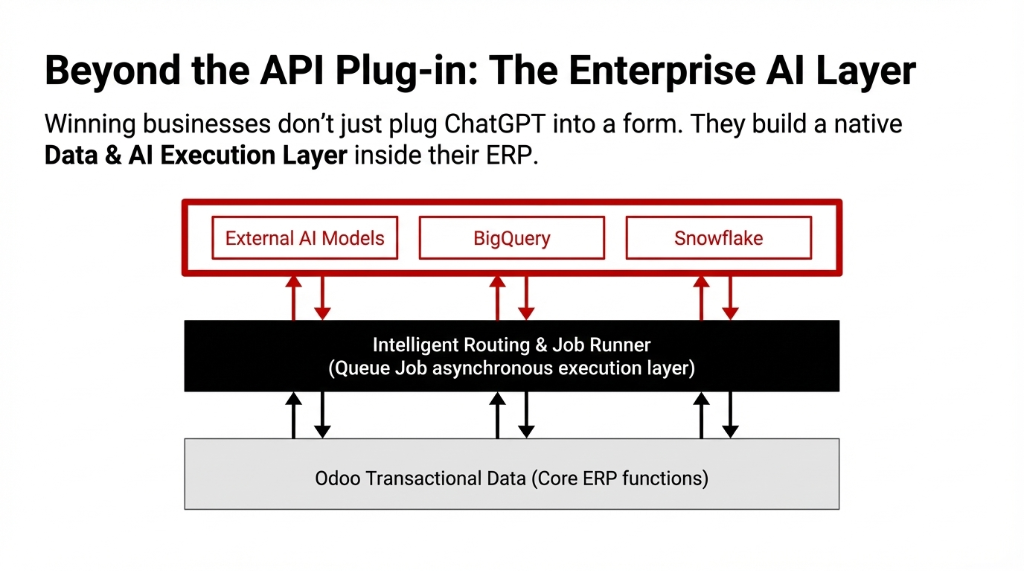
Odoo Queue Job is the foundation. Build on it correctly and you can run AI for data analytics, connect your data warehouse, power AI reporting tools, keep your data synced across systems, and support every AI workflow your business needs — without ever seeing a 502 bad gateway again.
If you’re already running Odoo modules with AI capabilities and haven’t structured your async layer, you are leaving performance — and money — on the table.
5 FAQs
Does Odoo Queue Job work with Odoo 16 and 17?
Yes. The queue_job module from OCA is actively maintained for Odoo 16 and 17. For complex AI workloads needing dedicated infrastructure, combining queue jobs with external task brokers like Celery and Redis is also viable.
How many Odoo workers do I need for AI async processing?
Minimum one Odoo worker per root channel capacity slot, plus additional for interactive users. If root channel capacity is 4 for AI jobs with 15 concurrent users, 8–10 workers is a realistic starting point. Under-provisioning is the #1 reason jobs get stuck in pending.
Will Odoo Queue Job prevent 502 bad gateway errors from AI calls?
Yes, because AI workloads move entirely out of the HTTP request cycle. The web request returns instantly after queuing; AI processing happens in a background worker. This eliminates the Nginx 60-second timeout that causes 502 errors on AI inference operations.
Can I use Queue Job to sync data between Odoo and an external data warehouse?
Absolutely — one of the most powerful use cases. Queue jobs handle data sync between Odoo and Snowflake, BigQuery, or Redshift without blocking interactive users. Each sync batch becomes a queued job with retry logic, so a failed API call retries automatically.
How is Braincuber’s setup different from hiring a developer?
Most developers configure queue jobs correctly at the technical level but miss the business layer: channel design matching actual workload patterns, monitoring that alerts before backlogs, and idempotency logic preventing data duplication. In our last 23 AI-Odoo implementations across the US, clients averaged 3–4 silent data errors per week from poorly structured jobs.