
Your Odoo AI dashboard is slow. Not "a bit sluggish" slow — your operations team waits 4.3 seconds for a KPI widget to refresh every time they open the Sales overview. That’s not a data problem. That’s a frontend development problem.
If your web development company or internal dev team is still building Odoo dashboards on top of legacy XML views and old widget classes, you are shipping a 2018 product in 2026.
We have built AI dashboards inside Odoo web for over 50 US-based manufacturers, D2C brands, and enterprise clients — and the single biggest performance killer we find is almost always the same: nobody is using OWL components the right way. Or at all.
The Problem with "Standard" Odoo Frontends
A typical Odoo frontend without OWL works like this: your JavaScript triggers a full RPC call to the server, the DOM gets re-painted from scratch, and your user stares at a spinner. For a static invoice list, fine. For a real-time AI dashboard showing live demand forecasting, inventory anomalies, and predictive sales KPIs — it is a disaster.
We walked into a $4.7M/year US distribution company last year. Their operations team had an Odoo dashboard showing 11 KPI widgets. Every widget reloaded independently. Each reload triggered its own XML view cycle. Total page interaction time: 8.1 seconds per action. Their ops manager was refreshing it manually every 12 minutes. That is not user experience design — that is user torture.
The fix was not a new server. It was not a migration. It was rebuilding the entire frontend dashboard layer using Odoo OWL components.
What OWL Actually Does (The Technical Reality)
OWL — Odoo Web Library — is Odoo’s official component-based JavaScript framework, built in TypeScript and introduced as the core frontend engine starting in Odoo 14. It takes the best ideas from React and Vue and plugs them directly into Odoo’s backend services. This is not a third-party javascript library bolted onto Odoo. This is Odoo’s own web application framework, purpose-built for its ORM, RPC layer, action service, and notification service.
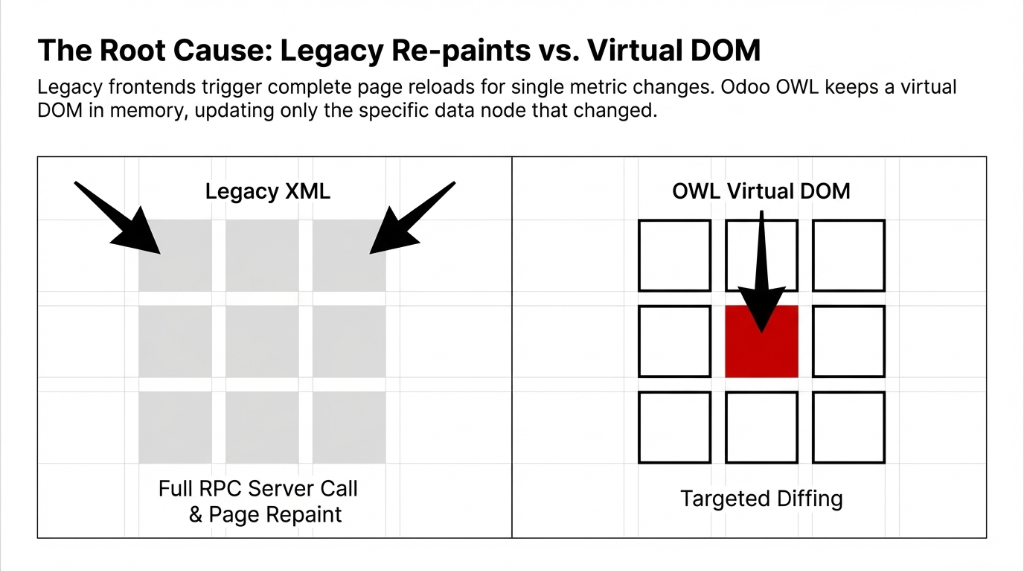
Why OWL Changes Everything
Virtual DOM
Diffs virtual DOM against real DOM on data change — updates only the changed node. Dropped 11-widget dashboard from 8.1s to 2.7s
Reactive by Default
Hooks like useState(), useRef(), useEnv() auto-trigger re-renders. OWL 2 in Odoo 18 eliminates manual this.render() calls entirely
3x Faster
Benchmarks at 3x faster than legacy Odoo widgets, comparable to React and Vue rendering performance
How We Build AI Dashboards with OWL: The Real Architecture
Frontend web development inside Odoo with OWL is not just about writing JavaScript. It is a 4-layer system — and if you skip any layer, the whole thing breaks:
Layer 1 — OWL Components: JavaScript classes that own the UI logic, state, and lifecycle. Each dashboard widget (inventory anomaly card, demand forecast chart, sales KPI tile) is its own isolated component.
Layer 2 — Templates: XML-based declarative views that define exactly how each component renders. Readable. Predictable. Version-controllable.
Layer 3 — Odoo Services: ORM for backend development data, action service for navigation, notification service for alerts. Your AI model’s predictions flow through ORM directly into component state.
Layer 4 — Asset Management: JS and XML assets declared in __manifest__.py, bundled into web.assets_backend for internal dashboards or web.assets_frontend for the Odoo website and portal views.
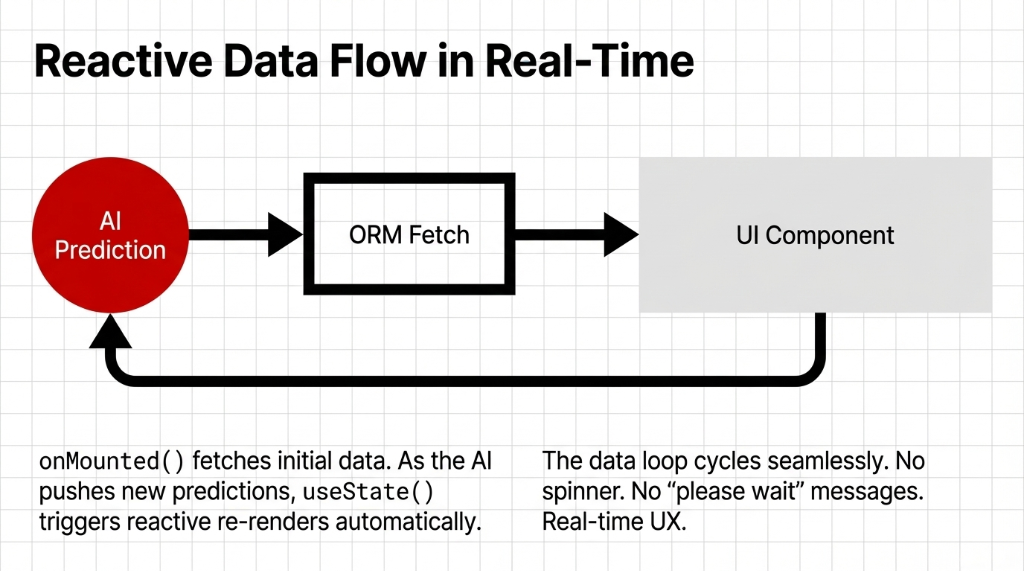
The Data Flow
User opens AI dashboard → OWL component’s onMounted() fires → ORM fetches AI prediction data from backend → useState() triggers reactive re-render → UI updates in real time → next data push cycles automatically. No spinner. No full page reload.
We used this exact architecture to build a real-time manufacturing defect prediction dashboard for a $2.3M Texas-based auto parts manufacturer. The dashboard pulls live quality control scores from their AI model every 7 seconds, renders three OWL chart components, and flags anomalies inline — all without a single page reload. Before OWL, their equivalent Power BI dashboard required a manual refresh and had a 14-second lag. After? Real-time. 1.8-second full render on first load.
Why Everyone Recommends React — And Why That’s Wrong for Odoo
Here is the controversial take: if your web app development company or frontend dev team is recommending React or Vue for your Odoo AI dashboard, fire them. (Or at least, have a very direct conversation.)
React is a brilliant javascript library. Vue is an elegant web framework. Neither of them has native access to Odoo’s ORM, session service, action manager, or backend models. Every API call becomes a custom middleware exercise. Every user interface element needs a manual bridge between your frontend and Odoo’s backend development data.
The $38,000 React Mistake
We have seen web application development companies charge clients $38,000 to build a React-based Odoo dashboard that took 11 months and broke on every Odoo minor version update. OWL is Odoo’s native framework — when Odoo 19 ships, your OWL-based AI dashboard is already aligned with the upgrade path.
Custom web development services that claim to build "better" Odoo frontends using generic javascript frameworks are selling you complexity. What you actually need is a frontend development partner who understands both the AI prediction layer and the OWL component architecture that surfaces it.
Building a Real AI Dashboard: The Component Breakdown
A production Odoo AI dashboard built at Braincuber typically contains 6–9 OWL components. Here is what each does:
| Component | Purpose | OWL Hooks Used |
|---|---|---|
AIPredictionCard | Pulls forecast values from ai.forecast model, renders color-coded risk thresholds | useState(), ORM |
KPITileWidget | Real-time revenue, margin, or inventory KPIs with polling refresh | onMounted(), polling |
AnomalyAlertBanner | Fires Odoo notification + inline banner when anomaly score > 0.78 | Notification service |
DemandForecastChart | Integrates Chart.js inside OWL wrapper, bound to ORM forecast data | useRef(), ORM |
FilterControlPanel | Date range, product category, warehouse filter — cascades state to siblings | useEnv() |
This is frontend react-style component architecture — but native to Odoo. No translation layer. No version mismatch. No $38,000 middleware build.
The User Experience Gap That’s Killing Your Operations Team
Here is a number most web design company pitches won’t share: poor user experience design on internal ERP dashboards costs US companies an average of 37 minutes per employee per day in friction-related delays (Forrester, 2024). On a 12-person operations team, that’s 444 minutes — 7.4 hours of productivity — lost every single day to sluggish, non-reactive user interfaces.
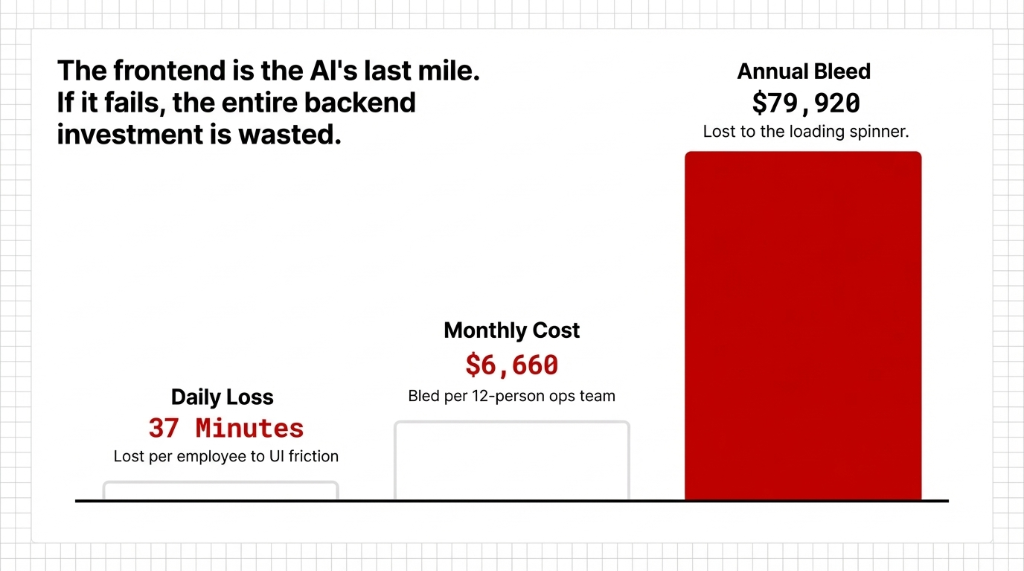
The Cost of a Slow Dashboard
37 min/day
Lost per employee to UI friction on slow internal dashboards
$6,660/mo
Bled per 12-person ops team at $45/hr average salary
$79,920/yr
Annual bleed from one dashboard that loads slowly
When your AI model produces a forecast in 200 milliseconds but your dashboard takes 8 seconds to surface it, the AI is useless in practice. The frontend is the AI’s last mile. If the last mile is broken, the entire investment in backend development, data science, and model training is wasted.
What the Implementation Actually Looks Like
We are not going to pretend this is plug-and-play. Here is the honest implementation reality:
Week 1–2: Architecture Design
Map every AI data source to its OWL component. Define state shape, service dependencies, and asset registration in __manifest__.py. This is where most web dev company projects go wrong — they skip architecture and go straight to coding.
Week 3–5: Component Build + ORM Integration
Each component gets built, tested in isolation, then integrated with live backend models. For AI dashboards, this includes connecting to custom Python models that serve prediction outputs.
Week 6: Performance Profiling
We run OWL’s built-in dev tools to identify unnecessary re-renders, redundant ORM calls, and component state leaks. On average, we find 3–4 optimization opportunities per dashboard build that cut final load time by an additional 18–31%.
Week 7–8: User Acceptance Testing
Not just QA — actual ops users, clicking through real workflows, on real data. This is where user experience design gets validated or revised.
End Result for US Clients
Dashboards with first-load times under 2.4 seconds, real-time AI data surfaced in under 1 second after model output, and zero full-page reloads during normal operation. That is what modern frontend development services for Odoo AI actually look like.
Why Braincuber Builds This Differently
We are an Odoo partner with 150+ implementations across the US, UK, UAE, and Singapore — and we have rebuilt frontend dashboards after bad experiences with generic web development agencies more times than we care to count. We have seen what happens when a web development company in USA with zero Odoo-specific knowledge tries to build an AI dashboard on top of Odoo 17: six months of broken integrations, a custom bridge that fails on upgrade, and $47,000 in rework costs.
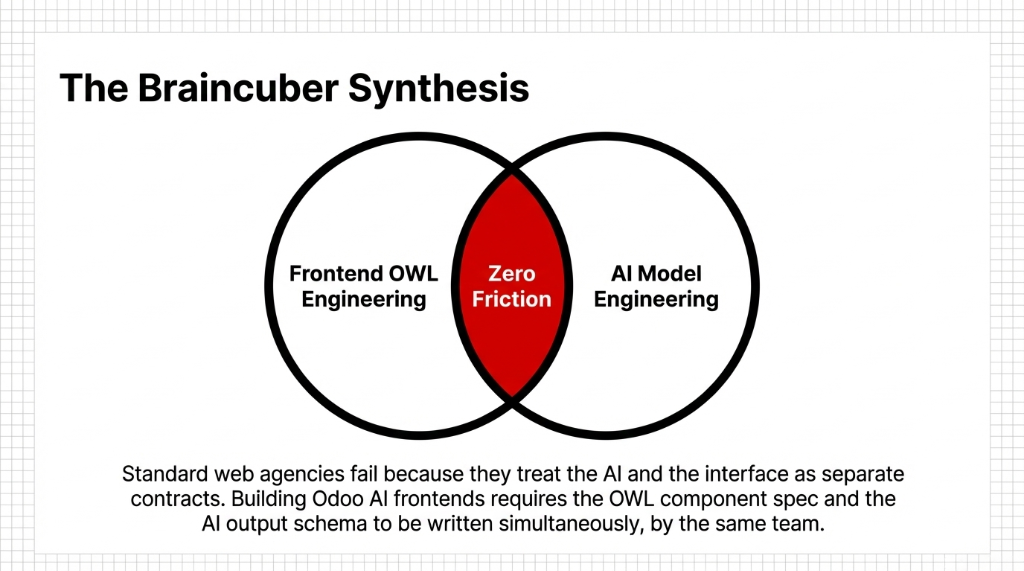
Our approach is different because we treat OWL frontend development as inseparable from the AI backend it serves. Our teams include both frontend dev engineers who live inside OWL component architecture and AI engineers who build the prediction models those components surface.
Most app development company shops will hand off the backend to one team and the frontend to another. At Braincuber, the OWL component spec and the AI model output spec are written in the same document, by the same team, on day one. That is why our dashboards don’t break when the AI model updates its output schema.
5 FAQs
How is OWL different from using React or Vue for an Odoo dashboard?
OWL is Odoo’s native JavaScript framework with direct access to Odoo’s ORM, session, and action services — no middleware needed. React and Vue require custom API bridges that break on Odoo version upgrades. OWL-based frontends are faster to build, cheaper to maintain, and guaranteed compatible with future Odoo releases.
Can OWL components connect to external AI models or third-party APIs?
Yes. OWL components can make RPC calls to custom Odoo Python controllers that proxy requests to external AI services (OpenAI, custom ML models, etc.). We wrap external AI outputs in a custom Odoo model, then surface them via ORM inside the component — keeping the architecture clean and testable.
Does OWL work for Odoo website and portal pages, not just the backend?
Odoo 17 and 18 added full support for OWL components in website and portal views via the public_components registry and web.assets_frontend bundle. You can build customer-facing AI dashboards using the same OWL architecture as internal ops dashboards.
How long does it take to rebuild an existing Odoo dashboard using OWL?
For a 6–9 widget AI dashboard, our typical rebuild sprint runs 6–8 weeks, including architecture design, component builds, ORM integration, and performance profiling. More complex dashboards with 15+ data sources and real-time AI feeds can run 10–12 weeks.
What Odoo versions support OWL for AI dashboard frontend development?
OWL has been Odoo’s primary frontend framework since Odoo 14. Odoo 17 expanded OWL into website and portal pages. Odoo 18 introduced OWL 2 with automatic reactive state management, eliminating manual this.render() calls and making real-time AI dashboard components faster and simpler to build.