
Your AI app worked perfectly last Tuesday. Today, it’s giving garbage outputs to 3,000 users. No one touched the code. Someone tweaked the prompt — and didn’t tell anyone.
That’s not an edge case. That’s Tuesday for most AI teams in 2026. A single untracked prompt change can degrade output quality across thousands of user interactions, introduce safety violations, or break downstream integrations — often without immediate detection.
The #1 operational failure we see isn’t a broken API or a bad model choice. It’s zero prompt version control.
We work with AI development teams across the US who are building LLM-powered products — from customer support agents to document processing pipelines. They’re running $200k/month in AI infrastructure off prompts stored in a Notion doc that six people have edit access to.
This needs to stop.
Your Prompts Are Breaking Production (Here’s Exactly How)
Here’s the dirty detail most AI tutorials skip: prompts aren’t static config — they’re live logic.
When your engineer updates the system prompt for your GPT-4o customer support agent from “Answer in 3 sentences” to “Be concise,” that one-word swap changes output length, tone, and downstream parsing behavior simultaneously. If your CRM integration expects structured 3-part answers and gets a one-liner, 400 support tickets get mis-routed.
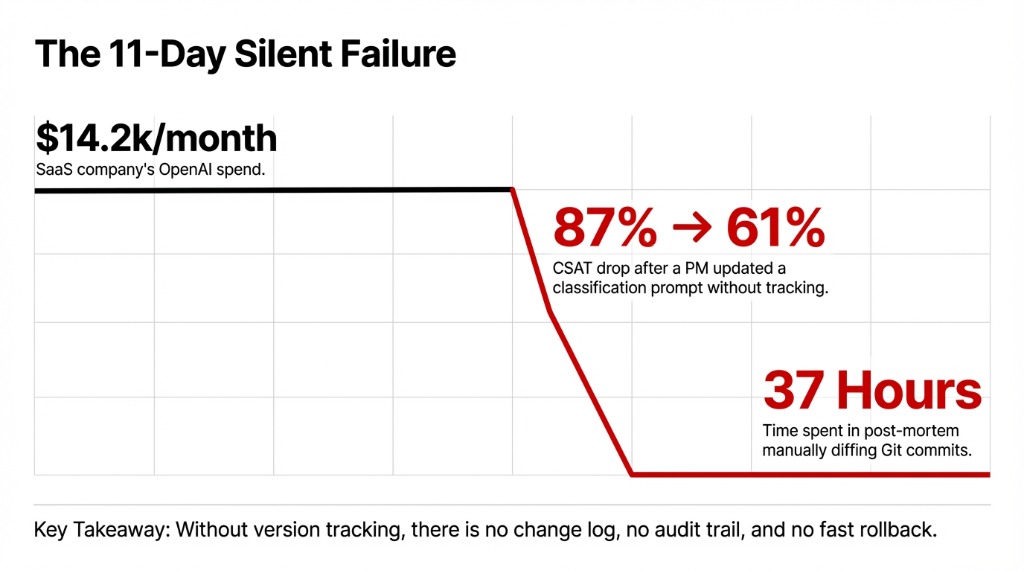
The $14,200/Month Silent Failure
What happened: A US-based SaaS company running ~$14,200/month in OpenAI costs. A product manager updated the classification prompt directly in their codebase, didn’t flag it in Slack, and 11 days later their support CSAT dropped from 87% to 61%.
The real damage wasn’t technical — it was operational
Without version tracking, there’s no change log, no audit trail, and no fast rollback. The team spent 37 hours in a post-mortem that could have been a 4-minute revert. No one connected the dots until a developer manually diffed two weeks of Git commits.
And this isn’t unique to small teams. Production AI systems fail this way precisely because prompt changes feel “lightweight” — they’re just text, not code. That mental model is costing teams real money.
Why “Just Throw It in Git” Doesn’t Actually Work
Every developer’s first instinct is Git. And frankly, Git is fine — if your prompts behave exactly like code.
Here’s when Git falls apart for AI prompt management:
Where Git Breaks Down for Prompts
No PM-Friendly Workflow
Your product manager needs to iterate on the prompt — and they don’t do pull requests. You lose velocity or you lose tracking. Pick one.
No Evaluation Layer
You need to A/B test prompt v1.3 vs v1.4 against real output quality metrics. Git shows diffs, not outcomes.
No Granular Rollback
You need to roll back specifically the customer service prompt without reverting the summarization prompt that was deployed the same day.
No Outcome Visibility
You need to see how a prompt change affected user satisfaction scores. Git shows what changed, not what happened because of the change.
The Controversial Opinion No One Wants to Say Out Loud
Treating prompt version control like code version control is the wrong mental model entirely. Prompts are more like database schemas — they need versioning and environment management and evaluation integration, all in one place.
Git’s cons are real: no experimentation tooling, no output quality visibility, no environment management without heavy custom work, and a slow iteration cycle that kills prompt engineering velocity.
The System That Actually Works: Semantic Versioning + Staged Deployment
Here’s the framework we recommend to every AI development team we work with:
Phase 1: Semantic Versioning and Immutability
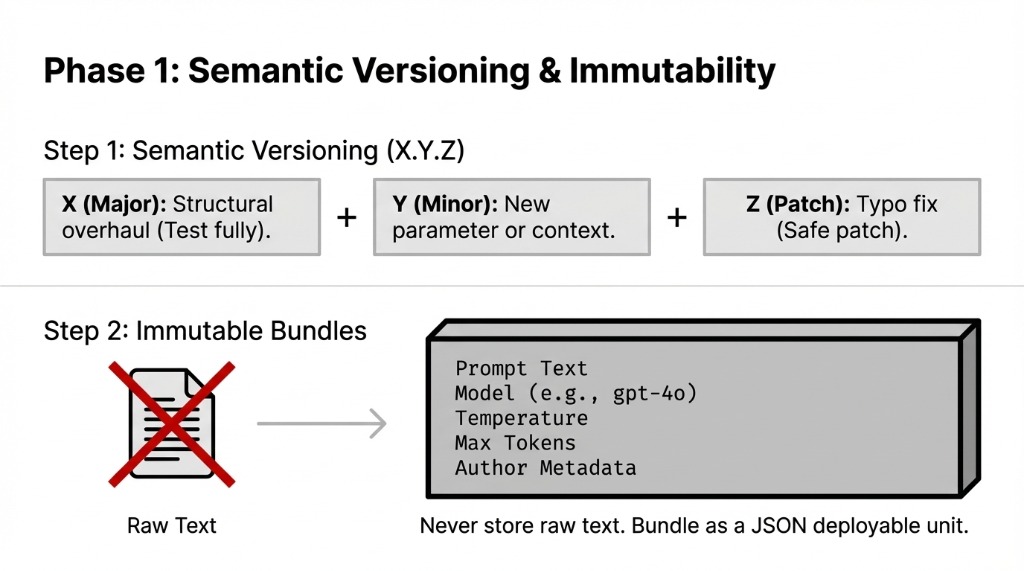
Step 1: Adopt Semantic Versioning for Every Prompt
Format: X.Y.Z — where X is a structural overhaul, Y is a new parameter or context addition, and Z is a typo fix or minor tweak.
▸ v1.2.0 to v1.2.1 signals “safe patch” — deploy without full testing
▸ v1.2.1 to v2.0.0 signals “test everything downstream before deploying”
Step 2: Bundle Prompts as Immutable Artifacts
How: Store each prompt version as a JSON file that includes the prompt text, model selection (e.g., gpt-4o, claude-3-5-sonnet), temperature setting, max tokens, and author metadata.
This bundle becomes the deployable unit
Not raw text in a config file. Not a string stuffed in a Python variable. A versioned, immutable artifact with full metadata.
Phase 2: Staged Deployments and Fast Rollbacks
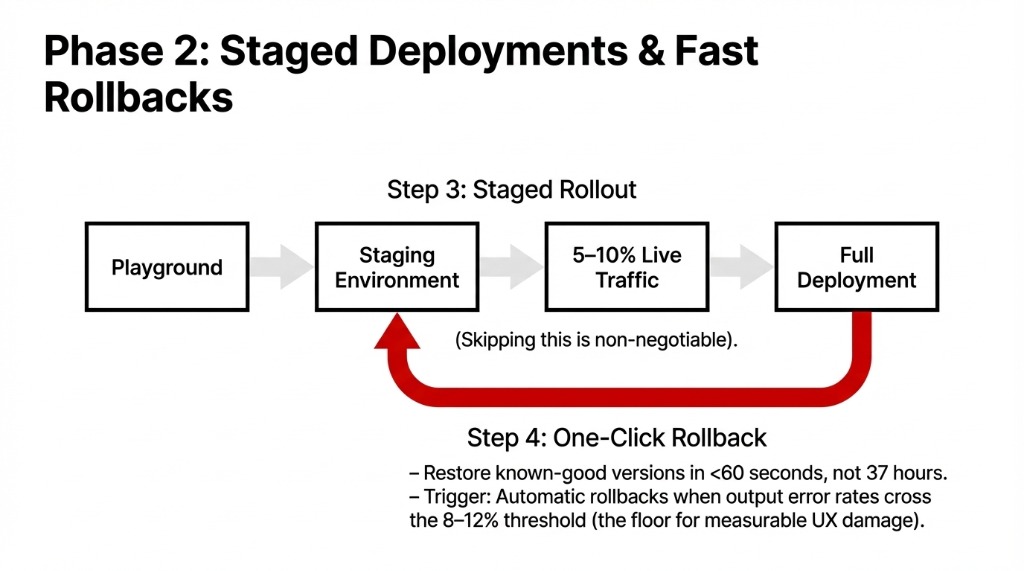
Step 3: Implement Staged Deployment with Quality Gates
Pipeline: Playground testing → staging environment (mirroring production conditions) → gradual rollout to 5–10% of real traffic → full deployment.
This is non-negotiable. Every AI team we’ve talked to that skipped staging has a story about a bad rollout they’re still recovering from.
Step 4: Build One-Click Rollback Into Your Workflow
When production breaks — and it will — you need to restore a known-good prompt version in under 60 seconds, not 37 hours.
Define quality thresholds that trigger automatic rollbacks when output error rates cross 8–12%. That number isn’t arbitrary — it’s the floor where user experience damage becomes measurable.
Step 5: Set Access Control and Mandatory Change Logs
Every prompt change needs: who changed it, what changed, and why. Not optional. Not “we’ll add it later.” Record this from day one.
The team that tells you “we’ll add logging later” is the same team doing a 37-hour post-mortem next month.
The Tools That Handle This Without Building from Scratch
You don’t need to build this infrastructure yourself. The prompt management tooling ecosystem matured significantly in 2025–2026. Here’s what’s worth looking at:
| Tool | Best For | Standout Feature |
|---|---|---|
| PromptLayer | Fast iteration without redeployment | Decouples prompts from code, batch evaluations, CI/CD integration, advanced search via tags |
| LangSmith | LangChain-heavy stacks | Commit-hash versioning familiar to engineers, centralized LangChain Hub for shared prompts |
| Maxim AI | Metric-driven teams | Visual diff comparison, side-by-side output quality analysis, performance dashboards |
| PromptHub | Compliance-heavy environments | Git-style branching, deployment guardrails that scan for secrets, profanity, and regressions |
| Agenta | Hybrid PM/engineer workflows | Author in playground, deploy to staging, sync to Git via CI/CD webhooks |
For most US-based AI product teams running between $50k–$500k/month in LLM costs, a dedicated prompt management platform pays for itself in the first major production incident it prevents — which, statistically, happens within the first 90 days of scaling.
What Changes After You Implement This
Measurable Shifts Within 30–60 Days
Iteration Speed: 3–5 Days → 4–8 Hours
PR + review + deploy cycles replaced by test-in-playground, staged deploy workflows. Product managers stop waiting in the engineering queue.
Untracked Incidents: Near-Zero
Every change has an author, a timestamp, and a rollback path. No more mystery production regressions.
Cross-Functional Collaboration
Product managers, ML engineers, and domain experts can collaborate on prompts without engineering bottlenecks.
MTTR: 18.5 Hours → Under 12 Minutes
One AI platform team we advised cut their mean-time-to-recovery from prompt-related incidents after implementing semantic versioning + Maxim AI. The fix wasn’t more engineers. It was better tooling.
The Hard Truth About Prompt Engineering at Scale
Here’s what most prompt engineering guides won’t tell you: prompt management IS software development. It has deployments, rollbacks, staging, QA, and access control — or it has production fires at 2 AM.
Braincuber’s AI development teams build AI applications with this infrastructure baked in from day one — not retrofitted after the first incident. If you’re building an LLM-powered product and your prompts live in a shared Google Doc or are hardcoded directly in your Python files, you’re one bad edit away from a bad week.
Check your cloud infrastructure while you’re at it — observability and version control start at the deployment layer.
The Challenge
Open your production AI system right now. Can you answer these three questions in under 60 seconds: Who last changed the customer support prompt? What was the previous version? How do you roll back to it?
If you can’t, your next 37-hour post-mortem is already queued up. Don’t learn this the hard way.
Frequently Asked Questions
What is AI prompt version control?
Tracking every change made to an AI prompt — recording what changed, who changed it, when, and why — so teams can roll back to working versions, run A/B tests, and maintain consistent AI output quality across production environments.
Can I use Git for prompt version control?
Git works for small, stable prompt sets managed exclusively by engineers. It lacks experimentation tooling, output quality visibility, and environment management. For teams with non-engineer contributors or rapid iteration needs, use PromptHub, LangSmith, or Maxim AI.
What is semantic versioning for AI prompts?
A three-part number (X.Y.Z): major (X) for structural overhauls, minor (Y) for new context parameters, and patch (Z) for small fixes. This signals how risky a change is before deployment.
How do I roll back a bad AI prompt?
Use a prompt management platform with one-click version reversion. Define automatic rollback triggers based on quality thresholds (e.g., error rate above 10%) so the system responds before users notice degradation.
Which prompt versioning tool is best in 2026?
Depends on your stack. LangSmith fits LangChain teams, PromptHub suits compliance-heavy environments, Agenta works for hybrid engineer/PM workflows, and Maxim AI excels for teams needing output quality analytics tied to each prompt version.