
Your AI agent just ran overnight. You check your OpenAI billing dashboard the next morning and see a $4,300 charge for what you thought was a $200 automation.
That is not a hypothetical. We see it happen to companies every single month. A single prompt-injection test. A runaway reasoning loop. An agent calling the same API 847 times. And by the time anyone notices, the damage is already done.
AI monitoring isn’t optional. It’s the difference between a 40% cost reduction and a five-figure surprise invoice.
We’ve audited 30+ AI deployments across US-based SaaS companies. Fewer than 1 in 5 had token-level cost monitoring in place at launch. The gap between “uptime monitoring” and “AI observability” is exactly where engineering teams lose $8,000–$23,000 per month without realizing it.
Stop trusting green uptime dashboards. A call can succeed with a 200 response, charge you $0.94, and still be wrong.
The Real Problem Is Not Your Model Choice
Most teams obsess over picking the right LLM. GPT-4o vs. Claude 3.5 vs. Gemini 1.5. They spend weeks on model evaluation and zero hours setting up real-time cost monitoring.
Here’s what we consistently see in production deployments: it’s not the model that breaks your budget. It’s the agent behavior.
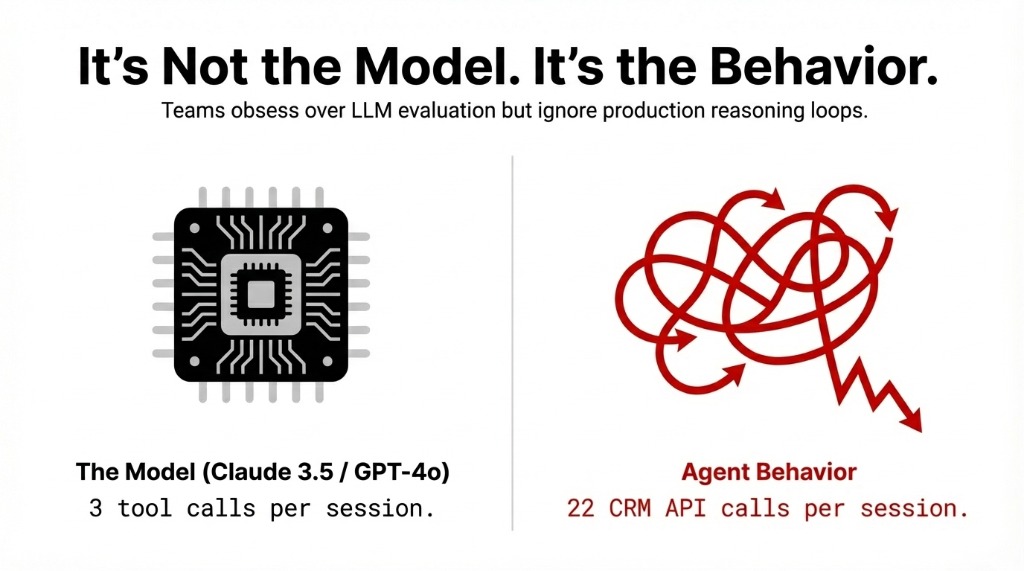
An agent designed to answer customer support tickets will work perfectly in staging — 3 tool calls, 1,200 tokens, $0.04 per request. Then you push it to production on a Monday morning with 600 concurrent users, and it enters a reasoning loop, calling your CRM API 22 times per conversation instead of 3.
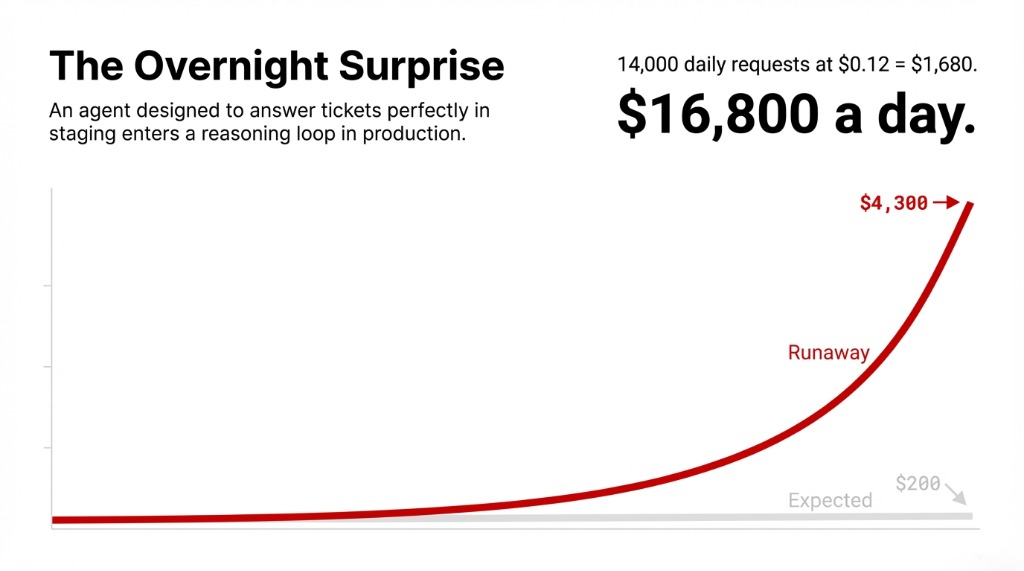
At $0.12 average cost per request, that’s not bad. But multiply that by 14,000 daily requests with broken loop behavior, and you’re looking at $16,800 a day instead of $1,680. The model didn’t change. The monitoring didn’t exist.
Why Standard Alerting Software Won’t Save You
Your existing infrastructure monitoring setup — whether that’s UptimeRobot, Pingdom, or a basic server monitoring dashboard — tracks uptime and response time. That’s necessary. It’s not sufficient.
Traditional APM Is Blind to AI Cost Overruns
Traditional application performance monitoring tools were built for deterministic systems. If a web server returns a 500 error, your alerting software fires. Done.
AI agents are non-deterministic
A call can succeed with a 200 response, charge you $0.94, and still be completely wrong. Your APM tool will never flag it. Your server monitoring software sees green. Your bank account disagrees.
Hidden cost: $8,000–$23,000/month in undetected overruns
The 4 Metrics You Must Track in Real-Time
Stop looking at aggregate monthly spend. By the time that number surfaces, you’ve already overspent. Real-time AI agent cost monitoring means tracking four specific signals:
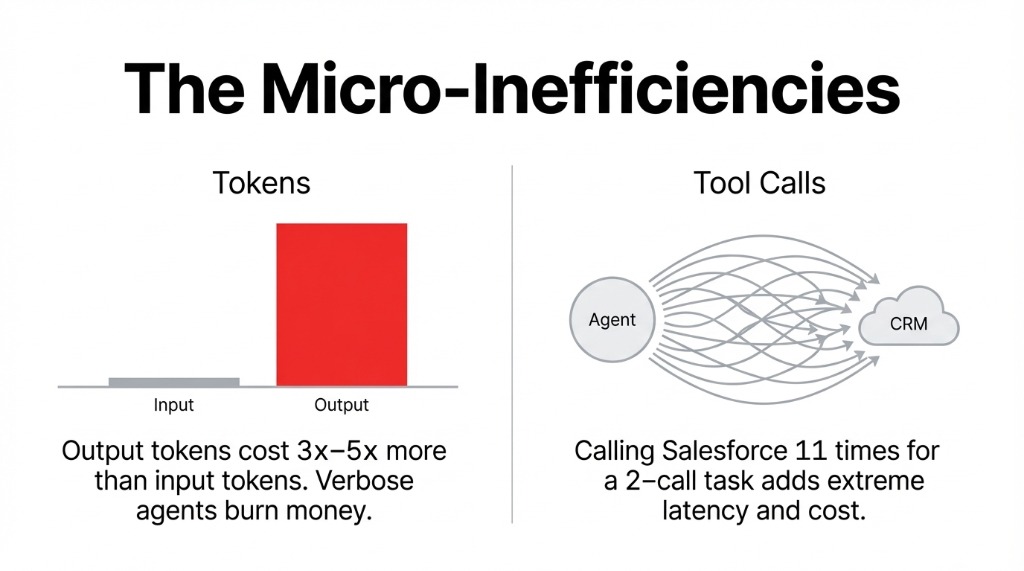
Four Real-Time Cost Signals
1. Token Consumption Per Request
Track input + output tokens separately. Output tokens cost 3x–5x more on most providers. An agent generating verbose responses when a 40-word answer would do is burning money on every call. LangWatch and Portkey break this down per-request in live dashboards.
2. Tool Call Frequency Per Session
Every external API call your agent makes — Slack, your CRM, your vector database — adds latency and cost. Galileo AI maps tool call frequency against outcome quality, so you can spot an agent calling Salesforce 11 times for a question that requires 2 calls.
3. Cost Per Workflow Branch
Multi-agent systems have decision trees. Some branches cost $0.07. Some cost $1.34. Without decision-tree visualization in your monitoring software, you’re flying blind. Datadog’s LLM Observability traces full agent workflows and maps cost to each branch.
4. Spend Velocity ($/Minute)
The one nobody implements until they’ve been burned. Set a threshold: if your agent cluster crosses $47/hour at 2 AM on a Sunday, trigger a Slack alert and throttle traffic automatically. Fire alerts when individual requests exceed 3x the median token count.
The Monitoring Tools That Actually Work in 2026
Here’s the honest breakdown. Not the vendor pitch version.
Datadog LLM Observability
Gold Standard for Enterprise
What it does: Pulls real billed costs directly from the OpenAI API — not estimates — and gives you per-trace cost attribution down to each individual LLM call span. Tag pipelines by team, project, or environment. Set monitor-based alerts for budget overages.
The Catch
Minimum commitment: 100,000 monitored LLM requests per month. If you’re an early-stage AI team running 8,000 requests/day, Datadog pricing will eat you alive. Use it at enterprise scale. Not before.
Portkey
Best Fit for Mid-Market Teams
What it does: Tracks costs, token usage, latency, and accuracy across 40+ metrics in real-time. Semantic caching stores and reuses results for similar queries, cutting token usage by 30%–90% for repetitive tasks like FAQ responses.
The Standout Feature
Intelligent routing pushes traffic toward cost-efficient models without degrading quality. Teams using this consistently report 25% average annual savings. Hard spending limits per agent, team, or project — as granular as $1 minimum or 100 tokens.
Coralogix and LangWatch
The Specialist Options
Coralogix: Continuous in-stream analysis of AI interactions. Detects cost anomalies before they impact users. Logs and categorizes every AI transaction across token usage, compute time, and API calls simultaneously.
LangWatch: Live dashboards with drill-down into individual traces. Surfaces the slowest calls, highest token usage, and error patterns. Per-request and aggregated cost visibility across providers, models, and prompts.
Maxim AI: Distributed tracing across multiple applications. Custom metrics tied to token data let you track correlation between token spend and user satisfaction scores.
The Setup That Stops a Five-Figure Bill
We’ve deployed AI agent monitoring infrastructure for teams running everything from LangChain customer support bots to CrewAI procurement agents. Here is the exact setup that works:
Layer 1 — Real-Time Token Tracking
Action: Instrument every LLM call with a tracing tool (LangWatch or Portkey depending on scale). Capture input tokens, output tokens, model used, and estimated cost per call. Feed this into a live dashboard.
Time to configure: 4–6 hours
Skip this step and you’re debugging blindfolded when the bill hits. Every team that tells us “we’ll add monitoring later” ends up calling us after a $9,700 invoice.
Layer 2 — Anomaly Alerting
Three alert thresholds you need:
▸ Single request exceeds 3x your median token count
▸ Hourly spend crosses a defined ceiling
▸ Any agent invokes an external tool more than 5 times in a single session
Route all three to Slack and PagerDuty. Not email. Email gets read at 9 AM. Your runaway agent doesn’t wait until 9 AM.
Layer 3 — Budget Hard Limits
Action: Portkey lets you set hard spending limits per agent, team, or project — as granular as $1 minimum or 100 tokens. Enable these for every non-critical agent.
Your marketing automation agent does not need an unlimited budget. *(Yes, your CTO will argue. Show them the invoice.)*
Layer 4 — Weekly Cost Attribution Reports
Action: Break costs by agent, team, and workflow weekly. This is where Datadog’s custom tag system earns its keep at enterprise scale. For smaller teams, Portkey’s built-in team-level reporting handles this without the overhead.
If you can’t answer “which agent cost us the most last week?” within 30 seconds, you don’t have monitoring. You have a dashboard.
What Braincuber Builds for You
We implement production-grade AI observability stacks as part of every Agentic AI deployment we run. LangChain or CrewAI agent builds come with monitoring software pre-configured — not bolted on three months later after a painful billing cycle.
Braincuber Deployment Results
38.7% Lower LLM Costs
Teams that launched with real-time monitoring in place vs. teams that added monitoring reactively — across our last 12 US-based deployments
Zero Rip-and-Replace
We integrate with your existing APM tools — Datadog, New Relic, or custom server monitoring — and layer AI-specific observability on top
No Six-Month Timelines
Full AI monitoring infrastructure operational within weeks, not quarters. Your cloud setup stays intact.
The Challenge
Open your LLM provider billing dashboard right now. Look at the last 7 days. Can you tell which agent, which workflow, which team spent the most? Can you see the cost per request — not the monthly aggregate, the per-request breakdown?
If the answer is no, you’re flying blind. And your next surprise invoice is already accumulating.
Frequently Asked Questions
What is AI agent cost monitoring?
It tracks token consumption, tool call frequency, and API spend per request in real-time. Unlike standard uptime monitoring, it captures non-deterministic agent behavior like reasoning loops or excess tool calls before they generate unexpected provider invoices.
Which free tool works for AI cost monitoring?
LangWatch and Portkey both offer free tiers with real-time token tracking. Portkey’s free tier covers per-request cost attribution, model-level breakdowns, and basic alerting for teams under 10,000 requests/day.
How do I set up real-time cost alerts?
Configure three triggers in Portkey, Datadog, or Coralogix: single request exceeds 3x median token count, hourly spend crosses a ceiling, and any agent makes more than 5 external tool calls per session. Route to Slack or PagerDuty.
Does AI monitoring work with existing APM tools?
Yes. Datadog LLM Observability integrates directly with existing Datadog infrastructure. Portkey and Coralogix offer API-based integrations that slot into most IT monitoring and alerting software setups.
How much can monitoring reduce LLM costs?
Semantic caching via Portkey reduces token usage by 30–90% on repetitive tasks. Intelligent routing delivers 25% average annual savings. Teams with monitoring at launch spend 38.7% less on LLM API costs in month one.