
Your company processed 1,400 invoices last month. Your team manually keyed in data from 847 of them — each one taking 8.3 minutes on average. That’s 117 hours of labor you paid for, and 4.7% of those entries had errors that cost you real money downstream.
That’s not a data problem. That’s a decision problem. And the decision to keep doing it manually is costing you more than you think.
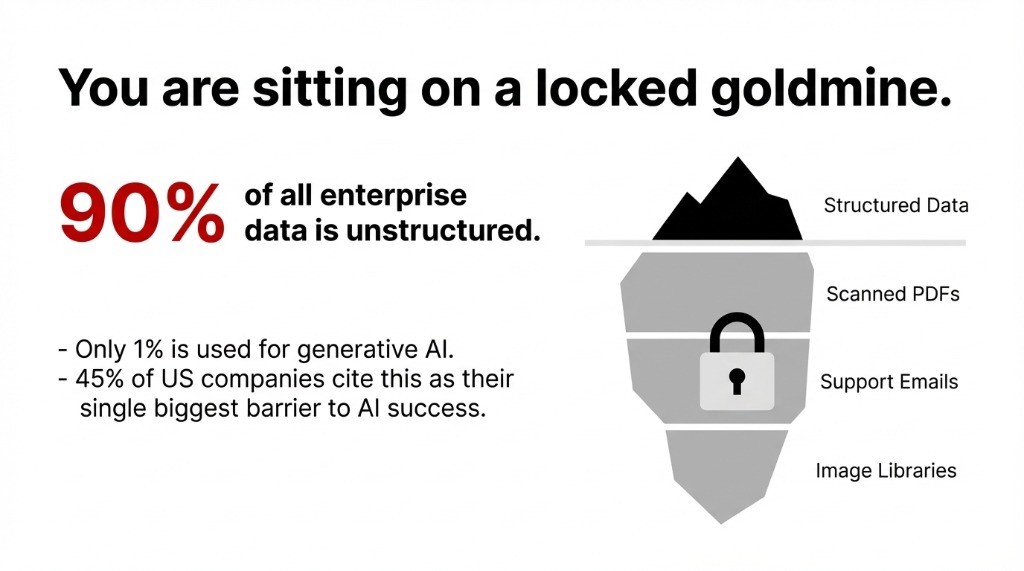
90% of all enterprise data is unstructured. Only 1% is being used for generative AI.
It’s buried in contracts, emails, scanned documents, and images. If you’re a US-based business running on Salesforce, HubSpot, and a folder full of PDFs that nobody can search, you are sitting on a goldmine with a padlock on it.
45% of US companies cite unstructured data as their single biggest barrier to AI success.
Your Data Is Drowning You — And You Don’t Even Know It
We work with operations teams across the US and they all have the same confession: “We know the data is there, we just can’t get to it fast.”
What “We Can’t Get to It” Actually Looks Like
200-Page Vendor Contracts
Nobody re-reads them because Ctrl+F doesn’t work on scanned PDFs. Pricing escalation clauses sit unnoticed until renewal hits.
3,200 Support Emails/Month
74% contain product feedback your product team will never see. Patterns buried across hundreds of messages for weeks.
18 Months of Shipping Photos
Your claims team reviews them manually — one by one. Damage detection at 67% accuracy. At scale, that’s thousands of missed claims.
The gap isn’t in the tools. It’s in understanding how the tools actually work.
How AI Processes PDFs: It’s Not Just OCR Anymore
Here’s where most companies get this wrong.
They buy a basic OCR tool, run it on their PDFs, get back some messy text output, and call it “AI-powered document processing.” That’s like buying a metal detector and calling yourself a geologist.
Legacy OCR vs. Modern Document AI
Legacy OCR: Hits about 80% accuracy on complex documents — tables with merged cells, multi-column layouts, handwritten annotations. A 20% error rate on a 500-invoice batch means 100 invoices with wrong data feeding directly into your ERP.
Modern AI Document Processing: 95–99% accuracy
The AI isn’t just reading characters. It understands context. It knows that “NET 30” means payment terms, not a fishing reference. It knows that a number in the upper-right corner of an invoice is likely an invoice number, not a phone number.
For scanned PDFs, AI models use a combination of computer vision (to identify layout and structure) and natural language processing (to extract meaning). The result: a financial services firm that deployed AI-driven compliance document pipelines cut reporting errors by 61% and saved $2.1 million annually in labor costs.
How AI Reads Your Emails (And Finds What You Keep Missing)
Your customer support inbox is not just a support queue. It’s a real-time sentiment analysis feed, a product bug tracker, a churn predictor, and a competitor intelligence source — all in one.
You’re just not using it that way.
The Pattern No Human Caught
One of our clients — a US-based e-commerce brand doing $4.3M/year — was missing a recurring complaint about a specific SKU driving returns. The pattern was buried across 340 emails over 6 weeks. No human caught it.
An AI sentiment analysis model flagged it in 11 minutes during its first pass.
What NLP Models Actually Do With Your Emails
Tools: AWS Comprehend, Google Cloud Natural Language API, and custom NLP models built on transformer architectures like BERT.
▸ Classify email intent: complaint, inquiry, refund request, or genuine praise
▸ Extract named entities: product names, order numbers, specific dates
▸ Score sentiment at the sentence level — not just “positive/negative” but “frustrated but loyal” vs. “done with you”
▸ Route emails to the right team before a human opens them
Response times drop from 6.2 hours to under 45 minutes. We’ve seen this exact pattern across 3 US implementations in the last 14 months.
How AI Handles Images: Computer Vision Is Not Magic, It’s Math
Here’s what actually happens: the image is broken into a grid of pixel values, passed through multiple convolutional neural network layers that detect edges → shapes → patterns → objects, and then classified against a training dataset of millions of labeled examples. That’s deep learning doing real work.
Real Business Applications of AI Image Recognition
Insurance Claims
AI image recognition on claims photos detects pre-existing damage — flagging fraudulent claims with 89% accuracy before a human adjuster even opens the file.
Retail Shelf Monitoring
AI image analysis on shelf photos detects misplaced products or empty slots in real time. Stockout prevention at scale.
Healthcare Imaging
AI models processing X-rays and MRIs catch anomalies human radiologists miss at 3 AM. Production-grade pipelines on AWS SageMaker and Azure ML.
The Logistics Client: 7,400 Photos/Day
We deployed an image recognition model for a US-based logistics client processing 7,400 package photos daily for damage detection.
▸ Before: 3 full-time staff reviewing photos, catching about 67% of damage cases
▸ After: AI model processes all 7,400 images in 4.2 minutes, flagging 94% of damage cases automatically. Those 3 staff now handle escalations and edge cases only.
Why “We’ll Add AI Later” Is the Most Expensive Decision You’ll Make
Here’s the part your cloud vendor’s sales team won’t tell you: the longer you wait, the harder it gets.
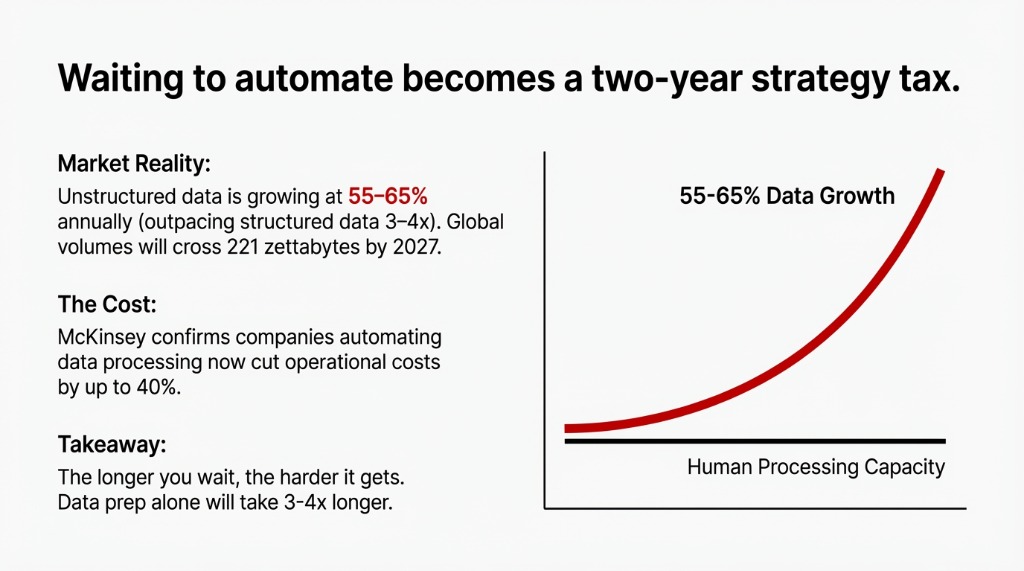
Every day without an AI layer on your unstructured data, you’re adding to the pile. Your contracts folder grows. Your email archive deepens. Your image library expands. When you finally decide to build the AI pipeline, the data prep alone takes 3–4x longer than the model build itself.
Unstructured data is growing at 55–65% annually — outpacing structured data by 3–4x.
By 2027, global unstructured data volumes will cross 221 zettabytes. If your data governance isn’t keeping pace, your AI implementation timeline in 18 months will cost twice what it costs today.
McKinsey confirms companies automating data processing now are cutting operational costs by up to 40%. That gap between early movers and laggards is widening every quarter.
What Braincuber Builds (And What You Should Expect)
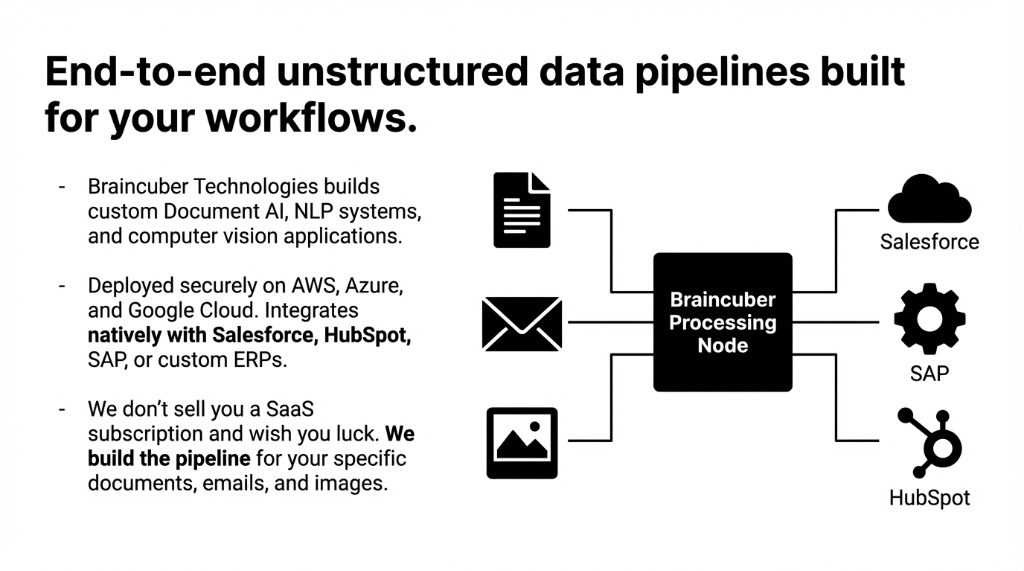
At Braincuber Technologies, we build end-to-end unstructured data pipelines — Document AI, NLP systems, and computer vision applications — deployed on AWS, Azure, and Google Cloud. We don’t sell you a SaaS subscription and wish you luck. We build the pipeline for your specific documents, your specific email workflows, and your specific image data.
A Typical Engagement Timeline
▸ Week 1–2: Data audit — we map exactly where your unstructured data lives and what formats you’re dealing with
▸ Week 3–4: Pipeline build — Document AI or NLP layer depending on data type, integrated with your existing systems (Salesforce, HubSpot, SAP, or custom ERP)
▸ Week 5–6: Testing and calibration — accuracy benchmarking, edge case handling, human-in-the-loop review for low-confidence results
▸ Week 7–8: Go-live and monitoring — measurable results appear in the first week of production
Clients typically see measurable ROI within 47–63 days of deployment.
The Challenge
Open your shared drive right now. Count the PDFs nobody has opened in 6 months. Check your support inbox — how many emails from last month contain product feedback your team never saw? Look at your image folders — is anyone reviewing them at scale?
You are leaving operational intelligence on the table every single day those files sit untouched. Don’t let your biggest competitor figure this out six months before you do.
Frequently Asked Questions
Can AI process any type of PDF, including scanned documents?
Yes — modern Document AI handles scanned PDFs using computer vision combined with OCR and NLP. Accuracy ranges from 95–99% for well-structured documents and 88–93% for complex scanned forms. A human-review layer handles the bottom 3–5% of low-confidence extractions.
How does AI sentiment analysis on emails work?
AI reads email text through a trained NLP model — typically a transformer like BERT or GPT — that scores emotional tone, extracts intent, and classifies topics at the sentence level. Setup takes 2–3 weeks; results show measurable improvement in routing accuracy within 30 days.
What is the difference between OCR and AI document processing?
OCR reads characters. AI understands meaning. Basic OCR gives you raw text. AI document processing identifies document type, extracts specific fields, validates logic (does the line-item sum match the total?), and outputs clean structured data ready for your ERP.
How accurate is AI image recognition for business use?
For well-defined tasks like detecting defects, reading license plates, or classifying document types from photos, accuracy reaches 91–97%. For nuanced tasks like medical imaging or fraud detection, models need ongoing training and regular validation cycles.
What does Braincuber need to build an AI pipeline?
A representative sample of 500–2,000 labeled examples per document type, plus API access to your existing systems. We handle all data security and compliance protocols and sign a mutual NDA before touching your data.