
Your Black Friday instance is still running. It is April.
You launched your Shopify store on an m5.2xlarge during last year's Black Friday rush, and you never touched it again. That instance is now running at 11% average CPU utilization — and you are writing AWS a check for roughly $312/month for the privilege of doing nothing with 89% of it.
Multiply that across 6-12 EC2 instances behind your storefront, product catalog API, search service, and order management layer. You are burning $1,800 to $4,300 every single month on compute you do not use.
We see this with almost every e-commerce brand we work with at Braincuber. They over-provision once — usually right before a big sale — and never scale back. AWS EC2 right-sizing is not a one-time task. It is an operating discipline. And if you are not doing it quarterly, you are just donating money to Amazon.
The Over-Provisioning Trap E-Commerce Brands Walk Right Into
Here is exactly how it happens.
Your DevOps team spins up c5.4xlarge instances for your product search microservice because your CTO said "performance is non-negotiable" ahead of a product launch. The launch goes fine. Traffic peaks at 40% CPU for about 3 hours. Then life goes back to normal, and that instance idles at 8-14% CPU every day for the next 11 months.
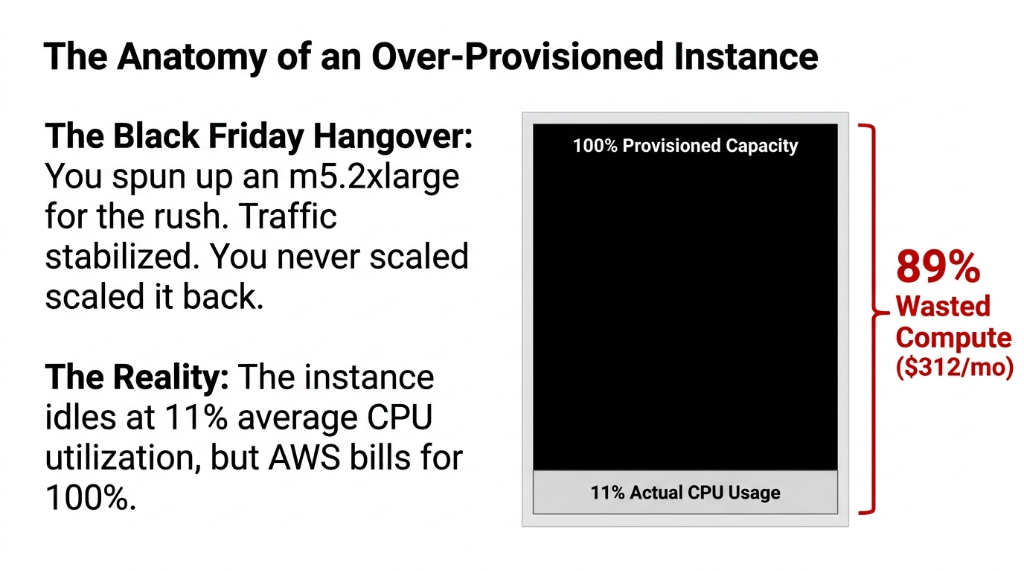
Nobody flags it. CloudWatch has the data, but nobody is reading it. And your AWS bill quietly climbs.
The Ugly Truth AWS Will Not Tell You
AWS will never tell you to downsize. AWS Compute Optimizer will make suggestions, but only if you go looking. By default, it uses a 20% CPU headroom in its rightsizing recommendations — meaning even the tool is being conservative. The real savings are often much deeper.
Real Audit Result: 7 out of 9 instances over-provisioned
We audited one US-based D2C brand running a WooCommerce + custom API stack on AWS and found 7 out of 9 EC2 instances were over-provisioned by at least one full size tier. That single audit freed up $3,870/month — before touching Savings Plans, Spot Instances, or anything else.
What AWS EC2 Right-Sizing Actually Means (And What It Does Not)
Right-sizing is not about cutting corners. It is about matching the instance type and size to the actual workload — not the imagined worst-case workload your team sized for during a nervous planning meeting.
The mistake most e-commerce teams make: they size for peak traffic 24/7/365 when peak traffic happens for maybe 47 hours a year (sale events, holidays, product drops). The other 8,713 hours? Idle metal.
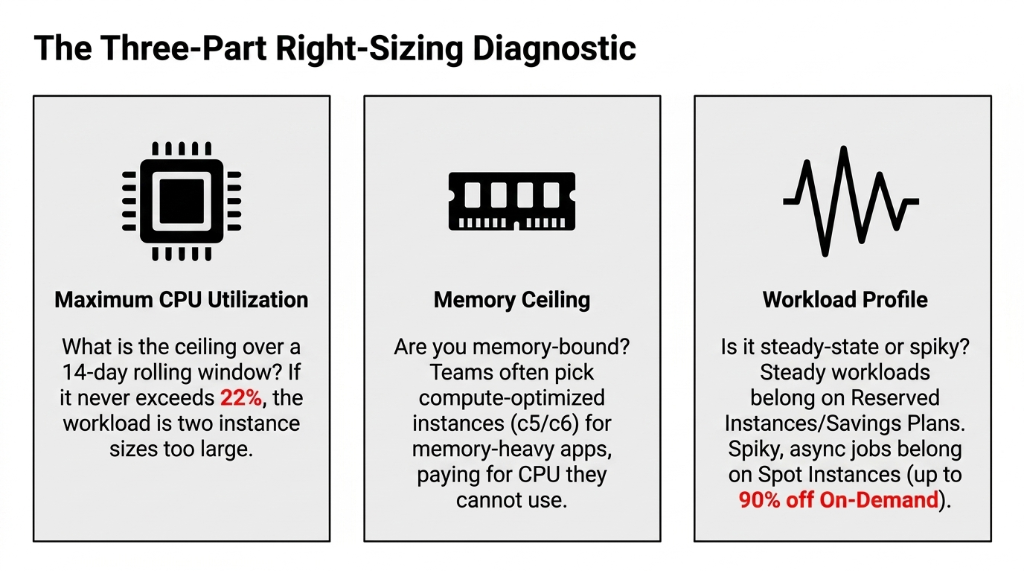
The 3 Questions Right-Sizing Asks
Max CPU Over 14 Days?
If it never exceeds 22%, you are two instance sizes too large. Period.
Memory Ceiling?
Many teams pick compute-optimized c5/c6 instances when their app is memory-bound. Paying for CPU they cannot use.
Steady or Spiky?
Steady-state = Reserved Instances. Spiky async jobs (reports, email triggers) = Spot Instances at up to 90% off On-Demand.
The E-Commerce Workload Map: Which Instance Goes Where
This is what we consistently recommend for a mid-market US e-commerce platform doing $2M-$15M in annual revenue:
| Workload | Wrong Instance (Common) | Right Instance | Monthly Savings |
|---|---|---|---|
| Storefront (Next.js / React) | m5.2xlarge |
m6g.large (Graviton) |
~$187/mo |
| Product Search API | c5.4xlarge |
c6g.xlarge (Graviton) |
~$243/mo |
| Order Management Service | r5.xlarge |
r6g.large (Graviton) |
~$119/mo |
| Batch Jobs (Reports, Email) | On-Demand m5.large |
Spot m5.large |
~$72/mo |
| Staging / QA Environments | Always-on t3.medium |
Scheduled stop (nights/weekends) | ~$61/mo |
That is $682/month in savings from one e-commerce stack — and we have not even touched the database layer. One thing almost no one talks about: AWS Graviton3 (the m7g, c7g, r7g family) delivers 20-40% better price-performance than their x86 equivalents. Most modern Node.js, Python, and Go stacks run on them without a single code change.
Why "We Will Fix It After Peak Season" Is Costing You $22,200/Year
We hear this constantly. "Black Friday is coming, let's not touch the infra right now." Fine. But after Black Friday? And after Christmas? And after Valentine's Day? Somehow there is always a reason to push the right-sizing audit to next quarter.
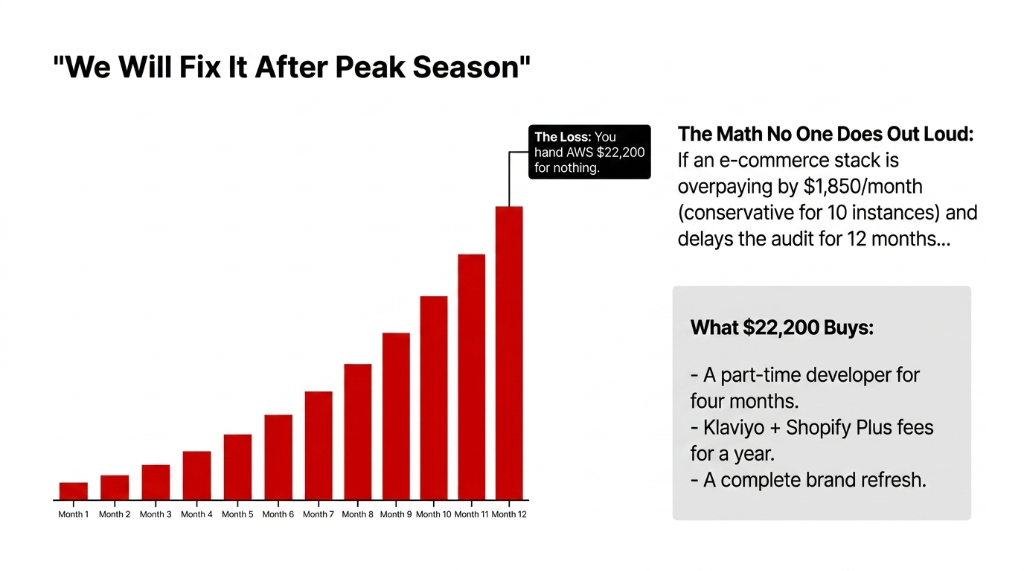
Here is the math no one does out loud: If your team is over-paying by $1,850/month on EC2 *(conservative for a 10-instance stack)*, and you delay the right-sizing exercise by 12 months, you have handed AWS $22,200 for nothing.
What $22,200 in Wasted Compute Buys Instead
A Part-Time Developer
Four months of engineering time. Enough to rebuild your checkout flow or migrate to headless.
Klaviyo + Shopify Plus
Full-year subscription fees for both platforms. The tools that actually drive revenue, not idle CPU.
A Complete Rebrand
New identity, new packaging, new landing pages. Something your customers actually notice.
The right time to do the audit was six months ago. The second-best time is this week.
The 5-Step Right-Sizing Process We Run for E-Commerce Clients
We do not guess. We follow a repeatable process that takes 8-12 business days from audit to implementation for a standard 10-15 instance e-commerce stack.
Step 1: Instrument First
Pull CloudWatch metrics for CPU, memory (requires the CloudWatch Agent), network I/O, and disk throughput over a minimum 14-day window — ideally 28 days to capture a full business cycle including at least one weekend. Without this data, you are guessing.
Step 2: Run AWS Compute Optimizer
It flags instances marked as OVER_PROVISIONED and gives you a ranked list sorted by estimated monthly savings. Sort by savings value, not by instance count. Enhanced Infrastructure Metrics extends the lookback window from 14 days to 3 months for about $0.0036/resource/hour (~$26/month for 10 instances).
Step 3: Validate in Staging
Never rightsize production cold. Spin up the recommended instance type in your non-prod environment for 48-72 hours under synthetic load. Watch p99 latency, not just average. Average hides spikes that kill checkout conversions.
Step 4: Migrate with Zero Downtime
Use Auto Scaling Group instance refresh — not stop-start. For stateless services (most storefront workloads), a rolling replacement takes under 11 minutes with zero user impact. No maintenance window needed.
Step 5: Lock In Savings with a Savings Plan
After you right-size, commit to a 1-year Compute Savings Plan for steady-state instances. Saves up to 66% versus On-Demand. Unlike Reserved Instances, it applies across instance families — you are not locked in if you switch from m6g to m7g in six months.
The Graviton Elephant in the Room
Everyone in the AWS community says "try Graviton." Most e-commerce teams nod and do nothing.
Real Scenario: 9-Month Delay Cost $7,692
A US fashion D2C brand we work with was running 8x c5.2xlarge instances for their product API (Python/FastAPI). We moved them to c7g.xlarge — smaller footprint, ARM architecture. Their monthly EC2 spend on that service dropped from $1,847 to $991. API response time actually improved by 17ms at p95 because c7g has a faster memory bus.
They resisted the migration for nine months because "we do not have time to test"
The actual test took 6 hours. The nine-month delay cost them $7,692. Graviton is not a risk. Inaction is the risk.
Your AWS Bill Is a Decision — Not a Fate
The single biggest misconception we fight with every e-commerce client: "AWS bills are what they are." No. Every line on your AWS Cost Explorer is a decision your team made — or failed to make.
Right-sizing is not a one-off project. It is a quarterly discipline. Set a calendar reminder every 90 days to pull Compute Optimizer recommendations. Make it someone's explicit job — not a side task for the engineer who already has 30 Jira tickets.
The brands we see running AWS efficiently share one trait: they treat cloud spend the same way they treat COGS. They measure it, they optimize it, and they hold someone accountable for it.
Stop treating your AWS bill like a utility you cannot control. You can. The data is already there in CloudWatch and Compute Optimizer. You just have to look at it. Or better yet — have someone who does this for a living look at it for you.
Frequently Asked Questions
Will rightsizing EC2 instances hurt my site's performance?
Only if you rightsize without data. Use CloudWatch metrics and Compute Optimizer recommendations based on actual CPU, memory, and network utilization over the past 14 days. If your m5.2xlarge is running at 12% CPU, dropping to m5.large will not degrade performance. Rightsizing from real metrics is safe and repeatable.
How often should e-commerce teams run an EC2 rightsizing audit?
Every 90 days, minimum. E-commerce workloads shift with seasons, catalog size, and traffic patterns. A quarterly audit keeps your instance fleet aligned with actual usage. We also recommend running Compute Optimizer checks immediately after any major traffic event — post-Black Friday analysis routinely surfaces 2-4 additional savings opportunities.
What is AWS Compute Optimizer and is it free?
AWS Compute Optimizer analyzes your EC2 utilization and recommends optimal instance types. The basic tier is free. Enhanced Infrastructure Metrics extends the lookback window from 14 days to 3 months and costs approximately $0.0036 per resource per hour. For a 10-instance stack, that is about $26/month for dramatically better rightsizing accuracy.
Should I use Reserved Instances or Savings Plans after rightsizing?
Use Compute Savings Plans, not Reserved Instances. Savings Plans apply across instance families, sizes, and regions — so if you switch from m6g to m7g mid-year, your commitment still applies. Reserved Instances lock you to a specific instance type. For e-commerce brands who update their stack 1-2 times per year, Savings Plans deliver the same 60-66% discount with far more flexibility.
How long does EC2 rightsizing take for a typical e-commerce stack?
For a standard 10-15 instance e-commerce stack, the full audit-to-implementation cycle takes 8-12 business days. This includes 14 days of metric collection run in parallel, 2 days of staging validation per service tier, and rolling production deployment. Actual engineering effort is typically 18-22 hours total.
Stop Bleeding Compute Budget You Could Be Spending on Growth
We will pull your Compute Optimizer data live on the call, identify your top 3 over-provisioned instances, and tell you exactly how much you can save — before you spend a dollar with us.
No pitch. No fluff. Just your numbers. Top 3 over-provisioned instances identified on the first call.