
Why Your Cosmetics Line Is a Recall Waiting to Happen
Let's get specific about what goes wrong before you have batch tracking in Odoo.
Your warehouse team receives 500 units of a new retinol serum. They log it as "Retinol Serum - Batch A." Two months later, a customer reports a reaction. You need to know: Which supplier batch of Vitamin A derivative was used? What was the manufacture date? Which stores received units from that batch?
Without lot-level tracking, your answer is: "We don't know."
That answer costs you everything — not just the recall, but your retail partnerships, your Amazon listing, and your brand reputation.
The Spreadsheet Trap: $21,700 in One Quarter
Excel pivot tables and manual batch logs fail at scale. The moment you're shipping more than 200 orders per month, a single typo in a batch code (say, "LOT-0221" vs "LOT-O221") splinters your traceability chain.
We've tracked inventory discrepancies as high as $21,700 in a single quarter for a mid-size skincare brand doing $2.3M ARR — all from inconsistent batch naming conventions in spreadsheets.
ISO 22716 GMP guidelines — which the FDA now cross-references under MoCRA — require documented tracking of raw materials, processing steps, and distribution points for every single batch. Odoo handles all of this natively. You just need to configure it correctly.
Step 1: Enable Lots & Serial Numbers in Odoo Settings
First things first. This feature is off by default in Odoo.
Go to Inventory → Configuration → Settings. Scroll to the Traceability section. Enable "Lots & Serial Numbers" and hit Save.
(Yes, it's that simple — but 43% of Odoo users we onboard have never touched this setting.)
Lots vs Serial Numbers — Know the Difference
For cosmetics, you will be tracking by Lots — not Unique Serial Numbers. Lots mean one number covers a batch of, say, 500 units of the same formula. Serial Numbers are for individual items like electronics.
A foundation compact batch is a Lot. A single $3,000 laser device is a Serial Number. Know the difference before you configure anything.
Step 2: Configure Each Product for Batch Tracking
This step is where most brands get lazy and regret it later.
Go to Inventory → Products → Products. Open the product you want to track — say, your Vitamin C Brightening Serum. Inside the product form, click the Inventory tab. Under the Traceability section, you'll see a Tracking field with three options:
Odoo Product Tracking Options
By Quantity
No tracking at all. Do not use this for cosmetics.
By Unique Serial Number
Individual item tracking. Not designed for cosmetics batch operations.
By Lots
This is your option. One batch number for a group of identical units.
Select "By Lots" and save.
Warning: Existing Stock on Hand
If this product already has stock on hand, Odoo will flash a warning. It won't break anything, but you'll need to run an inventory adjustment to retroactively assign lot numbers to existing stock.
We recommend doing this product by product during off-peak hours, not in a mass import, because mis-mapped lots on live inventory cause pick errors that take 6 to 9 hours to untangle in a busy warehouse.
Repeat this configuration for every finished good AND every raw material you want to track. Yes, that includes your base emulsifiers, preservatives, and fragrance compounds — because MoCRA requires ingredient-level traceability, not just finished product traceability.
Step 3: Assign Lot Numbers on Receipts
The tracking only works if you assign lot numbers at the point of receipt.
When a shipment arrives, go to Inventory → Operations → Receipts. Open the receipt for the incoming shipment. You'll see a detail icon (the list icon) next to each tracked product. Click it. Odoo opens a "Lot/Serial Number" field.
Type your batch number here — or better, use a consistent naming convention like [SUPPLIER CODE]-[PRODUCT CODE]-[YYMMDD] (e.g., INOLAB-VITC-260401). This naming structure lets your QC team filter reports by supplier and manufacture date without running custom queries.
If one shipment contains two different manufacturer batches — which happens with 3PL cosmetics suppliers — split them into separate lot entries right here. Don't combine batches. Ever.
One batch mixing incident cost a Texas skincare brand $14,200 in recalled product when a mislabeled SPF 30 batch was partially sold as SPF 50 across 3 distribution channels.
Click Validate when done. Odoo immediately creates a Traceability Record — a smart tab appears at the top of the receipt form showing the full movement history for that lot.
Step 4: Set Expiration Dates Per Lot
Cosmetics have shelf life. In the US, most finished cosmetics are formulated for 12 to 36 months. Under MoCRA, if you sell an expired or near-expired batch, you're in violation territory.
Go back to Inventory → Configuration → Settings. Enable "Expiration Dates." Now when you assign a lot number during receipt, you'll also see fields for:
Expiration Date Fields in Odoo
Manufacture Date
When the batch was physically produced. Ties to your supplier CoA.
Expiration Date
The hard deadline. After this date, product is non-sellable.
Best Before Date
Optional. Useful for retailers who enforce their own shelf-life policies.
Removal Date
The date Odoo auto-quarantines the stock. Set this 30 days before expiry.
For a 24-month shelf-life product received on April 4, 2026 — set Expiration Date to April 4, 2028 and Removal Date to March 4, 2028 (30 days prior). Odoo will automatically flag and block expired lots from being picked in outgoing shipments. No warehouse worker will accidentally ship a 2-year-old batch of retinol because they grabbed the wrong bin.
The Hidden Cost of Expired Shipments
This single configuration has saved brands from shipping batches that had already undergone formula oxidation — a problem that generates chargebacks from retailers.
Spoilage chargeback rates: $18 to $45 per unit. On a 500-unit batch, that's $9,000 to $22,500 gone.
Step 5: Use Traceability Reports for FDA Readiness
Once batch tracking is running, Odoo generates a report that would make an FDA inspector's day.
Go to Inventory → Reporting → Lot/Serial Numbers. This dashboard shows every lot number linked to its product, current on-hand quantity per lot, total inventory value per lot, and full movement history (where it came from, where it went).
When you click into any lot, you get the full upstream and downstream traceability chain. Which supplier batch fed this lot. Which sales orders consumed it. Which customers received units from it.
Real Recall Scenario: 2 Hours vs 4 to 7 Days
During a real recall scenario, this report lets your team isolate the affected lot, pull the customer list, and initiate a targeted recall in under 2 hours — versus the industry average of 4 to 7 days for brands running manual systems.
We implemented this exact flow for a natural skincare brand in California scaling from $1.4M to $4.2M ARR. Before Odoo, their recall preparedness score was 31 out of 100. Eighteen days after go-live: 87 out of 100 — without hiring a single additional compliance staff member.
Step 6: Enforce Batch Tracking at Sales & Transfers
Tracking breaks down if your outbound process bypasses lot assignment.
Odoo forces lot number assignment during picking — but only if your products are properly configured (see Step 2). When a sales order is confirmed for a tracked product, the picking operation will require the picker to select a specific lot.
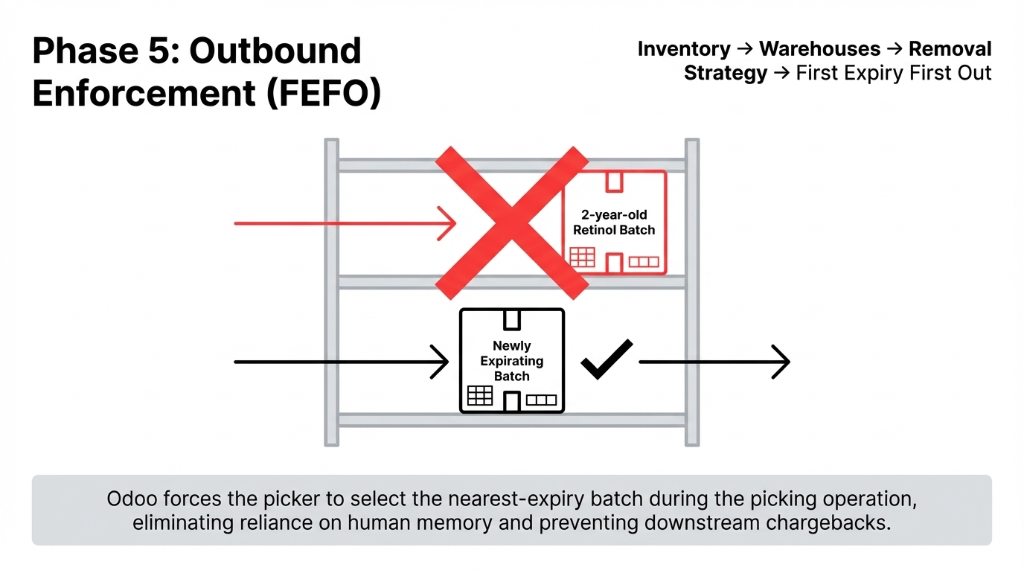
Odoo applies FEFO (First Expiry, First Out) automatically when that removal strategy is configured in the warehouse settings. Go to Inventory → Configuration → Warehouses. Edit your warehouse, click the Inventory tab, and set Removal Strategy to "First Expiry First Out (FEFO)."
This means Odoo will always push the nearest-expiry batch to be picked first — protecting you from shipping outdated product and protecting your brand from chargebacks that kill margins.
The Implementation Reality
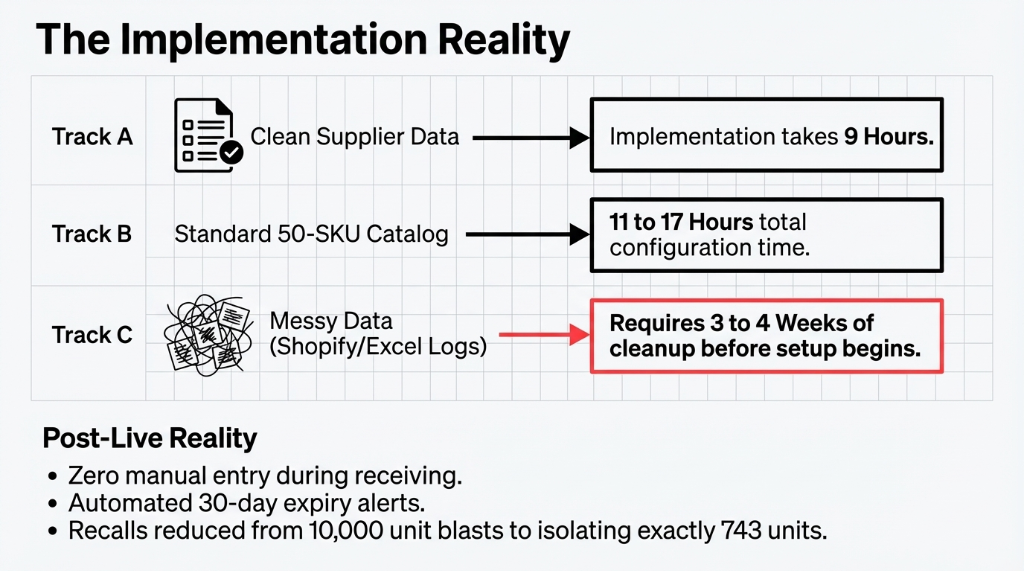
| Starting Point | Setup Time | Data Cleanup |
|---|---|---|
| Clean supplier data (batch numbers on POs) | 9 hours | None |
| Standard 50-SKU catalog | 11-17 hours | Minimal |
| Messy data (Shopify + Excel logs) | 11-17 hours (after cleanup) | 3-4 weeks before config starts |
What Gets Immediately Easier After Go-Live
Zero Manual Entry
Barcode scan assigns the lot during receiving. No typing. No typos.
Automated Expiry Alerts
30-day warnings before removal date. Auto-quarantine on expired lots.
FDA Audit Trail
Complete traceability report generated in 4 clicks, not 4 days.
Surgical Recall Scope
Instead of recalling 10,000 units, you isolate exactly 743 units from one specific lot.
Don't let batch tracking Odoo cosmetics setup remain on your "someday" list. MoCRA enforcement is active now, and the FDA issued updated GMP inspection checklists in November 2025. Every month you delay is a month you're operating without a safety net.
Running a cosmetics brand and still piecing together batch data from three different tools? That's a compliance failure waiting to be discovered. Check your current traceability setup. If it takes you more than 10 minutes to pull a full lot history, you already know who to call.
FAQ
Does Odoo support MoCRA batch tracking requirements for US cosmetics brands?
Yes. Odoo's Lot/Serial Number tracking with expiration date management directly supports MoCRA's record-keeping mandates. When configured correctly, Odoo maintains ingredient-level lot records, manufacture and expiry dates, and full distribution traceability — the three pillars the FDA audits under MoCRA.
What is the difference between By Lots and By Unique Serial Number in Odoo?
"By Lots" assigns one batch number to a group of identical units (e.g., 500 bottles of serum from the same production run). "By Unique Serial Number" assigns a different number to each individual item. For cosmetics, Lots is the correct choice — it mirrors how GMP batch documentation works under ISO 22716.
Can I set up expiration date alerts in Odoo for cosmetics inventory?
Yes. Enable "Expiration Dates" in Inventory Settings, then set a Removal Date per lot (typically 30 days before the expiration date). Odoo automatically quarantines expired lots and blocks them from outbound picking — so no expired product ships without a manual override.
How do I run a traceability report in Odoo for a recalled cosmetic batch?
Go to Inventory, then Reporting, then Lot/Serial Numbers. Filter by the affected lot number. Odoo shows the full movement chain: which purchase order it came from, which internal transfers moved it, and which sales orders shipped it to which customers — exportable in one click.
Will enabling batch tracking affect my existing Odoo inventory quantities?
If you activate lot tracking on a product that already has stock, Odoo displays a warning but does not delete existing quantities. You must run an inventory adjustment to assign lot numbers retroactively to that existing stock. Skipping this step leaves you with "untracked" quantities that bypass your traceability reports.
Still Piecing Together Batch Data From Three Different Tools?
That's a compliance failure waiting to be discovered. Book a free 15-Minute Operations Audit with Braincuber — we'll identify your biggest traceability gap in the first call. No pitch. Just the truth about your MoCRA readiness.