
You deployed an AI agent three months ago. It "looks" like it’s working. But your team still manually fixes 1 in 4 outputs, your support tickets haven’t dropped, and nobody can tell you — with a number — whether the agent is actually delivering value.
That’s not an AI problem. That’s a measurement problem.
And it is costing US enterprises an average of $2.1M per year in wasted AI spend on agents nobody can prove are effective.
We build and deploy agentic AI systems for enterprises across the US and globally — using LangChain, CrewAI, and custom agent architectures. After 500+ projects, the number-one reason AI agents fail isn’t the model. It’s that the team never defined what "good" looks like before go-live. This guide fixes that.
Why Most AI Agent Evaluations Are Completely Wrong
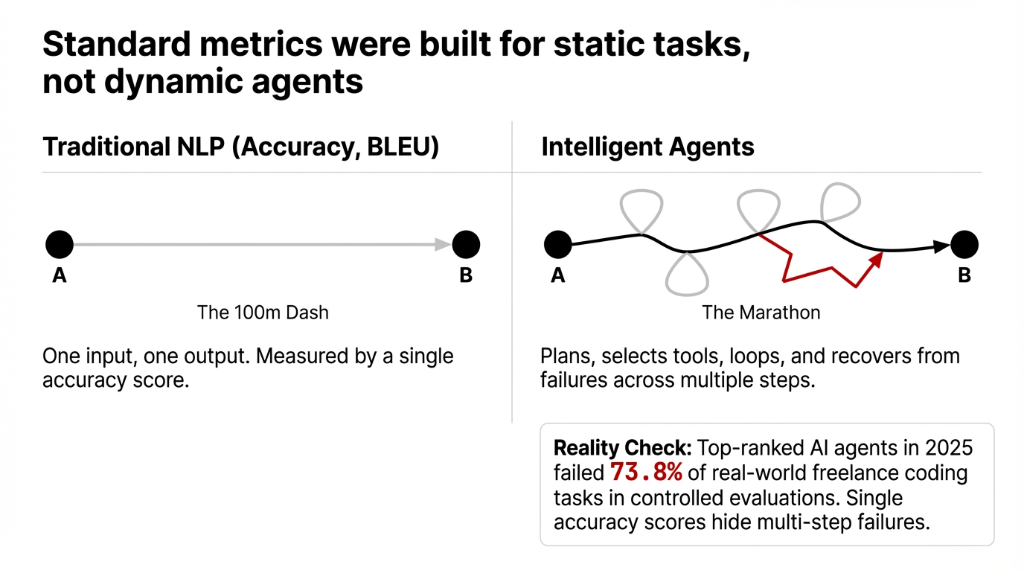
Here is the ugly truth about how most teams evaluate an AI agent: they watch it run a few demo tasks, it completes them, and someone in the room says "looks good." That is not evaluation. That is wishful thinking.
Traditional AI evaluation metrics — accuracy, precision, BLEU scores — were designed for static NLP tasks: one input, one output, done. An intelligent agent doesn’t work that way. It plans, selects tools, loops back, recovers from failures across multiple steps before reaching a final result. Measuring it with a single accuracy score is like judging a marathon runner by how fast they ran the first 100 meters.
Even more damaging: top-ranked AI agents in 2025 failed 73.8% of real-world freelance coding tasks in controlled evaluations. If you’re not stress-testing your agent against real task scenarios, you’re deploying a system whose actual capability you fundamentally don’t understand.
The 5 Core Dimensions Every AI Agent Must Be Measured On
The 5-Dimension Evaluation Model
1. Planning & Reasoning
Can your agent break a multi-step task into logical sub-tasks and adapt when step 3 fails? An agent that can’t replan mid-task is an expensive autocomplete tool.
2. Tool Selection & Execution
Does it call the right API at the right moment? An agent that fires a database query when it should be parsing a document will loop endlessly and burn $0.09 per token doing it.
3. Persistence on Long-Horizon Tasks
Complex tasks span 20+ steps: document review, multi-system data reconciliation, customer onboarding. Can your agent hold context across all of them without losing the thread?
4. Accuracy & Faithfulness
Hallucination rates above 4% in a production agent will generate wrong invoices, bad customer responses, and one day, a legal liability.
5. Multi-Agent Coordination
If one agent handles intake and another handles resolution, is the handoff clean? Broken handoffs cause 31% of task failures in multi-agent systems.
The 7 Metrics That Actually Tell You If Your AI Agent Works
These are the exact numbers you should be tracking, starting week one of deployment:
| Metric | Target | Red Flag |
|---|---|---|
| Task Success Rate (TSR) | 87%+ | Below 72% = rebuild |
| Steps-to-Completion (STC) | 3–5 steps | 14+ steps = broken logic |
| Hallucination Rate | <3.2% | Above 6% = re-architecture |
| Latency per Task (LPT) | <4.3 seconds | Beyond = 38% user abandonment |
| Cost per Completed Task (CPCT) | $0.09 | $0.47+ = fix tool-calling |
| Error Recovery Rate | 68%+ | Below = escalation overload |
| Human Override Rate (HOR) | <19% | Above = draft generator, not agent |
The Industry Benchmarks You Need to Know
AgentBench
Tests LLM-based agents across 8 environments — OS, databases, card games, web interfaces. Proprietary models hit 34.4% task success. Most open-source models scored under 8%.
SWE-agent
Benchmarks software agents on actual GitHub issue resolution — the closest evaluation to production-grade agent-based AI for engineering teams.
CAMEL
Tests collaborative multi-agent AI — how agents with different assigned roles coordinate toward shared goals. Non-negotiable if you run a multi-agent platform.
MMLU (Use With Caution)
57 academic subjects. Most-cited baseline for knowledge breadth. But we’ve seen models score 87% on MMLU and fail 61% of actual customer service tasks. Don’t let vendors hide behind MMLU numbers.
How Multi-Agent Systems Break Standard Evaluation
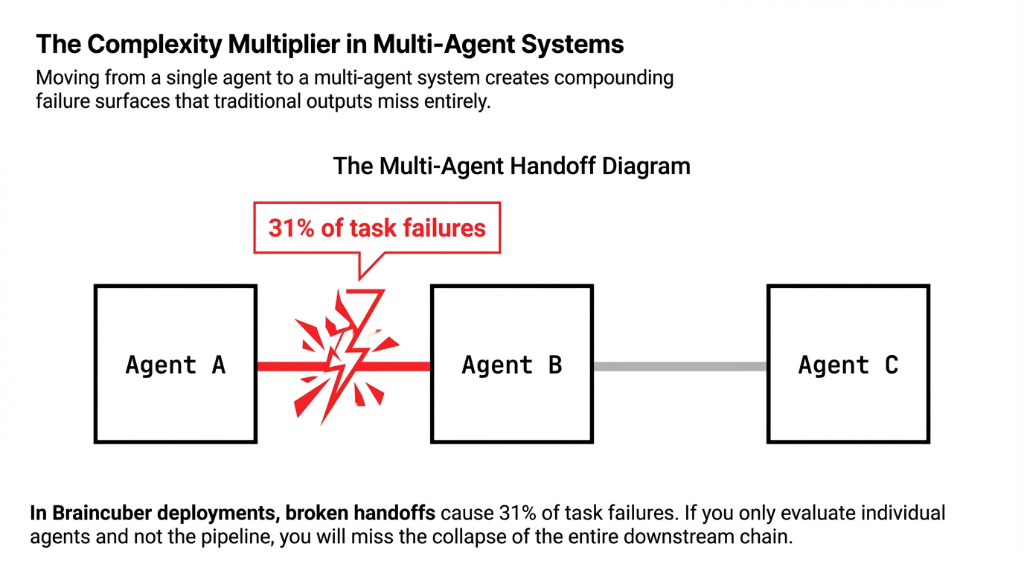
A single agent evaluation model is inadequate once you move to multi-agent systems. When you have multiple agents — one for data gathering, one for analysis, one for output generation — you now have three failure surfaces that interact with each other.
Multi-Agent Metrics That Change Everything
- •Inter-Agent Communication Efficiency: Above 22% re-query rate signals broken context management.
- •Workflow Handoff Success Rate: Production pipelines need above 91% handoff success.
- •Outcome Consistency Across Agents: Inconsistency above 11% is a governance risk, not just a UX problem.
How to Build Your AI Agent Evaluation Framework in 4 Weeks
Week 1 — Define Success Criteria
Before a single agent runs, define TSR targets, max LPT, CPCT ceiling, and acceptable HOR. Document these. Without written targets, evaluation is just an opinion.
Week 2 — Build Evaluation Dataset
Create 150–200 realistic task scenarios spanning edge cases, partial failures, and ambiguous inputs. Generic test sets produce optimistic scores that collapse in production.
Week 3 — Run Baseline Benchmarks
Test against AgentBench-style environments and your internal scenarios simultaneously. Log every step, every tool call, and every token cost. Not just the final output.
Week 4 — Stress Test & Iterate
Introduce adversarial inputs — contradictory instructions, missing context, rate-limited APIs. An agent at 89% TSR under ideal conditions but 41% under stress isn’t ready for deployment.
What Braincuber Does Differently
We do not deploy an agent and walk away. When we build agentic AI systems using LangChain, CrewAI, and cloud infrastructure on AWS and Azure, every agent ships with an embedded evaluation layer — real-time TSR tracking, LPT dashboards, HOR alerts, and weekly performance reports delivered to your team.
Real Deployment Result
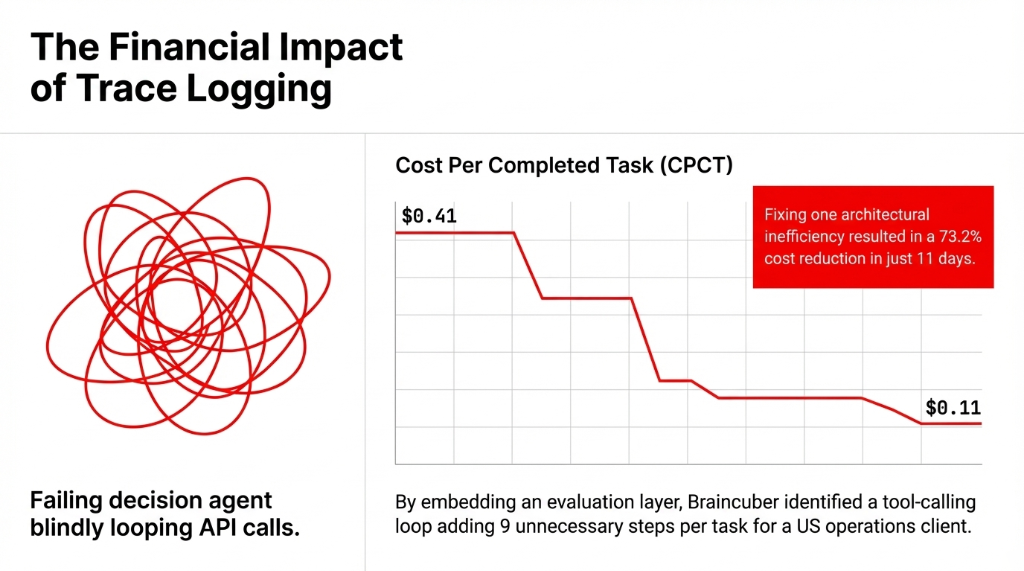
In one recent deployment for a US-based operations company, we identified a tool-calling loop adding 9 unnecessary steps per task. Fixing that single issue dropped CPCT from $0.41 to $0.11 per task — a 73.2% cost reduction that showed up on the bottom line within 11 days of go-live.
That’s what proper AI evaluation actually looks like. Not a benchmark score on a slide deck. A cost-per-task line that goes down.
Stop Deploying AI Agents You Can’t Measure
You wouldn’t run a $500,000 ad campaign without conversion tracking. Don’t deploy an AI agent — especially one touching customer data, financial workflows, or operations — without a measurement framework in place before launch.
Pull your current Human Override Rate. If it’s above 19%, your team is cleaning up after your AI — not being augmented by it.
Frequently Asked Questions
What is the most important metric for evaluating an AI agent?
Task Success Rate (TSR) is the single most critical metric. It measures what percentage of tasks your agent completes correctly without human intervention. A production-ready agent should maintain 87%+ TSR. Below 72% means the agent architecture needs a full re-evaluation.
How is evaluating a multi-agent system different from a single agent?
Multi-agent systems require measuring handoff success rates, inter-agent communication efficiency, and outcome consistency — not just individual accuracy. Each additional agent adds a failure surface. Most teams miss broken handoffs because they only check final outputs.
What benchmarks should US enterprises use to evaluate AI agents?
AgentBench is most relevant for general-purpose agentic tasks across 8 real-world environments. SWE-agent is ideal for software teams. CAMEL benchmarks multi-agent collaboration. Avoid relying solely on MMLU — it measures static knowledge, not real autonomous task performance.
How often should we re-evaluate an AI agent's performance?
Every time something changes: model updates, new tool integrations, workflow modifications, or significant shifts in input data. Build continuous evaluation pipelines from day one. One-time benchmarking at launch gives you a false sense of stability.
What hallucination rate is acceptable in a production AI agent?
For enterprise deployments handling financial data or regulated workflows, target below 3.2% per 100 tasks. Above 6% is a hard threshold for re-architecture. Hallucinations at that rate generate incorrect outputs at scale — wrong invoices, bad responses, and regulatory exposure.