
Your SaaS platform is live. Your customer base is growing. And somewhere between onboarding ticket #847 and a sales pipeline that your team reconciles manually in HubSpot every Monday morning, you are quietly hemorrhaging $19,300 a month in operational drag.
We see this exact scenario in nearly every mid-market SaaS company we work with — companies doing $2M to $15M ARR that are scaling their headcount to compensate for what an autonomous AI agent could handle in milliseconds.
This is not a post about what AI agents could do. This is the story of what happened when we actually deployed one.
The SaaS Company That Was Drowning in Its Own Growth
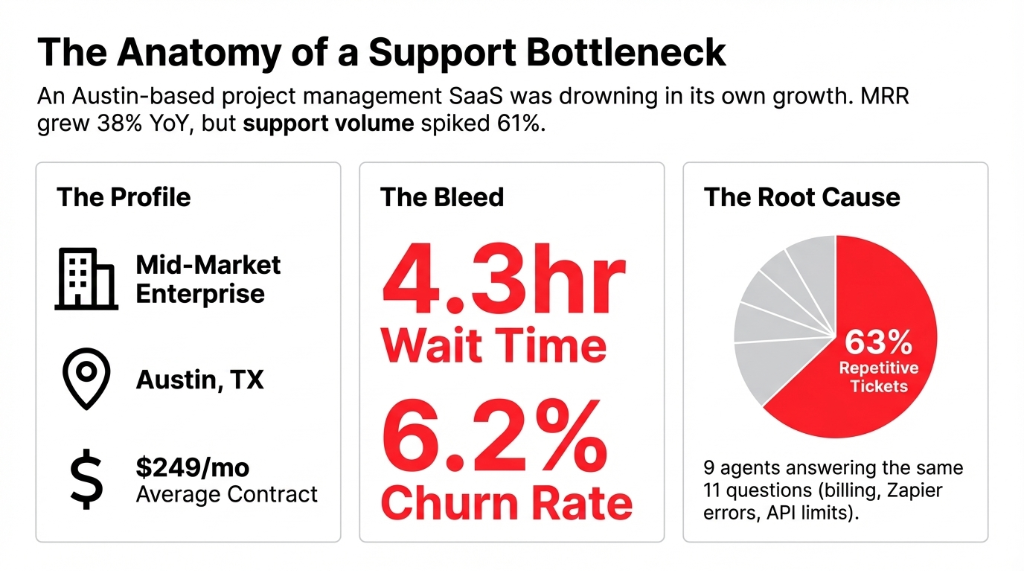
The company — a project management SaaS platform based in Austin, Texas, serving mid-market US enterprises — came to us with a classic "good problem, bad execution" situation.
MRR had grown 38% year-over-year. Support ticket volume had grown 61%. Their team of 9 human support agents was burning out. First-response time had ballooned to 4.3 hours average. Churn in the 90-day cohort was creeping up at 6.2%, and post-analysis showed 71% of those churned users had submitted at least one unanswered support ticket in their last 30 days.
Slow support was killing their retention.
And retention, at a $249/month average contract, was costing them roughly $22,600 in lost MRR per quarter.
Here is what made this painful to watch: 63% of those incoming support tickets were asking the same 11 questions. Billing resets. Seat upgrades. Integration errors with Slack and Zapier. API rate-limit explanations.
Nine people. Answering the same 11 questions. Every single day.
Why "Just Hire More Agents" Is the Wrong Answer
When your support queue is overloaded, the reflex is to hire. Two more agents, problem solved. Right?
Wrong. Frankly, that is the most expensive band-aid in SaaS history.
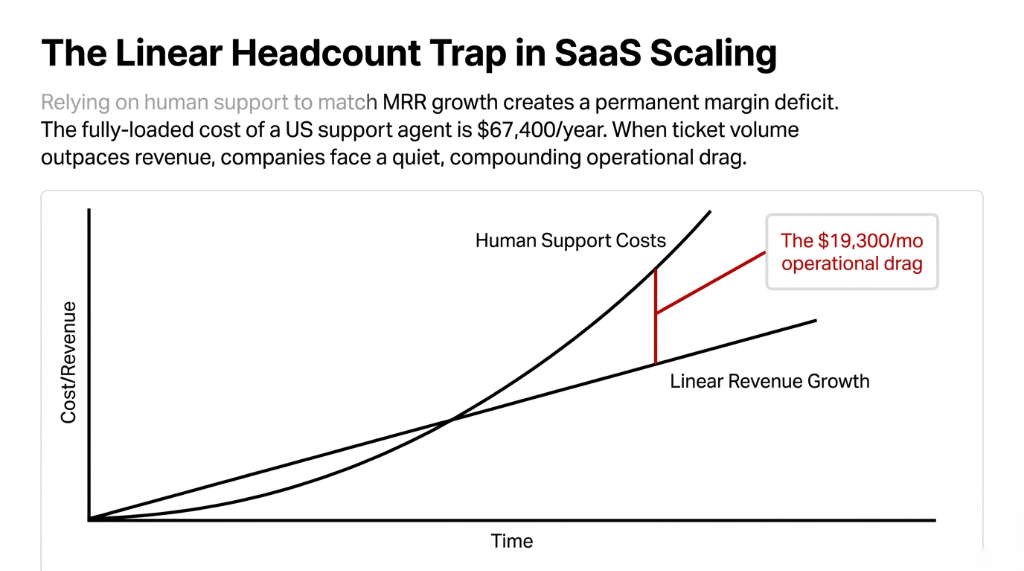
The average fully-loaded cost of a US-based SaaS support agent in 2025 is $67,400 per year including benefits and tools. Hiring two more? You just added $134,800/year to your burn rate — permanently. And in 18 months, when your MRR doubles again, you are hiring three more.
Headcount scales linearly. Revenue doesn’t.
That gap will kill your margins.
(Here is what your VC-backed competitors are doing instead: they are deploying agentic AI that scales infinitely at essentially zero marginal cost per resolved ticket.)
According to Google Cloud’s 2025 ROI of AI study, 52% of enterprises have already deployed AI agents, and early adopters report ROI on at least one use case 88% of the time.
What We Actually Built: The Agent Architecture
We deployed a three-layer agentic AI system using LangChain as the orchestration framework, integrated directly into their existing Zendesk ticketing environment, Stripe billing API, and their internal knowledge base.
The 3-Layer Agent Architecture
Layer 1 — The Intake & Triage Agent
Reads every incoming ticket, classifies by intent (billing, technical, onboarding, feature request), extracts entities (account ID, plan type, error code), and routes it. Classification accuracy after 3 weeks of fine-tuning: 94.7%.
Layer 2 — The Resolution Agent
For the 14 high-frequency issue categories, this agent pulls live data from Stripe and the internal user database, drafts a resolution, and sends it. No human touch. Average resolution time: 47 seconds. Previous: 4.3 hours.
Layer 3 — The Escalation & Handoff Agent
Anything outside confidence threshold — emotionally negative tickets, enterprise accounts over $1,500 MRR, legal complaints — gets flagged and handed to a human agent with a full context brief already written.
The best AI agent is one which knows exactly when to stop being an AI.
The human-agent handoff is not a failure state. It is a design feature.
The Results After 90 Days
| Metric | Before Deployment | After 90 Days |
|---|---|---|
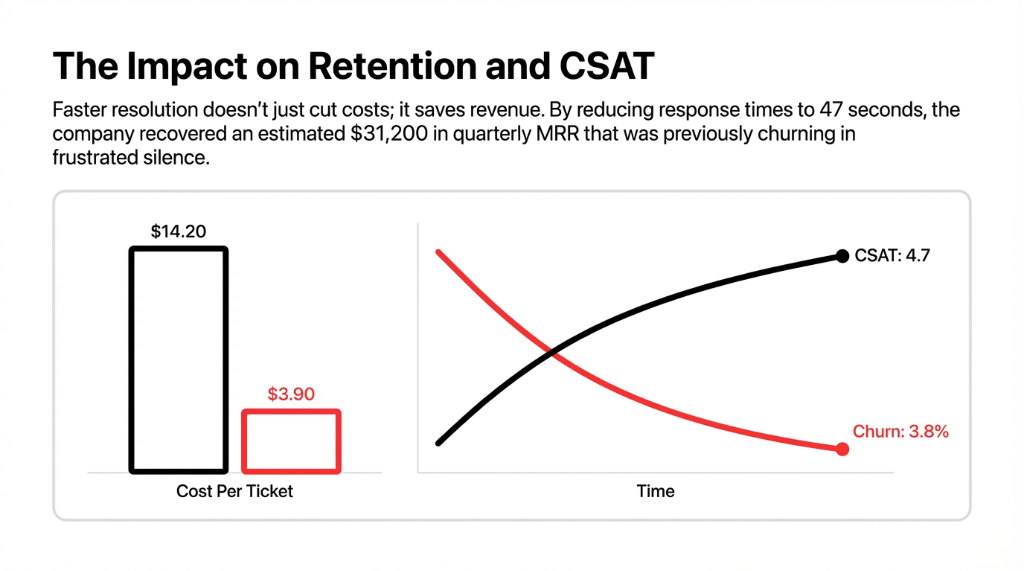
| First-response time | 4.3 hours | 47 seconds |
| Tickets resolved autonomously | 0% | 73.4% |
| Human agent workload | 9 agents, overwhelmed | 9 agents, focused on complex |
| CSAT score | 3.9 / 5 | 4.7 / 5 |
| Support cost per ticket | $14.20 | $3.90 |
| 90-day churn rate | 6.2% | 3.8% |
The Bottom Line
$188,400
Annual savings
$31,200
Quarterly MRR recovered
10.7 mo
Full ROI payback
What Nobody Tells You About AI Agent Deployment
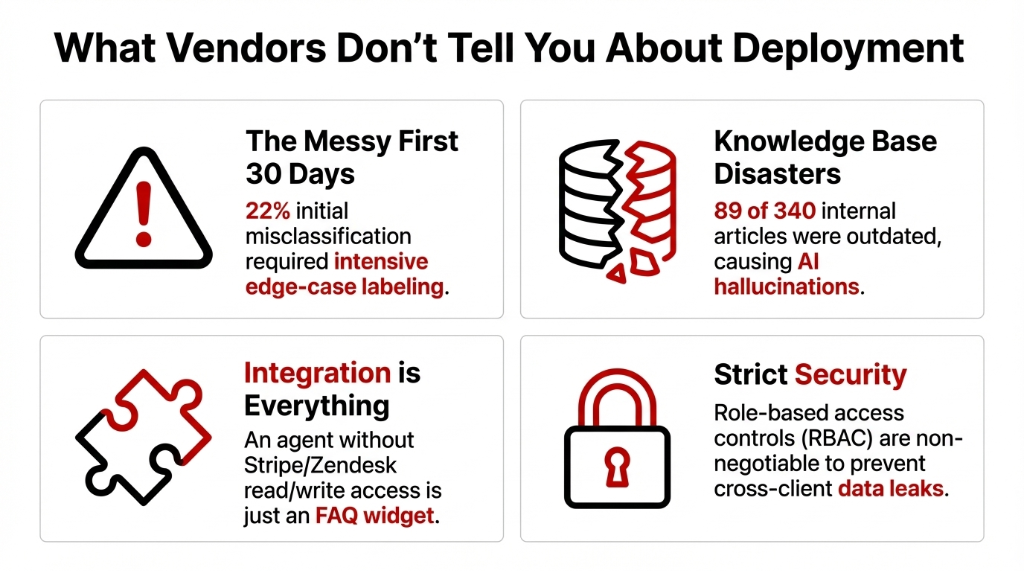
The first 30 days are messy. Every AI agent environment requires calibration. The intake agent initially misclassified 22% of tickets. We spent week two doing nothing but labeling edge cases and retraining intent classifiers. If a vendor tells you their AI agent is "plug-and-play," they are either lying or selling you something that cannot handle your actual data.
Your knowledge base is probably a disaster. This client’s internal documentation had 340 articles. 89 of them were outdated. 47 had conflicting information. The knowledge agent was confidently giving users wrong answers based on a help doc written in 2021. We spent 11 days auditing and rewriting before the system performed reliably.
Integration with your existing agent software stack is not optional — it is everything. An AI agent that cannot read your Stripe data, pull from your Intercom history, or write back to Zendesk is not an agent. It is a sophisticated FAQ widget.
Security and governance cannot be an afterthought. We built role-based access controls into the agent’s data queries from day one, so the agent could never surface one client’s data in another client’s resolution thread. Non-negotiable.
The Agent Platform Stack We Used
Full Tech Stack
LangChain
Agent orchestration & chaining
OpenAI GPT-4o
Primary LLM for resolution drafting
Pinecone
Vector DB for knowledge retrieval
AWS Lambda + API Gateway
Serverless infra at $1,847/mo
Zendesk + Stripe APIs
Live data integration
LangSmith
Agent observability & trace logging
The entire system runs on AWS infrastructure, auto-scales during peak hours, and costs a fraction of what a horizontal AI platform license would charge for the same throughput.
What a SaaS Company Should Do This Week
Your Immediate Action Plan
Audit your last 500 tickets
Categorize by resolution type. If more than 40% fall into fewer than 15 categories, you have a clear autonomous agent opportunity.
Map your data sources
List every system an agent would need: CRM, billing, product database, knowledge base. Gaps = gaps in your agent’s usefulness.
Define your escalation threshold
Know in advance which ticket types must reach a human agent. Build that boundary into your agent’s design, not as an afterthought.
Start narrow, not broad
Deploy one specialized agent for your highest-volume, lowest-complexity category first. Prove the model. Then expand.
The companies hitting 171% average ROI on agentic AI — yes, that is the actual average projected ROI in the 2025 data — are not the ones who built a 20-agent system on day one. They started with one use case, measured everything, and scaled with evidence.
Frequently Asked Questions
How long does AI agent deployment take for a SaaS company?
A single-use-case deployment like support ticket automation takes 6 to 10 weeks from audit to live. That includes knowledge base cleanup, API integrations, agent training, and calibration. Enterprise-wide multi-agent systems take 4 to 6 months.
What does it cost to deploy an AI agent for a SaaS platform?
A production-grade deployment for mid-market SaaS typically costs $28,000 to $85,000 initial build. Monthly infra and maintenance averages $1,500 to $4,200. Compare that to $67,400 per year per human agent it replaces or augments.
Will AI agents replace our human support agents?
No. The correct design is human-agent collaboration: AI handles 60–80% of ticket volume autonomously while human agents focus on enterprise accounts, complex escalations, and emotionally sensitive interactions. CSAT scores improve when both work together.
Which AI agent platform is best for SaaS companies?
LangChain gives maximum flexibility for custom builds. Azure AI Studio is best for Microsoft-stack SaaS. Relevance AI is fastest for low-code deployments. The platform that fits your existing stack and gives full observability wins — not the one with the best demo.
How do we measure ROI from an AI agent deployment?
Track four numbers from week one: cost per resolved ticket, first-response time, autonomous resolution rate, and 90-day churn rate. If those four aren’t improving within 60 days of go-live, your agent needs retraining. Expect full ROI payback within 10 to 14 months.