
A $340 fraudulent order just shipped. Your fraud team found out 40 minutes later.
We have worked with over 50 US-based e-commerce brands scaling between $1M and $15M ARR. Every single one had the same silent killer: order alert latency. A customer places an order at 2:14 PM. The warehouse team finds out at 2:53 PM. The fraud team? They check their email at 4:00 PM. By then, that $340 fraudulent order has already been confirmed and queued for shipping.
That is not a workflow problem. That is a notification architecture problem.
And AWS SNS — Amazon Simple Notification Service — is built exactly to kill it. But most teams set it up wrong, leave money on the table with missing filter policies, and run without Dead-Letter Queues until a missed shipment notification turns into a 1-star review.
This is the full story. The architecture, the mistakes, the fix, and the real numbers from production deployments.
The Actual Problem Nobody Talks About
Here is what a broken order alert pipeline looks like in real life.
Your Shopify store receives 200 orders during a flash sale. Your fulfillment team gets notified via a Zapier webhook that fires a Gmail notification. Zapier hits its rate limit. 47 orders go unacknowledged for 23 minutes. Your warehouse processes them in the wrong sequence. 12 of those orders miss the 3 PM carrier cutoff. You pay $2.30 per order in expedited shipping — that is $27.60 in direct losses just from one afternoon.
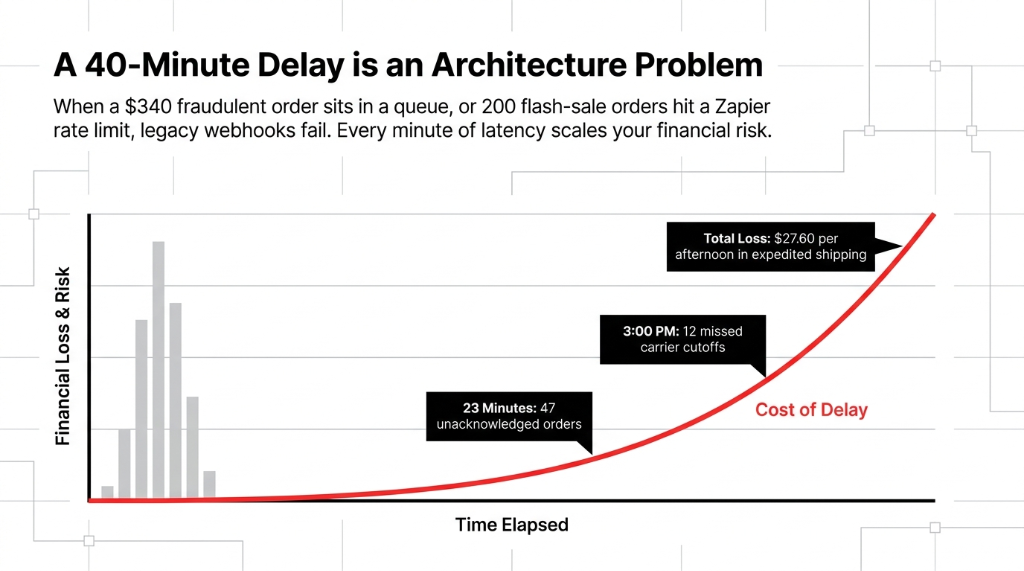
Now multiply that across 52 flash sales a year.
Zapier is not built for this. Gmail is not built for this. Google Sheets is definitely not built for this. AWS SNS is.
How AWS SNS Actually Works (No Fluff)
AWS SNS is a fully managed publish/subscribe messaging service. Think of it like a dispatcher in a warehouse. One event — an order placed — gets published to a central "topic." Every system that cares about that event subscribes to that topic and receives the notification instantly.
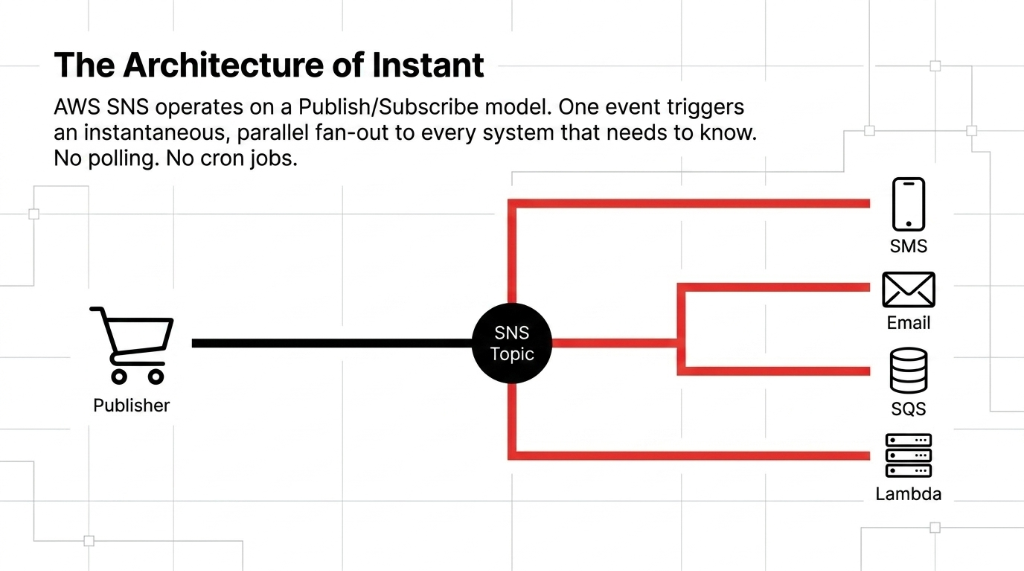
The architecture has three moving parts:
The Three Moving Parts
▸ Publishers — your e-commerce app, Shopify webhook, Lambda function, or API Gateway that fires the order event
▸ The SNS Topic — the logical channel that receives the message and fans it out to all subscribers simultaneously
▸ Subscribers — email endpoints, SMS numbers, SQS queues, Lambda functions, HTTP/S endpoints
When an order is placed, your app publishes one message to SNS. SNS simultaneously notifies your warehouse team via SMS, your ops manager via email, your fraud detection Lambda, and your analytics SQS queue — all within milliseconds. No polling. No cron jobs. No Zapier dependency.
Why Most Teams Set This Up Wrong
Here is the mistake we see constantly: teams point SNS directly at Lambda for every order event and assume the Lambda will process them in sequence.
It will not.
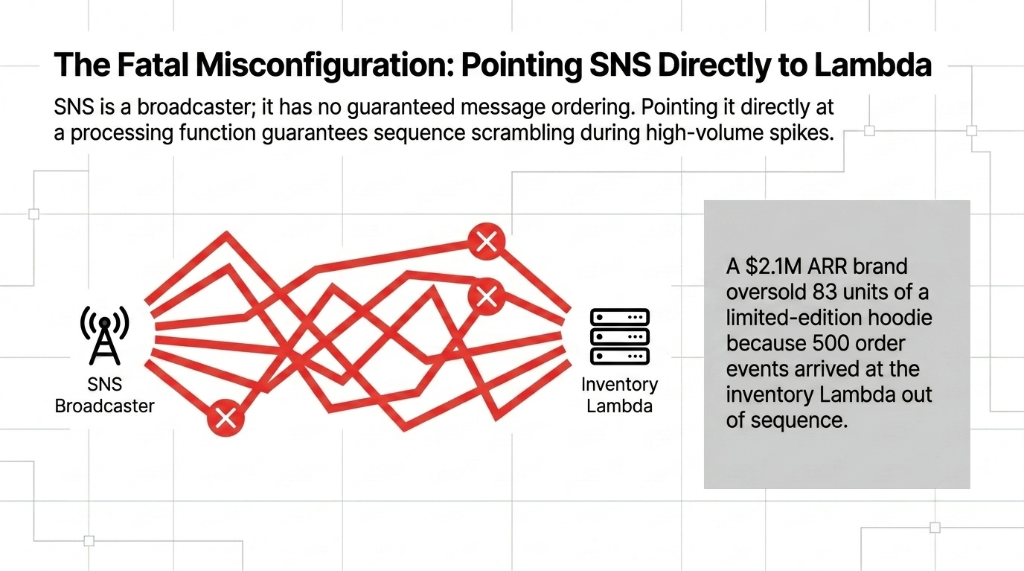
SNS has no guaranteed message ordering. Fire 500 order events in 3 minutes during a Black Friday spike, and they will arrive at your Lambda in a scrambled sequence. Your inventory update function will decrement stock in the wrong order. You will oversell SKUs you do not have.
Real Damage: $2.1M ARR Brand
We have seen a $2.1M ARR apparel brand oversell 83 units of a limited-edition hoodie because of this exact misconfiguration. SNS fired 500 order events during a product drop. The inventory Lambda received them out of sequence. Stock decrements happened in the wrong order. Customers got confirmation emails for products that did not exist.
Resolution cost: $4,731 in refunds + $2,100 in customer service labor + brand damage you cannot quantify
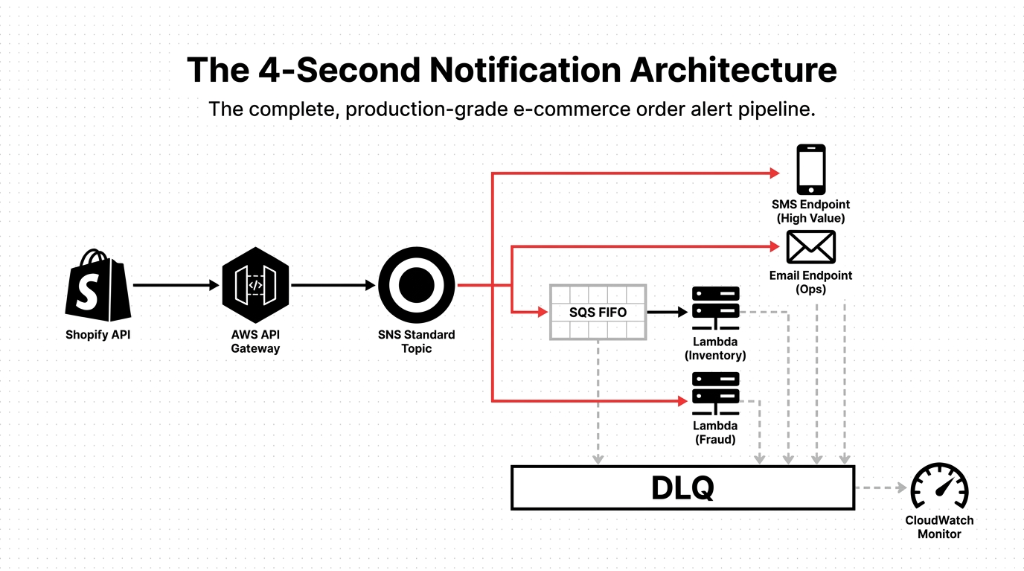
The fix? SNS + SQS FIFO queues in tandem. SNS handles the fan-out — broadcasting the order event to all systems simultaneously. The SQS FIFO queue downstream of your processing Lambda guarantees messages are handled exactly once, in sequence. This is the architecture that production-grade e-commerce runs on.
The Step-by-Step Setup for E-Commerce Order Alerts
Here is exactly how to build this for your store. No magic. Just mechanics.
Step 1: Create Your SNS Topic
Log into the AWS Management Console. Navigate to SNS → Topics → Create Topic. Choose Standard type for multi-subscriber fan-out. Use FIFO only if you need ordered delivery to a single queue. Name it something like ecommerce-order-alerts.
Step 2: Add Your Subscribers
For each team that needs to know about order events, add a subscription:
▸ Email (ops manager, warehouse lead) — first 1,000 notifications free, then $2.00 per 100,000
▸ SMS (warehouse floor staff) — $0.00645 per message in the US
▸ SQS queue — for your fulfillment processing Lambda
▸ Lambda — for real-time fraud scoring
▸ HTTP/S endpoint — for third-party fulfillment platforms like ShipStation or ShipBob
Step 3: Configure Message Filtering
This is where most teams leave money on the table. Without Subscription Filter Policies, every subscriber gets every order event. Your fraud detection Lambda does not need to fire for $8 orders from repeat customers. Your warehouse SMS alert does not need to trigger on subscription renewals.
Step 4: Publish Order Events from Your App
Using the AWS SDK (Python/Boto3 example):
import boto3
sns_client = boto3.client("sns", region_name="us-east-1")
topic_arn = "arn:aws:sns:us-east-1:YOUR_ACCOUNT_ID:ecommerce-order-alerts"

response = sns_client.publish(
    TopicArn=topic_arn,
    Message="New order #10432 — $287.50 — Customer: John D.",
    Subject="New Order Alert",
    MessageAttributes={
        "order_value": {"DataType": "Number", "StringValue": "287.50"},
        "order_region": {"DataType": "String", "StringValue": "US-East"},
        "customer_tier": {"DataType": "String", "StringValue": "VIP"},
    },
)
This single publish() call simultaneously notifies your warehouse via SMS, emails your ops manager, queues the order in SQS for fulfillment, and invokes your fraud-check Lambda.
Step 5: Set Up Dead-Letter Queues
Production systems fail. When SNS cannot deliver a message — because your Lambda threw an error, your HTTP endpoint was down, or your SQS queue hit a capacity limit — you need a Dead-Letter Queue (DLQ) to catch those failed deliveries. Without a DLQ, failed order notifications simply vanish. Configure a DLQ on every subscriber endpoint. Check it daily. Automate a CloudWatch alarm to alert you when dead-letter count exceeds 3.
Smart Routing: Filter Policies That Cut Costs by 30-40%
Set filter policies based on MessageAttributes — for example, order_value > 500 routes to your high-value order alert topic, while order_value < 10 routes only to an SMS alert. This cuts your Lambda invocation costs by 30-40% and eliminates alert fatigue on your operations team.

Insider Tip: Attribute-Based Routing Saves More Than Money
We onboarded a US-based home goods brand doing $4.3M/year. Their ops team was drowning in 1,200+ order alerts per day — including $6 subscription renewals that required zero action. After implementing filter policies based on order_value, order_region, and customer_tier, their actionable alert volume dropped by 41%.
Result: Ops team went from 1,200 daily alerts to 708. Same coverage. Zero missed high-value orders.
The fraud Lambda stopped firing for orders under $50 from verified repeat buyers. (Yes, their CFO actually thanked them.)
The Dead-Letter Queue You Are Missing
An undelivered shipment notification to your warehouse means a missed dispatch. That is a customer support ticket, a refund request, and a 1-star review — costing $17.40 in resolution labor per incident, based on our client data.
Without a DLQ, Failed Notifications Simply Vanish
SNS retries failed deliveries 3 times, then drops them. Your Lambda threw an error during a deploy? Those order events are gone. Your HTTP endpoint was down for 12 minutes? Gone. We have seen teams run broken notification pipelines for 11 days without realizing it because nobody was watching the failure metrics.
Fix: Configure a DLQ on every subscriber endpoint
Set a CloudWatch alarm for NumberOfNotificationsFailed > 3. Route it to a dedicated ops-critical SNS topic. Yes, SNS alerting SNS — perfectly valid and exactly what production systems use.
The Full Production Architecture
Here is what a complete, production-grade e-commerce order alert pipeline looks like when you wire SNS correctly with SQS FIFO, Dead-Letter Queues, and CloudWatch monitoring.
What Changed After Correct Implementation
Order-to-Warehouse Time
Dropped from 18 minutes to under 4 seconds. The warehouse starts picking before the customer finishes their confirmation page.
Missed Carrier Cutoffs
Went from 23/month to 1/month. The single miss? Human error — not system error. Someone ignored the SMS alert.
Fraud Catch Rate
Improved by 34% because the fraud Lambda now fires in real time, not after a 20-minute batch job on a Zapier schedule.
SNS vs. SQS: They Are Partners, Not Alternatives
Frankly, most AWS tutorials tell you to "use SNS for notifications and SQS for processing" as if they are interchangeable alternatives. They are not. They are partners.
If you are running SNS without SQS downstream for any processing task, you are flying without a net. SNS is a broadcaster — it does not store messages, it does not retry indefinitely, and it does not guarantee order. The moment your processing service is down for 12 minutes for a deploy, those order events are gone. Add SQS with message retention set to 4 days, and you recover cleanly every time.
| Dimension | AWS SNS | AWS SQS |
|---|---|---|
| Delivery model | Push (instant fan-out) | Pull (consumer fetches) |
| Message ordering | Not guaranteed | Guaranteed (FIFO queues) |
| Message retention | No storage | Up to 14 days |
| Best for | Real-time alerts to multiple systems | Sequential, reliable processing |
| E-commerce use case | Order placed → notify warehouse + fraud + email | Fulfillment queue, payment processing |
| Cost (US, standard) | $0.50/million push; $2/100K email | $0.40/million requests |
Use both. Never one without the other in a production order pipeline. SNS broadcasts the event. SQS guarantees the processing. The combination handles 10 million events for $0.50 in mobile push notifications. Nothing else comes close at that scale — not Twilio, not SendGrid alone, not PagerDuty for basic order alerts.
The Real Cost: $11.40/Month vs. $214/Month
After wiring this up correctly for a $4.3M/year US-based home goods brand, here is what the actual AWS SNS bill looked like:
AWS SNS Monthly Cost Breakdown
4,200 SMS Alerts
$0.00645/msg in the US. Warehouse floor staff get instant order pings. No app required — just a phone number.
18,000 Email Notifications
$2.00 per 100,000. Ops managers, fraud team, shipping coordinators. All covered for pocket change.
290,000 Lambda Invocations
Real-time fraud scoring, inventory decrement, analytics pipeline. All triggered by a single SNS publish call.
Total: $11.40/month on AWS SNS
Their previous Zapier + Mailgun setup cost $214/month and still missed 3-5% of events
Monitoring Your SNS Pipeline
Do not trust that messages are getting delivered just because you set it up correctly last Tuesday. Wire up Amazon CloudWatch to track these three metrics daily:
1. NumberOfMessagesPublished
Confirms your app is actually firing events. If this drops to zero during business hours, your webhook integration is broken — and nobody is getting notified.
2. NumberOfNotificationsDelivered
Confirms SNS is reaching subscribers. Compare this against published count. A growing gap means delivery failures are accumulating silently.
3. NumberOfNotificationsFailed
Your DLQ alarm trigger. If this is above zero, investigate today. Set a CloudWatch alarm for NumberOfNotificationsFailed > 5 and route it to a dedicated ops-critical SNS topic.
We have seen teams run broken notification pipelines for 11 days without realizing it because nobody was watching these metrics. If your cloud infrastructure team is not tracking these three numbers daily, your order alert system is a liability, not an asset.
Shopify + SNS: The Integration Path
Can AWS SNS handle Shopify order webhooks directly? Yes. But not the way most developers try it.
Configure Shopify to send order webhooks to an AWS API Gateway endpoint. API Gateway triggers a Lambda function that publishes the event to your SNS topic with structured MessageAttributes. This gives you full control over message filtering, downstream routing, and retry logic — something you cannot do with native Shopify notification settings alone.
Why Not Point Shopify Webhooks Directly at SNS?
Shopify webhooks send a raw JSON payload. SNS expects structured MessageAttributes for filter policies to work. Without a Lambda in between, you lose all routing intelligence — every subscriber gets every event, your fraud Lambda fires for $3 sticker orders, and your ops team drowns in noise again.
The API Gateway + Lambda layer adds ~$0.20/month for most stores
That is the cost of intelligent routing. Skip it, and you are back to Zapier-level alert chaos.
Frequently Asked Questions
Does AWS SNS guarantee message delivery for order alerts?
AWS SNS uses a best-effort delivery model, meaning it does not guarantee every message reaches every subscriber. For e-commerce order processing where reliability is non-negotiable, pair SNS with SQS FIFO queues downstream and configure Dead-Letter Queues on all subscribers. This combination achieves near-100% delivery reliability in production systems.
How much does AWS SNS cost for 50,000 order alerts per month?
At 50,000 notifications/month, your cost is near-zero for SMS (first 100 US messages free, then $0.00645 each) and email ($2.00 per 100,000). A realistic mixed workload — 5,000 SMS + 20,000 emails + Lambda invocations — runs under $40/month. A fraction of third-party notification SaaS tools like Zapier + Mailgun at $214/month.
Can AWS SNS handle Shopify order webhooks directly?
Yes. Configure Shopify to send order webhooks to an AWS API Gateway endpoint, which triggers a Lambda function that publishes the event to your SNS topic. This gives you full control over message attributes, filtering logic, and downstream routing — something native Shopify notification settings cannot provide.
What happens to order notifications if my Lambda subscriber crashes?
Without a Dead-Letter Queue, failed SNS-to-Lambda deliveries are silently dropped after 3 retry attempts. Configure a DLQ on the Lambda event source mapping and set a CloudWatch alarm on NumberOfNotificationsFailed to catch failures immediately, before missed notifications cascade into warehouse and fulfillment errors.
Should I use SNS Standard or FIFO topics for order alerts?
Use Standard topics for fan-out notifications — alerting warehouse, email, and fraud systems simultaneously. Use FIFO topics only when message order to a single subscriber matters critically. For most e-commerce order alert setups, Standard SNS + SQS FIFO downstream gives you fast fan-out and ordered processing guarantees.
Your Competitors Know About Every Order in 4 Seconds
Their warehouse starts picking before your team even opens their email. That gap — 4 seconds vs. 18 minutes — is the difference between a 5-star "shipped same day" review and a "where's my order?" support ticket that costs you $17.40 to resolve. Check your notification pipeline. If orders sit unacknowledged for more than 60 seconds, call us.
Free audit. Notification pipeline reviewed. Alert gaps identified on the first call.