
Your e-commerce store just went down on Black Friday at 9:14 AM EST. Every minute offline costs you $3,000 in lost revenue.
And the reason? Your DNS had no failover. Just a single A record pointing to one overloaded EC2 instance sitting in us-east-1, with no health check, no backup, and a TTL of 86,400 seconds — meaning even after you fix the server, the world will not know for another 24 hours.
We see this exact setup at least 3 times a month from US-based e-commerce brands doing $500K to $5M ARR.
They built the store on Shopify or WooCommerce, migrated to AWS to "scale," and then handed DNS to the developer who set it up in 20 minutes and never touched it again. That is not infrastructure. That is a time bomb.
The $18,000/Hour Problem Nobody Talks About
Most brands treat DNS as a set-it-and-forget-it utility, not a mission-critical system. That is wrong.
Route 53 failover routing lets you point traffic at a healthy resource the moment your primary resource fails — but only if you have configured it properly before the outage happens. Without failover records and health checks in place, Route 53 just keeps serving the dead IP address until your TTL expires.
What a 6-Hour Unrecovered Outage Actually Costs
$18,000 Direct Revenue
For a brand doing $180K/month in sales, 6 hours during a flash sale. Gone. No recovery.
Burned AdWords Budget
Google Ads kept sending paid traffic to a dead page. Every click charged, zero conversions. That PPC budget is not coming back.
3 Months of Trust Repair
Customer service emails piling up. Repeat buyers questioning reliability. Trust you will spend 3 months trying to rebuild.
Why Your Current DNS Setup Is Already Broken
Look at your Route 53 hosted zone right now. Open the AWS console. Find your primary A record or CNAME for your store domain. What is the TTL set to?
If it is anywhere above 300 seconds, you have a problem.
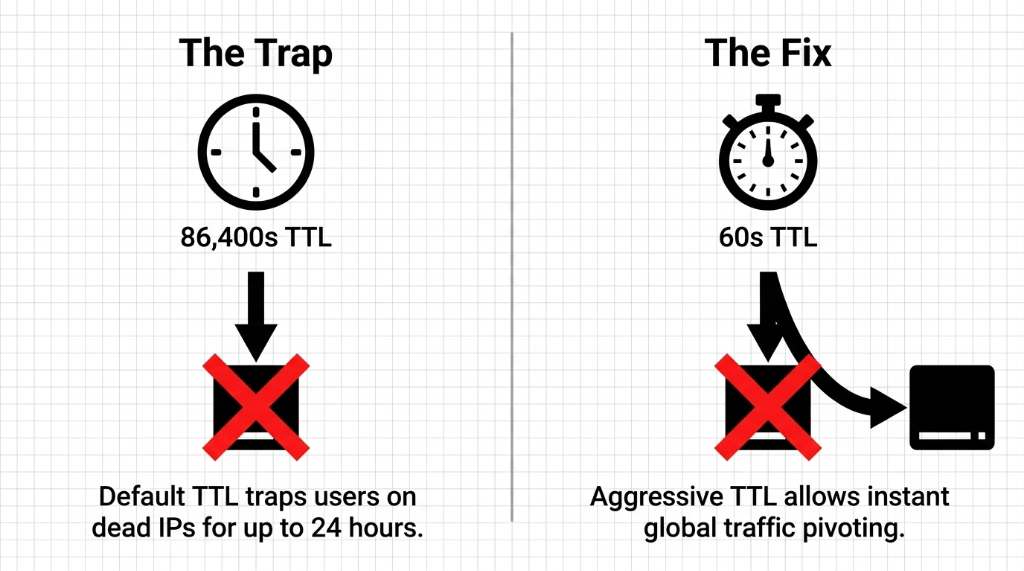
High TTL = slow failover. If your A record TTL is set to 3,600 seconds and your server dies at 11:00 PM, your customers will still be hitting the dead endpoint until midnight. That is 60 minutes of downtime that Route 53 could have fixed in under 30 seconds — if your TTL was set to 60 seconds and health checks were active.
The #1 Mistake We Find on Every Audit
We have implemented AWS Route 53 DNS for 40+ e-commerce brands across the US, and the number one mistake is always the same: no health check on the primary record. Without a health check, Route 53 does not know your server is down. It just keeps answering DNS queries with a dead IP.
The standard advice is "set high TTL for stability." Fine for a static marketing page. For a checkout flow processing $14,000/day in Stripe transactions, it is a disaster waiting to happen.
The Actual Route 53 Architecture That Holds Under Load
Here is the setup we build for every e-commerce client that takes uptime seriously. Not theory — the exact architecture.
Step 1: Create Your Hosted Zone and Domain Records
Your domain (yourstore.com) needs a Route 53 Hosted Zone. If you migrated from GoDaddy or Namecheap, update your domain registrar nameservers to the four Route 53 NS records AWS assigns. This takes up to 48 hours to propagate globally — do it during a low-traffic window, not 3 days before a sale.
Set your primary A record TTL to 60 seconds. Not 300. Not 3,600. Sixty. The increased query cost on Route 53 for a 60-second TTL versus 3,600-second TTL on a mid-size store is roughly $0.40/month. That is not a real trade-off. Pay the $0.40.
Step 2: Build the Health Check — The Right Way
In Route 53, navigate to Health Checks and create one with these settings:
▸ Protocol: HTTPS
▸ Path: /health — not /, not the homepage. Create a dedicated endpoint that returns HTTP 200 only when your database, payment gateway connection, and cart service are all alive
▸ Request interval: 10 seconds (fast health check — $1/month extra, worth every cent)
▸ Failure threshold: 3 consecutive failures before triggering failover
Step 3: Configure Active-Passive Failover Records
Primary Record: Record name www, type A alias to ALB, routing policy Failover (Primary), associate the health check, evaluate target health Yes
Secondary Record: Record name www, type A alias to backup ALB in different region — or S3 static maintenance page if full multi-region is not in your budget. No health check required on secondary.
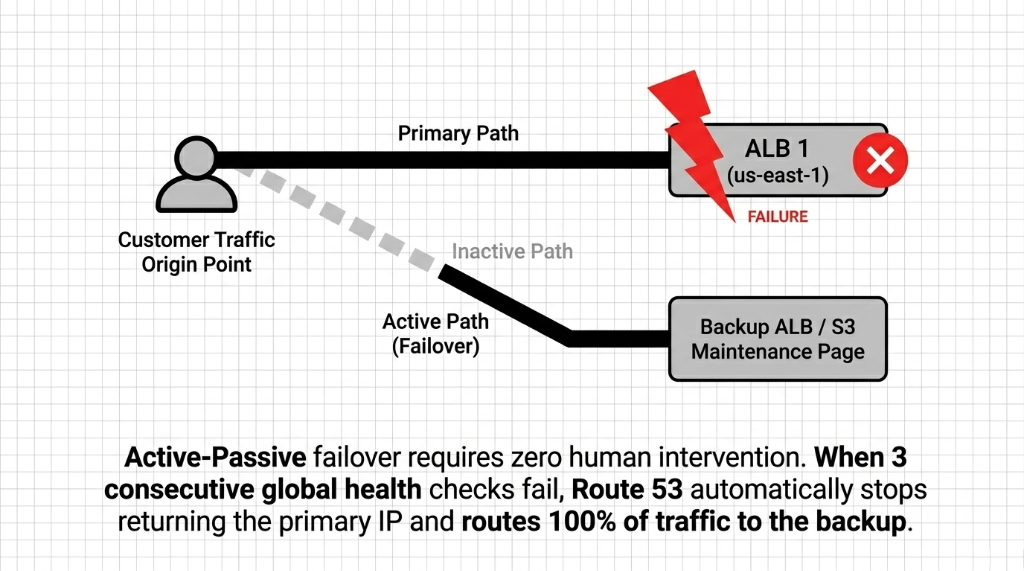
The failover math: 30 seconds for Route 53 to confirm the failure (3 checks at 10 seconds) + up to 60 seconds for TTL expiry = under 90 seconds total failover time. Compare that to the average "we didn't have failover" brand: 23 minutes from the time the server dies to the time someone wakes up, opens Slack, and starts fixing it.
Multi-Region Active-Active: For Brands Doing $500K+/Month
Active-passive protects you from outages. Active-active routing actually makes your store faster by cutting latency for customers in different US regions.
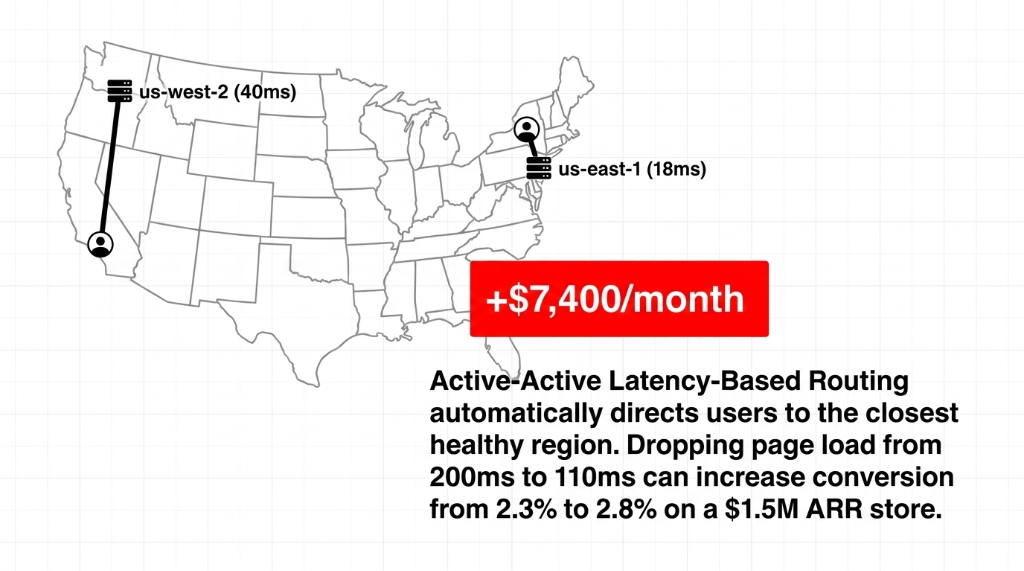
The setup uses Latency-Based Routing instead of Failover routing policy. Deploy your app stack in us-east-1 (Virginia) and us-west-2 (Oregon). Create two A records with Latency routing policy, each pointing to the ALB in the respective region. Attach a health check to each record.
The Conversion Math Is Real
A customer browsing from California hits the Oregon endpoint — 40ms average latency. A customer in New York hits Virginia — 18ms. For a store converting at 2.3% on a 200ms page load, dropping to 110ms through latency routing can push conversion to 2.8%.
+$7,400/month on a $1.5M ARR store
When one region's health check fails, Route 53 automatically stops serving it and routes all traffic to the surviving region. You get both performance and redundancy from the same DNS configuration.
Weighted Routing: Your Secret Weapon for Zero-Downtime Deployments
Here is something your AWS account rep will not tell you to set up: weighted routing for deployments.
Instead of pushing code directly to production and hoping it works, use two records with weights: production environment at weight 90, new version (canary) at weight 10.
10% of your shoppers hit the new code. You monitor error rates in CloudWatch for 30 minutes. If Stripe webhooks are failing or checkout 500s appear, you flip the canary weight to 0 with a single API call — and the entire internet is back on stable code within 60 seconds, because your TTL is 60 seconds.
Without Weighted Routing vs. With It
Without: Every deployment is a prayer. A bad deploy costs you 100% of your traffic for 2 hours while your dev team figures out how to roll back.
With: A bad deploy costs you at most 10% of your traffic for 30 minutes. That is the difference between a $14,000 mistake and a $700 mistake.
The Private Hosted Zone: Stop Leaking Internal Traffic to the Public Internet
One more thing we fix on nearly every AWS e-commerce cloud audit: internal services resolving over the public internet.
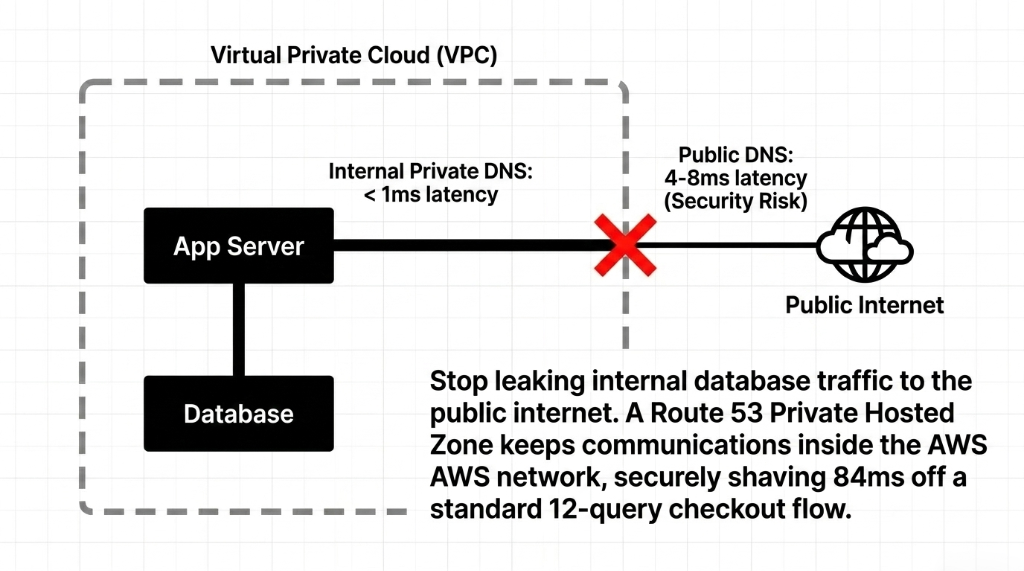
Your application servers, Redis cache, and RDS instance should communicate using private DNS records in a Route 53 Private Hosted Zone, not public IPs. If your app server is calling db.yourstore.com and that resolves to a public IP address, your database traffic is traversing the public internet. That is a security problem and a latency problem.
84ms Free Performance on Every Checkout
Create a private hosted zone for internal.yourstore.com, associate it with your VPC, and create A records pointing to private IPs. Your EC2 instances inside the VPC resolve those names internally. Traffic never leaves AWS's network.
Database query latency drops from 4-8ms (public) to under 1ms (VPC-local)
On a checkout flow that runs 12 database queries, that is shaving 84ms off your response time. Free. Zero cost beyond the $0.50/month for the hosted zone.
What This Setup Actually Costs
| Component | Cost/Month (USD) |
|---|---|
| Hosted Zone (1 domain) | $0.50 |
| DNS Queries (5M queries) | ~$2.00 |
| Health Check (standard) | $0.50 |
| Health Check (fast, 10s interval) | $1.00 |
| Multi-region latency routing | No extra DNS cost |
| Total for full failover setup | ~$4.00/month |
This is not a typo. The entire DNS failover architecture that keeps your store alive during regional outages costs less than a Starbucks coffee per month. The brands that skip this are not saving money. They are gambling $18,000/hour downtime risk against a $4 monthly bill.
Frequently Asked Questions
How fast does Route 53 failover actually trigger?
With a 10-second health check interval and a failure threshold of 3, Route 53 detects failure in 30 seconds. Add your DNS TTL (60 seconds recommended) and the full failover window is under 90 seconds. Without fast health checks and low TTL, that window can stretch to 60+ minutes.
Does Route 53 work with Shopify or WooCommerce hosted stores?
Yes. Even if your storefront is on Shopify, Route 53 can manage your domain DNS — pointing your apex domain and www subdomain to Shopify IPs via CNAME or ALIAS records. Failover in this case would route to a static maintenance page hosted on S3 when Shopify itself reports downtime.
What is the difference between active-active and active-passive failover?
Active-passive keeps a hot standby that only receives traffic when the primary fails. Active-active runs both regions simultaneously using latency or weighted routing, splitting live traffic between them. For most e-commerce brands under $500K/month, active-passive is sufficient. Above that, active-active pays for itself in conversion rate improvement.
How much does a full Route 53 failover setup cost per month?
A complete setup including one hosted zone, fast health checks, and failover routing runs approximately $4.00/month in Route 53 fees. Multi-region active-active setups add ALB and EC2 costs in the second region, but the Route 53 DNS layer itself remains under $5/month regardless of traffic volume.
Can Route 53 health checks monitor third-party services like Stripe?
Route 53 health checks can monitor any publicly accessible HTTPS endpoint. However, the best practice is to build your own /health endpoint that internally checks your Stripe connection, database availability, and critical third-party APIs — then returns a single pass/fail to Route 53. This gives you one health signal that reflects your full stack, not just whether your server is responding.
Do Not Let a $4/Month DNS Oversight Cost You $18,000
Open your Route 53 console. Check your TTL — if it says 3,600 or 86,400, you are exposed. Check your health checks — if there are none, your failover does not exist. We have helped brands go from "we panic every deployment" to "we didn't even know there was an outage until CloudWatch told us it self-healed." That is what proper Route 53 architecture looks like.
Free audit. Route 53 setup reviewed. Health checks and failover policy checked on the first call.