
If your e-commerce team is still running on long-lived AWS access keys stored in .env files — you are one compromised developer laptop away from a $150M disaster.
That is not a scare tactic. That is exactly what happened to Capital One when a misconfigured IAM role with wildcard S3 access exposed 106 million customer records in 2019.
We work with D2C brands processing $500K to $20M in annual GMV on AWS. The number of teams running their entire production environment under a single IAM user with AdministratorAccess is embarrassing.
Your Root User Is a Loaded Gun
The root user has unrestricted access to every resource, every service, every configuration. It bypasses SCPs (Service Control Policies). It can close your account. It can delete every S3 bucket your Shopify orders, customer data, and product images live in — permanently — in under 3 minutes.
▸ Delete the root user access keys immediately. There is no legitimate reason your CI/CD pipeline or any developer should be using root credentials
▸ Enable MFA on the root user using a hardware security key (YubiKey), not SMS. SMS-based MFA was broken years ago
▸ Lock root credentials in a physical safe or a dedicated password manager only the CTO and one other executive can access
Real Exposure: $4.2M Apparel Brand
One of our clients — a $4.2M/year apparel brand running on AWS and Shopify — had root credentials stored in a shared LastPass account accessible to 11 people, including two former contractors.
That is not an access policy. That is a liability waiting to happen.
The "One User, All Permissions" Mistake Is Killing Your Security Posture
Walk through this scenario: Your backend developer needs to push a Lambda function update. Your warehouse manager needs to read from an S3 bucket with order exports. Your marketing automation tool needs to write to DynamoDB.
If all three of these are using the same IAM user with FullAccess — you have already failed.
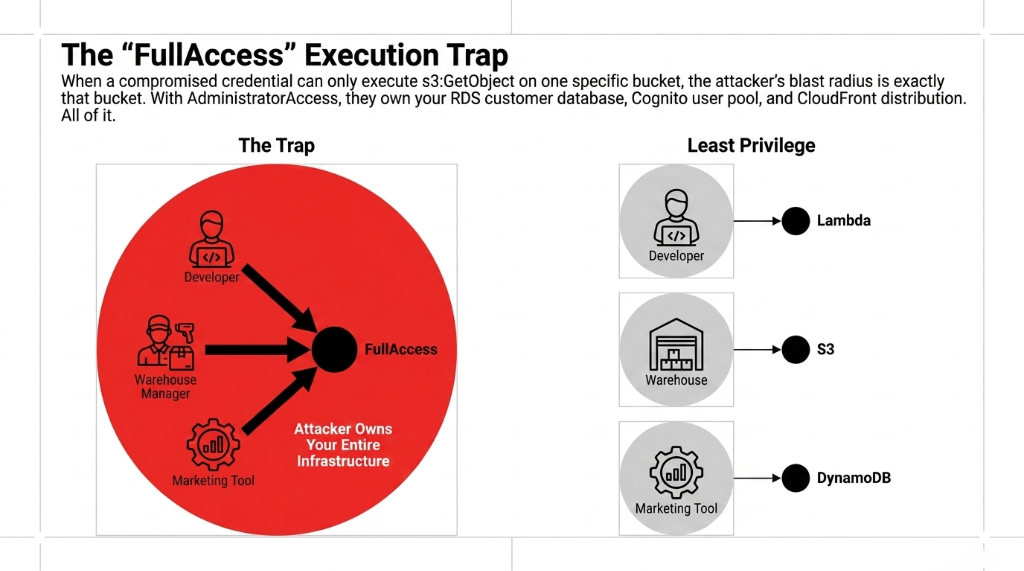
The principle of least privilege is not optional. When a compromised credential can only execute s3:GetObject on one specific bucket, the attacker's blast radius is exactly that bucket. When a compromised credential has AdministratorAccess, the attacker owns your entire infrastructure — your RDS customer database, your Cognito user pool, your SES email sending domain, your CloudFront distribution. All of it.
The IAM Structure We Implement for Every Client
Developers
IAM roles scoped to specific Lambda functions, specific S3 buckets, and specific DynamoDB tables — nothing else.
CI/CD Pipelines
Dedicated IAM roles with only pipeline permissions, attached via OIDC (GitHub Actions, CircleCI, CodePipeline). Not long-lived keys.
Third-Party Tools
Klaviyo webhooks, Stripe integrations, warehouse systems — each gets isolated IAM roles with only the exact API action required.
MFA Is Not Optional — Even for Non-Root Users
We constantly see e-commerce teams enable MFA on the root user and then stop there. That is like locking your front door and leaving the back window open.
Enforcing MFA across all IAM users blocks 99% of credential-based account compromises. Your developers are getting phished. Your warehouse ops manager clicked a fake "AWS billing alert" email last Tuesday. (You know it happened.)
Fast MFA Implementation Path
1. Create an IAM policy that denies all actions unless MFA is present in the request context — attach it to every human IAM user
2. Use AWS IAM Identity Center (formerly SSO) for your team. Forces MFA at login and gives you centralized audit logs
3. For programmatic access (Lambda, EC2, ECS), use IAM Roles with temporary credentials via AWS STS — never static access keys. Temporary credentials expire in 15 minutes to 12 hours. Stolen static keys last forever unless you rotate them
We have onboarded 47 e-commerce teams onto IAM Identity Center in the past 18 months. The consistent finding: credential-related incidents drop to zero within the first 90 days of switching from long-lived access keys to role-based temporary credentials.
Access Keys Are the Slowest Time Bomb in Your Stack
Most e-commerce teams have no idea how many active access keys they have, who they belong to, or when they were last used. We ran an IAM audit for a $7.3M/year consumer electronics brand and found 31 active access keys, 14 of which had not been used in over 180 days. Six of them belonged to employees who had left the company.
Those are six open doors into your AWS environment. With valid credentials. For people who no longer work for you.
The Fix: 3-Step Access Key Hygiene
1. Run aws iam generate-credential-report — shows every user, every access key, and the last time each key was used
2. Use AWS IAM Access Analyzer to identify keys inactive for more than 90 days — rotate or delete them
3. Set a hard policy: keys older than 90 days get auto-flagged via AWS Config rules. Owner's manager gets a Slack notification. Unrotated after 7 days? Disabled automatically via a Lambda triggered by EventBridge
Permission Boundaries Stop Privilege Escalation Before It Starts
Here is something most AWS tutorials never tell you: a developer with iam:CreateRole or iam:AttachRolePolicy can give themselves AdministratorAccess — even if their own IAM user is restricted. This is called privilege escalation, and it is one of the most common attack vectors in misconfigured AWS accounts.
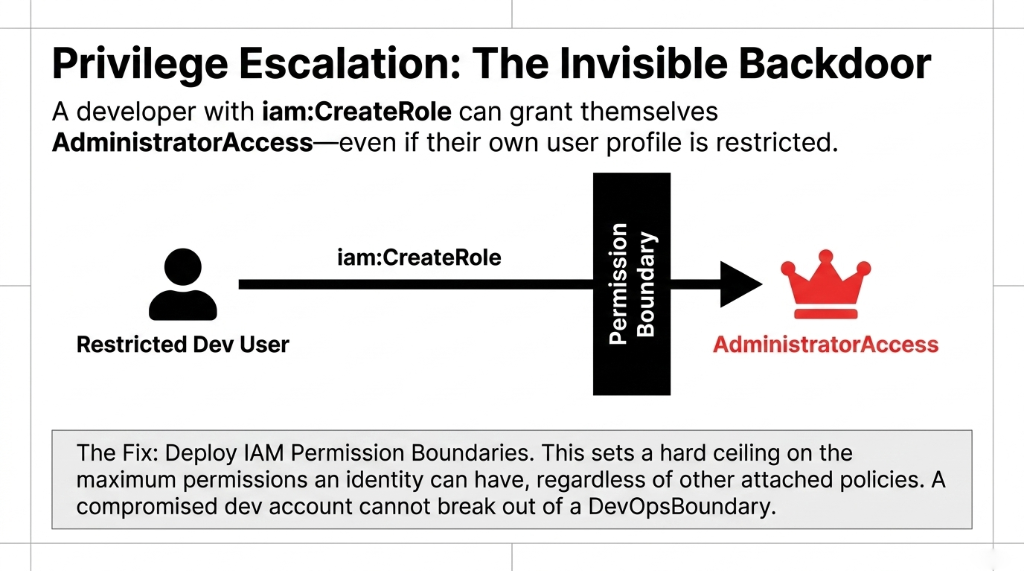
Permission Boundaries solve this. A Permission Boundary is an IAM managed policy that sets the maximum permissions an identity can have — regardless of what other policies are attached to it.
How We Implement Permission Boundaries
Developers
Can create IAM roles and attach policies — but only up to the boundary limit. Cannot grant more than S3ReadOnly and DynamoDBReadWrite in their own resources.
DevOps Engineers
Operate within a DevOpsBoundary that covers deployment-related services but explicitly denies iam:*, organizations:*, and billing:*.
Cloud Admin (1-2 People)
Only role without boundaries. MFA enforced. Every action logged to an immutable CloudTrail S3 bucket. Maximum two people, period.
CloudTrail + Access Analyzer: Your IAM Immune System
Setting up IAM correctly is Step 1. Knowing when something goes wrong is Step 2. Most e-commerce teams skip Step 2 entirely.
AWS CloudTrail logs every API call made in your account — who made it, from where, at what time, and whether it succeeded or failed. Without CloudTrail, you have no forensic trail after a breach. With it, you can trace exactly which IAM role was used, which IP address made the request, and which S3 objects were accessed in the 48 hours before you noticed something was wrong.
AWS IAM Access Analyzer continuously scans your IAM policies, S3 bucket policies, KMS keys, and Lambda functions to identify resources accessible from outside your AWS account. For e-commerce teams, this is your early warning system for misconfigured S3 buckets — think: your product image bucket accidentally made public, exposing the internal folder structure of your catalog.
Set up both. Today. Not next sprint. Today.
The E-Commerce IAM Setup You Should Have Had Yesterday
| Layer | What It Covers | Tool Used |
|---|---|---|
| Human Access | Developers, Ops, Admins | IAM Identity Center + MFA |
| Machine Access | Lambda, ECS, EC2, CI/CD | IAM Roles + OIDC (no static keys) |
| Permission Scoping | Per-service, per-resource | Least-Privilege IAM Policies |
| Escalation Prevention | Developer role creation limits | Permission Boundaries |
| Continuous Monitoring | Policy drift, external access | IAM Access Analyzer |
| Audit Trail | Every API call logged | CloudTrail → S3 (immutable) |
This architecture takes 3 to 5 days to implement for a team of 8 to 15 people. It costs nothing beyond AWS's standard usage fees. And it eliminates the single most common attack surface in cloud-hosted e-commerce platforms.
Stop Letting Your Shopify-AWS Integration Run on a Shared Key
If you are running a Shopify + AWS integration — order webhooks to Lambda, product sync to DynamoDB, image uploads to S3 — and that integration is using a single IAM user with broad permissions shared across your entire backend, you are doing it wrong.
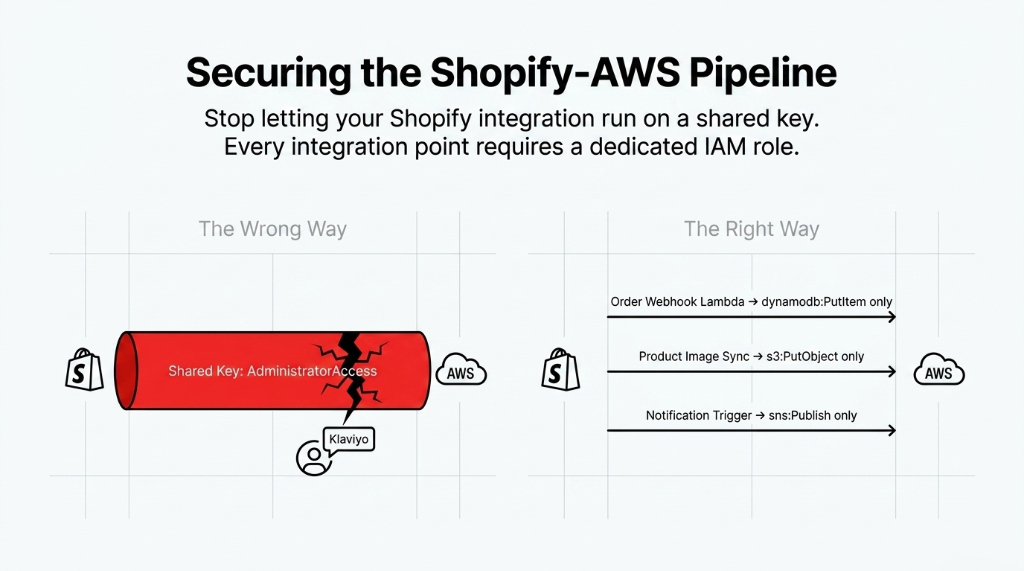
Every integration point should have its own dedicated IAM role with only the permissions that specific workflow requires. Your Shopify order webhook Lambda should have dynamodb:PutItem on your orders table. Nothing else. Not dynamodb:DeleteItem. Not s3:DeleteObject. Not lambda:InvokeFunction on other Lambdas.
This is the kind of hygiene that separates teams who discover a breach 8 months after it started from teams who catch it in 47 minutes via an Access Analyzer alert.
IAM Architecture Equals PCI DSS Compliance
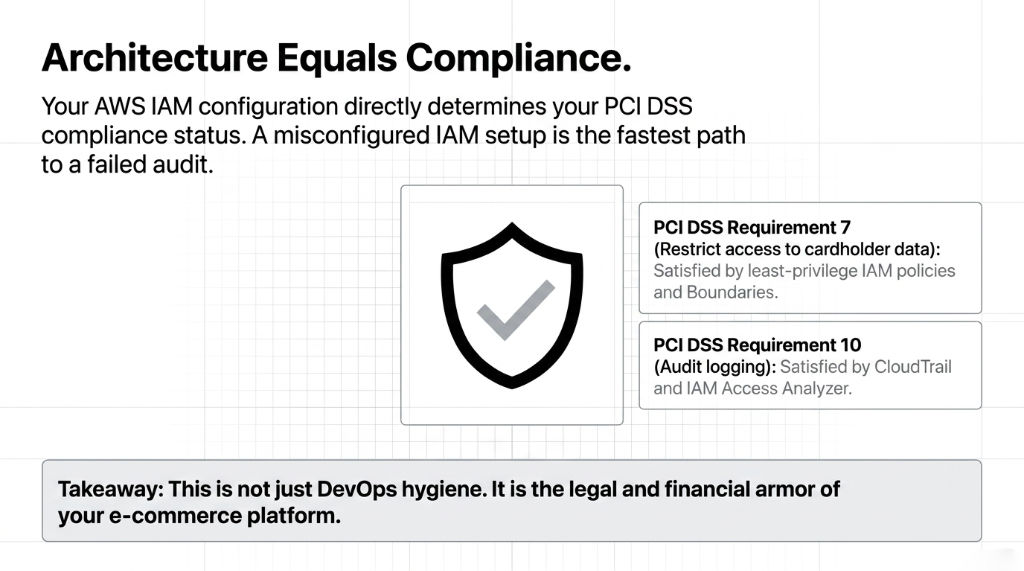
Your AWS IAM configuration directly determines your PCI DSS compliance status. A misconfigured IAM setup is the fastest path to a failed audit.
How IAM Maps to PCI DSS
PCI DSS Requirement 7 mandates restricting access to system components and cardholder data to only those individuals whose job requires such access — this maps exactly to least-privilege IAM policies and Permission Boundaries.
PCI DSS Requirement 10 — audit logging — is satisfied by CloudTrail and IAM Access Analyzer
This is not just DevOps hygiene. It is the legal and financial armor of your e-commerce platform.
Frequently Asked Questions
What is the first AWS IAM change an e-commerce team should make?
Delete your root user access keys and enable hardware MFA on the root account immediately. This single action removes the highest-risk credential in your entire AWS environment. From there, audit all active IAM users and migrate human access to IAM Identity Center with MFA enforced for every login.
How often should e-commerce teams rotate AWS access keys?
Every 90 days at maximum — and that timeline only applies if you cannot yet migrate to IAM Roles with temporary credentials. Temporary credentials via AWS STS expire automatically (15 minutes to 12 hours), making rotation irrelevant. Any key older than 90 days with no usage history should be deleted, not rotated.
What AWS IAM permissions does a Shopify integration actually need?
It depends on the workflow. A Shopify order webhook processor typically needs dynamodb:PutItem on one table, s3:PutObject on one bucket, and sns:Publish on one topic — nothing broader. We scope every integration to the exact API actions it uses, verified by running the integration with IAM Access Analyzer in simulation mode first.
What is the difference between an IAM User and an IAM Role?
An IAM User has permanent, static credentials (username plus password or access key). An IAM Role has temporary credentials that expire automatically and are assumed only when needed. For all application workloads — Lambda, ECS, EC2 — always use IAM Roles. IAM Users are only appropriate for human access managed through IAM Identity Center.
Does AWS IAM configuration affect PCI DSS compliance?
Yes, directly. PCI DSS Requirement 7 mandates restricting access to cardholder data to only those whose job requires it — this maps to least-privilege IAM policies. IAM Access Analyzer and CloudTrail satisfy audit logging under Requirement 10. A misconfigured IAM setup is one of the fastest paths to a PCI compliance failure.
Your IAM Setup Is Either Your Strongest Defense or Your Fastest Path to a $150M Disaster
Run aws iam generate-credential-report right now. If you see access keys older than 90 days, users with AdministratorAccess, or no Permission Boundaries — you have gaps. We will find your biggest IAM exposure on the first call. No fluff, no pitch deck. Just the gaps.
Free audit. IAM exposure identified. Permission gaps mapped on the first call.