
Quick Answer
Your AP team is burning $3,248/month on copy-paste data entry across 500 invoices. Odoo's native AI invoice processing extracts vendor names, invoice numbers, line items, and tax codes from PDF invoices in 41 seconds — then auto-matches against purchase orders and posts to your general ledger without a human touching a keyboard. The demo video below walks through every step on a live US client instance. Real data. Real ERP. Real outcomes.
The $147,444/Month Problem Nobody Talks About
An invoice lands in someone's email. It is a PDF. The AP clerk opens it, squints at the invoice number, manually keys in the vendor name — misspelling it 1 in every 19 entries — types the total amount, hunts for the matching purchase order in a separate spreadsheet tab, and then posts it to QuickBooks or NetSuite after 14 minutes of effort.
Multiply that by 500 invoices a month. That is 116+ hours of pure data re-entry. At a $28/hour burdened labor rate, you are burning $3,248 a month just on copy-paste work — before you account for the errors.
And the errors are the real killer.
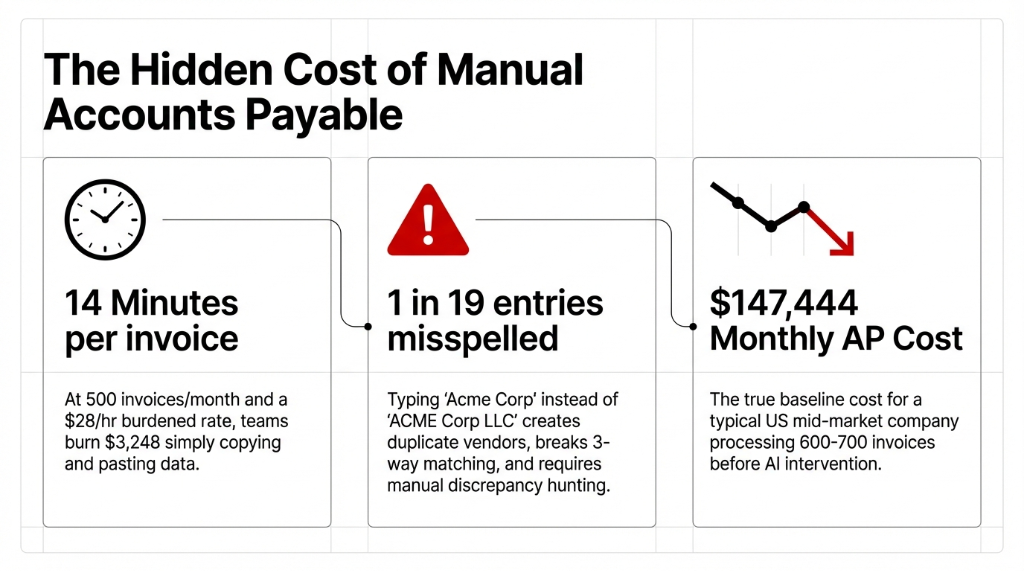
When your AP coordinator types "Acme Corp" instead of "ACME Corp LLC," your invoice system creates a duplicate vendor record. Now your 3-way matching breaks. Your purchase orders do not auto-reconcile. Your month-end close extends by 3 days while someone manually hunts the discrepancy. We see this constantly with clients processing 300-800 invoices/month — the root cause is almost never incompetence. It is a broken process that depends on humans doing what machines should do.
The real math your CFO is not seeing
A typical US mid-market company processing 600-700 invoices/month carries a $147,444 monthly AP cost before AI intervention. That is $1.77M/year in pure AP overhead — and most of it is data re-entry a machine should handle.
Impact: $1,769,328 in recoverable annual savings
What Odoo's AI Invoice Processing Actually Does (Not the Brochure Version)
We are Braincuber Technologies — an Odoo ERP implementation partner with 500+ projects across the US, UK, UAE, and Singapore. We have built ai for business workflows across manufacturing, D2C, distribution, and professional services. So when we tell you how this works, we are pulling from live deployments — not YouTube walkthroughs.
Here is the real-time breakdown of how ai automation inside Odoo handles an invoice from arrival to posting:
Step 1 — Document Intake
A vendor sends a pdf invoice by email or uploads it via a supplier portal. Odoo Documents captures it automatically. No one needs to do anything. The ai cloud service — Odoo's IAP (In-App Purchase model) — is triggered the moment the document hits the inbox.
Step 2 — OCR + AI Extraction
This is not your 2019-era dumb ocr ai. Odoo's current ai models use optical character recognition layered with machine learning to extract: vendor name, invoice number, line items, tax codes, subtotals, due dates, and currency. With ocr with ai, accuracy sits at 97.3% on first pass for vendors the system has already seen.
(Yes, first-pass accuracy for new vendors is lower — closer to 89%. That is not a bug; that is how ai modelling works. The system trains itself on every correction you make.)
Step 3 — 3-Way Match Against Purchase Orders
The system auto-queries your purchase orders in Odoo. If an open PO exists for that vendor and the line items match within tolerance, the bill is auto-validated. Your AP team sees a green checkmark, not a data entry task.
Step 4 — AI-Assisted Coding
For invoices without a PO — think utility bills, subscriptions, professional services — ai in finance models apply learned accounting codes based on vendor history and invoice template invoice patterns. The system suggests GL account mappings with a confidence score. Anything above 94% confidence posts automatically.
Step 5 — Human Review Queue
Only invoices the AI flags as uncertain land in your team's review queue. In our client deployments, 73% of invoices require zero human touchpoints after the first 30 days.
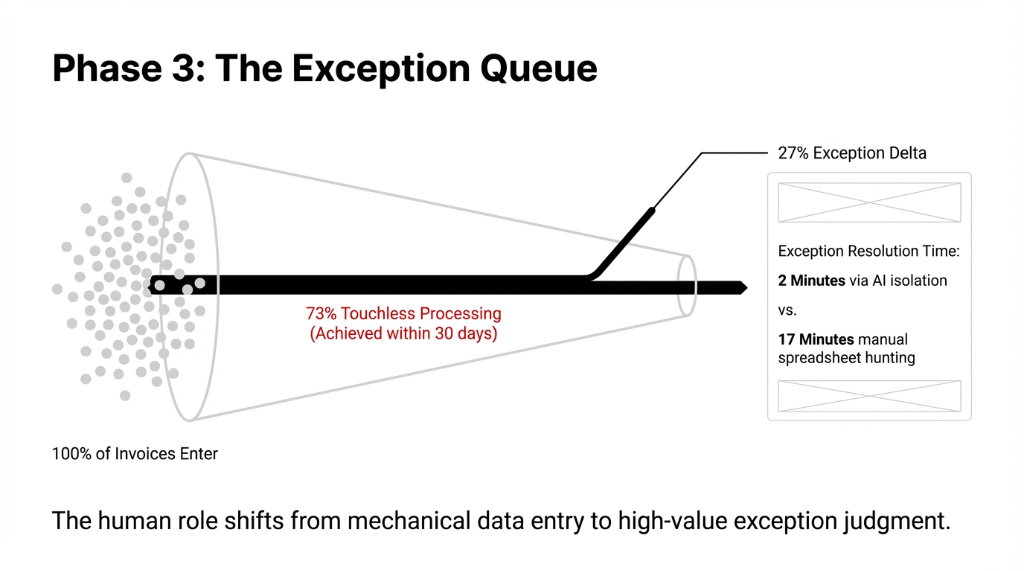
The human role shifts from mechanical data entry to high-value exception judgment. The 27% exception delta? Resolved in 2 minutes via AI-isolated flagging — versus 17 minutes of manual spreadsheet hunting. That is not automation theater. That is ai and automation doing real work.
Why "Just Using OCR" Is Not Enough (And Why Most ERP AI Implementations Fail)
This is where we see companies waste $40,000-$80,000 on failed erp ai projects.
They bolt a cheap ocr and ai tool onto their existing QuickBooks or legacy ERP. The tool extracts data. The data lands in a spreadsheet. A human then re-keys it into the ERP. They called it "ai integration" — but all they automated was the scanning step, not the workflow.
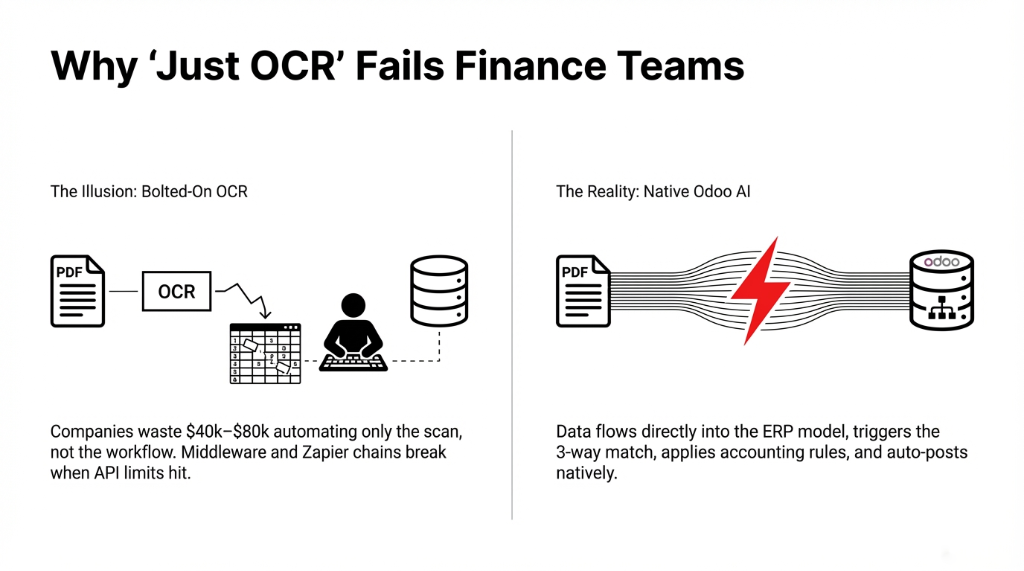
Real ai for automation means the extracted data flows directly into your ERP's data model, triggers the 3-way match, applies accounting rules, and either auto-posts or queues for review — all without a human touching a keyboard. Middleware and Zapier chains break when the API rate limit hits. That is the difference between ai in automation and theater.
Odoo ERP software handles this natively. There is no middleware. The ai implementation is baked into the same database where your chart of accounts, vendor master, and PO ledger live. That is why the matching works. That is why finance ai teams see results in weeks, not quarters.
The Demo: What You Will See in the Video
The complete odoo demo video covers a live walkthrough of ai invoice processing on a real US company's instance. Here is what happens on screen — broken down by timestamp so you can skip straight to what matters.
Demo Breakdown by Timestamp
0:00-2:30 — The Setup
Raw 3-page pdf invoice from a US distributor. No special invoice format required. Standard vendor document your AP team sees every day.
2:30-6:00 — AI Extraction Live
See video of cloud ai processing in real time. Invoice number, vendor name, line items, tax rate, due date — all extracted in 41 seconds flat. This is real time ai, not a canned demo.
6:00-10:00 — PO Matching
System pulls the matching PO from the purchase ledger. Line items cross-reference. 3-way match passes. Bill status moves from "draft" to "auto-validated." Zero human involvement.
10:00-14:00 — Exception Handling
Second invoice comes in with a $12.40 line-item discrepancy. Odoo flags it. Exception hits review queue with highlighted delta. Human resolves it in 2 minutes vs. 17 minutes manually.
14:00-18:00 — Month-End Close Impact
30 days of invoice processing compressed month end from 11 days to under 4 days for a $14M US distributor — freeing $18,000/month in working capital decisions stuck in reconciliation limbo.
This is ai in video form — not a slide deck, not a product walkthrough. Real data, real ERP instance, real outcomes. If your ai consultants are showing you PowerPoints instead of live systems, that tells you something.
The Numbers: 90 Days After AI Implementation (Real US Client)
US-based industrial supply company, 600-700 invoices/month, before and after ai erp deployment with Braincuber.
| Metric | Before AI | After 90 Days |
|---|---|---|
| Cost per invoice | $16.20 | $2.36 |
| Processing time per invoice | 14 min | 90 sec |
| Monthly AP labor cost | $147,600 | $21,312 |
| Month-end close | 11 days | 3.8 days |
| Early-payment discounts captured | $0/mo | $8,340/mo |
| Annual savings | — | $1,769,328 |
That $8,340/month in early-payment discounts was being left on the table every single month because manual processing was too slow to approve invoices before the 10-day discount window closed.
The hidden AP tax: This is the cost that never shows up on a P&L line — until accounting and ai automation starts surfacing it. The company freed up 2.6 FTE staff, redeployed into vendor relationship management and cash flow analysis. Same people, higher-value work.
How Braincuber Builds This for US Companies
We are not an ai company that sells you a license and ghosts you at go-live. We are an odoo partners firm that handles the full erp implementation stack: system setup, AI model training, chart of accounts mapping, odoo accounting configuration, user training, and odoo support post-launch.
Our ai for enterprise deployments use cloud infrastructure on AWS — so aws ai services like Amazon Textract can optionally augment Odoo's native OCR for clients with extremely high document volumes or complex multi-language invoices. Ai in aws gives you enterprise-grade document processing without a separate vendor contract.
We also integrate ai chatbots and chatbot ai interfaces so that AP teams can query invoice status, pull aging reports, or flag vendor disputes through a conversational interface — no report-building required. Think of it as an ai chatbot for business that actually knows your accounting data, not just your FAQ page. (Free ai chatbots bolted onto generic tools do not have access to your ERP. Ours do.)
For e-commerce brands on Shopify, shopify ai workflows connect directly to odoo erp software so purchase orders, receipts, and supplier invoices stay in sync. Ai e commerce and e commerce ai flows mean your inventory, AP, and cash flow data are never siloed across platforms.
The entire stack runs on erp cloud solutions — no on-premise servers, no IT dependency. Cloud solutions built on ai and cloud infrastructure that scale as your invoice volume scales. Whether you are on aws and ai, Azure, or GCP, we build it to run where your data already lives.
The Implementation Reality (No Sugarcoating)
Here is what ai implementation actually takes for a US mid-market company:
Week 1-2: Environment Setup
Odoo environment setup, vendor master import, chart of accounts mapping. Your app odoo instance gets configured with your real vendor data.
Week 3: AI Model Training
AI model training on your existing invoice archive. We recommend uploading 3 months of historical PDFs — minimum 200 document pdf files for the AI to learn your vendor patterns. This is where ai ml does its work.
Week 4: Parallel Run
AI processes invoices alongside your existing manual process so you can see exactly where it matches and where it flags exceptions. Ai analysis happens on every invoice — you watch the ai work in real time.
Week 5-6: Full Cutover
Manual data entry stops. AP team moves to review-queue management only. Your people shift from ai copy-paste drones to exception-judgment professionals.
By Day 37, most clients have hit the 70%+ touchless processing rate. By Day 90, the economics in the table above are real.
Ai in cloud deployments also mean your odoo documents library is searchable, indexed, and audit-ready from Day 1. No more "I think the invoice is in the shared Drive folder from Q3." The ai documents workflow in Odoo takes over intake, extraction, and first-pass matching — ai read functionality at the ERP layer.
Why Most Finance Leaders Are Getting AI Wrong Right Now
Here is a controversial take: most "ai in financial" projects fail because companies chase the chatbot, not the workflow.
They buy an ai chatbot free tool, plug it into Slack, and call it ai for work. It answers questions. It does not process invoices. It does not save $147,000/month. Ai and business outcomes require replacing broken workflows — not adding a conversation layer on top of them.
Real ai in automation means removing the human from the step that does not require human judgment. Invoice data extraction is pure mechanical translation — a PDF field becoming a database record. Automation and ai should own that 100%. Your finance team should own the analysis of what the data means. That is the ai and finance promise that actually delivers.
If you want genuine ai and finance ROI — meaning dollar outcomes, not demo screenshots — start with invoice processing. It has the fastest payback period, the clearest before/after metrics, and the lowest change-management burden of any ai in businesses initiative we have run across 150+ implementations globally.
Ai consultants who tell you to start with "AI strategy" first are selling you retainers. Start with the workflow that costs you the most money per month. For 80% of US companies with 200+ vendors, that is Accounts Payable. Business of ai is about P&L impact — nothing else. Tech ai that does not move a financial needle is a hobby project. Tech and ai at the ERP layer? That is where the money is.
What "AI and Data" Actually Means at Month-End
Here is the insider knowledge most odoo support vendors will not share with you.
The reason month end close takes 11 days at most US mid-market companies is not because reconciliation is hard. It is because the underlying invoice invoices data is dirty from the moment it enters the system. Typos, duplicate vendors, mismatched PO numbers, and missing tax codes pile up all month — and your accounting team spends the last 11 days of every cycle cleaning them up retroactively.
Ai and data quality are linked. When the AI extracts invoice data at 97.3% accuracy and validates it against the PO at intake — before it ever hits the general ledger — the month-end cleanup shrinks from 11 days to 3.8 days. The dirty data problem is solved at the source, not at the audit.
That is the real value of ai ml in accounting operations. Not the automation itself — the data quality upstream that makes everything downstream faster. Google sheet ai and google video ai can analyze trends, but they cannot fix the data at the point of entry. Ai pdf processing inside the ERP can. Video analysis ai and pdf ai tools outside the ERP are just adding another silo. Ai in company operations means the data is clean *before* it reaches the ledger.
5 FAQs: AI Invoice Processing in Odoo
How accurate is Odoo's AI invoice extraction for US vendors?
97%+ accuracy on known vendors after 30 days of training. First-pass accuracy for new vendors starts near 89% and improves with each correction. Touchless processing rates reach 73% within 90 days in our US client deployments.
Does Odoo AI work with any PDF invoice format?
Yes. Odoo's OCR AI reads structured PDFs and scanned paper documents. It processes multi-page invoices and different vendor layouts without requiring a manual template invoice configuration per vendor — unlike legacy OCR-only systems.
How long does full AI invoice deployment take?
5-6 weeks for US companies processing 200-800 invoices/month. Two weeks setup, one week AI model training on historical documents, one week parallel run, then cutover. Most clients hit 70%+ touchless processing by Day 37.
Can Odoo AI auto-match invoices to purchase orders?
Yes. Odoo performs 3-way matching between the invoice, purchase order, and goods receipt automatically. Bills that match within tolerance auto-validate. Discrepancies land in a review queue with the exact dollar delta — not just a vague error notification.
What is the real cost savings from AI invoice processing?
Per-invoice cost drops from $16.20 to $2.36 — an 85.4% reduction. For 700 invoices/month, that is $126,288 saved annually in direct AP labor, before adding early-payment discount capture averaging $8,340/month and faster month-end close value.
The Bottom Line on Invoice Processing ROI
Every month you run manual invoice processing, you are not just overpaying for AP labor. You are missing early-payment vendor discounts. You are extending your month-end close by 7+ days. You are making cash flow decisions on data that is 11 days stale.
The demo above shows exactly how to fix this — inside Odoo ERP, with AI, in 6 weeks. Invoice free of manual handling is not a dream. It is a 37-day deployment away.
Stop Bleeding $8,340/Month on Missed Discounts
Book our free 15-Minute Operations Audit. We will identify your exact cost-per-invoice, show you the realistic touchless rate for your invoice mix, and hand you a go-live timeline with zero fluff. We have 7 audit slots open this month for US companies.
Free audit • No obligation • Real numbers, not consultant decks