
Your staging environment does not match production. You will find out at the worst possible time.
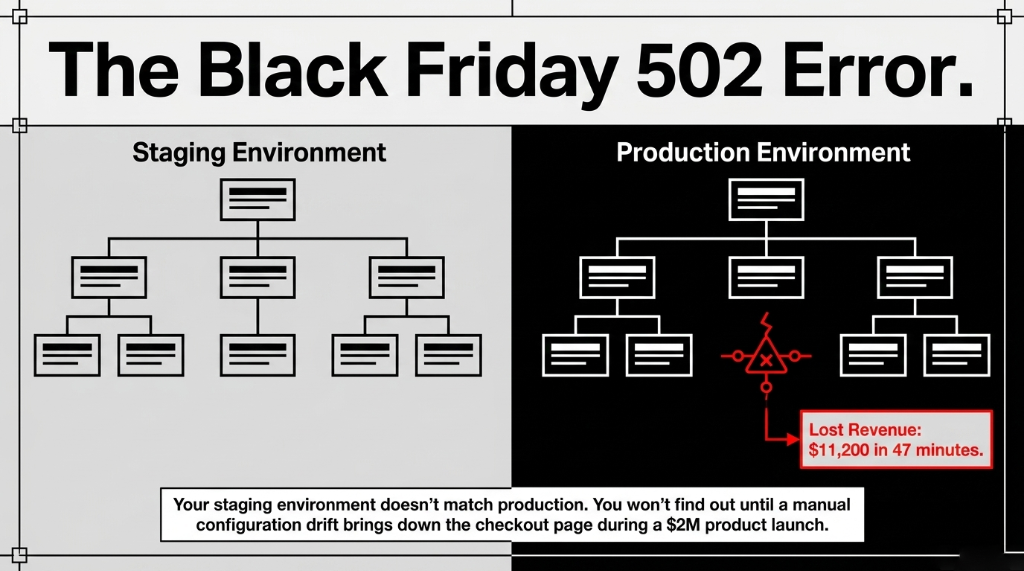
Your e-commerce infrastructure is being rebuilt by hand every single time someone on your team spins up a new environment. That means your staging environment on AWS does not match production — and you will not find out until Black Friday at 9:00 PM when your checkout page throws a 502 Bad Gateway.
We have seen this exact scenario play out with US-based e-commerce brands scaling between $2M and $15M ARR. The culprit is never the developer. It is always the missing system: Infrastructure as Code using Terraform on AWS.
Why Your AWS Console Clicks Are Costing You $8,400/Month
Here is the ugly truth most AWS consultants will not tell you: manually provisioning cloud resources through the AWS Console is not just slow — it is a financial liability hiding inside your DevOps process.
We audited a $4.3M/year US-based DTC apparel brand last year. Their DevOps team was provisioning RDS instances, ECS clusters, ALBs, and S3 buckets manually for every environment. Each environment setup took 3.7 hours. Multiply that by 7 deployments per sprint, 2 developers at $85/hour, and you are bleeding $4,403 per sprint in pure labor.
Before you account for the configuration drift errors that brought down their site for 47 minutes during a flash sale. Lost revenue: $11,200 that afternoon alone.
The Real Problem
The issue is not that they were using AWS. AWS is the right platform for scaling e-commerce. The issue is they had no Terraform. No state management. No repeatable infrastructure pipeline. Just a guy named Derek clicking around Route 53 and praying it matched the last setup.
The Architecture Every E-Commerce Brand on AWS Actually Needs
Before we touch a single .tf file, here is the real architecture that handles 50,000 concurrent users on a $2M product launch day:
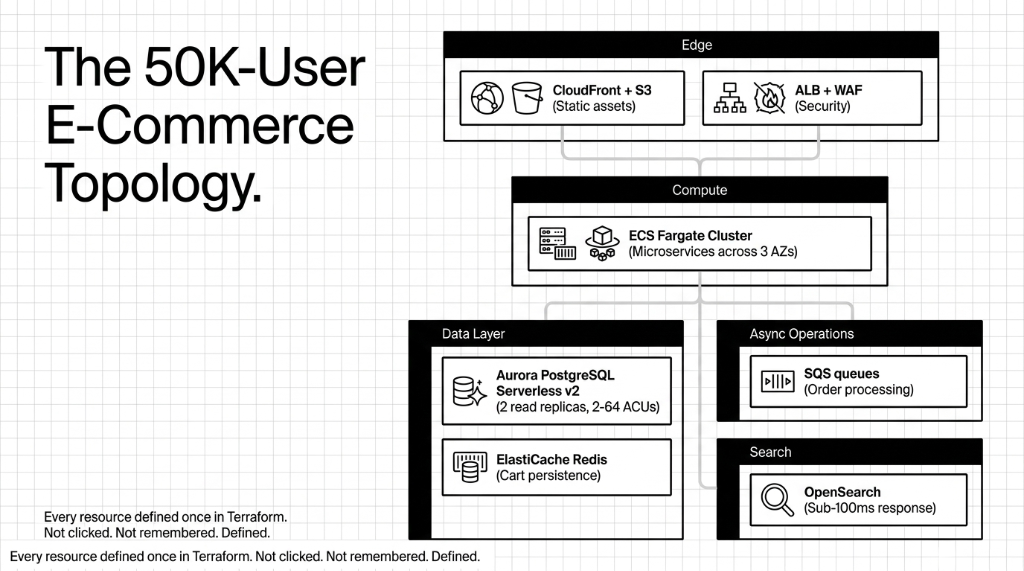
The 50K-User E-Commerce Stack (Terraform-Managed)
Edge + Compute
VPC with public/private subnets across 3 AZs. ECS Fargate cluster for containerized microservices. CloudFront + S3 for static assets. ALB with WAF attached.
Data + Async
Aurora PostgreSQL Serverless v2 (2-64 ACUs). ElastiCache Redis for sessions and cart. SQS queues for async order processing. OpenSearch for sub-100ms product search.
Every single one of those resources gets defined once in Terraform. Not clicked. Not remembered. Defined.
How Terraform Provisions This Entire Stack in 11 Minutes
Here is what most "Infrastructure as Code" tutorials skip: the actual workflow that connects your Terraform code to a production AWS account without blowing up state files or accidentally deleting a production database.
Step 1: Remote State Backend (Non-Negotiable)
Your Terraform state file cannot live on a developer's laptop. Full stop. Set up an S3 backend with DynamoDB state locking on day one.
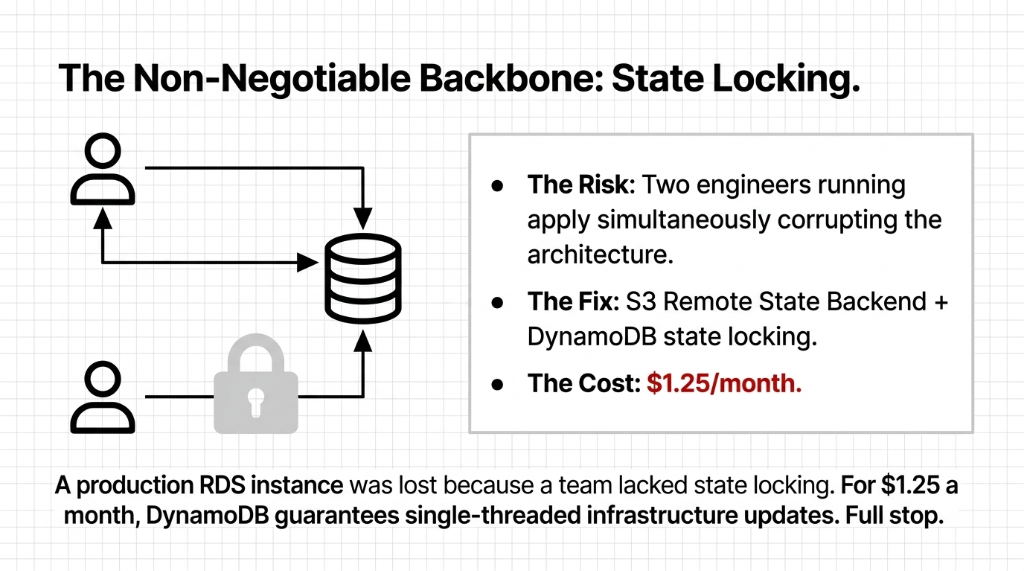
The State Backend Config
terraform {
  backend "s3" {
    bucket         = "braincuber-ecommerce-tfstate"
    key            = "prod/terraform.tfstate"
    region         = "us-east-1"
    encrypt        = true
    dynamodb_table = "terraform-lock"
  }
}
We have seen 3 separate clients lose hours of work — and one lost a production RDS instance — because two engineers ran terraform apply simultaneously without state locking. DynamoDB locking costs you $1.25/month. That is it.
Step 2: Modular Structure (Not a Monolith)
Do not dump 2,000 lines of HCL into one main.tf. Structure it like this:
modules/
  ├── networking/    # VPC, subnets, security groups
  ├── compute/       # ECS cluster, task definitions
  ├── database/      # Aurora, ElastiCache
  ├── cdn/           # CloudFront, S3 origins
  └── messaging/     # SQS queues, SNS topics
environments/
  ├── staging/
  └── production/
This structure means your staging environment is literally terraform apply -var-file=staging.tfvars. No guesswork. No Derek.
Step 3: Auto Scaling That Actually Works on Black Friday
This is where most Terraform tutorials fail you completely. They show you how to set up an Auto Scaling Group with a 5-minute scale-out cooldown. That is fine for enterprise SaaS. For e-commerce with flash sales, 5 minutes means 3,000 failed checkouts.
ECS Auto-Scaling: 3 Tasks to 50 in Under 90 Seconds
resource "aws_appautoscaling_policy" "product_service_cpu" {
  name         = "product-service-cpu"
  policy_type  = "TargetTrackingScaling"

  target_tracking_scaling_policy_configuration {
    predefined_metric_specification {
      predefined_metric_type = "ECSServiceAverageCPUUtilization"
    }
    target_value       = 50
    scale_in_cooldown  = 300
    scale_out_cooldown = 30  # Critical: scale OUT fast
  }
}
That 30-second scale-out cooldown is the difference between a Black Friday that makes you $380,000 and one that costs you $180,000 in cart abandonment.
The Database Setup Nobody Talks About
Every Terraform tutorial shows you how to spin up an RDS instance. None of them tell you about the part that bites you 6 months later.
Aurora PostgreSQL Serverless v2 is the right choice for e-commerce on AWS because it scales compute in fine-grained 0.5 ACU steps without a cold start restart. Your aws_rds_cluster block needs these settings that most implementations miss:
deletion_protection = true
We had a client's junior dev destroy a production cluster with a terraform destroy. Cost: $34,000 in data recovery. This single line prevents it.
backup_retention_period = 35
Not the default 7. You will thank us during a GDPR data subject access request that references an order from 4 weeks ago. 35 days gives you legal breathing room.
storage_encrypted = true + dedicated KMS key
Required for PCI-DSS compliance if you are processing credit cards. Use a dedicated KMS key, not AWS-managed — your compliance auditor will ask.
preferred_backup_window = "03:00-04:00" UTC
Insider secret: AWS's default backup window often overlaps with EU business hours if your brand ships internationally, causing 15-30 second I/O pauses during active traffic. Set it to 03:00 UTC.
Cost Optimization Built Into the Terraform Config
One e-commerce platform we worked with cut their AWS bill from $28,000/month to $14,100/month — without changing a single line of application code. The changes were all in Terraform:
| Terraform Change | Before | Monthly Savings |
|---|---|---|
| 4 ECS services moved to Spot capacity | On-Demand for all services | ~$8,400/mo |
| NAT Gateway endpoint routing for ECR pulls | $2,300/mo in data transfer | ~$2,300/mo |
| Staging shutdown at 9 PM via EventBridge | Always-on non-prod | ~$2,100/mo |
| Reserved Instances for Aurora writer node | On-Demand Aurora | ~$1,100/mo |
Every one of those changes is a Terraform resource block. Reviewable. Version-controlled. Reversible in 8 minutes if something breaks. Try doing that with console clicks.
CI/CD Pipeline: Terraform in Production Without Destroying Production
Here is the controversial take we stand behind: you should never run terraform apply manually in production. Ever. Not even you. Not even the CTO.
Everything runs through a CI/CD pipeline — GitHub Actions, GitLab CI, or AWS CodePipeline — with this workflow:
1. Developer opens a PR with infrastructure changes
Every infrastructure change starts as a pull request. No exceptions.
2. Pipeline runs terraform plan and posts the diff as a PR comment
You see exactly what will change before anything touches AWS.
3. A second engineer reviews the plan (4-eyes principle)
Two sets of eyes on infra changes. Non-negotiable for production-grade operations.
4. Merge to main triggers staging apply automatically
Staging gets the change first. Always. Validate there before production.
5. Manual approval gate triggers production apply
Human sign-off before anything hits production. This is the final safety net.
We saw a client accidentally apply staging Terraform against production last year — cost them 22 minutes of downtime and $6,700 in emergency recovery work because their RDS security group got replaced. The pipeline-gated approach eliminates this entirely. Your entire AWS infrastructure also gets a full Git history — your best friend during SOC 2 Type II audits.
What This Terraform-Managed Stack Actually Costs
A production-grade setup with ECS Fargate, Aurora Serverless v2, ElastiCache, and CloudFront runs approximately $2,100-$4,800/month for a brand doing $500K-$2M/month in GMV, depending on traffic patterns. Using Spot instances for non-critical workloads and Reserved Instances for Aurora typically brings this down by 38-45% versus fully On-Demand.
At Braincuber Technologies, we have deployed Terraform-managed AWS infrastructure for e-commerce brands running between $500K and $12M/month in GMV. We do not hand you a GitHub repo and disappear. We set up the state backend, configure the module structure, train your DevOps team on the PR-based apply workflow, and stay on for 90-day post-launch support.
If your AWS bill is above $5,000/month and you do not have IaC managing it, you are almost certainly paying for resources nobody knows about.
Frequently Asked Questions
How long does it take to migrate existing AWS infrastructure to Terraform?
For a mid-size e-commerce setup with 40-60 AWS resources, expect 3-4 weeks using terraform import. The critical step is importing state before making any changes — skipping this destroys existing resources. We typically complete this in parallel with ongoing operations, with zero production downtime.
Will Terraform work with our existing Shopify or WooCommerce store on AWS?
Yes. Terraform manages the AWS backend infrastructure (RDS, ECS, CloudFront, etc.) entirely independently of your storefront platform. Whether you are running a headless Shopify setup, WooCommerce on EC2, or a custom Node.js storefront on Fargate, Terraform provisions the cloud layer beneath it.
What happens if terraform apply fails mid-execution?
Terraform applies changes incrementally and records each successful resource creation in the state file. A partial failure leaves your infrastructure in a partially updated state — which is why remote S3 state backends and DynamoDB locking are non-negotiable. Re-running terraform apply after fixing the error picks up exactly where it left off.
Is Terraform on AWS PCI-DSS compliant for payment processing?
Terraform itself is just a provisioning tool — PCI-DSS compliance depends on how you configure your AWS resources. The right Terraform setup includes encrypted RDS with KMS, WAF with OWASP ruleset on ALB, VPC isolation for payment services, and CloudTrail logging. All of these are codified in your .tf files and auditable by your QSA.
How much does it cost to run this Terraform-managed AWS e-commerce stack?
A production-grade setup with ECS Fargate, Aurora Serverless v2, ElastiCache, and CloudFront runs approximately $2,100-$4,800/month for a brand doing $500K-$2M/month in GMV. Using Spot instances for non-critical workloads and Reserved Instances for Aurora typically brings this down by 38-45% versus fully On-Demand.
Stop Letting Derek Click Around Your AWS Console
If your AWS bill is above $5,000/month and you do not have Infrastructure as Code managing it, you are almost certainly paying for resources nobody knows about. We will find your biggest AWS cost leak and infrastructure risk in the first call.
No pitch. No fluff. Configuration drift identified. Cost leaks surfaced. Average onboarding: 3.5 weeks.