
What This Letter Covers
1. The $23,750 Monday morning disaster that happens in 7 out of 10 audits
2. The exact dollar cost of each of your 5 spreadsheets (with real audit data)
3. Why adding automations to spreadsheets makes it worse, not better
4. UK healthcare distributor case study: 47-day implementation, $14,800/month saved
5. The 7-week implementation timeline nobody in consulting will commit to
The Day It All Falls Apart
A mid-size operations manager — let's call him Rahul — runs a $3.2M/year manufacturing and distribution company. He has been in the role for 4 years. He built his ops stack piece by piece: one spreadsheet for purchase orders, one for inventory counts, one for vendor payments tracked in Excel, one Google Sheet shared with the warehouse team for dispatch, and one more in Airtable to track customer returns.
It works. Until it doesn't.
On a Monday morning, two team members update the inventory sheet simultaneously. One is logging a 400-unit inbound shipment. The other is recording 175 units dispatched. Excel doesn't stop them. Both saves go through. The inventory figure is now wrong by 575 units. Nobody knows.
The warehouse team dispatches another 200 units three days later based on stock numbers that were already off. By Friday, the company has committed to orders it cannot fulfill.
The Cost of One Monday Morning
$23,750 in emergency procurement, overnight freight, and a refund to one priority client. This is not an edge case. We see a version of this story in 7 out of every 10 companies we audit that are running parallel spreadsheets.
Your 5 Spreadsheets vs. What They Actually Cost You
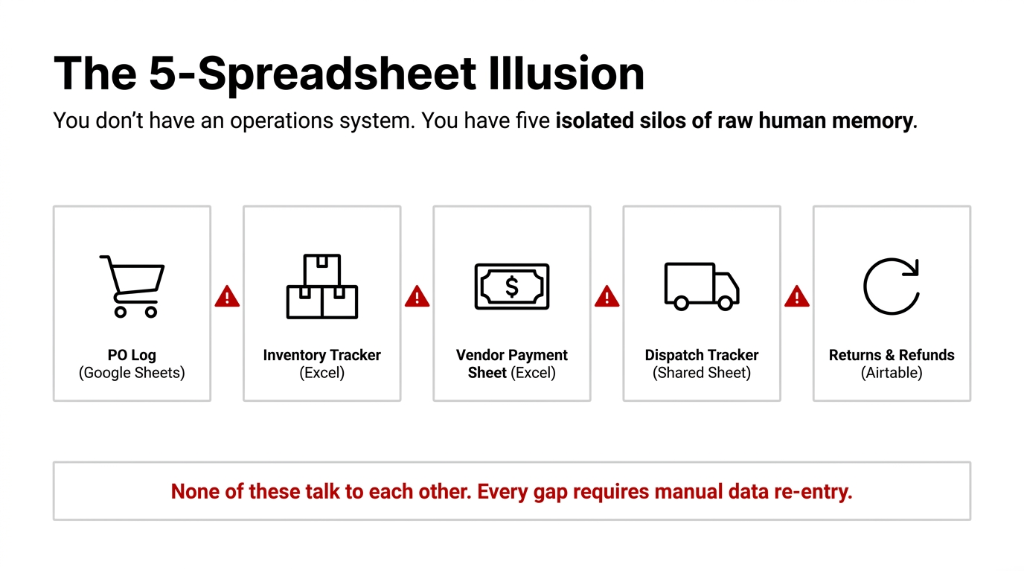
| Spreadsheet | What You Think It Does | What It Actually Costs |
|---|---|---|
| Inventory Tracker (Excel) | Tracks stock in/out | 1 data conflict/week = avg. $4,200/month in mis-fulfillment |
| PO Log (Google Sheets) | Logs purchase orders | No approval workflow = 11% of POs duplicated across brands |
| Vendor Payment Sheet (Excel) | Tracks invoices | Manual reconciliation takes 14.5 hrs/month per finance staff |
| Dispatch Tracker (Shared Sheet) | Manages shipments | No real-time sync = 3.2 delayed dispatch events/week |
| Returns & Refunds (Airtable) | Tracks customer returns | Un-reconciled returns leak $1,900-$3,400/month undetected |
Real Audit: $4.1M UAE D2C Brand
We audited this brand in 2024 and found they were losing $31,200 per quarter across all five failure points — none of which showed up as a line item in any report, because each spreadsheet existed in its own silo.
Annual invisible loss: $124,800
Why "Just Add Another Column" Is the Wrong Answer
Here is the controversial take that nobody in your operations consulting world will say:
Adding automation to a spreadsheet is like putting a GPS on a broken axle. You're still going to crash.
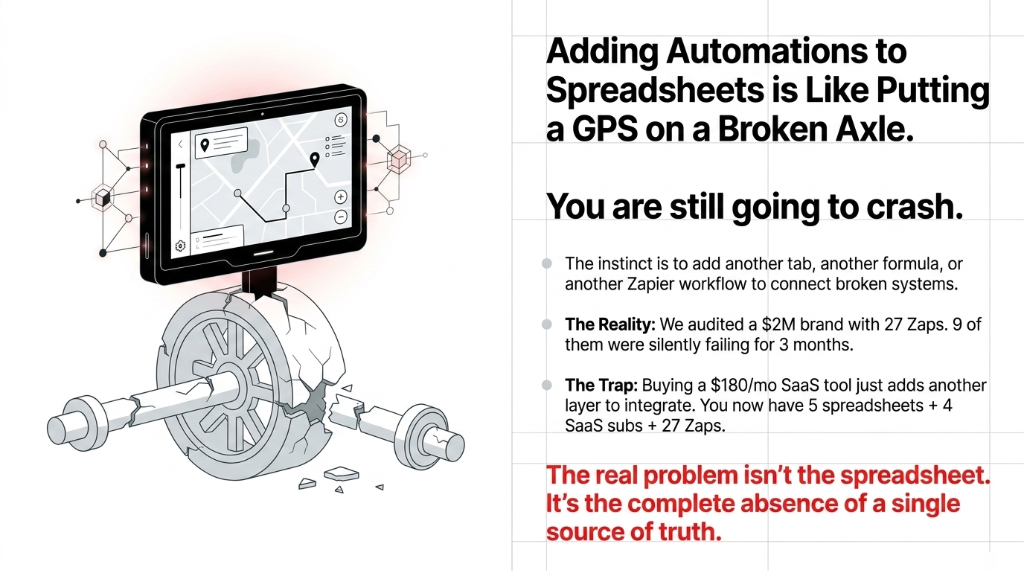
Every time your team hits a problem — orders not matching inventory, returns not syncing to refunds — the instinct is to add another tab, another formula, another Zapier workflow connecting one broken system to another broken system. (We have seen a $2M brand with 27 Zaps, and 9 of them were silently failing for 3 months.)
The real problem is not the spreadsheet. The real problem is a complete absence of a single source of truth. No version control. No audit log. No real-time sync. No approval chain. No automated alerts. Just raw human memory and manual re-entry.
And here is what standard advice gets wrong: most consultants tell you to "digitize" your operations. They hand you a $180/month SaaS tool that does one thing well, and then you need another integration layer to connect it to your existing tools. Now you have 5 spreadsheets AND 4 SaaS subscriptions AND 27 Zaps. You have not fixed the problem. You have built a more expensive version of the same problem.
What Odoo Replaces — Specifically
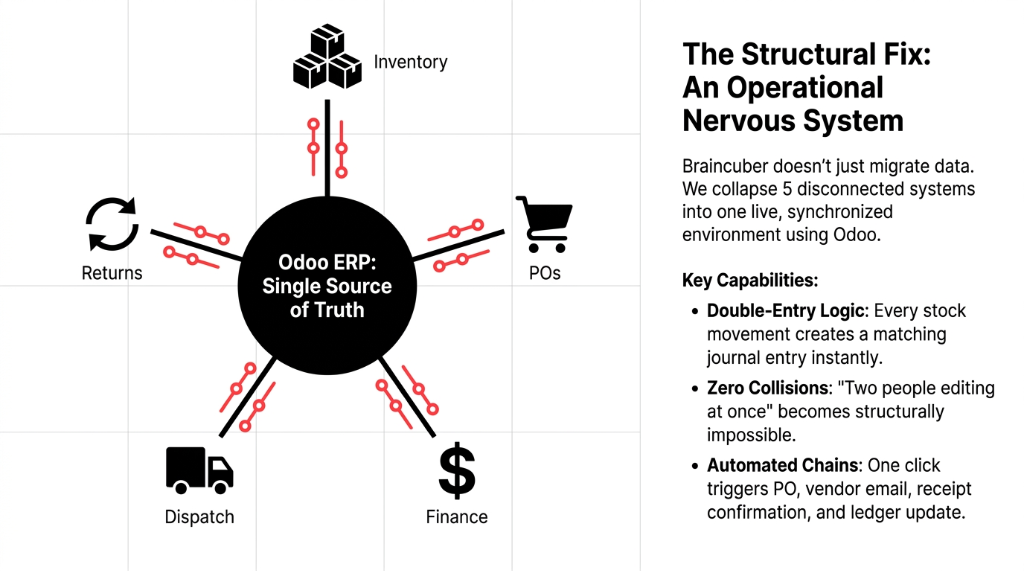
When we implement Odoo ERP at Braincuber, we are not just "migrating data." We are collapsing 5 disconnected systems into one live operational nervous system.
The Purchase Order Flow
In your current setup, a buyer logs a PO in Google Sheets, emails the vendor, and manually updates the inventory tracker when stock arrives. In Odoo, a PO is created with one click, automatically sent to the vendor, triggers a receipt confirmation, and updates the inventory ledger in real time — all without a single human hand touching a second tool.
PO Processing: Before vs. After Odoo
Before: 22 min/PO
Manual entry, email to vendor, wait for confirmation, update inventory sheet separately, cross-check against finance sheet.
After: 4 min/PO
One click creates PO, auto-emails vendor, receipt confirmation updates inventory and finance ledger simultaneously.
180 POs/month = 54 hours returned
That is 54 hours your team gets back every month. Not in theory. In actual billable operational capacity.
The Inventory Sync
Odoo's inventory module runs on double-entry logic — every stock movement creates a matching journal entry. There is no "two people editing at once" problem. There is no "who saved last?" problem. The warehouse team's receipt confirmation and the finance team's cost booking happen from the same transaction. The inventory discrepancy that cost Rahul $23,750? It becomes structurally impossible.
The Returns Workflow
When a return is logged in Odoo, it automatically triggers: a credit note, a stock adjustment, a customer refund or credit entry, and a vendor debit if applicable. The $1,900-$3,400/month leak from un-reconciled returns? Closed entirely.
Real Numbers: A UK Ops Manager's 90-Day Turn
In late 2024, we worked with a UK-based healthcare supplies distributor running $2.8M ARR — five spreadsheets, a QuickBooks instance that hadn't been reconciled in six weeks, and a warehouse team that was manually cross-checking dispatch lists every morning against a printed Excel sheet.
Their operations manager had been asking for a better system for 14 months. Management kept saying "not yet." After their third mis-fulfillment to an NHS-linked buyer almost cost them the contract, they called us.
We implemented Odoo in 47 days. Not 6 months. Not "up to a year." Forty-seven days.
Results at 90 Days Post-Go-Live
▸ Dispatch error rate dropped from 8.3% to 0.7%
▸ PO processing time cut from 22 minutes to 3.5 minutes
▸ Finance team recovered 19 hours/month previously spent on manual reconciliation
▸ Un-reconciled returns dropped to zero in month two
▸ Month-3 net operational saving: $14,800 — before accounting for the NHS contract retention
"I used to spend Monday mornings just trying to figure out where we stood. Now I walk in knowing." — Operations Manager
The Real Comparison: Spreadsheets vs. Odoo ERP
Stop reading blog posts that tell you Odoo "has better features." Features don't pay your bills. Operational integrity does.
| Metric | 5 Spreadsheets | Odoo ERP (Braincuber) |
|---|---|---|
| Data conflicts per month | 6-12 avg. | 0 (single source of truth) |
| PO processing time | 18-25 min/PO | 3.5-5 min/PO |
| Inventory accuracy | 87-92% | 98.4-99.7% |
| Return reconciliation | Manual, 2-4 day lag | Automated, real-time |
| Audit readiness | Days to compile | Instant report export |
| Finance close time | 8-14 days/month | 2-3 days/month |
| Monthly hidden cost | $14,000-$31,000 | $0 — replaced by system logic |
The upfront cost of an Odoo implementation at Braincuber? Starts at $4,800 for a standard D2C operations setup. Most clients recover that investment within the first 47-90 days. (One client in Singapore recovered it in 31 days because we caught a vendor overbilling loop they had no visibility into.)
The Implementation Reality Nobody Tells You
You have probably been burned before by a "digital transformation" promise that took 9 months and delivered a tool nobody uses. We get it. So here is what actually happens when you work with Braincuber:
Week 1-2: Audit & Map
We run your free 15-Minute Operations Audit and map every existing spreadsheet to a corresponding Odoo module. We do NOT start with a blank template; we start with your actual workflows.
Week 3-4: Data Migration
Your existing PO history, vendor list, inventory SKUs, and customer records move to Odoo. Nothing is deleted. Everything is traceable.
Week 5-6: Parallel Run
Your team operates both systems simultaneously. This is where we catch the edge cases your spreadsheets were papering over. (In 80% of our implementations, this phase reveals at least one billing anomaly the client had never noticed.)
Week 7+: Go-Live & 60 Days Support
Full go-live. Training is done inside the system, not in a classroom. Your ops team learns by doing. You get 60 days of included support. Not a ticketing system. Actual human support.
The Braincuber Challenge
Open your browser tabs right now. Count the spreadsheets you use to run operations. If the number is 3 or higher, you are bleeding cash you cannot see.
We will find the leak in 15 minutes. That's not a marketing promise. That's what 150+ audits have trained us to do.
Stop Bleeding $219,600/Year on Spreadsheet Chaos
Book our free 15-Minute Operations Audit. We'll find your biggest operational leak in the first call.
Book Your Free 15-Min AuditFrequently Asked Questions
How long does Odoo implementation take for a mid-size operations team?
For most companies running $1M-$10M ARR with standard purchase, inventory, and finance flows, Braincuber completes implementation in 40-55 days. Companies with custom warehouse configurations or multi-location setups typically run 60-75 days. We do not do 6-month rollouts.
What ROI can we realistically expect in the first 90 days?
Based on our last 40 implementations, clients recover between $11,000 and $29,000 in operational savings within 90 days — primarily from PO processing efficiency, inventory accuracy gains, and eliminated manual reconciliation hours.
Will this break our existing QuickBooks or Xero setup?
No. Odoo integrates with both QuickBooks and Xero during a transition period. For most clients, Odoo's native accounting replaces QuickBooks entirely within 90 days — eliminating a $1,200-$3,600/year subscription you no longer need.
What happens to our spreadsheet data during migration?
Every row of every spreadsheet gets mapped before migration begins. Nothing is deleted. We import historical POs, inventory records, and vendor data into Odoo with full traceability. The migration itself typically takes 3-5 business days depending on data volume.
What if our team refuses to change their workflow?
This is the most common concern — and the most manageable one. We train teams inside the live system using their own real data, not dummy demos. Adoption resistance typically drops after Week 2 when staff realize they are no longer fixing their own errors at 6 PM on a Friday.