
The Inventory Graveyard No One Talks About
Here is what actually happens inside a warehouse running Odoo without properly configured Stock Moves and Traceability Reports.
A warehouse operator receives 500 units of a chemical compound — Lot #B-4429 — on a Monday. By Wednesday, 120 ship to a customer in Dubai. By Friday, 80 go to internal production. The remaining 300 sit in Bin C-12.
Now your quality team calls. Contamination alert on Lot #B-4429.
The Cost of Broken Traceability
37 Hours
Manual cross-referencing with Excel exports, phone calls to warehouse staff, and guessing — when Odoo (configured correctly) resolves the same trace in under 4 minutes
$47K-$180K
Typical cost of a product recall where you cannot prove lot containment for a $2M-$10M business — regulatory fines, customer credits, and operational disruption combined
218 Unnecessary Moves
Inter-warehouse transfers discovered per month for one client — 73 of which were reversing moves from the same week. $8,700/month in wasted labor at $40/hour
If your Odoo traceability is set up right, you find every affected unit in under 4 minutes. If it is not — you are spending the next 37 hours in operational chaos while contaminated product potentially reaches end consumers.
What Stock Moves Actually Are (And Why You Are Reading Them Wrong)
Every time a product changes location in Odoo — from Vendor to WH/Input, WH/Input to WH/Stock, WH/Stock to Customers — Odoo records a stock.move.
Each stock.move can have multiple stock.move.lines attached to it. The move is the instruction ("move 50 units of SKU-1021 from Stock to Output"). The move line is the execution detail — which specific serial number, which lot, exactly how many, and from which sub-location.
This Distinction Matters More Than Most Odoo Consultants Bother to Explain
When you go to Inventory → Reporting → Moves Analysis, you are reading stock.move records. But when you are doing a product recall investigation or auditing expiry compliance, you need stock.move.line data — because that is where the lot number, serial number, and expiration date actually live. We constantly see clients filtering their Moves Analysis report by product and calling it "traceability." It is not. That is like reading a shipping manifest and calling it a GPS tracker.
If your current inventory management system cannot distinguish between a move instruction and its execution detail, your audit trail has a gap exactly where regulators will look first.
The Three Traceability Reports That Actually Matter
Odoo gives you a full traceability stack, but almost nobody uses all three layers together.
1. The Stock Moves Report (Operations → Moves Analysis)
This is the macro view. It shows you every stock.move record — all the state changes, quantities, source locations, destination locations, and the originating document (Purchase Order, Sale Order, Manufacturing Order, or Internal Transfer).
Filter it by: Product, Date Range, Source Location, Destination Location, or Origin document. If you are managing a 3PL relationship and need to prove that 450 units left your warehouse between April 1-15, this is the report you send them.

The Insider Trick Most Teams Miss
Switch the report to group-by "Product Category" + "Source Location" to instantly identify which product families are bleeding the most internal transfer waste. One of our clients discovered 218 unnecessary inter-warehouse moves per month — 73 of which were reversing previous moves from the same week. That is $8,700 in wasted labor at $40/hour warehouse staff rates.
2. The Lot/Serial Number Traceability Report
Navigate to Inventory → Products → Lots/Serial Numbers. Open any lot. Hit the Traceability button.
What you see is a two-directional chain — upstream and downstream. Upstream tells you which vendor, on which PO, with which receipt document, brought this lot into your warehouse. Downstream tells you every move that lot made after: internal transfer, production order, delivery, or even subcontracting.
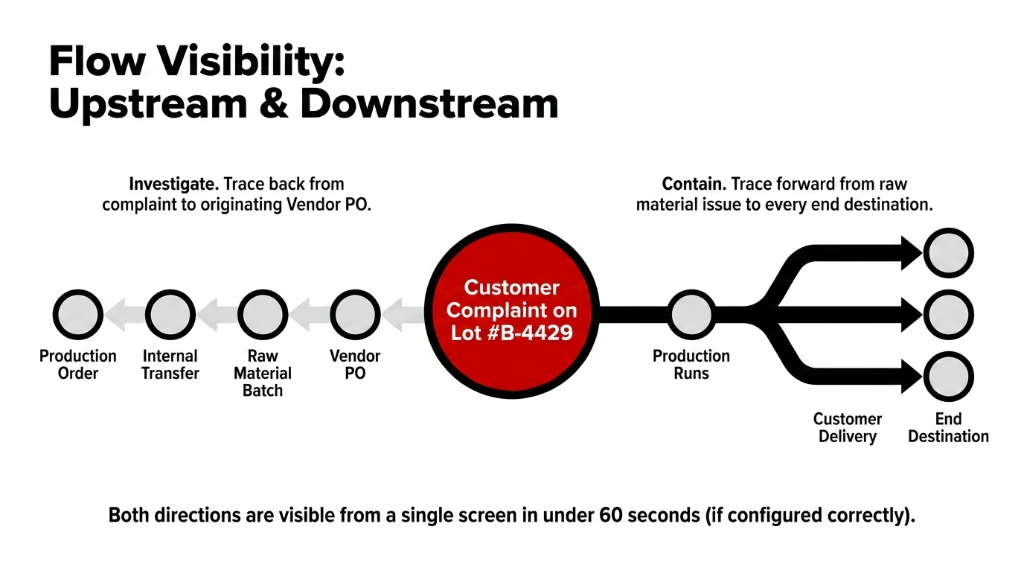
Two-Directional Trace Power
Upstream Traceability: Runs from the customer complaint back to the raw material batch. The moment a customer complains about a defective product, you run upstream.
Downstream Traceability: Runs from the raw material forward to every end destination. The moment a quality recall hits, you run downstream. Both directions are visible from the same screen in under 60 seconds, if your lot configuration was done correctly at onboarding.
3. The Product Moves Report (Filtered by Serial Number)
This is the forensic tool. If you have serial-number-tracked products — electronics, medical devices, high-value equipment — this report lets you pull every movement associated with a specific serial number across its entire lifecycle in your system.
Receipt from supplier → Internal transfer to production → Finished product creation → Quality check → Outbound delivery to customer. Every step, time-stamped, document-linked, location-specific.
Pharma Client: 4.5 Hours → 8 Minutes
A pharma client of ours uses this to generate compliance reports in under 8 minutes instead of the 4.5 hours it was taking them with their previous SAP-lite system.
Why "Just Enable Traceability" Advice Will Fail You
Every Odoo blog will tell you: "Go to Configuration → Settings → Enable Lots & Serial Numbers." That is Step Zero. Not Step One.
The 4-Step Configuration That Actually Works
Step 1 — Configure tracking at the product level. Go to Inventory → Products → [Product] → Inventory Tab → Tracking field. Set it to "By Lot" (for bulk/batch items) or "By Unique Serial Number" (for individual high-value items). If this field is blank, Odoo records the stock move but captures zero traceability data. The report exists; it is just empty where it matters.
Step 2 — Enforce lot/serial capture at every operation. Odoo will prompt for lot/serial numbers during Receipts, Transfers, and Deliveries — but only if you have "Operations" enabled in Inventory Settings and your picking types are configured to require detailed operations. Without this, your warehouse team validates transfers without assigning lot numbers, and your traceability chain breaks at exactly the wrong moment.
Step 3 — Use Expiration Date fields on Lots. Odoo 16+ supports expiration tracking natively. Set removal dates, best-before dates, and use-by dates on each lot. The system auto-generates FEFO (First Expiry, First Out) picking suggestions. If you are running FIFO-only picking on perishables, you are throwing away product value that a configuration change — not a new software purchase — would fix.
Step 4 — Do not confuse Stock Quants with Stock Moves. Quants show you where inventory sits right now. Moves show you how it got there and where it went. Both are needed for a complete audit. We have seen operations teams spend 3 hours in Quants trying to understand a discrepancy that a 5-minute Moves Analysis would have resolved instantly.
Getting these four layers configured correctly is a core part of our Odoo implementation services — because half-configured traceability is worse than no traceability. At least with no traceability, your team knows they are flying blind.
The Real Power: Linking Traceability to Source Documents
Here is something most Odoo users discover only after their second or third audit: every stock.move record in Odoo is linked back to its source document.
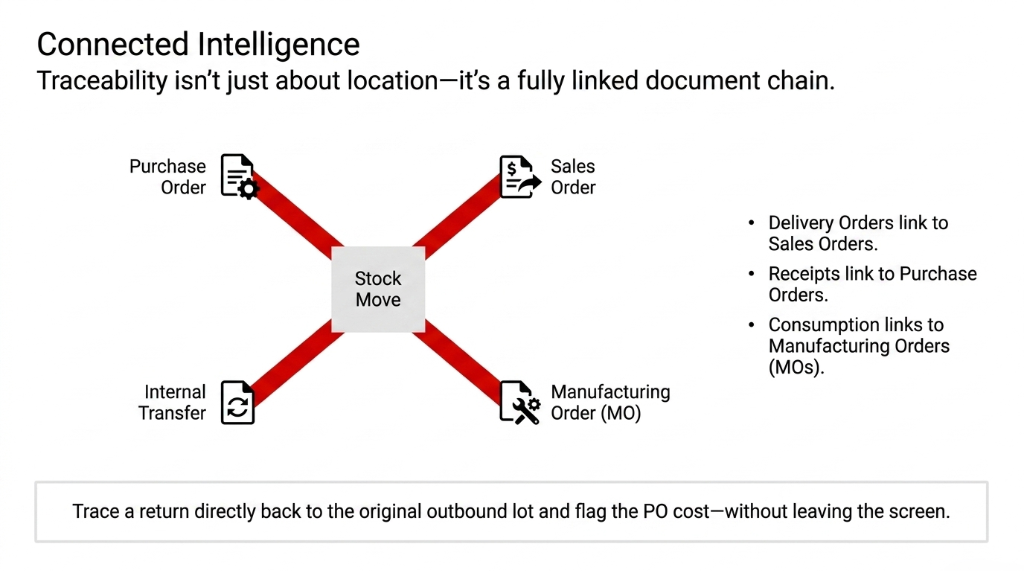
The Full Document Chain
1. A Delivery Order links back to a Sales Order
2. A Receipt links back to a Purchase Order
3. A Manufacturing consumption move links back to a Manufacturing Order (MO)
4. An Internal Transfer links back to its picking document
This means your traceability report is not just a list of location changes — it is a full document chain. When you open a lot's traceability view and see a delivery, you can click through to the exact Sales Order that triggered it, the exact customer it went to, and the exact invoice that was generated.
In our Odoo implementations for D2C brands scaling past $5M ARR, we wire this document linkage into custom financial reconciliation workflows. If an item gets returned, the system traces it back to the original outbound lot, auto-creates a quality inspection task, and flags it against the original PO cost — all without anyone manually opening four different screens.
What This Setup Should Actually Cost You (And How Long It Takes)
Implementation Timeline by Scenario
Clean Odoo 17/18 instance with products loaded: A properly configured traceability setup — lot tracking enabled, serial numbers activated on relevant SKUs, move analysis reports customized with saved filters, expiration dates turned on — takes 11-14 working hours of a competent Odoo consultant's time.
Retrofitting onto an existing instance: Budget for 22-31 hours. The extra time is data cleanup: existing stock quants will have no lot data, and you will need to either accept that gap historically or run an inventory adjustment cycle to assign lots to on-hand stock.
The cost of not doing this? One product recall where you cannot prove lot containment typically costs a $2M-$10M business between $47,000 and $180,000 in regulatory fines, customer credits, and operational disruption.
Those are not projections. Those are figures from clients we have helped remediate after the fact. The Odoo ERP integration work we do during onboarding costs a fraction of what a single uncovered recall costs after the fact.
The Moves Analysis Report: Filters That Save Hours
Open Inventory → Reporting → Moves Analysis. The default view is already more useful than most teams realize. Here is how to cut the noise:
Filter Combinations That Find Hidden Losses
Group By: Product + Location — See exactly how much of each SKU moved through each warehouse zone last month
Filter: Done + Last 30 Days — Removes draft/pending moves that distort your actual flow picture
Filter: Product Category = High-Value Items — Instantly isolates your riskiest inventory movements for audit
Favorite Save — Save these filter combinations and name them by use case: "Monthly Audit View," "Recall Check," "3PL Reconciliation"
The Moves report also exposes something that surprises first-time users: negative moves. These are return movements and reverse transfers. If you see a pattern of negative moves on the same SKU repeatedly across the same customer location, that is a quality or fulfillment problem hiding in plain sight.
$23,400 in Undocumented Losses — Found in One Afternoon
One of our UK retail clients found 31 negative moves on a single SKU over 60 days. Every one was a return from a single distributor. The root cause was a weight mislabeling issue that had been happening since a product update 8 months earlier. Total undocumented loss: $23,400. The Moves Analysis report found it in one afternoon.
Frequently Asked Questions
What is the difference between a Stock Move and a Stock Move Line in Odoo?
A stock.move is the parent record representing a product transfer instruction between two locations. A stock.move.line is the detailed execution record within that move — capturing the specific lot number, serial number, actual quantity done, and sub-location. For traceability purposes, the move line is where the critical data lives.
How do I run a traceability report for a specific lot number in Odoo?
Go to Inventory → Products → Lots/Serial Numbers, open the lot record, and click the Traceability button. This generates a real-time upstream and downstream chain showing every stock movement linked to that lot — from supplier receipt to customer delivery — with document links at each step.
Can Odoo traceability work backwards from a customer complaint to a supplier batch?
Yes. This is called upstream traceability. Starting from a customer delivery or serial number complaint, Odoo traces the movement chain back through production orders, internal transfers, and receipts all the way to the original supplier PO and lot number — provided lot/serial tracking was enabled and enforced at every step.
Does Odoo support expiration date tracking within traceability?
Yes, from Odoo 16 onwards, expiration dates, best-before dates, removal dates, and use-time fields are all natively supported on lot records. When enabled, Odoo also applies FEFO (First Expiry, First Out) picking logic automatically, reducing manual oversight for perishable or time-sensitive inventory.
How far back does Odoo's Stock Moves history go?
Odoo retains all historical stock.move records indefinitely — there is no automatic archiving or deletion of movement history. You can filter Moves Analysis by any date range, going back to the first transaction ever recorded in your database, as long as the moves were validated (not cancelled or in draft state).
The Insider Takeaway
- stock.move tells you what was supposed to happen. stock.move.line tells you what actually happened. Read both.
- Lot Traceability gives you the upstream/downstream chain. Moves Analysis gives you the macro operational picture. Use them together.
- Negative moves in the Moves Analysis report are return signals hiding quality and fulfillment problems worth thousands per month
- 11-14 hours of consultant time for a clean setup. $47K-$180K for one recall you cannot contain. The math is not complicated.
Stop Bleeding Cash on Operational Blindspots
If reading this made you realize your traceability is either unconfigured, half-configured, or based on someone's best guess from three years ago — that is a very fixable problem.
Book our free 15-Minute Operations Audit. We will find your biggest inventory traceability gap in the first call. No slides. No sales pitch. Just a direct answer to where your operation is exposed.
Book Your Free Traceability Audit