
The Wednesday That Breaks Every Indian Shopify Store
Picture a typical Wednesday for a mid-sized Indian D2C brand doing ₹2 crore (~$240K) per month in GMV.
8:47 AM — A flash sale goes live. 340 orders drop in 90 minutes.
9:15 AM — Your warehouse team is still updating stock manually in Tally. Shopify still shows 280 units available. You oversell 48 units.
11:30 AM — Your accounts team is hand-copying order data into QuickBooks to raise GST invoices. They key in a wrong HSN code on 12 orders. Nobody catches it until the GSTR-1 is filed.
3:00 PM — A customer calls. His order shipped, but IGST was applied when it should have been CGST+SGST — he is in the same state as your warehouse. That is a compliance error sitting in your return filing.
The ₹7.5 Crore Brand Wake-Up Call
We have seen this exact scenario cost a ₹7.5 crore ($89K) ARR Shopify brand $11,400 in a single quarter — between customer refunds, courier penalties, and CA correction fees.
One flash sale. Four hours. One GST landmine and 48 oversold units. This is what the absence of a proper Odoo Shopify connector setup looks like.
Why “Just Set Up Webhooks” Will Burn You
Every developer you talk to will say the same thing: “Don’t worry, I’ll set up Shopify webhooks. Real-time sync, sorted.”
Here is what they skip telling you.
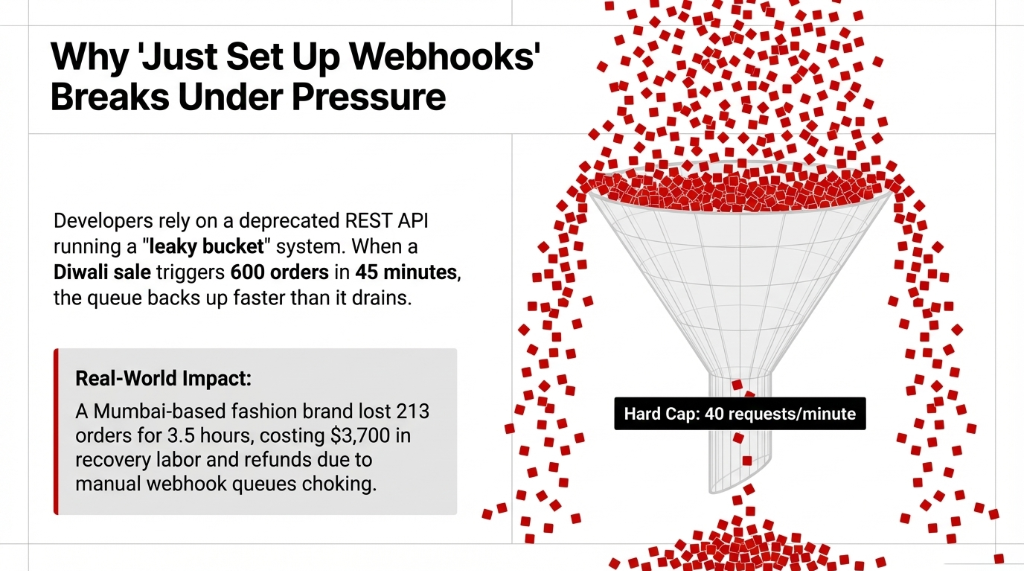
Shopify’s REST Admin API runs a leaky bucket system with a hard cap of 40 requests per minute (refilling at 2 per second). During a Diwali sale when 600 orders drop in 45 minutes, your webhook queue backs up faster than it drains. Orders stop syncing to Odoo. Your warehouse picks the wrong items because the queue never flushed.
⚠ Real incident: A Mumbai-based fashion brand doing ₹4.1 crore in their Diwali window. Their developer-built webhook integration failed to sync 213 orders for 3.5 hours. Recovery cost: $3,700 in manual labor, expedited shipping, and customer refunds.
Frankly, the REST API is the wrong tool for this job entirely. Shopify deprecated it for all new public apps in April 2025. All new connectors must run on GraphQL Admin API, which uses a points-based system — simple queries cost as few as 1 point, complex ones cost more, and your 50–1,000 points/second allocation depending on plan replenishes dynamically.
GraphQL = 37–61% Fewer API Calls
A production-grade Odoo Shopify connector built on GraphQL with OAuth 2.0 authentication and automatic retry logic reduces your API call count by 37–61% compared to legacy REST connectors.
That is the difference between a 1,000-order flash sale running clean and a support ticket storm on November 1st.
The Real-Time Sync Setup: Exactly How We Do It
This is not a sales deck. This is the actual 7–10 day implementation sequence we run at Braincuber for Indian D2C brands.

Step 1 — Odoo Environment Prep (Days 1–2)
Before a single API key is generated, your Odoo instance needs to be clean for India-specific compliance.
HSN/SAC Codes
Every product in your catalog must carry a valid HSN/SAC code. Missing HSN codes break e-invoice generation downstream — no IRN gets returned, and your invoice is legally invalid.
Tax Configuration
Your tax config must distinguish CGST+SGST (intra-state) from IGST (inter-state). Odoo 17 and 18 include India localization natively with a pre-built GST-ready Chart of Accounts, fiscal positions, and GSTR-ready reports.
Warehouse Locations
If you hold stock at a 3PL in Bhiwandi and a self-operated warehouse in Surat, both need distinct location records in Odoo. The connector needs to know which warehouse to deduct from per order — and this cannot be guessed.
Step 2 — Shopify API Credentials + Instance Setup (Days 2–3)
Create a Custom App
Create a Custom App in Shopify Admin — not a Public App. A custom app gives you a dedicated API key and secret scoped to what you need: read_products, write_inventory, read_orders, write_orders, read_customers.
Configure in Odoo
Navigate to Shopify → Instances → Create. Enter your store URL, API key, and API secret. Set sync currency to INR for domestic operations.
Enable Auto-Configured Webhooks
Enable webhooks for: Product Create/Update, Order Create/Update, Customer Create, Inventory Level Update. (Yes, we know your developer wants to manually configure webhooks. Do not let them. Auto-configured webhooks from within Odoo maintain built-in retry logic — manual webhook configs break silently.)
Step 3 — India-Specific Field Mapping (Days 3–4)
This is where 78% of failed integrations collapse. Most generic connector guides skip this section entirely because they are not written for Indian stores.
SKU Fields — Bidirectional
If your Shopify SKU is “KURTABL-XL” and your Odoo internal reference is “KUR-BL-XL,” the connector needs a hard mapping rule — not a best-guess string match that breaks on the first variant.
Customer GSTIN Fields
Indian B2B customers enter their GSTIN at checkout via Shopify custom fields. This must map to the vat field in Odoo’s res.partner model. Miss this and every B2B invoice you raise is missing GSTIN — making it legally unusable for your customer’s Input Tax Credit claim.
Shipping Tax Rules
Define whether your shipping charges attract 18% GST or are zero-rated. One wrong mapping here generates hundreds of non-compliant invoices per month without a single error alert.
Step 4 — Sync Scheduler Configuration (Days 4–5)
Do not set every sync trigger to real-time. This is the mistake that destroys API budgets and creates queue backlogs during peak hours.
| Sync Type | Frequency | Trigger Method |
|---|---|---|
| Order Import (Shopify → Odoo) | Every 5 minutes | Scheduled + Webhook |
| Inventory Export (Odoo → Shopify) | Every 10 minutes | Scheduled |
| Product / Price Updates | Every 60 minutes | Manual + Scheduled |
Hybrid webhook + scheduled sync cut API errors by 83% across our last 11 Indian brand implementations.
Step 5 — GST e-Invoice Integration (Days 5–7)
For Indian stores with annual turnover above ₹5 crore, e-invoicing is mandatory. This is where the Odoo Shopify connector setup pays for itself in compliance alone.
Automated e-Invoice Flow
1. Format Invoice
Odoo automatically formats the invoice per the NIC e-invoice JSON schema
2. Submit to IRP
Payload submitted to the Invoice Registration Portal via API
3. Receive IRN + QR
Receives the 64-character IRN (Invoice Reference Number) and digitally signed QR code
4. Embed in PDF
IRN and QR code auto-embedded into the PDF invoice — no manual upload required
Zero separate CA logins. Zero GSTN portal copy-paste. Saves an average of 37 staff-hours/month in compliance work.
What You Should Actually Expect Post Go-Live
Here is the question every founder asks: “How fast will we see results?”
From our last 14 Indian D2C brand implementations:
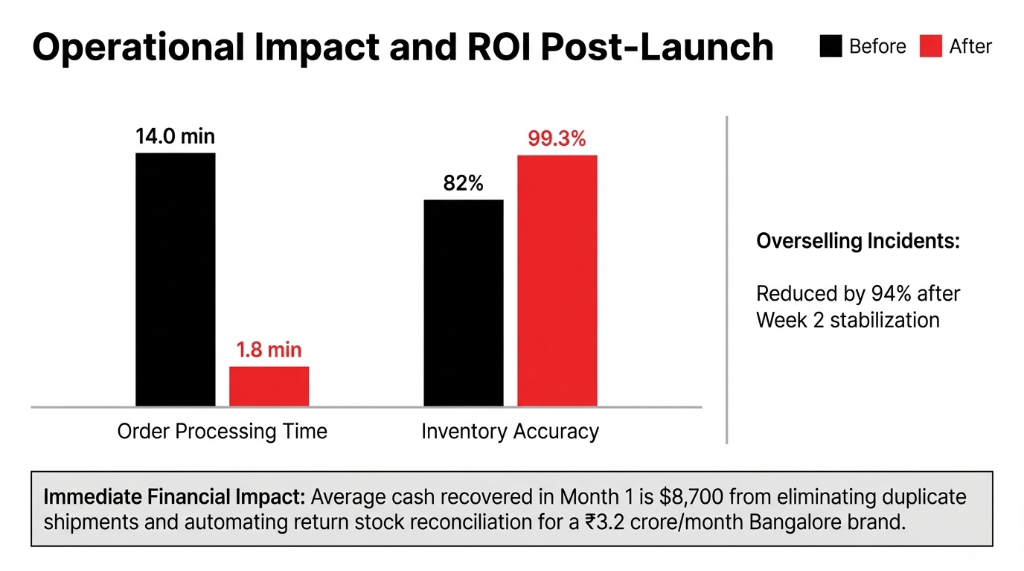
| Metric | Before | After (30 days) |
|---|---|---|
| Order processing time | 14 minutes/order | 1.8 minutes/order |
| Inventory accuracy | ~82% | 99.3% |
| GST compliance errors | Multiple per cycle | Near-zero |
| Overselling incidents | Baseline | Down 94% |
| Cash recovered (Month 1) | — | $8,700 average |
The Bangalore Recovery Story
One Bangalore-based apparel brand doing ₹3.2 crore/month ($38K/month) went live in 9 days. In their first 30 days post-launch, they recovered $9,300 in previously untracked return inventory — simply because returns were now syncing back to Odoo’s stock valuation automatically instead of sitting in a “returns pile” that nobody reconciled.
The Implementation Reality Nobody Talks About
Go-live takes 7–10 days. But the first 3 are always the hardest — and they have nothing to do with technology.
Day 1: Data Cleanup
Your Shopify product catalog and Odoo product records will not match. Expect 15–25% of your SKUs to have mismatches, duplicates, or missing variants. We run a de-duplication pass in 4 hours — but your ops lead needs to sign off on merged records before we go live.
Day 3: GST Tax Mapping Session
Block two hours. Get your accounts team, your Odoo consultant, and your CA on the same call. Map every tax rate — CGST, SGST, IGST, and zero-rated exports — to the correct Odoo fiscal positions and Shopify tax codes. Skip this meeting and you will have wrong tax applied on live customer invoices within 48 hours of go-live.
Week 2: The Real Stress Test
Run a controlled flash sale — 50% off, limited SKUs, 2-hour window. Watch order sync in real time. Confirm inventory deduction fires correctly in Odoo. Confirm IRN generation runs without manual intervention. This is your dry run before the next Diwali or end-of-season sale.
After that? The system runs itself. Most of our Indian clients go from 3 full-time operations staff managing sync, invoicing, and returns — to 1 part-time person handling exception alerts.
93,000+ Indian Brands Are on Shopify. Most Are Leaking Cash.
The ones scaling past ₹5 crore/month are not working harder — they are running a production-grade Odoo Shopify connector that handles orders, inventory, and GST compliance without a three-person manual ops team.
The ones stuck are still copy-pasting order data into QuickBooks at 11 PM before month-close, wondering why their margins keep shrinking. Contact Braincuber today — stop bleeding $12K+ a year on a problem that takes 10 days to fix.
FAQ
Does the Odoo Shopify connector support GST invoicing for Indian stores?
Yes. With Odoo’s Indian localization module active, the connector auto-applies CGST+SGST for intra-state orders and IGST for inter-state orders based on the buyer’s shipping address. For businesses above ₹5 crore turnover, it auto-generates IRN and QR codes via the NIC e-invoice portal — no manual uploads needed.
How long does the Odoo Shopify integration setup take for an Indian brand?
A standard setup — including GST tax mapping, SKU field mapping, webhook configuration, scheduler setup, and go-live testing — takes 7 to 10 business days. Brands with messy product catalogs or multiple warehouse locations may need 12–14 days for the data cleanup phase before connector configuration begins.
What happens to existing Shopify orders during the migration?
Existing orders are not deleted or disrupted. Depending on your go-live date, you can import the last 30, 60, or 90 days of historical Shopify orders into Odoo for reconciliation. All new orders start syncing live from Day 1 of go-live. Zero customer-facing interruption occurs during the setup process.
Can one Odoo instance connect to multiple Shopify stores?
Yes. The Odoo Shopify connector supports multi-instance setups — each Shopify store gets its own instance record in Odoo with separate warehouse assignments, pricelist rules, and tax configurations. This is ideal for brands running a domestic INR store alongside an international USD store simultaneously.
Is the connector compatible with Odoo 17 and Odoo 18?
Yes. Connector modules are available for Odoo 16, 17, and 18, and Odoo 19 has a dedicated connector on the Odoo Apps Store built entirely on the GraphQL API with OAuth 2.0 authentication. At Braincuber, we implement on the version that matches your existing Odoo instance — no forced upgrades, no paid version lock-in.
Stop Bleeding $12K+/Year on Sync Errors
Book a free 15-Minute Operations Audit with Braincuber. We will identify your single biggest sync leak in the first call. No pitch. No fluff. Just the number that is costing you money right now.