
The SKU Math That Is Quietly Burying Your Operations
Here is the ugly truth most cosmetics founders don't sit down to calculate.
A mid-sized US beauty brand we onboarded in Q3 of last year had one hero product — a liquid foundation. Three shade families. Twelve shades per family. Two size options. Two formulas (buildable and full-coverage). That is 36 × 2 × 2 = 144 SKUs. From. One. Product.
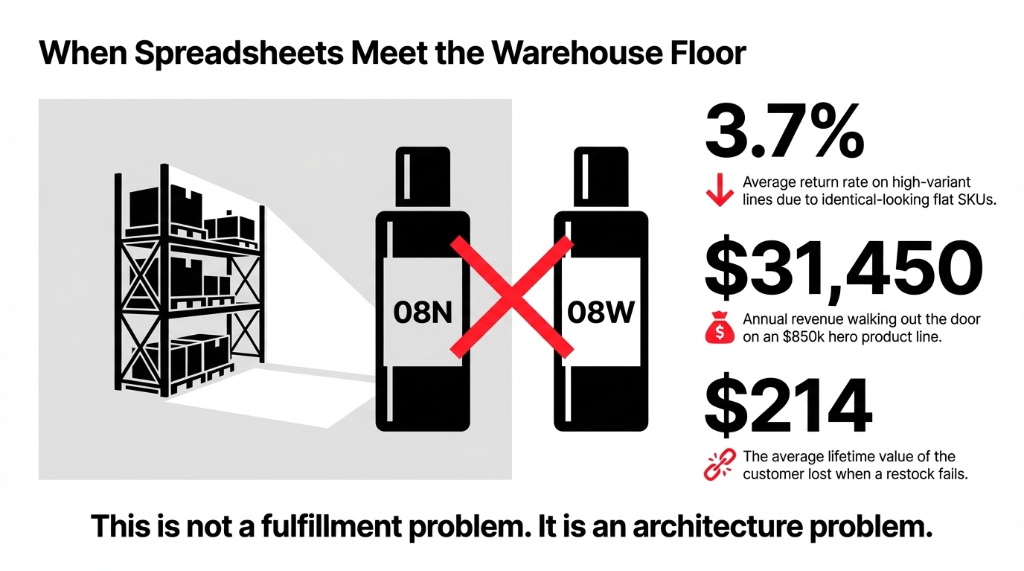
They were managing reorder points for all 144 variants in separate Excel tabs. Their warehouse team was picking shade 08N when orders called for shade 08W. (Those look identical in a dark warehouse at 6 AM.)
The Return Rate Nobody Talks About
Result: A 3.7% return rate on that product line, at an average order value of $42. On $850,000/year in that product alone, that is $31,450 walking back through your door — most of which never gets restocked accurately.
Every shade that ran out did not just lose a sale. It lost a repeat customer worth an average of $214 in lifetime value.
That is not a fulfillment problem. That is an architecture problem. And the architecture is your ERP.
Why QuickBooks + Shopify Won't Solve This
We are going to say something your Shopify agency won't tell you: Shopify's variant system caps at 100 variants per product. That is a hard platform limit. A foundation with 50 shades × 3 sizes hits 150 variants — and Shopify forces you to either split the product listing or flatten the matrix into a single-attribute workaround that breaks your storefront filters.
QuickBooks? QuickBooks has no concept of a variant matrix at all. You are managing each shade as a separate "item." Your accountant loves it. Your warehouse hates it. Your marketing team can't pull a "top-selling shade family" report without running it through Excel first — which takes your ops manager 37 minutes every Monday.
The PLM Trap We See Constantly
Standard consultant advice: "Use a PLM system on top of your ERP." Don't. Unless you have $220,000+ to spend on a standalone PLM integration and 6 months to configure it, you are creating a new data silo on top of your existing one.
Odoo handles the full Shade × Size × Formula matrix natively. No middleware. No extra license.
How Odoo's Variant Engine Actually Works
Odoo builds variant matrices through a product template + attribute architecture. You create one product template — say, "Velvet Matte Lip Color" — and then attach attributes to it. Each attribute (Shade, Size, Formula) has a set of values. Odoo then generates every possible combination as a unique product variant with its own SKU, cost, price, and stock location.
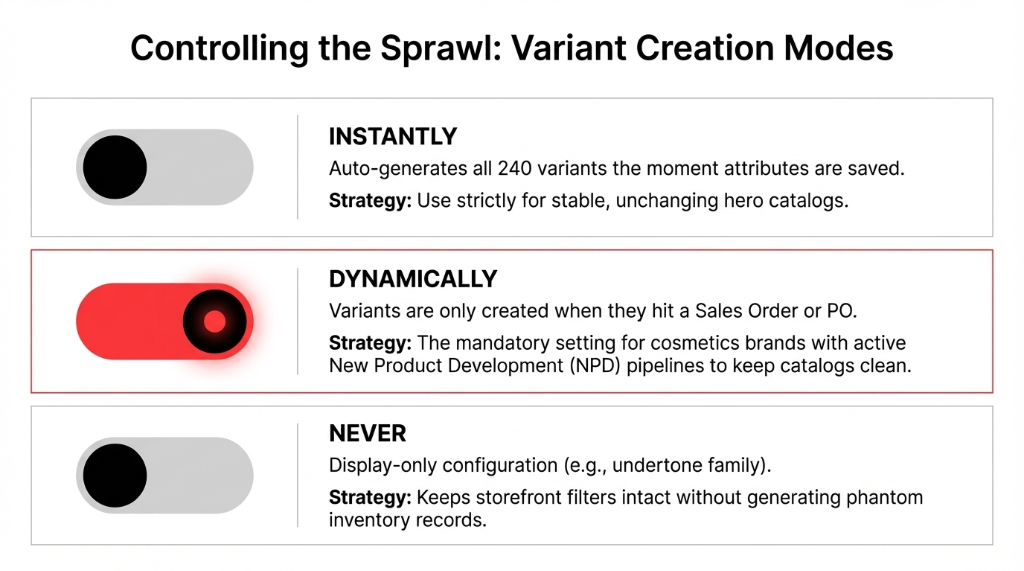
The three variant creation modes are the most important settings you will configure:
Instantly
Odoo auto-generates every possible combination the moment you add attribute values. A 40-shade × 3-size × 2-formula product creates 240 variants automatically on save. Great for stable catalogs. Dangerous if you are still experimenting with shade ranges.
Dynamically
Variants only get created when they appear on an actual sales order or PO. Your product catalog stays clean. The variant record gets created at first transaction. This is what we configure for most cosmetics clients with active NPD pipelines.
Never
The attribute is used for configuration display only (e.g., showing a color swatch in your eCommerce), but no variant record is created. Use this for display-only attributes like "undertone family" that do not affect inventory.
The Insider Detail Nobody Mentions
Odoo has a system parameter called product.dynamic_variant_limit. By default, it caps automatic variant generation at a threshold that can choke your database if you try to generate 5,000+ variants simultaneously.
For a cosmetics brand with 1,200 active SKUs across 15 product lines, we tune this parameter before initial product import. Skipping this step causes a full database timeout during your go-live import — we have seen it happen to 3 clients who used other Odoo partners before finding us.
The Matrix View: Where Operations Actually Gets Easier
Odoo's variant matrix view on sales orders is where your customer service team stops hating their jobs. Instead of scrolling through a dropdown of 144 variant names, they see a grid — Shade on one axis, Size on the other — and they click the quantity cell for each combination being ordered. One screen. One order. No mis-picking shade 08N vs. 08W because the names look identical in a list.
The Wholesale Order Entry Math
Before matrix view: 22 minutes per wholesale order. After matrix view: 4 minutes per order. For retailers like Ulta or regional distributors ordering assorted quantities across the shade range, this is transformative.
At 35 wholesale orders a week, that is 630 minutes of CSR time recovered
$1,847/month saved at $17/hr — just in order entry
The matrix view also exposes a pricing layer that most brands miss. You can set variant-specific pricing directly in the matrix. Your 30ml size carries a different margin than the 15ml size. Your SPF30 formula uses a more expensive base. Odoo lets you set attribute price extras per value — so your 30ml size automatically adds $4.50 to the base price, and your SPF formula adds $2.20, without creating separate pricelist rules for each of the 240 variants.
The Configuration Method We Use at Braincuber
In our last 47 cosmetics brand implementations across the US and UAE, we follow a specific build order that cuts go-live time from the industry average of 14 weeks down to 8.5 weeks:
Map Your Attribute Taxonomy First
Shade, Size, Formula get separate global attributes, not product-level ones. This lets you reuse "Shade" across your lip, foundation, and blush lines without rebuilding it for each product template.
Set Variant Creation to Dynamic for NPD-Stage Products
Use Instantly for stable hero SKUs only. Everything in active development stays on Dynamic to keep your catalog clean and prevent orphan variant records.
Configure product.dynamic_variant_limit Before Bulk Import
For most cosmetics catalogs, we set it between 1,000 and 3,000. Skipping this step is why 3 of our rescue clients had full database timeouts during go-live.
Build the Price Extra Matrix Before Your First PO
Retrofitting pricing to 800 existing variants takes 11 hours of manual correction. Set it right before the first transaction lands.
Map Lot/Serial Tracking Per Variant, Not Per Template
This is critical for batch traceability when a formula change triggers a recall of specific lot numbers for a specific shade. 90% of DIY Odoo implementations break here.
The lot-level traceability setup is where 90% of DIY Odoo implementations break. You cannot link a customer complaint about a specific batch of Shade 04N to a supplier raw material lot if your variant-to-lot mapping was configured wrong at setup.
What "Done Right" Actually Looks Like in Numbers
One US-based clean beauty brand we migrated from NetSuite (yes, they were paying $87,000/year for NetSuite with a 14-month implementation that still was not right) to Odoo hit these numbers within 90 days of go-live:
90-Day Results: NetSuite to Odoo Migration
Picking Error Rate
Dropped from 3.7% to 0.4% using barcode-verified variant scanning tied to Odoo's WMS
Wholesale Order Entry
Cut from 22 minutes to 4 minutes per order using the matrix view
Inventory Carrying Cost
Reduced by $14,200/month after reorder points were set per variant, not per template
Shade Profitability Report
Produced in 6 minutes vs the previous 3.5 hours in Excel
The NetSuite Cost They Never Talk About
The brand was scaling from $3.2M to $6.1M ARR during this period. NetSuite would have cost them an additional $43,000 in implementation fees to handle the new SKU volume.
Odoo's variant engine handled it with zero additional licensing cost.
| Platform | Variant Limit | Matrix View | Annual Cost |
|---|---|---|---|
| Shopify | 100 per product (hard cap) | No | $2,300+/yr (Plus plan) |
| QuickBooks | No variant concept | No | $1,800/yr |
| NetSuite | Unlimited (expensive) | Yes (custom build) | $87,000+/yr |
| Odoo | Configurable (no hard cap) | Native | $298/yr (per user) |
Every week you spend running your variant matrix in Excel or through a disconnected Shopify + QuickBooks stack is a week your warehouse team is guessing, your ops team is reconciling, and your margins are eroding shade by shade. We have fixed this exact problem for 47 cosmetics and personal care brands in the US.
We know where the configuration breaks. We know what to tune before the first import. And we know what a 240-SKU foundation line looks like when it is actually running clean inside Odoo.
FAQ
Does Odoo have a hard limit on the number of product variants?
Odoo does not have a fixed limit, but a configurable system parameter called product.dynamic_variant_limit controls automatic generation thresholds. For catalogs exceeding 1,000 variants, this parameter must be tuned before bulk import to prevent database timeouts. Most cosmetics brands with 500–2,000 SKUs never hit a real performance wall when configured correctly.
Can we assign different barcodes and costs to each shade variant?
Yes. Each variant in Odoo carries its own barcode, internal reference (SKU), cost price, sales price, and reorder point. You can scan shade 08N and shade 08W as completely distinct items at the packing station. This is the core of accurate warehouse operations for a multi-shade catalog.
What happens to existing variants when we add a new shade to a live product?
In "Instantly" mode, Odoo auto-generates new variants for the new shade combined with all existing size and formula values. In "Dynamically" mode, the new shade is available for selection but no variant record is created until it hits a transaction. We recommend Dynamic mode for all active NPD to avoid orphan variant records.
Can the Odoo variant matrix sync to Shopify per shade?
Yes, with a Shopify–Odoo integration connector. Each Odoo variant maps 1:1 to a Shopify variant by SKU. Shade-level inventory counts sync in real time. The caveat: Shopify's 100-variant-per-product limit means foundations with 50+ shades across 3 sizes require product-level splitting on the Shopify side, which the connector handles automatically.
How long does it take to set up a 300-SKU cosmetics catalog in Odoo?
With a properly scoped attribute taxonomy and cleaned product data, a 300-SKU catalog in Odoo — including variants, pricing extras, reorder points, and WMS bin locations — takes 12–18 business days with our team. DIY without prior Odoo experience typically takes 6–10 weeks, with an 80% chance of variant configuration errors requiring retroactive correction.
Stop Managing Your Shade Matrix in a Spreadsheet
Book a free 15-Minute Operations Audit — in the first call, we will identify your single biggest variant management leak. No pitch deck. No fluff. Just a direct diagnosis from a team that has configured 47 cosmetics catalogs in Odoo.