
The $743 Billion Problem Your Accountant Keeps Ignoring
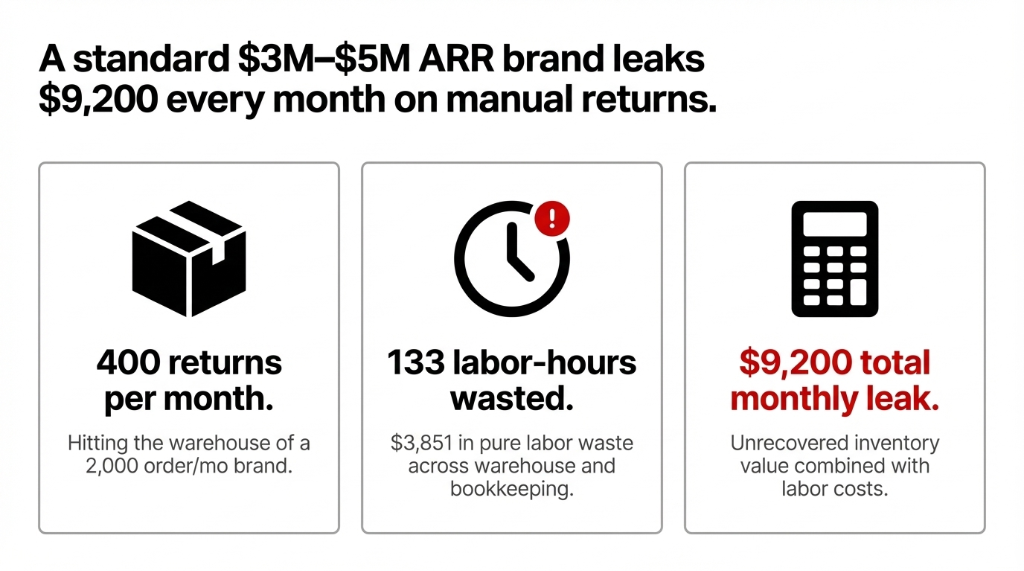
Here's what that looks like operationally for a brand processing 2,000 orders/month at a 20% return rate: 400 returns per month hitting your warehouse. Each return requiring an average 18-23 minutes of manual work across three systems. Total: roughly 133 labor-hours/month on nothing but return data entry.
At $22/hr for warehouse staff and $35/hr for your bookkeeper's time, that's $3,851/month in pure labor waste — before you count a single accounting error. The cost of US e-commerce returns as a whole is estimated at $400 billion annually.
And yet the brands we talk to in Texas, California, and New York are still running this on a combination of Google Sheets, Klaviyo manual triggers, and three Zaps that break every Black Friday.
What's Actually Breaking Inside Your Returns Process
We've implemented Odoo returns automation for 150+ brands globally. The failure pattern is always the same — and it always starts in the same place.
A customer initiates a return. The return hits your 3PL or warehouse. Your warehouse guy validates the receipt. Then he either emails someone, drops a note in Slack, or (our personal favorite) puts a sticky note on the monitor of the person who creates the credit notes in QuickBooks.
That handoff is where $12,450 disappears every month.
We had a client in Austin, TX — a DTC apparel brand at $4.2M ARR — who discovered 6 months of unreconciled credit notes sitting in a QuickBooks backlog. Their accounts receivable balance was inflated by $74,700 because nobody owned the returns-to-accounting handoff end-to-end.
Their bank balance, their QuickBooks AR, and their Shopify inventory count were all telling three different stories.
Here's the dirty detail nobody talks about: when your warehouse team types a return reason of "defect" into ShipStation but your bookkeeper codes it as "customer remorse" in QuickBooks, your warranty claims data is garbage. Six months from now, when you sit down with your supplier to negotiate deductions for defective units, you have no documentation. You leave money on the table. Every time.
And if you're on AVCO or FIFO costing — which most product-based e-commerce brands should be — manual returns created without linking to the original delivery order generate incorrect cost valuation entries that require manual journal corrections. Your accountant isn't catching those. They're catching them at year-end when the damage is done.
Why the Tools You're Using Are Making It Worse
Here's the controversial opinion: Loop Returns and AfterShip are not solving your problem. They're solving your customer-facing UX problem. The moment the customer submits that return portal form, you're right back to manual processes on the operations side because neither of those tools owns your accounting layer or your warehouse inventory valuation.
You're paying $299-$999/month for a pretty portal that emails your warehouse team. (Yes, really.)
The Zapier Failure We Watched in Real Time
Zapier automations connecting Shopify → QuickBooks → ShipStation fail spectacularly above 200 daily orders. Shopify's API rate limit hits a wall, return confirmations don't sync, and your QuickBooks balance is wrong before your morning coffee.
We watched a client miss $18,300 in credit notes during a single Q4 weekend because their Zapier webhooks timed out and nobody caught it until January reconciliation.
The fundamental problem: returns need to be one atomic transaction, not three sequential steps across three systems owned by three different people. When the step 1 → step 2 → step 3 handoff is manual, any one of the three steps can fail silently. And in a 400-returns/month operation, silent failures compound fast.
How Odoo Returns Automation Actually Works
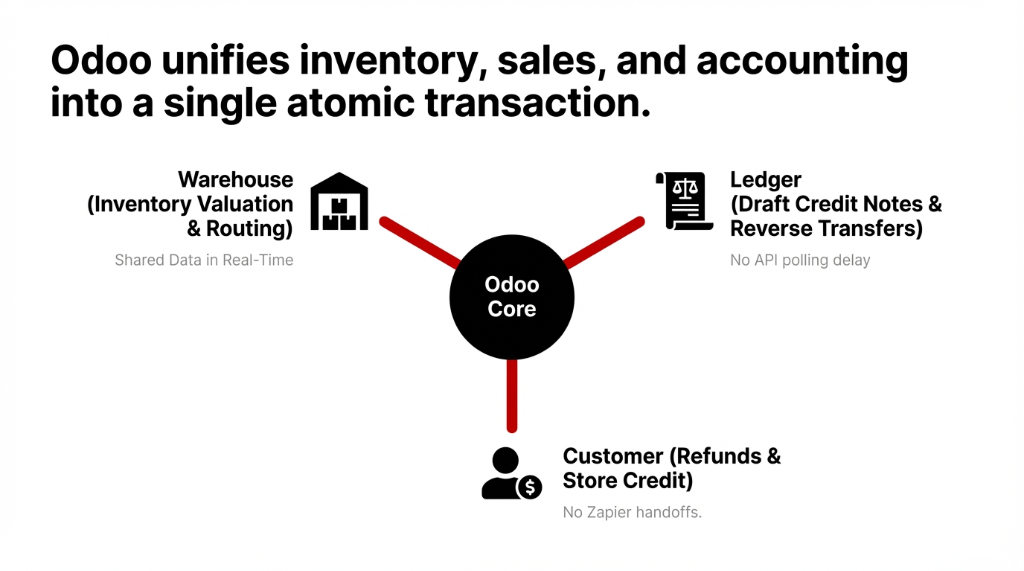
Odoo handles returns through an interconnected chain of its Inventory, Sales, and Accounting modules that share data in real time. When configured correctly, a single warehouse action triggers everything downstream.
Step 1: Warehouse Receives the Return (90 seconds)
Your warehouse team opens the original Sales Order in Odoo and clicks "Return." A wizard opens. They confirm quantities, select the return reason code, and choose the return destination location. No email to accounting. No Slack message. No sticky note.
Step 2: One Click Triggers Three Simultaneous Actions
Clicking "Return with Credit Note" creates a Reverse Transfer (physically moves product back), generates a Draft Credit Note linked to the original invoice (pre-populated with line items, quantities, tax calculations, refund journal), and updates real-time inventory valuation with automatic AVCO/FIFO cost reversal.
Step 3: Accounting Reviews — Not Rebuilds
Your accountant opens the draft credit note. It is not blank. Odoo pulled the original invoice line items, quantities, unit prices, tax jurisdiction. They verify and confirm. Total accounting time: under 60 seconds.
Step 4: Customer Receives Resolution — Same Day
For store credit: the credit note sits on the customer account and auto-applies to the next sales order. For cash refund: one click registers the outbound payment and reconciles against the original invoice. Odoo marks the transaction fully settled.
Per-Return Processing Time
Before Odoo
18-23 minutes across 3 systems, 3 people
After Odoo
4 minutes 12 seconds. Zero manual handoffs.
Reduction
81% less time per return
The Restocking Logic Is Where Brands Leave $18,750/Month on the Table
Here's what the Odoo tutorials don't emphasize enough: the credit note is the easy part. The inventory routing is where you actually recover money.
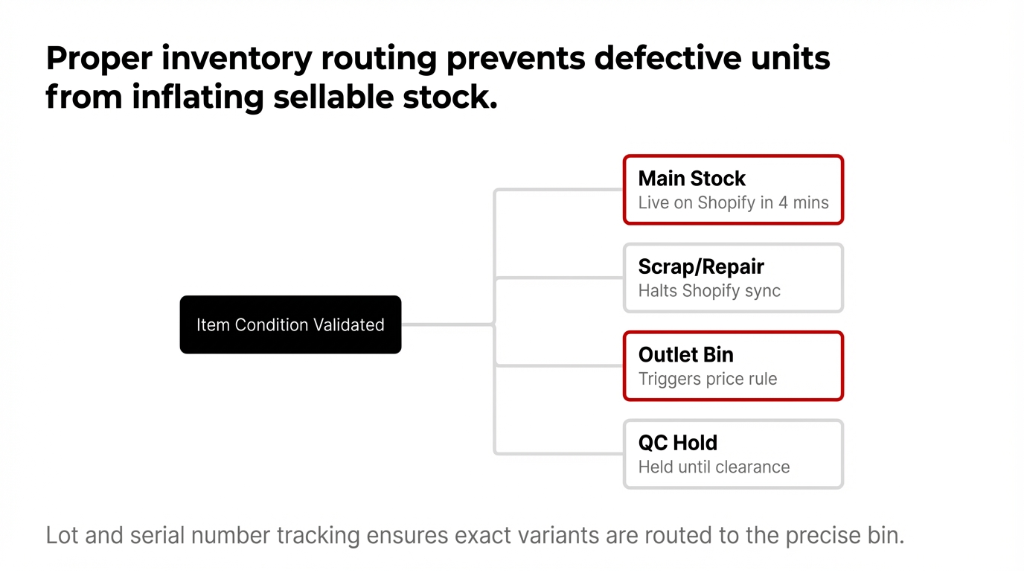
Returned as sellable → routed directly to main stock location (available to resell within 4 minutes of warehouse validation)
Returned as damaged → routed to a dedicated scrap or repair location (does not inflate your sellable count on Shopify)
Returned for discount resale → routed to an outlet bin with a separate price rule configured
Returned for quality inspection → held in a QC location until inspection is complete, then routed based on outcome
Without multi-location routing, every return defaults to main stock.
Which means your Shopify storefront is showing inventory as available that is literally ripped packaging sitting in a receiving bin. We've seen clients ship defective returns to brand-new customers.
That's a $47 average cost-per-complaint for customer support handling, reshipping, and goodwill discount — on top of the original refund.
The Recovery Math
With Condition-Based Routing
73% of returned inventory value recovered into sellable stock
Without Routing (Industry Avg)
48% recovery. The 25-point gap on 400 returns at $75 AOV = $7,500/month
What Your First 30 Days Actually Look Like
Days 1-3: Core Setup
Define return locations (main stock, scrap, repair, outlet), configure refund journals (store credit vs bank refund), set up return reason codes, map condition-based routing rules. Shopify-Odoo integration maps return triggers directly — no Zapier, no webhook lag.
Days 4-5: Team Training
Your warehouse team needs to know one new button: "Return with Credit Note." Your accountant needs to know where draft credit notes appear in the accounting queue. That's the entire training scope for 80% of e-commerce brands.
Day 14: First Checkpoint
Returns that took 18 minutes now take 4. Credit notes that sat in a queue for 3-7 days are created same-day. Shopify inventory count matches your Odoo warehouse count in real time.
Day 30: The Reconciliation Moment
For the first time, your AR balance in Odoo matches your bank. Your Shopify stock matches your physical warehouse. Your accountant has time for something other than chasing return paperwork.
Real Result: First Clean Month-End in 14 Months
One of our clients — a home goods brand in Dallas at $5.7M ARR — told us their accountant sent the operations team a thank-you email after the first clean month-end close in 14 months.
(That's not a marketing story. That's a real Tuesday morning email forwarded to our Slack.)
The Edge Cases Odoo Handles That Will Surprise You
Partial Returns
Odoo creates a credit note for only the returned line items — uncheck the lines you're not crediting in the reverse dialog. The original invoice stays intact and partially settled.
Fiscal Period Crossover
The credit note date is configurable in the wizard. You can back-date to the correct fiscal period without manual journal entries.
Bundle SKU Returns
Component-level return configuration is available but requires partner-level setup. A "Starter Kit" bundle with 4 components needs each component tracked separately in the reverse transfer.
High-Volume Overnight Processing
Odoo's reconciliation models run daily automated matching of overnight return credit notes to originating invoices. For 30+ returns/night, this is a 7 AM clean-slate dashboard vs a 3-hour morning reconciliation session.
The Implementation Reality
We'll say the thing nobody else will: you do not need a 3-month "discovery phase" to implement Odoo returns automation.
That timeline exists because implementation partners bill by the hour. A properly scoped returns automation configuration — locations, routes, credit note workflows, Shopify sync, condition-based routing — takes 2-3 business days with an experienced Odoo partner. Add 1-2 days for team training. You can be fully live in one week.
The Cost of Not Acting
Labor Waste
133 hrs/month × $29/hr blended rate = $46,212/year
Unrecovered Inventory
25-point gap in restocking recovery = $90,000/year
Payback Period
The automation pays for itself in Month 1. Not Year 1.
FAQ
Does Odoo automatically create a credit note when a product is returned?
With proper module configuration, yes. Clicking "Return with Credit Note" in the return wizard simultaneously creates a reverse transfer and a draft credit note pre-populated from the original invoice, including line items, quantities, tax lines, and the correct journal. Accounting confirms in under 60 seconds.
Can Odoo route returned items to different warehouse locations based on their condition?
Yes. Odoo's multi-location routing rules send sellable returns to main stock, damaged returns to scrap or repair, and discount-grade returns to an outlet bin — all based on the condition code selected during return validation. This prevents defective inventory from appearing as available on Shopify.
How long does Odoo returns automation implementation take for a US e-commerce brand?
With an experienced Odoo partner, core configuration — return locations, credit note workflows, refund journals, condition routing, and Shopify sync — takes 2-3 business days. Team training adds 1-2 days. Most brands are fully live within one week.
Will Odoo handle partial returns on a multi-product order correctly?
Yes. In the return wizard, you uncheck the line items not being credited. Odoo creates a credit note only for the returned quantities and amounts, leaving the original invoice partially settled and fully traceable. AVCO and FIFO cost reversals apply only to the returned items, keeping inventory valuation accurate.
Does Odoo returns automation connect directly to Shopify without Zapier?
Yes. The Shopify-Odoo integration routes return triggers from Shopify directly into Odoo's inventory and accounting modules in real time — no Zapier polling lag, no API rate-limit failures during Q4 volume spikes. Updated inventory counts push back to Shopify automatically within minutes of warehouse validation.
Stop the Bleeding. Your Returns Process Is Costing You $9,200/Month.
Book a free 15-Minute Operations Audit — in the first call, we'll show you exactly how many hours your team is wasting on returns and what it's costing you in real dollars. No fluff. Just numbers.