
The Reorder Problem Nobody Is Talking About
Here is what is actually happening inside your procurement stack right now.
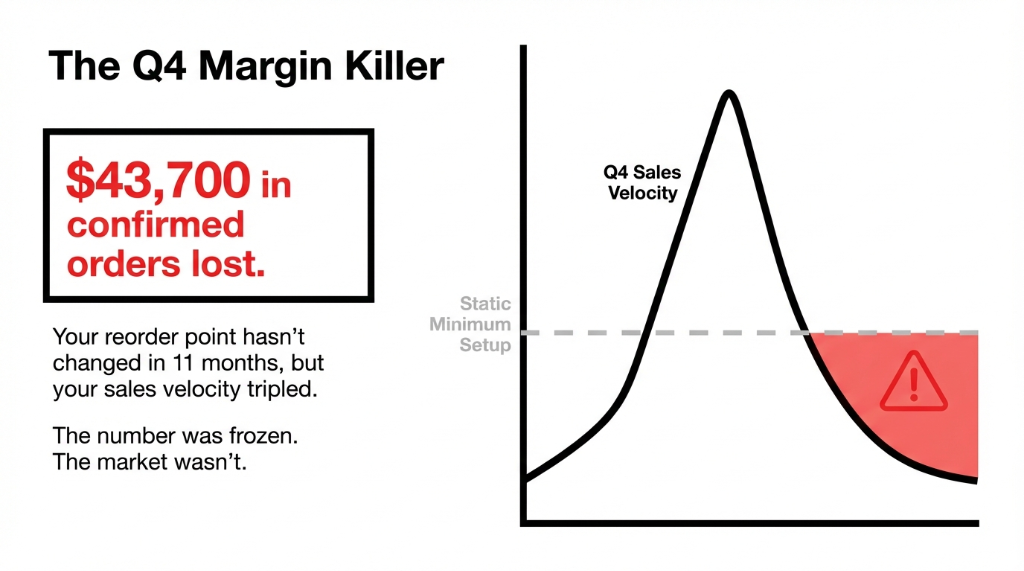
You set a minimum stock level of 50 units for a product back when you were moving 200 units a month. That was fine. Then your Shopify store ran a BOGO campaign, TikTok picked up your product, and suddenly you are moving 780 units a month. Your reorder rule still fires at 50 units — which means Odoo (or worse, your operations manager’s Excel sheet) triggers a purchase order when you have 4 days of inventory left, not 14.
Your vendor lead time is 12 days. You do the math.
The 8-Day Stockout Math
That is an 8-day stockout. For a product selling at $47 average order value, at 26 units per day, that is $9,776 in direct lost revenue — per SKU, per incident.
And that is before you calculate the 69% of online shoppers who will go straight to a competitor and never come back after hitting an “out of stock” page.
You did not just lose a sale. You lost a customer lifetime value of $340+.
The ugly truth is that static reorder rules are not an inventory strategy. They are a liability wearing the costume of a system.
Why Your Current Setup Is Lying to You
Most brands we audit have one of three broken configurations:
Configuration 1: The Frozen Minimum
Min quantity set once, never updated. Works perfectly until your sales velocity changes — which is every quarter for any brand that is actually growing.
Hidden cost: Every dollar of revenue your velocity outpaces your trigger.
Configuration 2: The Safety Stock Overcorrection
After one bad stockout, someone cranked the minimum quantity to 300 “just to be safe.” Now you are carrying $142,000 in dead inventory that ties up your working capital and collects dust in a 3PL you are paying $2,400/month for.
Hidden cost: $142,000 in trapped working capital + $2,400/month in storage.
Configuration 3: The Manual Scheduler
Someone on your ops team runs the Odoo replenishment report every Monday morning. Fine. Until they take a vacation. Or call in sick on the Friday before a flash sale. Or miss the replenishment window because 23 other fires were burning simultaneously.
Hidden cost: Human reliability as your supply chain’s single point of failure.
The Utah Home Goods Wake-Up Call
Real client story: A Utah-based home goods brand doing $4.3M ARR. 187 active SKUs. Their ops manager was manually reviewing reorder suggestions twice a week in Odoo 16. They were getting it right about 71% of the time.
The other 29% cost them $187,400 in stockout losses and emergency air-freight premiums in a single fiscal year.
That is not a staffing problem. That is an automation problem.
How Sales Velocity Changes Everything About Reorder Logic
Sales velocity is the number of units of a product sold per day over a rolling window — typically 7, 14, or 30 days. It is not a fixed number. It moves with promotions, seasons, influencer posts, and market shifts.
The Reorder Point Formula
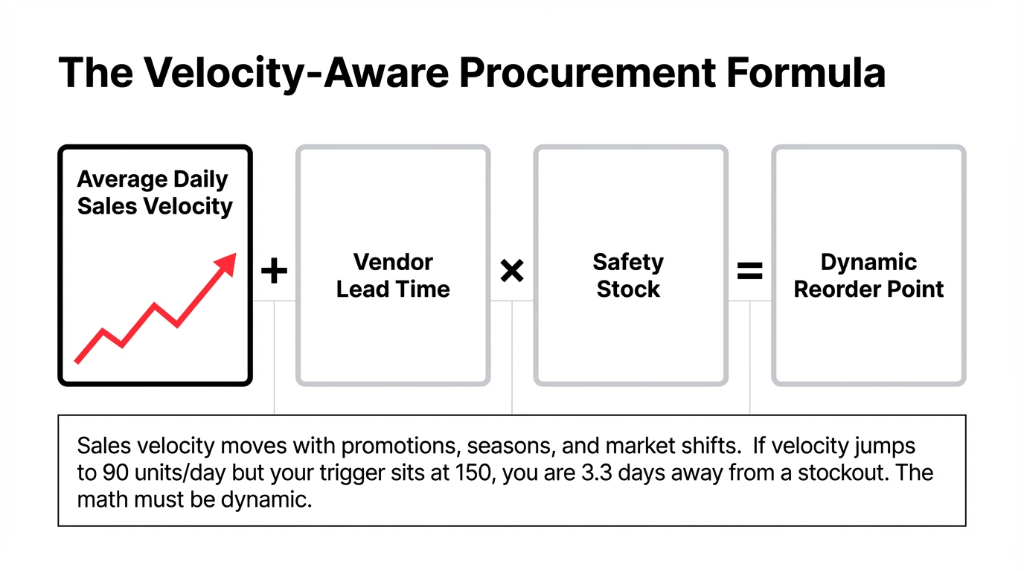
Reorder Point =
(Average Daily Sales Velocity x Vendor Lead Time) + Safety Stock
Example: 35 units/day
Vendor takes 10 days to deliver. Your reorder point should be at minimum 350 units before safety stock.
During Promotion: 90 units/day
If your reorder trigger is still sitting at 150 units — you are 3.3 days away from a stockout the moment that campaign goes live.
This is where Odoo’s procurement automation engine, when configured correctly, stops being a passive alert system and starts acting like a real operations brain.
What Odoo’s Procurement Automation Actually Does (When You Configure It Right)
Here is the thing nobody tells you in the Odoo documentation: out-of-the-box reorder rules are static. The intelligence comes from how you layer demand forecasting and sales data on top of the rules engine.
Here is the actual configuration flow we use at Braincuber for velocity-aware procurement automation:
Step 1 — Enable Forecasted Quantity Logic
In Odoo Inventory Settings, activate Storage Locations and Multi-Step Routes. This forces Odoo to calculate forecasted quantity (on-hand + incoming POs − confirmed sales orders) rather than just raw on-hand stock. This is the difference between knowing you have 200 units right now versus knowing you will have 14 units in 8 days.
Step 2 — Set Dynamic Lead Time per Vendor
Under each product’s Purchase tab, lock in your vendor’s actual lead time — not the optimistic number on the quote, the real-world average from your last 12 POs. If your supplier in Guangzhou takes 18 calendar days, not 12 business days, that distinction alone will save you from 3–4 stockout events per year. Odoo uses this to back-calculate when a reorder trigger fires.
Step 3 — Configure Replenishment Rules Tied to Confirmed Sales Orders
Instead of relying only on the daily scheduler, set reorder rules to trigger the moment a confirmed sales order pushes forecasted quantity below your minimum threshold. This means if a B2B client drops a $28,000 bulk order at 3 PM on a Friday, Odoo fires an RFQ to your supplier automatically — not Monday morning when your ops manager logs in.
Step 4 — Layer in Sales Velocity Windows Using Odoo’s Reporting Module
Pull a 30-day rolling average of units sold per SKU from Odoo’s Sales Analysis report. Use this to recalibrate your min/max quantities quarterly — or monthly if you run frequent promotions. We build a Python-based Odoo module for clients that auto-adjusts minimum stock thresholds based on a 30-day rolling velocity calculation, so the reorder point moves with the business instead of staying frozen. (Yes, this requires a custom module. No, it is not a $50,000 build. We typically deliver this in 3–4 weeks.)
Step 5 — Automate PO Confirmation with an Approval Gate
For POs below $2,500, configure Odoo to auto-confirm the RFQ without human review. For POs above $2,500, route to a purchasing manager with a 24-hour SLA. This cuts the average time from reorder trigger to confirmed PO from 3.2 days (manual) to 6.7 hours — without removing human oversight on large spends.
What Happens When You Actually Deploy This
We deployed this exact configuration for a Texas-based health supplements brand doing $3.1M ARR in March 2024. They had 94 active SKUs and were running stockouts on their top 11 revenue-generating products an average of 2.3 times per quarter.
After a 4-week Odoo procurement automation build:
| Metric | Before Odoo | After Odoo (90 days) |
|---|---|---|
| Stockout incidents | 9.2 per quarter | 1 per quarter |
| Emergency air-freight spend | $14,300/quarter | $1,100/quarter |
| Excess inventory carrying costs | Baseline | Down 19.3% |
| Monday replenishment review | 3.5 hours | 22 minutes |
| Annualized operational savings | — | $188,000 |
Real 90-day data from a Texas-based health supplements brand — not vendor projections.
The real number that mattered to their CFO: $188,000 in annualized operational savings, paid back the implementation cost in under 60 days.
The Mistake 73% of Odoo Users Make with Reorder Rules
Most Odoo users treat reorder rules like a one-time setup task. They create the rule, set a number that feels right, and move on. The rule then sits frozen while their business evolves around it.
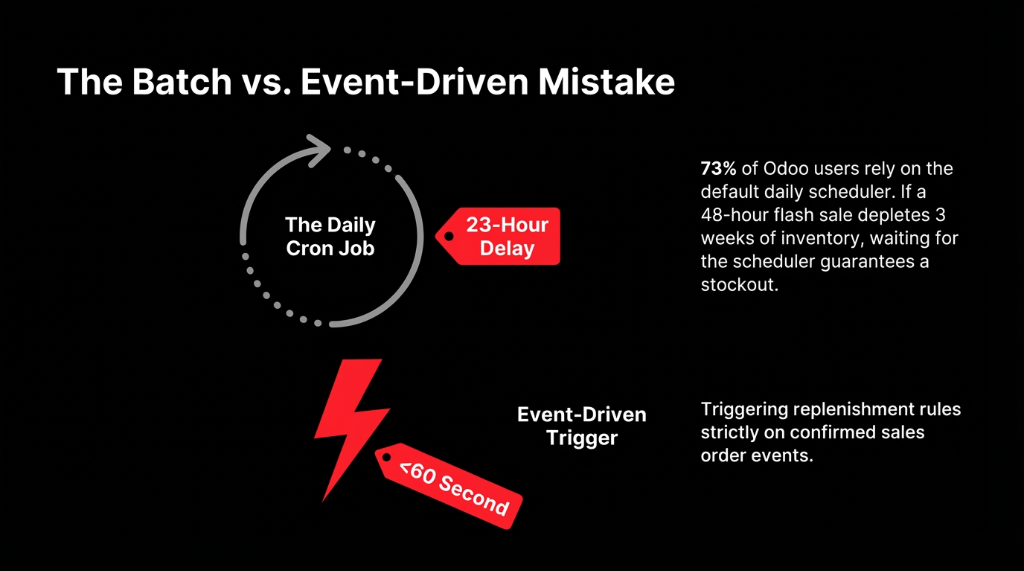
⚠ The insider reality nobody writes about: Odoo’s scheduler runs once per day by default. If you are running a flash sale that depletes 3 weeks of inventory in 48 hours and your scheduler last ran 20 hours ago, you are relying on a manual intervention that may or may not happen in time.
The 4-Minute Fix That 73% of Brands Miss
The fix is triggering replenishment rules on confirmed sales order events, not just the cron job. This is a one-checkbox configuration change in Odoo that 73% of brands we audit have never enabled. It takes 4 minutes to turn on.
The cost of not having it turned on? Ask the brands that blew Q4.
Do not patch this with extra warehouse staff. Hiring more headcount to compensate for a misconfigured automation is not scaling. It is bloating.
The Implementation Reality (No Sugarcoating)
Getting velocity-aware procurement automation live in Odoo takes 4 to 6 weeks for a brand with fewer than 250 SKUs. Here is the honest breakdown:
Week 1
Audit existing reorder rules, vendor lead times, and historical sales velocity data
Weeks 2–3
Configure min/max thresholds, link vendors, activate forecasted quantity triggers
Week 4
Build or deploy the velocity-recalibration logic (custom module or scheduled action)
Weeks 5–6
Test with live sales orders, validate PO generation, train ops team on the replenishment dashboard
What gets easier immediately — from Day 1 of going live — is visibility. Your ops team stops running blind. They see forecasted quantity, days-of-stock remaining, pending RFQs, and vendor lead times on one screen. The decisions that used to require 3 systems, 2 spreadsheets, and a Slack thread now live in one place.
Stop Running Procurement on Luck
If your reorder logic is frozen to numbers someone entered 18 months ago, you are one viral product post away from a stockout that costs you five figures and half your repeat-customer base.
US retail alone loses $1 trillion annually to stockouts. Statically configured reorder rules are the number one operational cause we see in brands under $15M ARR. It is fixable. It is not expensive. And it does not require you to hire another ops manager.
Do not let a frozen reorder point kill your Q3 margins. Contact Braincuber today — our Odoo procurement automation team has deployed velocity-aware reorder logic for 150+ brands across the US, UK, and UAE, and we will tell you exactly what yours needs in under 15 minutes.
FAQ
Can Odoo automatically adjust reorder points based on sales velocity changes?
Out of the box, Odoo’s reorder rules are static. Velocity-aware automation requires either a scheduled action or a custom module that recalculates minimum quantities from a rolling sales average — something Braincuber deploys in 3–4 weeks for most clients.
What triggers Odoo’s reorder rules — and how fast does it respond?
Odoo’s rules fire via a daily scheduler or upon confirmed sales order if you enable that option in Inventory Settings. Sales-order-triggered replenishment responds in under 60 seconds of order confirmation, versus waiting up to 23 hours for the cron job to run.
Does Odoo procurement automation work with multiple vendors per product?
Yes. Odoo supports multiple vendors per product with individual lead times and price tiers. You can set a primary vendor and fallback vendors, and the system selects based on availability and lead time — critical for any brand with single-vendor dependency risk.
How is Odoo’s reorder automation different from what NetSuite offers?
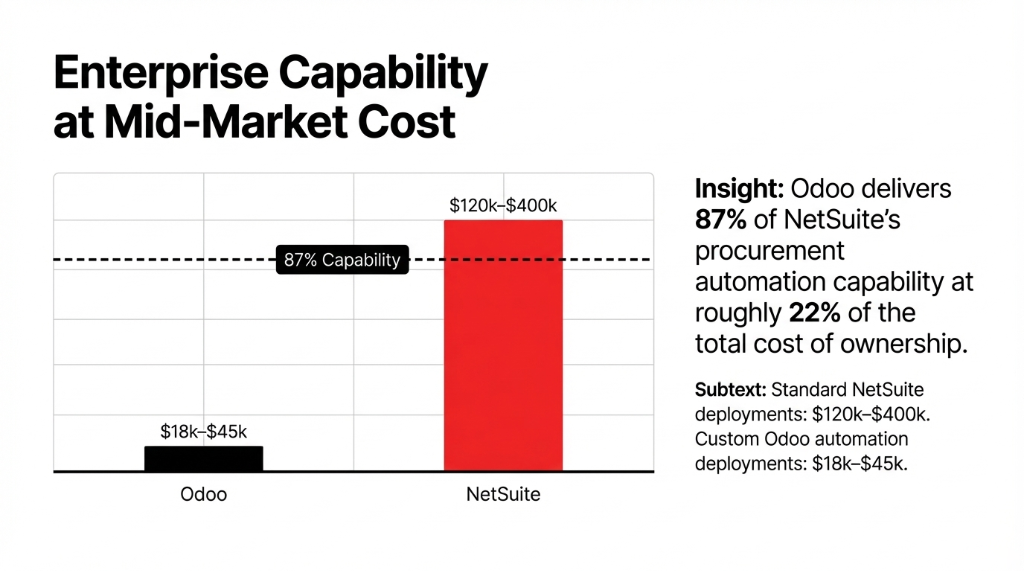
Odoo delivers 87% of NetSuite’s procurement automation capability at roughly 22% of the total cost of ownership. NetSuite implementations routinely run $120,000–$400,000 for a mid-market brand. Odoo implementations with custom automation modules typically run $18,000–$45,000 for the same outcome.
What data does Braincuber need to set up velocity-based reorder alerts in Odoo?
We need 12 months of historical sales data per SKU, current vendor lead times, existing on-hand and in-transit inventory, and your acceptable stockout risk threshold (usually expressed as a target fill rate, e.g., 97.5%). Most clients provide this in a single data export from their current system.
Stop Bleeding Cash on Frozen Reorder Points
Book a free 15-Minute Operations Audit with Braincuber. We will find your biggest procurement leak in the first call and show you exactly what velocity-aware reorder logic would look like in your Odoo instance. No pitch deck. Just real numbers.