
The Mess We Walk Into Every Time
Here is what a $2.1M/year beauty retail operation typically looks like before Odoo:
The in-store POS is a legacy system — maybe Vend, maybe just a Square terminal — that tracks sales in its own silo. The online store sits on Shopify or WooCommerce with its own inventory count. At the end of each day, someone — usually the store manager — manually exports a CSV from the POS, opens another CSV from Shopify, and tries to figure out which SKU sold where.
(Yes, this is your current setup. Do not be embarrassed. We have seen it at brands doing $8M a year.)
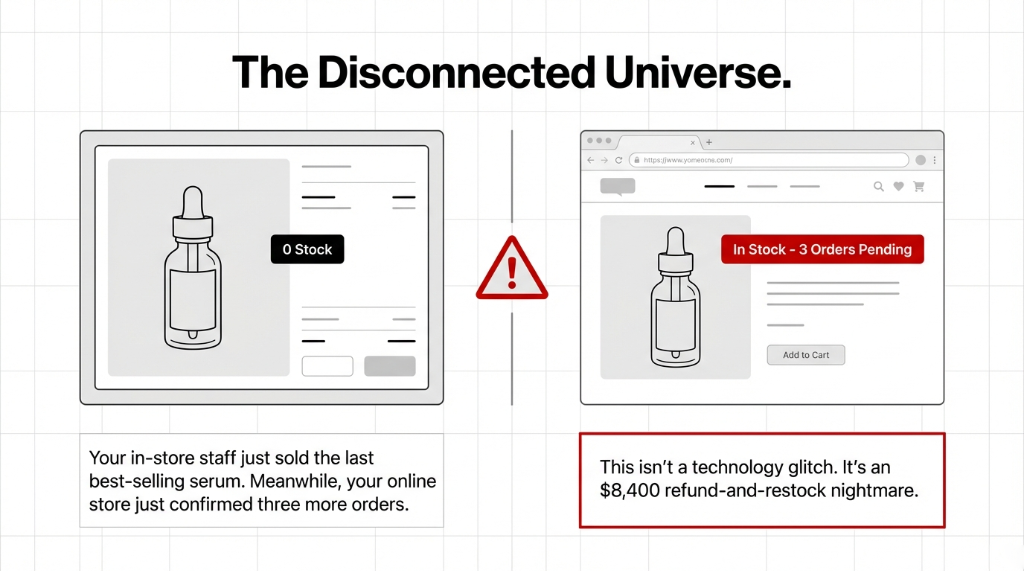
The problem compounds fast. A tube of foundation has 14 shade variants. Each variant is a separate SKU. Multiply that by 3 store locations plus 1 online channel, and you have 42 inventory lines to reconcile manually — every single day. When your team makes a typo, you oversell. When you oversell, you refund. When you refund, you lose trust.
The Real Cost of Disconnected Beauty Retail
10% Revenue Loss
43% of small-to-mid-sized retailers report that stockouts and overstocking cost up to 10% of annual revenue. On a $2M beauty brand: $200,000/year.
42 SKU Lines
14 shade variants × 3 locations + 1 online channel = 42 inventory lines to reconcile manually every day. That does not scale.
$8,400/Week
Refund costs + restock logistics + customer trust damage from selling product you do not have. Every week.
Why “Just Sync Shopify to Your POS” Does Not Fix It
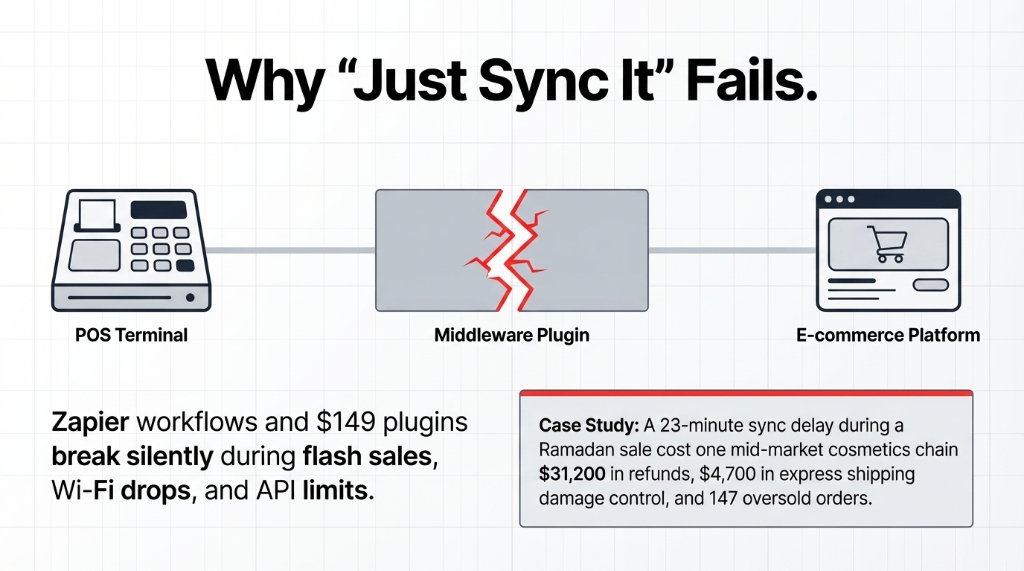
Every tech consultant will tell you to use a middleware connector — some Zapier workflow or a $149/month plugin that “bridges” your POS with your e-commerce store.
Here is the ugly truth: those connectors break. They break during flash sales, during Wi-Fi drops, during Shopify API rate limit hits — and they break silently, meaning you will not know inventory is out of sync until a customer is standing at your register demanding a product your online store promised was available.
The Ramadan Sale Disaster
A mid-market cosmetics chain in Dubai was running a third-party connector between their Lightspeed POS and WooCommerce. During a Ramadan sale, the connector hit a sync delay of 23 minutes. In those 23 minutes, 147 online orders confirmed for products that had already sold out in-store.
Total damage: $31,200 in refunds plus $4,700 in express shipping for damage control. That is not a connector problem. That is an architecture problem.
You are trying to stitch together three different systems that were never designed to speak the same language.
How Odoo POS Actually Solves This — Not Just “Integrates” It
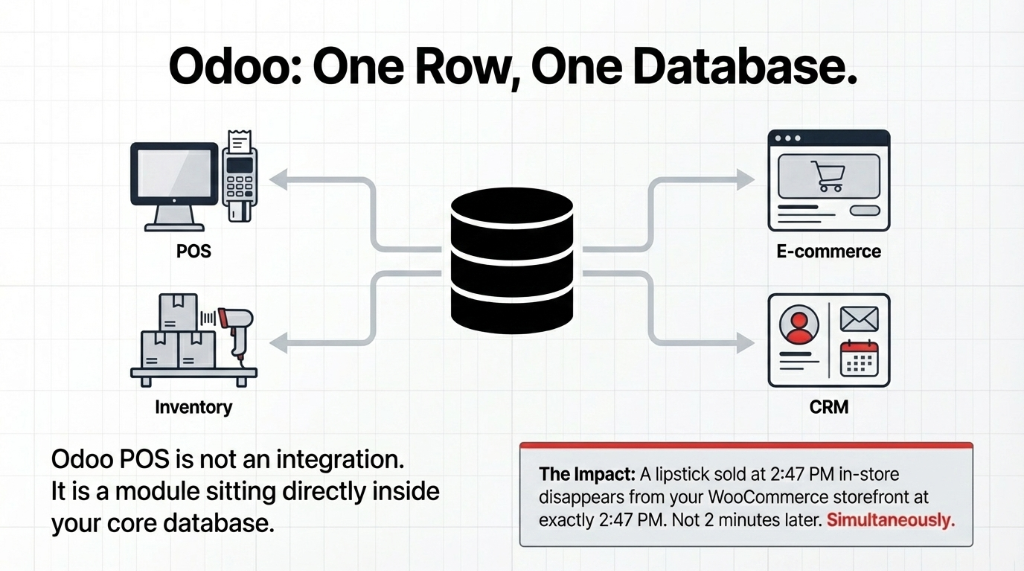
Odoo POS is not an integration. It is a module sitting inside the same database as your inventory, your e-commerce, your CRM, and your accounting. When a product sells at the in-store POS, the same database record updates — not via API, not via webhook, not via a connector that may or may not be running. The same row in the same database.
Real-Time Stock Everywhere
A lipstick sold at your Bandra store at 2:47 PM disappears from your WooCommerce storefront at 2:47 PM. Not 2 minutes later. Not after a “sync cycle.” Simultaneously. Because there is nothing to sync. It is one database.
Offline Selling Without Chaos
This is the one nobody talks about. Your store’s Wi-Fi drops during a Saturday rush — it happens in every mall. With Odoo POS, the terminal switches to offline mode automatically. Your staff keeps billing. Every transaction is stored locally. The moment Wi-Fi restores, Odoo syncs everything back in the correct chronological order.
✓ Result: No duplicate invoices. No lost orders. No “we had a network issue” conversation with an angry customer. Your store manager stops spending 45 minutes closing the POS every night — it drops to 8 minutes.
Loyalty Points That Actually Work Across Channels
This is where beauty retail brands leave the most money behind. A customer buys online on Monday, walks into your store on Thursday expecting to redeem points — and your in-store system has no idea she exists.
With Odoo, one customer profile. One loyalty wallet. Works offline. Works online. Works at any location. Ulta Beauty’s POS modernization delivered a 20% increase in loyalty program signups after they fixed exactly this cross-channel disconnect.
One-Click Promotions Across Both Channels
Running a “Buy 3 skincare items, get a free toner” campaign? In your current setup, you configure it separately in Shopify, separately in your POS, and pray they run identically. In Odoo, you configure the promotion once in the backend — it applies at the in-store POS terminal, the WooCommerce cart, and the mobile app, simultaneously, without a developer touching anything.
What the Numbers Look Like After Odoo Goes Live
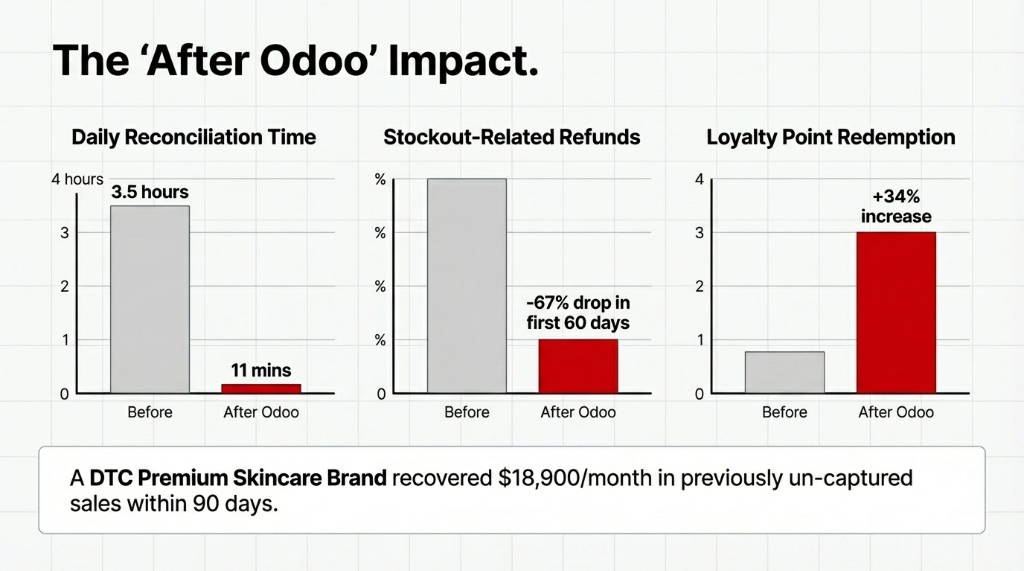
| Metric | Before Odoo | After Odoo POS |
|---|---|---|
| Daily reconciliation time | 3.5 hours/day | 11 minutes/day |
| Stockout-related refunds | Weekly occurrences | -67% in 60 days |
| Loyalty redemption rate | Low (siloed systems) | +34% increase |
| Omnichannel AOV lift | Single-channel only | +30% (McKinsey) |
| Monthly un-captured sales recovered | $0 (invisible loss) | $18,900/month |
The Un-Captured Sales Nobody Counts
One of our clients — a premium skincare brand with 4 stores and a DTC site doing about $3.7M annually — recovered $18,900/month in previously un-captured sales within the first 90 days. Not because they sold more. Because their inventory was now accurate enough to stop over-refusing online orders. They had been marking products “out of stock” online as a safety buffer because they did not trust their inventory numbers. With Odoo, they finally could.
The Implementation Reality (No Sugarcoating)
A full Odoo POS + e-commerce + inventory integration for a beauty retailer with 2–5 locations takes 6 to 9 weeks from kickoff to live. Not 2 weeks. Anyone quoting you 2 weeks is either cutting corners or lying.
The 6–9 Week Go-Live Sequence
Week 1–2: Data Migration
Pull your product catalog, SKUs, and customer records out of your legacy POS and WooCommerce. If you use Excel or QuickBooks as a secondary ledger (and most of our clients are, even the $5M ones) — this phase is messy.
Week 3–4: POS Configuration
Hardware setup, receipt templates, session management, offline mode testing, and payment terminal integration.
Week 5–6: E-Commerce Integration
Connect Odoo’s website module or your existing WooCommerce/Shopify front-end. Configure product pages, pricing rules, and shipping zones.
Week 7–9: Parallel Run
Your staff runs both systems simultaneously to validate accuracy. We do not switch off your old system until the numbers match for 7 consecutive business days.
The Controversial Take Nobody Wants to Hear
Most beauty retail brands are not actually an omnichannel problem. They are a “we bought cheap software and now we are living with the consequences” problem.
Shopify is excellent at selling online. Square is fine for pop-ups. But neither of them was built to be the operational backbone of a multi-location beauty retail business. They were built to get you to your first $500K. After that, you are held together with Zapier, manual processes, and optimism.

The “We Are Not Big Enough” Illusion
We hear this from brands doing $4M a year: “We are not big enough yet.”
At that scale, you are big enough to be hemorrhaging $180K+ annually in operational inefficiency — you just cannot see it because it is spread across 11 different line items on 4 different spreadsheets.
The brands that moved fastest — and recovered the most — were the ones that stopped treating their tech stack as a cost center and started treating it as a revenue lever.
Stop Letting Two Systems Cost You One Business
If your beauty brand is running a physical store and an online channel on separate platforms, you are not running an omnichannel business. You are running two businesses that share a brand name — and paying the operational tax every single day.
Every stockout, every loyalty frustration, every end-of-day reconciliation headache is a quantifiable dollar amount. Most of our clients find their first 90 days recover more than the full implementation cost. Do not let a $200/month connector keep costing you $18,000/month in inventory chaos.
FAQ
Does Odoo POS work without internet in a beauty store?
Yes. Odoo POS automatically switches to offline mode when the network drops, allowing staff to continue processing sales and billing customers. All transactions are stored locally on the device. The moment connectivity restores, every offline order syncs to the central Odoo database in order — no manual re-entry required.
How long does it take to go live with Odoo POS for a beauty retailer?
For a 2–5 location beauty retail setup with an existing e-commerce store, plan for 6 to 9 weeks. This includes data migration from your current POS or Excel sheets, hardware setup, payment terminal integration, online store connection, and a parallel-run validation period before fully switching over.
Can Odoo POS handle loyalty points for both in-store and online purchases?
Yes, and this is one of the biggest wins for beauty retailers. Odoo’s loyalty engine operates from a single database, so a customer earns and redeems points whether she shops in-store or on your website. There is no manual syncing needed and no “points do not transfer” conversation at the register.
Does Odoo POS integrate with WooCommerce or Shopify for beauty brands?
Odoo integrates natively with its own website/e-commerce module, which shares the same inventory database as the POS. For brands running Shopify or WooCommerce, Braincuber builds custom connector modules that sync product catalogs, stock levels, orders, and customers — with real-time updates rather than batch syncs that introduce lag.
What happens to existing product catalog and customer data during migration?
Your data migrates before the Odoo POS goes live, not after. We extract your product SKUs, pricing, customer profiles, and loyalty balances from your current system — whether that is Vend, Square, WooCommerce, or Excel — clean the data, and load it into Odoo. You do not start Odoo with a blank slate.
Check Your End-of-Day Close Tonight. Time It.
If it takes more than 15 minutes, your beauty retail operation is leaking money you cannot see. Book a free 15-Minute Operations Audit with Braincuber — we will map exactly where your POS and e-commerce disconnect is costing you, and what the first 90 days of Odoo will recover. No pitch deck. Just the number.