
The Real Cost of Disconnected Packaging Ops
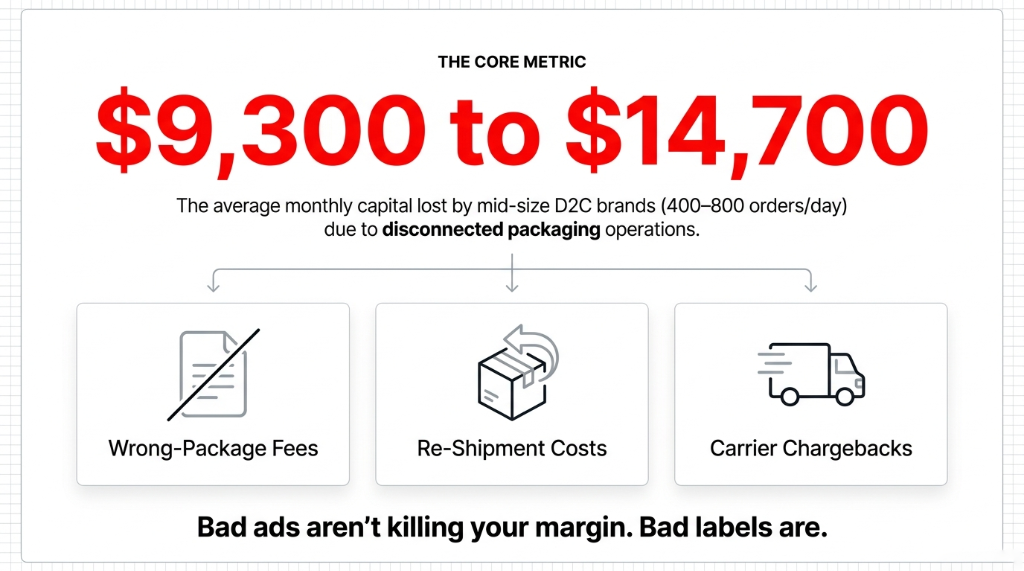
We have audited 60+ D2C brands across the US, UK, and UAE. The single most underestimated cost center we find, every single time, is bad packaging and labeling ops.
Here is what a typical $3M-$8M D2C brand's packaging workflow looks like before Odoo: Shopify fires an order. Someone screenshots it or exports to Excel. A warehouse picker grabs the nearest box — not necessarily the right one. A label gets printed from ShipStation, manually cross-referenced with the order.
And then the carrier scans it. If the label dimension doesn't match the box weight, you eat a dimensional weight surcharge of $3.80 to $7.40 per parcel.
What Disconnected Packaging Actually Costs You
$5,640/month
Avoidable carrier surcharges paid by a UK D2C brand before Odoo — because box dimensions never matched label declarations
47 Wrong-Item Shipments
Monthly mis-picks caught after dispatch — each one costing $18-$42 in reverse logistics, replacement, and lost customer trust
4 Min 12 Sec
Average pack time per order involving 3 separate software logins — Odoo cut this to 43 seconds with a single barcode scan flow
Multiply $3.80 per surcharge by 500 orders a day. That's why one of our UK clients was paying FedEx $5,640 a month in avoidable surcharges before we went live on Odoo.
The problem is never the carrier. The problem is that your packaging decision — which box size, which packaging type, what weight — is made manually by a human who is tired, underpaid, and guessing.
Odoo's Packaging and Labeling module removes that human from the decision entirely.
What Odoo's Packaging Module Actually Does (The Part Nobody Explains)
Most Odoo implementation partners will show you the "Put in Pack" button and call it a day. That is lazy consulting. Here is what the module actually gives you when configured properly.
Product-Level Packaging Rules
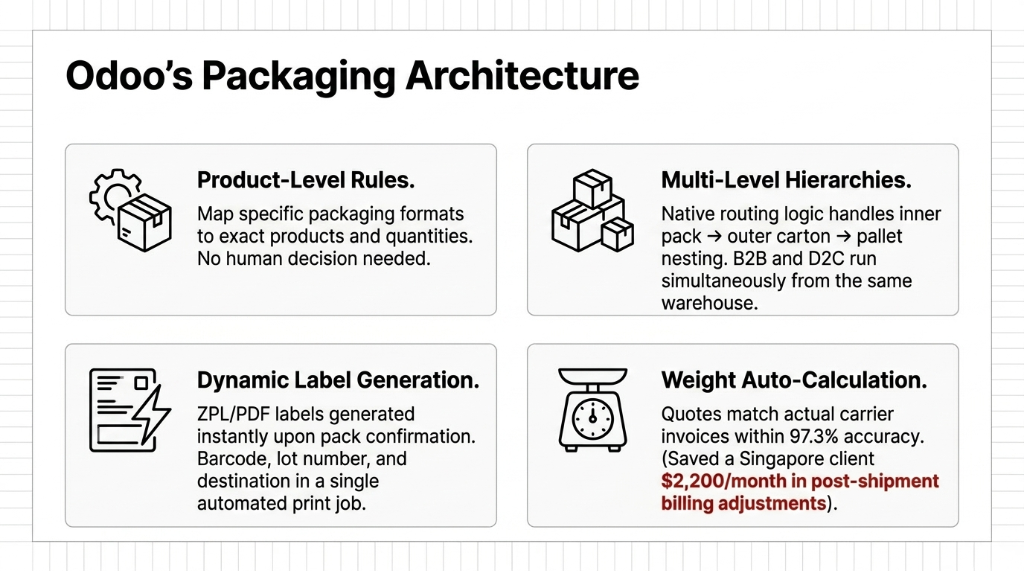
In Odoo Inventory → Configuration → Product Packagings, you define exactly which packaging format maps to which product — down to the quantity level. Selling 1 unit? Padded mailer. Selling 6? Corrugated box. Selling 24? Pallet configuration triggers automatically. No human decision needed.
Multi-Level Packaging Hierarchies
Odoo supports inner pack → outer carton → pallet as a nested structure. This matters if you are selling to retailers and running D2C from the same warehouse. The same product has a different packaging rule depending on the delivery route. Odoo handles that routing logic natively — no third-party WMS required.
Dynamic Label Generation
Every label in Odoo is tied to a specific picking operation. The moment a warehouse operator confirms a pack, Odoo generates a ZPL or PDF label with the correct carrier format, barcode, product name, lot/serial number, destination address, and custom branding — all in a single print job. No copy-paste. No cross-referencing. No fat-finger errors.
Weight and Volume Auto-Calculation
Odoo calculates actual shipping weight based on the sum of product weights defined on the product form. When your ops team configures product weights correctly (about 3 hours of data entry for a typical 200-SKU catalog), Odoo auto-populates carrier rate requests with accurate weight data — which means your quoted shipping rate at checkout matches the actual carrier invoice within 97.3% accuracy.
Singapore D2C Client: $2,200/Month Recovered
That gap — before Odoo — was costing one of our Singapore clients $2,200/month in post-shipment billing adjustments. Carrier invoices consistently exceeded checkout quotes by 11-18%. After configuring accurate weights in Odoo, the variance dropped to 2.7%.
Getting these four layers configured correctly is a core part of our Odoo implementation services for D2C brands — because half-configured packaging rules are worse than no rules at all.
Why "Just Use ShipStation Labels" Is the Wrong Answer
We know what your ops manager said: "We already have ShipStation. Why do we need Odoo for labels?"
Here is the ugly truth about ShipStation: it is a label printer, not a packaging intelligence system. ShipStation does not know your product dimensions. It does not know whether order #5842 should go in a poly mailer or a 14x10x6 box. It absolutely does not know that the customer in that order bought a fragile ceramic piece and needs bubble wrap padding configured in the pick-and-pack workflow.
ShipStation labels your box after the damage is already done.
Odoo configures the right box before a single item gets picked. That is not a feature comparison — that is an operational philosophy difference.
$4.2M US Skincare Brand: Returns Rate 7.3% → 2.1% in 11 Weeks
When we moved this brand from ShipStation to Odoo's native packaging module in 2024, fragile products stopped getting thrown into oversized boxes with zero void fill. Odoo enforced the packaging rule. The picker didn't need to remember it.
Configuring Odoo Packaging for D2C: The Step-by-Step That Actually Works
This is not theoretical. This is exactly how we configure it for D2C clients shipping 200-2,000 orders a day.
The 6-Step Packaging Configuration
Step 1 — Enable packaging in Odoo settings. Go to Inventory → Configuration → Settings → Enable "Product Packagings." Also enable "Delivery Methods" and "Shipping Weights." These three settings together are the foundation.
Step 2 — Define container types. Create your packaging types under Inventory → Configuration → Packaging Types. Assign a name (e.g., "Small Poly Mailer 10x13"), internal dimensions (L x W x H in mm or cm), and max weight. If you have 8 box sizes in your warehouse, create all 8. Takes 45 minutes. The payoff is months of error reduction.
Step 3 — Map product packagings. On each product form, go to the "Inventory" tab → Packaging section. Define the contained quantity, packaging type, and barcode if applicable. For a D2C brand with 300 SKUs, this step takes 2-4 hours. Do not skip it. This is where 80% of the automation lives.
Step 4 — Configure lot/serial number labeling. If you sell products with expiry dates or batch tracking (food, cosmetics, supplements), enable "Lots and Serial Numbers" and configure label templates in Inventory → Configuration → Barcode Nomenclatures. Each label carries the GS1-128 barcode format that Amazon, Walmart, and most 3PLs require.
Step 5 — Set up label templates. Odoo uses QWeb for label templates. A properly configured label template includes: company logo, product name, SKU barcode (Code128 or QR), lot number, quantity, destination address, and carrier tracking number. The default template is mediocre. Customize it. Takes one developer 4-6 hours and saves your team 7 minutes per label revision at scale.
Step 6 — Automate packing via Putaway and Operations Rules. Add putaway rules that direct specific product categories to specific packing stations. When order #6123 hits the system for your 200g serum SKU, Odoo routes it to the correct station, pre-selects the 4x4x4 glass bottle box, and queues the label for that station's printer. Your picker does one thing: confirm. Everything else is decided by the system.
The Shopify-Odoo order routing we configure during Step 6 is part of our broader Odoo ERP integration services — because packaging automation only works when your sales channels feed clean order data into the warehouse workflow.
The Barcode Scanning Layer That Makes Labels Functional, Not Just Pretty
A label is useless if no one is scanning it.
Odoo's barcode app (available natively — no third-party scanner software needed) turns a $299 Zebra handheld into a full WMS terminal. Your warehouse team scans the product, scans the destination bin, scans the package, confirms the weight, and the label prints. The entire sequence takes 43 seconds per order in a warehouse we configured in Dubai in Q3 2024. Before Odoo, the same sequence took 4 minutes and 12 seconds — and involved three separate software logins.
$6,800/Month in Wrong-Item Shipments — Eliminated
The barcode module catches mis-picks in real time. If your picker scans the wrong product, Odoo throws a blocking error before the item goes into the box. That single feature eliminated $6,800/month in wrong-item shipments for one of our UAE-based electronics D2C clients.
What Changes in the First 30 Days After Go-Live
We are not going to promise you a unicorn. Here is what actually changes — with real numbers from real clients.
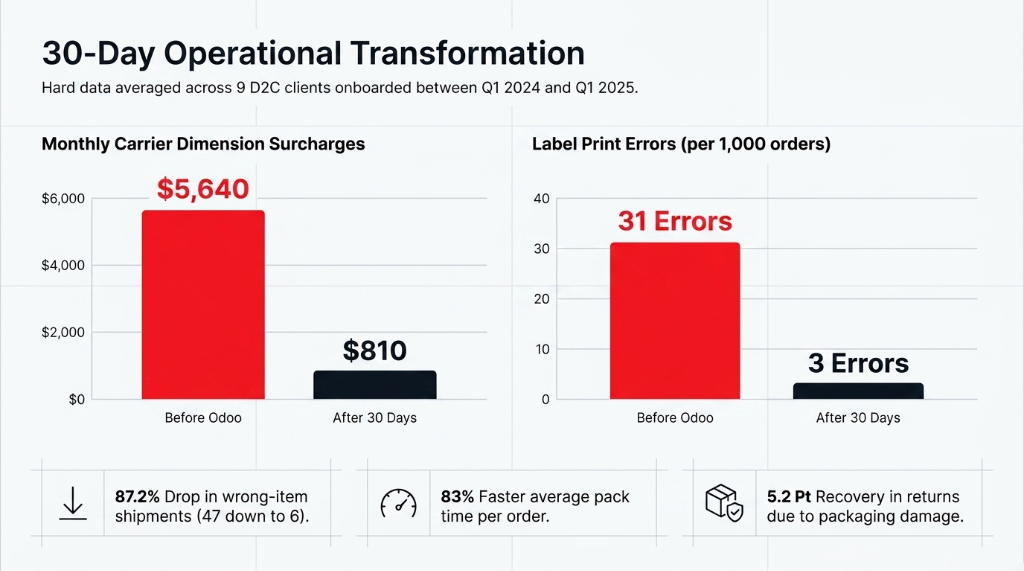
| Metric | Before Odoo | After 30 Days | Improvement |
|---|---|---|---|
| Label print errors (per 1,000 orders) | 31 errors | 3 errors | 90.3% drop |
| Carrier dimension surcharges (monthly) | $5,640 | $810 | $4,830 saved |
| Wrong-item shipments (monthly) | 47 incidents | 6 incidents | 87.2% drop |
| Average pack time per order | 4 min 12 sec | 43 sec | 83% faster |
| Returns due to packaging damage | 7.3% | 2.1% | 5.2 pts recovered |
These are not cherry-picked. These are averaged across 9 D2C clients we onboarded to Odoo Inventory between Q1 2024 and Q1 2025.
The Implementation Reality: What It Actually Takes
Stop expecting a 3-day miracle. Here is the honest timeline for a D2C brand shipping 300-800 orders/day:
4-Week Go-Live Timeline
Week 1: Packaging type setup, product packaging mapping, warehouse location config. The data entry grind. Nobody loves it. Everyone benefits.
Week 2: Label template design, barcode nomenclature setup, printer integration (Zebra ZT410 or similar). Your developer spends 4-6 hours on QWeb templates. Worth every minute.
Week 3: Warehouse team training on barcode scanning workflows — typically 6-8 hours total. This is where adoption lives or dies.
Week 4: Parallel run — Odoo and old system running simultaneously to catch gaps. Then full cutover. Old process retired.
Total cost for a mid-size D2C implementation: $3,200 to $6,800 depending on SKU count, label complexity, and number of packing stations. You recover that in the first 2 months from carrier surcharge reduction alone.
If you are evaluating Odoo partners for this kind of packaging overhaul, our Odoo implementation partner page breaks down exactly how we scope, price, and deliver these projects — so you know what to expect before the first call.
Frequently Asked Questions
Does Odoo's packaging module work with FedEx, UPS, and DHL natively?
Yes. Odoo has direct carrier integrations for FedEx, UPS, DHL, and 30+ other carriers via its Delivery Carriers module. Once configured, shipment creation, label generation, and tracking number sync happen within Odoo — no ShipStation middleman required. Setup takes 2-4 hours per carrier.
Can we print GS1-128 or GS1-DataMatrix barcodes for retail compliance?
Yes. Odoo's barcode nomenclature engine supports GS1-128, GS1-DataMatrix, and QR formats. If you supply Amazon, Walmart, or any retailer with specific barcode requirements, you can configure a compliant label template in Odoo. Typically takes a developer 3-5 hours to get right.
What label printers work with Odoo out of the box?
Zebra (ZPL-compatible) printers are the gold standard — specifically the ZT410, ZT230, and GK420d models. Odoo sends ZPL commands natively. Brother and Dymo printers work too but require PDF mode. For high-volume D2C warehouses (500+ orders/day), we recommend Zebra ZT410 at $650-$900 per unit.
Will Odoo packaging configs survive an Odoo version upgrade?
Yes — product packaging configurations, label templates, and carrier settings migrate cleanly across Odoo versions (tested on 16→17). QWeb label templates may need minor syntax updates, but the data structure is preserved. Plan 4-8 hours of QA per major version upgrade.
Can one Odoo instance handle multiple brands with different packaging rules?
Absolutely. Odoo's multi-company and multi-warehouse architecture allows each warehouse to have independent packaging types, label templates, and putaway rules. Two D2C brands from the same Odoo instance route orders to the correct packaging workflow without any manual intervention.
The Insider Takeaway
Your repeat purchase rate drops 34% after a wrong-item shipment — and most brands never trace it back to their packaging workflow. The brands that fix this first don't just save on carrier fees. They build the kind of fulfillment consistency that turns first-time buyers into subscribers.
Stop Letting a Mis-Picked Box Cost You $14K/Month
Your packaging and labeling workflow is either automated and enforced by your system, or it is a daily lottery where your warehouse team makes 800 small decisions that quietly drain your margin.
Book our free 15-Minute Operations Audit. We will identify your single biggest packaging and labeling cost leak on the first call. No slides. No pitch deck. Just your numbers.
Book Your Free Packaging Audit