
The Real Cost of Running Meesho Without Odoo
The cost of running Meesho by hand rarely shows up as one line in your books. It shows up in three places.
First, labour: every order that is typed or copied by hand into another system is time spent on entry, status updates and return logging instead of on catalogue or sourcing work. The time grows in step with order volume.
When your warehouse executive types “KRTOPS-BLU-L” instead of “KRTOPS-BLK-L” (because black and blue look the same at 11 PM), that order ships the wrong item. Second, errors: the buyer returns it, you pay the return shipping charge Meesho levies on the seller, and the unit comes back needing a quality check. A recurring typo pattern turns into a recurring monthly leak.
Third, and usually largest: overselling.
How Overselling Happens
A fast-moving SKU sells out on your shelf while the Meesho listing still shows stock, because the count was last updated by hand. Every order placed in that gap has to be cancelled, and seller-side cancellations count against your account metrics on the marketplace.
The fix is a shorter gap between a stock change and the listing update.
More spreadsheet formulas or more warehouse staff do not close that gap. An automated stock push from one inventory record does.
Why “Just Use the Meesho Seller Panel” Is a Trap
Every Meesho account manager will tell you the seller panel is enough. It is not — and here is exactly why.
The Meesho seller panel shows you Meesho data. It does not show you your business. It does not know that you also sell on Flipkart. It does not know what your GST liability is for the week. It does not know that the 14 units of “Floral Rayon Kurti - XL” sitting on Shelf C3 are already allocated to a wholesale buyer who paid ₹7,200 in advance. It does not know any of that — because it is a marketplace panel, not an ERP.
What You Actually Need (and the Panel Cannot Give You)
▶ Stock positions across all channels, in real time
▶ Order status from placement to delivery to return
▶ GST filing data — clean, auto-reconciled, GSTIN-compliant
▶ Profitability per SKU — not per channel, per SKU, after returns, fees, and logistics
The moment you add a second warehouse or a third sales channel, the panel becomes risky — you are making inventory decisions on a count that was last correct whenever someone last updated it.
How Odoo Meesho Integration Actually Works
Odoo does not include a Meesho connector in Community or Enterprise. You add a third-party module: a search of the Odoo Apps Store for “Meesho” on 5 October 2026 returned two Odoo 19 modules — ECOSIRE’s paid Meesho Store Management and Aura Odoo Tech’s free multi-channel module covering Amazon, Flipkart, Meesho, Etsy and eBay. Before you pick one, confirm which Meesho seller APIs your account can access and which of the five flows below the module actually implements:
The 5 Automation Modules
Order Sync
Every new Meesho order — from the moment it hits “Confirmed” status — is automatically pulled into Odoo as a Sales Order. No manual entry. Customer details, SKU, quantity, delivery address, and order ID populate directly. Nobody re-types the order.
Inventory Push
When you update stock in Odoo — whether from a purchase order, a production order, or a manual adjustment — that quantity is pushed back to your Meesho listing on the connector’s sync schedule. Ask the vendor for the interval and test it before a sale.
Shipment & Tracking Sync
Once your warehouse confirms dispatch in Odoo and a tracking number is assigned (via Delhivery, Ekart, or your 3PL), that tracking information is automatically sent back to Meesho. Your buyer gets the update without anyone touching the seller panel.
Return Management
Meesho return requests flow back as reverse transfers. Your warehouse receives a return notification in the WMS module, completes the quality check, and the system decides whether the item goes back into sellable inventory or into damaged-goods. Returns stop disappearing between the courier and the shelf.
GST Auto-Reconciliation
Odoo’s Indian accounting module handles HSN code mapping, GST slab assignments, and GSTR-1 auto-population. Every Meesho invoice is stamped with the correct GST treatment the moment the order syncs. Your CA reviews and reconciles payouts against invoices that already exist in the books, instead of rebuilding them from the seller panel.
Multi-Channel Reality: Meesho Is Not Your Only Channel
Here is what most integration vendors will not tell you: setting up Meesho in isolation is only slightly better than not setting it up at all.
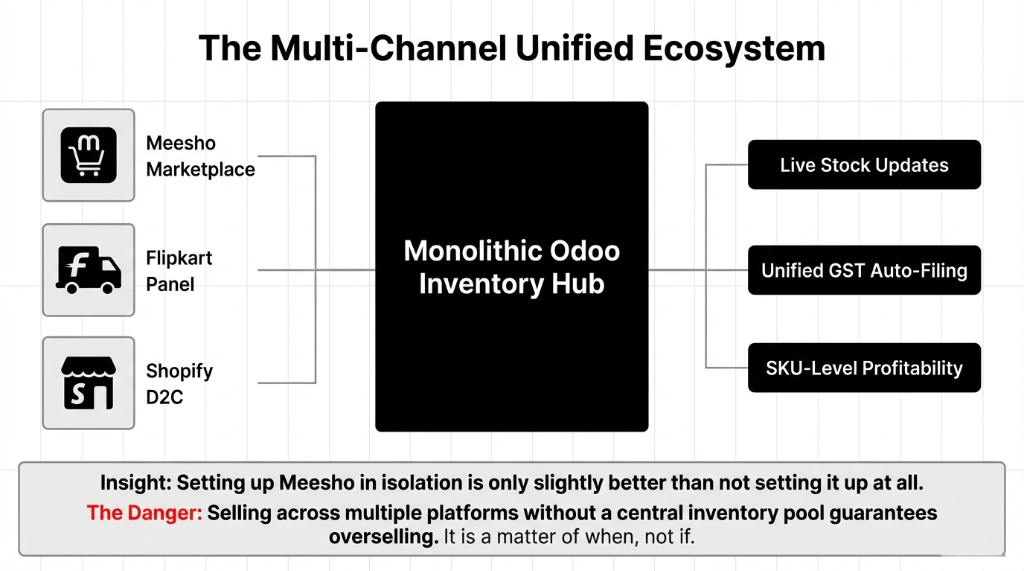
If you are selling on Meesho and Flipkart and Instagram (even with just a WhatsApp checkout), and these three channels are not talking to the same inventory pool in Odoo — you are going to oversell. It is not a question of if. It is a question of which product, on which day, and how much it costs you.
What a Shared Stock Pool Changes (Illustrative)
Take a fashion seller on Meesho, Flipkart and a Shopify store, with one person updating stock on all three by hand. With a single Odoo inventory record feeding every channel:
▶ The manual update job goes away; that person can move to customer service or catalogue work
▶ Stock discrepancies between channels become exceptions you investigate, not a daily routine
▶ Wrong-item shipments fall once picking runs off the synced order instead of a copied SKU
What the Implementation Timeline Looks Like (No Sugarcoating)
We are not going to tell you this takes “just a few days.” It does not. Here is the real timeline:
The 5-Week Go-Live Sequence
Week 1–2: Foundation
Odoo environment setup, product master cleaning, HSN code mapping, warehouse location configuration. If your SKU master has duplicates or inconsistent variant codes, this phase takes longer — fix it here, not after go-live.
Week 3: Connector Deploy
Meesho API credentials configuration, connector module deployment, sandbox testing with real order data.
Week 4: Go-Live
Live sync activation, team training (warehouse staff, accounts, ops manager), first reconciliation cycle run.
Week 5+: Stabilization
The first live week surfaces the mapping issues sandbox testing missed. Budget time for configuration fixes before you call it done.
Cost depends on the connector licence, the number of channels and warehouses, and how much data cleaning is needed. Use the Odoo cost calculator for a first estimate.
The Sellers Who Should NOT Do This Integration Yet
Frankly? If you sell only on Meesho at low daily volume, this integration is usually overkill. The manual panel works at that scale. Spend the money on better product photography instead.
But if manual entry has become a daily job, you are adding a second channel, or you are preparing for Diwali and other sale-season spikes, set it up before the spike, not during it.
⚠ Peak sale warning: Do not go live during a peak sale. Sync errors in the first live week can cause cancellations and late dispatches, and those count against your seller metrics exactly when volume is highest. Implement in your off-peak window.
Stop Bleeding on Returns You Are Not Even Tracking
Returns are a large cost line for fashion sellers on any marketplace. If you are not tracking return reasons at the SKU level in Odoo — size issue vs. quality issue vs. wrong item shipped vs. buyer changed mind — you have no way to fix the problem.
Example: One SKU, One Return Reason (Illustrative)
Suppose one kurta size returns far more often than its siblings, and nearly every return is tagged “too small”. That pattern points at the size chart, not the buyer. Correct the chart and that SKU’s return rate is the number to watch over the next month.
The insight comes from return reasons recorded per SKU.
You cannot find that insight in the Meesho seller panel. You can find it in Odoo.
If You Cannot Answer This in 30 Seconds, You Have a Problem
How many units of your top SKU are in stock right now — across Meesho, Flipkart, and your warehouse? If you cannot tell us within 30 seconds, you have an operations problem, not a growth problem.
Stop patching it with more staff and more spreadsheets. Plan a five-week rollout and one inventory record that every channel reads from.
FAQ
Does Odoo officially support Meesho API integration?
No. Odoo Community and Enterprise do not include a Meesho connector. Third-party modules on the Odoo Apps Store add it; on 5 October 2026 a search returned two Odoo 19 modules (ECOSIRE’s Meesho Store Management and Aura Odoo Tech’s free multi-channel module). Braincuber can configure a connector against your warehouses and GST setup; check which flows the module supports before you buy.
How long does it take for inventory to sync between Odoo and Meesho after a stock update?
It depends on the connector’s sync schedule and the API limits on your Meesho seller account. Ask the module vendor for the stock-push interval, test it in a sandbox, and keep a small safety buffer on fast-moving SKUs during sale events.
Will I lose my existing Meesho order history after integration?
No. Historical Meesho orders are not deleted or affected. The integration pulls live and new orders into Odoo from the activation date. If you need historical data migrated for analytics or GST reconciliation, we do a one-time data import as part of the implementation — that starts from a report export from your Meesho seller panel.
Does the integration handle GST and HSN code assignment automatically?
Yes. Odoo’s Indian localisation module maps each product SKU to its HSN code and GST slab. Every Meesho order that syncs into Odoo is automatically assigned the correct tax treatment, making your GSTR-1 population near-automatic. You still need a CA to review and file, but the work becomes reviewing invoices that already exist rather than rebuilding them from payout statements.
What happens to my integration if Meesho updates its API?
The connector module has to be updated to match the new API version. Before buying a module, check how often its vendor ships updates and whether your support contract covers marketplace API changes; Braincuber support plans can include connector maintenance.
Your Top SKU’s Stock Count Has the Answer. Check It.
Book a free 15-Minute Operations Audit with Braincuber. We will look for your biggest operational leak in the first call — overselling, return leakage or manual processing.