
Your Ingredient Cost Is a Lie (Here Is Why)
The purchase order price is not your cost. Never was. Never will be.
When you import a $14,000 shipment of cocoa butter from Ivory Coast or cold-pressed almond oil from Spain, the price on the supplier invoice is the starting point — not the finish line. By the time that pallet lands in your warehouse, you have layered on:
| Cost Component | Range |
|---|---|
| Ocean freight | $870-$2,400 per container (origin + season dependent) |
| Customs duty | 3.5%-18% of CIF value (HS code + country dependent) |
| Customs broker fees | $285-$650 per shipment |
| Inland freight (port to warehouse) | $320-$900 |
| Port handling & demurrage | $150-$800 (if container sits past 3 free days) |
| Insurance | 0.3%-0.5% of cargo value |
Add it up on that $14,000 cocoa butter shipment and your real landed cost is $17,450. You are pricing your chocolate bar based on $14,000 and wondering why margins keep shrinking.
The Scale of This Problem
23
F&B brands audited (UAE, UK, US) in last 2 years
91%
Not allocating landed costs to ingredient valuations accurately
$0
What most brands invest in fixing this — until the audit hits
Why Spreadsheets and QuickBooks Won't Solve This
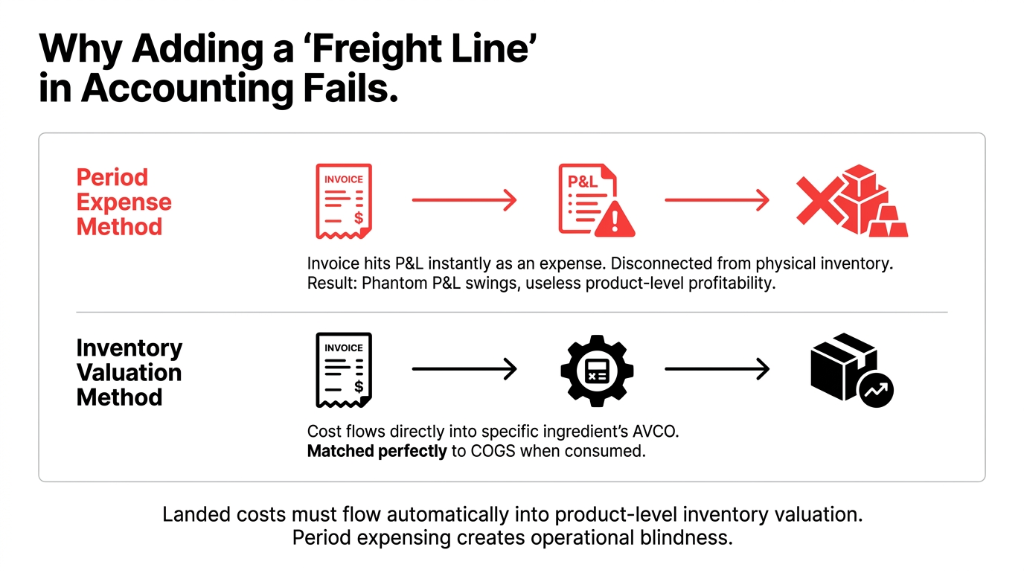
The standard advice from most accountants: "Track it in QuickBooks, add a freight line to the invoice, done."
Wrong. That approach treats all landed costs as period expenses — meaning they hit your P&L the moment the invoice is posted, not when the ingredient is consumed in production. You end up with phantom margin swings every time a large shipment lands, and your product-level profitability reports are useless.
The $37,000 mistake:
A London-based herbal supplement brand ran three months of promotions assuming a 34% gross margin on their flagship SKU. Actual margin after proper landed cost allocation? 21.3%. The $37,000 they "made" on that campaign was actually a $6,200 loss when freight and duty were properly rolled into COGS.
Excel VLOOKUPs across five tabs do not fix this. A separate landed cost tracker that no one updates after week 2 does not fix this. You need landed costs to flow automatically into inventory valuation at the product layer — and that is exactly what Odoo does when configured correctly.
How Odoo's Landed Cost Module Actually Works (Step by Step)
This is not a feature overview. This is the operational mechanic — because knowing that Odoo has a landed cost feature and knowing how to use it for multi-ingredient food manufacturing are two different things.
Step 1: Enable Landed Costs in Inventory Settings
Go to Inventory ▸ Configuration ▸ Settings, scroll to the Valuation section, and enable Landed Costs. This only works if your products are set to AVCO (Average Cost) or FIFO valuation. If you are on Standard Price, landed costs are blocked — and you should not be on Standard Price for imported ingredients anyway. Standard Price is for a company that buys the same widget from the same vendor at the same price forever. That is not you.
Step 2: Set Your Ingredient Products to AVCO or FIFO
For imported ingredients where prices fluctuate with exchange rates and freight markets, AVCO is what we recommend for most food brands at $1M-$15M revenue. FIFO is better if you need lot-level traceability for expiry management — which you probably do if you are working with perishables.
Go to the product form ▸ General Information tab ▸ set Cost Method to AVCO or FIFO. Odoo will now maintain a running weighted average cost that updates with every incoming shipment and every landed cost allocation.
Step 3: Receive the Goods via Purchase Order + Warehouse Receipt
Create your Purchase Order in Odoo for your imported ingredients. When the shipment arrives, validate the Receipt (WH/IN). At this point, Odoo books the inventory at the purchase price. This is intentional — you do not always have the freight invoice on the same day the goods arrive.
Step 4: Create the Landed Cost Entry
Navigate to Inventory ▸ Operations ▸ Landed Costs. Click New and link the vendor bill from your freight forwarder, select the warehouse receipt from Step 3, and add cost lines for each charge type: Freight, Customs Duty, Brokerage, Insurance.
Mistake #1 that most teams make here:
They lump everything into one "Freight" line. Do not do this. Break it out. You need to know which landed cost type is eating your margin most aggressively.
Real finding:
A UAE spice importer was spending $48,300/year on demurrage alone — a number invisible until we separated it from general freight on a 12-month review.
Step 5: Choose Your Split Method
| Split Method | Best For |
|---|---|
| By Quantity | Uniform items, similar density/weight |
| By Weight | Multi-ingredient shipments with varying weights |
| By Volume | Bulk liquids, gases, or volumetric freight billing |
| By Current Cost | High-value items where freight % of value matters |
For a mixed food ingredient shipment — say, 200 kg of vanilla extract plus 800 kg of sugar — "By Weight" is the most accurate. Allocating a $900 ocean freight charge equally by quantity would grossly overstate the vanilla's landed cost and understate the sugar's.
Step 6: Validate and Watch Inventory Valuation Update Automatically
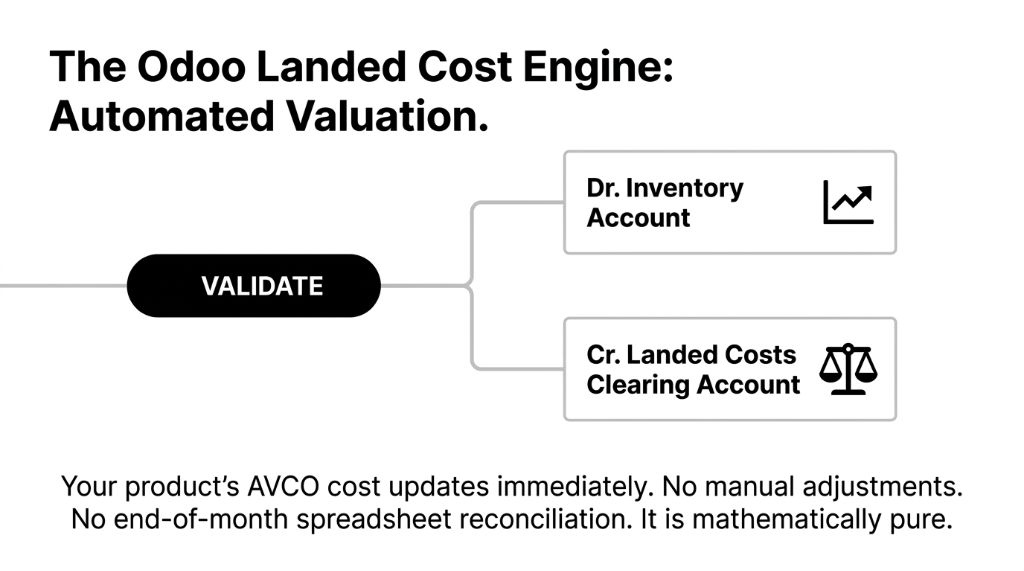
Click Validate. Odoo posts the journal entries in the background: Dr. Inventory Account (each product's value goes up) and Cr. Landed Costs Clearing Account (which you then offset against the vendor bill).
Your product's AVCO or FIFO cost updates immediately. Every subsequent manufacturing order that pulls that ingredient into a Bill of Materials will now use the true landed cost as the basis for COGS. No manual adjustments. No end-of-month spreadsheet reconciliation. (Yes, your accountant will love this.)
The Multi-Shipment Reality: Partial Deliveries and Delayed Invoices
Here is something nobody tells you in the Odoo documentation: freight invoices almost never arrive the same week as the goods. Your container lands on March 3rd. Your customs broker sends the invoice on March 14th. Your ocean freight invoice arrives March 19th.
In Odoo, this is handled by the Landed Costs Clearing Account workflow. You can create the landed cost entry even before the vendor bill is received — using a manual journal entry — and then reconcile it when the actual bill arrives. We set this up as a standard operating procedure for all our food manufacturing clients.
Split shipments:
You ordered 5,000 kg of ingredient but received 2,000 kg first. Odoo lets you apply landed costs to a partial receipt. Allocate the proportional freight to the 2,000 kg received, create a separate landed cost entry when the remaining 3,000 kg arrives. Your average cost stays accurate throughout the receiving process.
What Accurate Landed Costs Actually Change in Your Business
This is not about accounting hygiene. This is about decisions you make every single day.
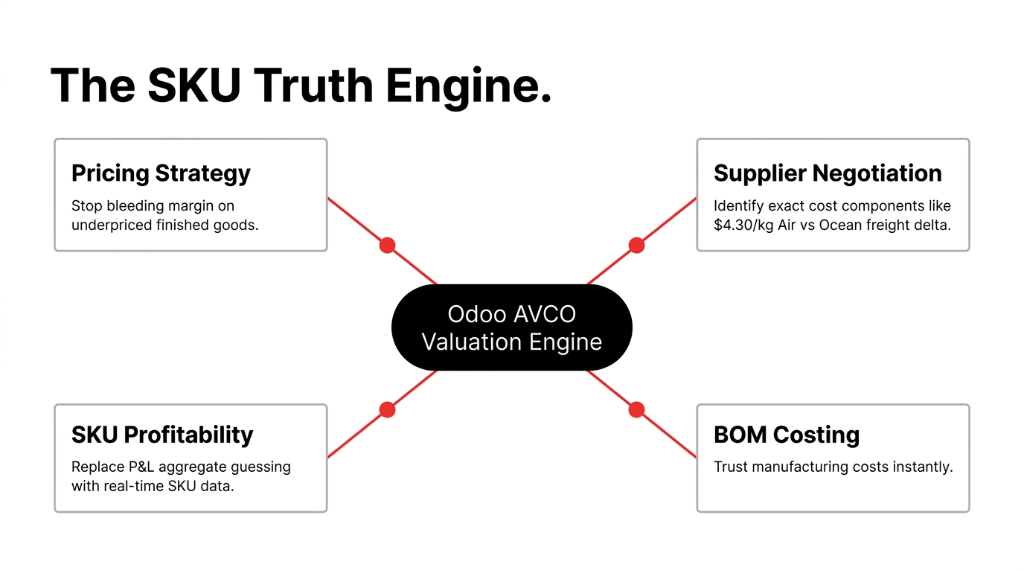
Pricing: If your true landed cost for vanilla oleoresin is $186/kg not $141/kg, your flavor compound is underpriced. Every unit you sell is a slow bleed.
Supplier negotiation: When landed cost is tracked by cost component, you can see that switching from Ocean to Air freight costs you $4.30/kg in extra landed cost per shipment. That number goes into your negotiations.
SKU profitability: Odoo's Inventory Valuation report combined with proper landed cost allocation means your management accounting is finally accurate at the SKU level — not just at the aggregate P&L level.
BOM costing: When you run a BOM cost analysis, the system pulls the current AVCO/FIFO cost of each ingredient. If landed costs are not embedded, your BOM says your product costs $4.12 to make when it really costs $5.87. You price at $8.50 thinking you have a 51.5% margin. You actually have 32.1%.
UK natural skincare brand:
Using exactly this setup, they realized they had been losing $1.23 per unit on their bestselling face oil for 14 months. That SKU alone accounted for $68,400 in unrecognized losses before we corrected the landed cost workflow.
The One Configuration Mistake That Breaks Everything
Using Standard Price costing with landed costs enabled.
Odoo will let you create landed cost entries on a Standard Price product. It will seem to work. The journal entries will post. But the product's cost will not change — because Standard Price is locked until you manually update it.
So your accounting will show a landed cost allocation, your clearing account will balance, but your inventory valuation will still reflect the original purchase price. Your COGS will be wrong. Your BOM costing will be wrong. And you will not notice until a physical stocktake or an external audit forces the issue.
Always set imported ingredient products to AVCO or FIFO before enabling landed costs. Non-negotiable. We enforce this as a Day 1 configuration standard across every implementation.
Related Resources:
▸ Odoo Implementation Services — Full ERP deployment for D2C brands
▸ Inventory Management System — Multi-channel stock sync and automation
▸ Odoo ERP Integration Services — Connect Shopify, Amazon, and WMS to Odoo
Frequently Asked Questions
How does Odoo allocate landed costs across multiple ingredients in one shipment?
Odoo splits the landed cost across all products on the linked warehouse receipt using one of four methods: by quantity, by weight, by volume, or by current cost. You choose per cost line, so freight can be split by weight while insurance is split by current cost. The system auto-calculates each product's share and updates inventory valuation instantly on validation.
Can I apply landed costs to a receipt that was validated weeks ago?
Yes. Odoo allows you to link landed costs to any validated receipt regardless of date, as long as the inventory layers are still reconcilable. However, applying landed costs to old receipts in a closed fiscal period will create backdated journal entries. Always confirm with your accountant before doing this in a live accounting environment.
Does landed cost work with Odoo's manufacturing module for BOM costing?
Yes, and this is where the real value is. Once landed costs update a product's AVCO or FIFO unit cost, every Bill of Materials that includes that ingredient automatically reflects the new cost in the BOM cost analysis. Your manufacturing orders will carry accurate COGS from the moment production starts with no manual updates needed.
What if my freight invoice covers multiple purchase orders?
Odoo lets you link a single landed cost entry to multiple warehouse receipts. Select all relevant pickings in the Transfers field on the landed cost form. The system then proportionally allocates the total cost across all receipts based on your chosen split method. This is standard practice for consolidated shipments covering multiple POs.
Is Odoo landed cost calculation compliant with IFRS and US GAAP?
Yes. Both IFRS (IAS 2) and US GAAP (ASC 330) require that inventory be measured at purchase cost plus all costs incurred in bringing inventory to its present location and condition, which explicitly includes freight, customs duty, and handling. Odoo's landed cost allocation directly satisfies this requirement by embedding these costs into inventory valuation rather than expensing them as period costs.