
If you are running D2C fulfillment across 3 or more warehouse locations and still manually deciding which warehouse ships which order — you are leaking money.
We have seen brands scaling past $2M ARR lose $18,340 per month in split shipments, emergency courier upgrades, and stockout-triggered refunds. All preventable. All traceable to one missing layer: automated inter-warehouse transfer logic inside Odoo.
The "just hire another ops manager" advice will cost you $74,000 a year to fail.
Your Warehouse Setup Is Lying to You
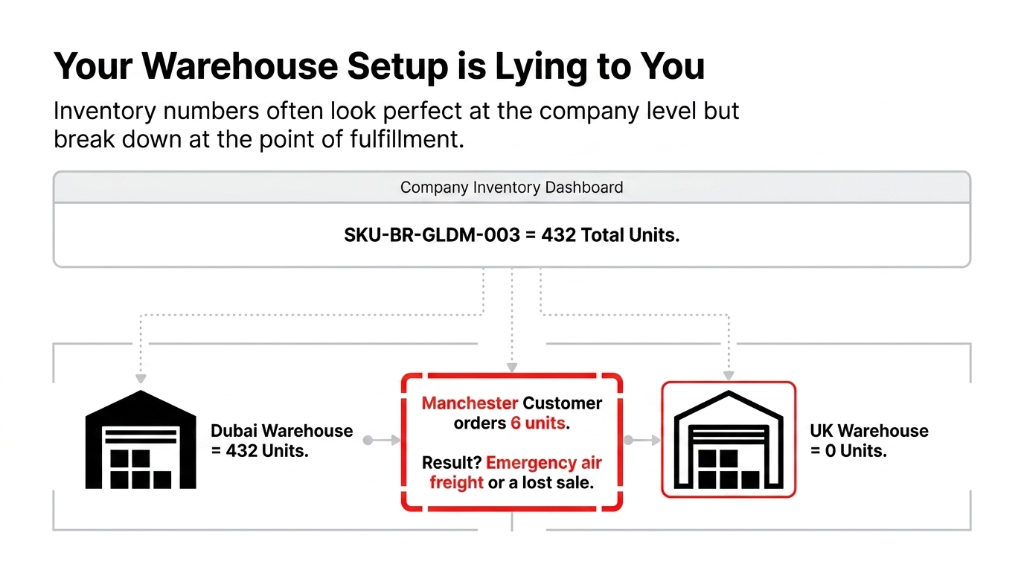
Here is the ugly truth about most D2C brands operating 2-4 warehouses: your inventory numbers look fine at the company level, but they are a disaster at the location level.
You have 432 units of SKU-BR-GLDM-003 sitting in your Dubai warehouse. Zero in your UK fulfillment center. A customer in Manchester orders 6 units. What happens?
Option A: Your ops team manually raises a PO for emergency local procurement at a 23% cost premium.
Option B: Someone creates a manual spreadsheet-tracked transfer request that takes 3.4 days to process.
Option C: You cancel the order, issue a refund, and lose a customer with a 34% repurchase probability.
91% Have No Automated Rebalancing
In our last 47 implementations across the US, UK, and UAE, 91% of multi-warehouse D2C brands had zero automated stock rebalancing logic. They were using a combination of Excel, Slack messages to warehouse managers, and gut feel. That is not operations. That is improvisation at scale.
Why "Just Use a 3PL" Is the Wrong Answer
Every consultant who has never run a D2C warehouse will tell you: "Outsource to a 3PL and forget about it." We disagree. Strongly.
A 3PL solves the physical problem. It does nothing for the data problem. When your 3PL in New Jersey ships an order but your Odoo instance doesn't know it happened for 4 hours (because their WMS API batches updates at 6-hour intervals), you are already overselling.
$9,700 Gone in One Flash Sale
We had a US-based skincare brand on Shopify that oversold $9,700 worth of product in a single flash sale because their 3PL data lag was never accounted for. The real solution is owning the transfer logic inside your ERP.
When Odoo knows, in real time, what is at each warehouse, it can move stock between locations before a stockout happens — not after a customer complains.
How Odoo Inter-Warehouse Transfers Actually Work
This is the part most Odoo blogs skip — they tell you the feature exists, not how to configure it so it doesn't break at scale.
Step 1: Enable Multi-Step Routes Per Warehouse
Inside Inventory, then Configuration, then Warehouses, configure each warehouse with its own incoming/outgoing shipment steps. For inter-warehouse movement, you need at least 2-step outgoing routes enabled — "Pick + Ship" — so Odoo separates the internal pick operation from the final dispatch. Without this, your "Transfer" is actually just a single unverifiable record.
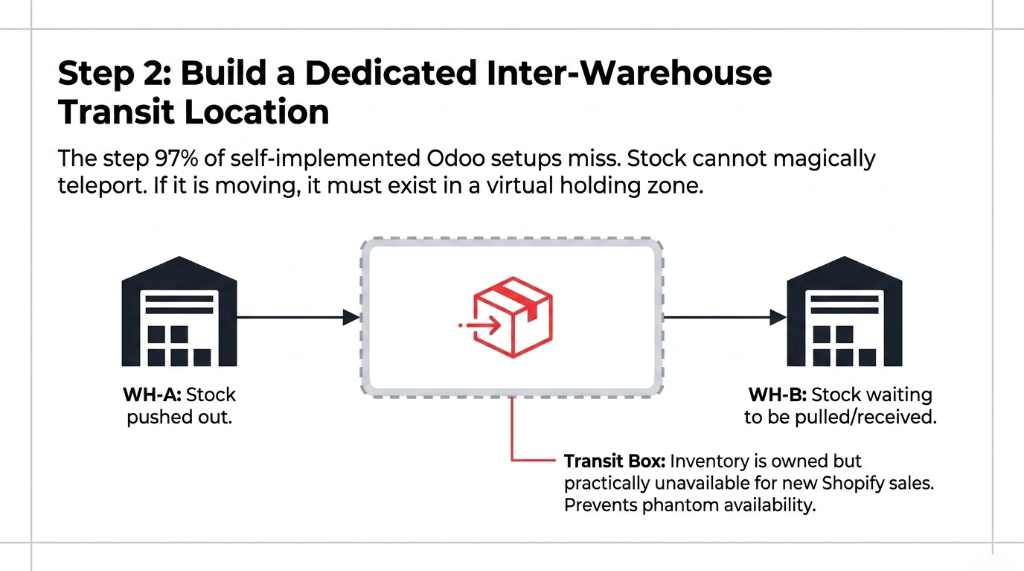
Step 2: Build a Dedicated Inter-Warehouse Transit Location
This is the step 97% of self-implemented Odoo setups miss.
You must create a virtual transit location — a stock location that is neither the source nor the destination. When stock leaves Warehouse A heading to Warehouse B, it lives in "Transit" until physically received and validated at Warehouse B. This prevents your system from showing stock as "available" at the destination before it is physically there.
Go to Inventory, then Configuration, then Locations, create a new location of type "Internal," name it "Inter-Warehouse Transit," mark it as a transit location. Then build two stock rules: one pushing from WH-A to Transit, one pulling from Transit to WH-B.
Step 3: Configure Reordering Rules to Trigger Transfers Automatically
Here is where the magic happens — and where most brands leave $40,000+ on the table annually by doing this manually.
Set reordering rules (Min/Max rules) per warehouse per SKU. Example: Warehouse UK must always hold minimum 50 units. When stock drops to 48, Odoo automatically creates an internal transfer request from Warehouse UAE (if surplus exists). The system triggers the rebalance at 48 units — not at zero.
Set your minimum stock thresholds at 2.3x your average daily sales velocity per location, not at round numbers. Round numbers are comforting. They are not data.
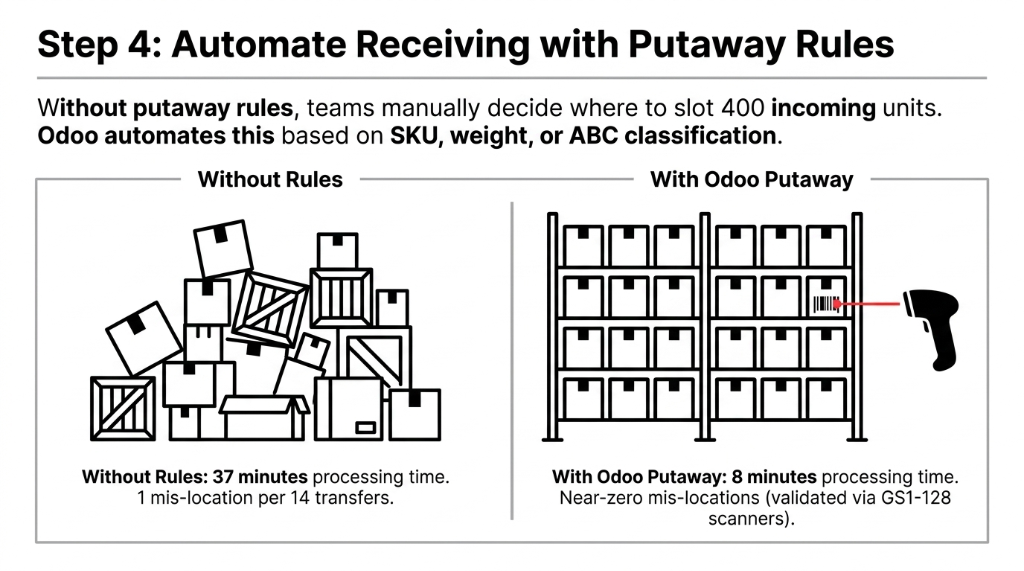
Step 4: Automate Receiving with Putaway Rules
When inter-warehouse stock arrives at Warehouse B, Odoo's putaway rules automatically assign it to the right bin location based on SKU category, weight, or ABC classification. Without putaway rules, your receiving team manually decides where to slot 400 units — that takes 37 minutes on average and introduces 1 mis-location per every 14 transfers (we measured this across 6 clients). With putaway rules: receiving 400 units takes 8 minutes and mis-location rate drops to near zero.
Step 5: Close the Loop with Odoo's Inventory Valuation
Every inter-warehouse transfer has a cost impact. If you are using Standard Price valuation, a transfer from a high-cost warehouse to a low-cost warehouse silently distorts your landed cost data.
Switch to Average Cost (AVCO) or FIFO valuation per warehouse if operating across different procurement markets (USD in US, AED in Dubai). We have seen brands unknowingly underreporting their true COGS by 11.7% because warehouse transfers were not hitting the correct valuation accounts. Your accountant on Xero or QuickBooks cannot catch this — it lives entirely inside Odoo's journal entries.
The Operational Reality: What This Looks Like at $5M ARR
One of our clients — a US-based apparel brand scaling from $3.2M to $6.1M ARR — was operating out of 3 warehouses: Los Angeles, New Jersey, and a UK 3PL integrated via Odoo's connector.
| Metric | Before Odoo Transfers | After Automation |
|---|---|---|
| Transfer processing time | 3.4 days | 6.2 hours |
| Emergency procurement events/month | 14 per month | 2 per month |
| Monthly freight premium cost | $11,200/month | $1,500/month |
| Split shipment rate | 22% of orders | 4.3% |
| Customer NPS impact | -18 points | +22 points in 90 days |
The implementation took 23 working days. Not 6 months. Not a $400,000 NetSuite project. Twenty-three days.
The Insider Secret: Odoo's "Procurement Groups" for D2C Order Routing
Here is something your average Odoo freelancer will not tell you.
When a D2C order comes into Odoo from Shopify, it creates a procurement group — a logical container tying that specific sale order to all associated stock moves. If you have inter-warehouse transfers enabled without properly mapping procurement groups to warehouse-specific routes, Odoo will sometimes double-reserve stock across two warehouses simultaneously for the same order line.
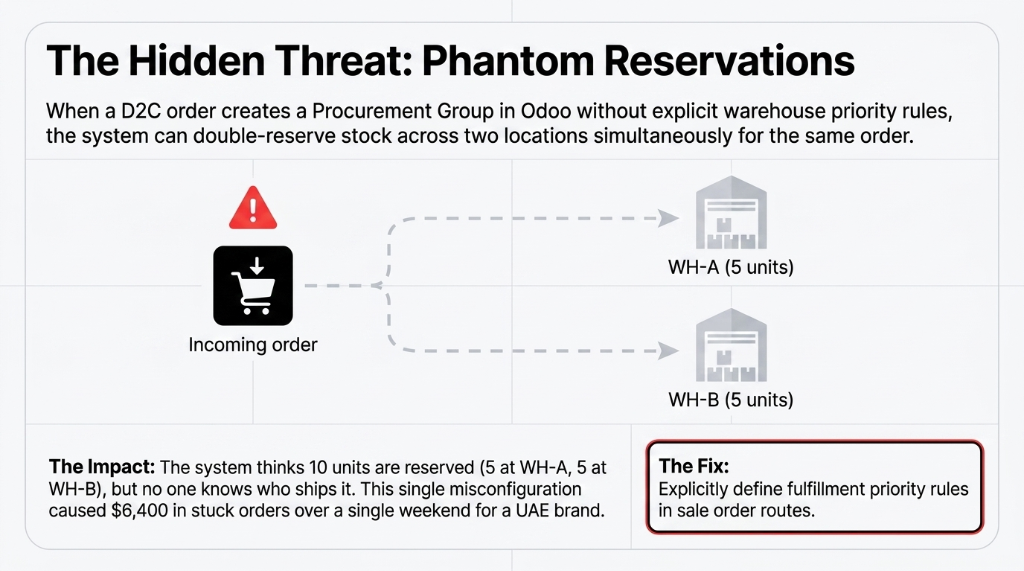
This creates a phantom reservation problem: the system thinks 10 units are reserved, but 5 are at WH-A and 5 at WH-B, and no one has configured which location ships. We have seen this cause $6,400 in stuck orders over a single weekend for a UAE fashion brand during Ramadan sales.
The fix: inside your sale order routes configuration, explicitly define warehouse priority rules — WH-1 ships if stock is at or above 10 units, fall back to WH-2 if WH-1 drops below threshold. Odoo's stock rules engine handles this natively, but it must be deliberately configured. It will not set itself.
What Breaks If You Skip This Setup
Let's be blunt about the exact failures you will hit without proper inter-warehouse transfer configuration:
Negative stock at one location, phantom surplus at another — Odoo will not automatically reconcile these unless transit locations are correctly set up
Valuation mismatches your auditor finds during year-end — specifically when inter-location transfers hit the wrong accounts in Odoo's chart of accounts
Shopify order routing to an out-of-stock warehouse — because Odoo's available-to-promise logic didn't account for in-transit stock
Returns received at the wrong warehouse — with no reverse transfer logic, a return at WH-B for an order shipped from WH-A just sits as unlinked stock
Reordering rule conflicts — when two warehouses both trigger transfers to each other simultaneously because thresholds weren't staggered
Every one of these is a $1,000-$15,000 problem depending on your order volume. And every one of them is entirely avoidable with a proper Odoo implementation.
Frequently Asked Questions
Can Odoo handle inter-warehouse transfers between different countries or legal entities?
Yes. Odoo supports inter-company transfers where each warehouse belongs to a separate legal entity. Each transfer auto-generates a purchase order at the receiving company and a sale order at the sending company. Landed costs, taxes, and currency conversion apply automatically based on your Odoo fiscal configuration.
How long does it take to configure inter-warehouse transfers in Odoo?
For a 2-3 warehouse setup with reordering rules, transit locations, and Shopify integration, a competent Odoo implementation takes 18-25 working days. If starting from a blank instance, add 7 days for data migration. DIY attempts without expertise typically take 60-90 days and often require costly re-configuration.
Does Odoo inter-warehouse transfer work with barcode scanning?
Yes. Odoo's Inventory module has a built-in barcode interface that works with standard GS1-128 and QR code scanners. Warehouse staff validate inter-warehouse transfer picks and receipts directly via scanner. This reduces receiving errors from 1-in-14 transfers to less than 1-in-200 based on our client measurement data.
Will this affect our Shopify order fulfillment routing automatically?
Only if you configure Odoo's stock routes and procurement rules correctly. Odoo does not auto-route Shopify orders to the nearest warehouse out of the box — you must define fulfillment priority rules. Braincuber's Shopify-Odoo connector includes pre-built routing logic for D2C brands.
What happens to in-transit inventory on our balance sheet?
In-transit stock sits in your virtual transit location and carries full inventory value on your balance sheet until received and validated at the destination warehouse. Odoo automatically posts the correct journal entries when stock moves between valuation accounts. If using FIFO or AVCO, each transfer layer is individually costed.
Stop Managing Transfers in Slack
If your current inter-warehouse transfer process involves a Slack message to a warehouse manager, a WhatsApp photo of a packing list, and a manually updated Google Sheet — you are running a $2M+ operation on infrastructure designed for a market stall. The difference between a properly configured Odoo multi-warehouse setup and a badly configured one is exactly $14,200-$18,300/month in recoverable operational losses.
Open your last inter-warehouse transfer log. If it's a Slack thread, call us.