
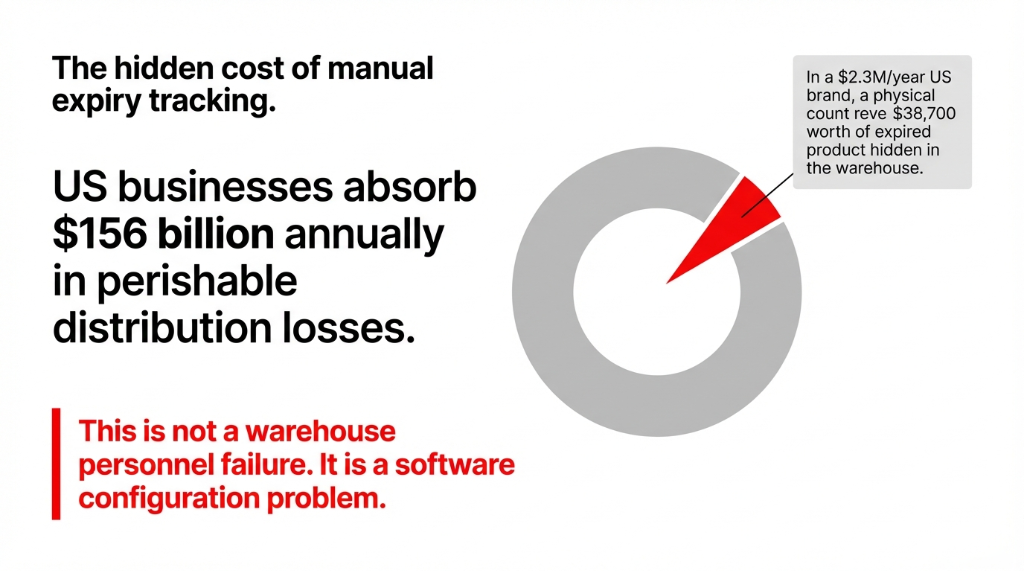
Your FIFO Setup Is Half-Finished
Here is the part nobody tells you at go-live: FIFO alone does not protect perishable products.
FIFO (First In, First Out) picks the oldest received stock first. That is fine for electronics or apparel. But for food, supplements, or biologics — where Lot A received 6 months ago might expire after Lot B received last week — FIFO will serve the wrong stock and you will not even know it.
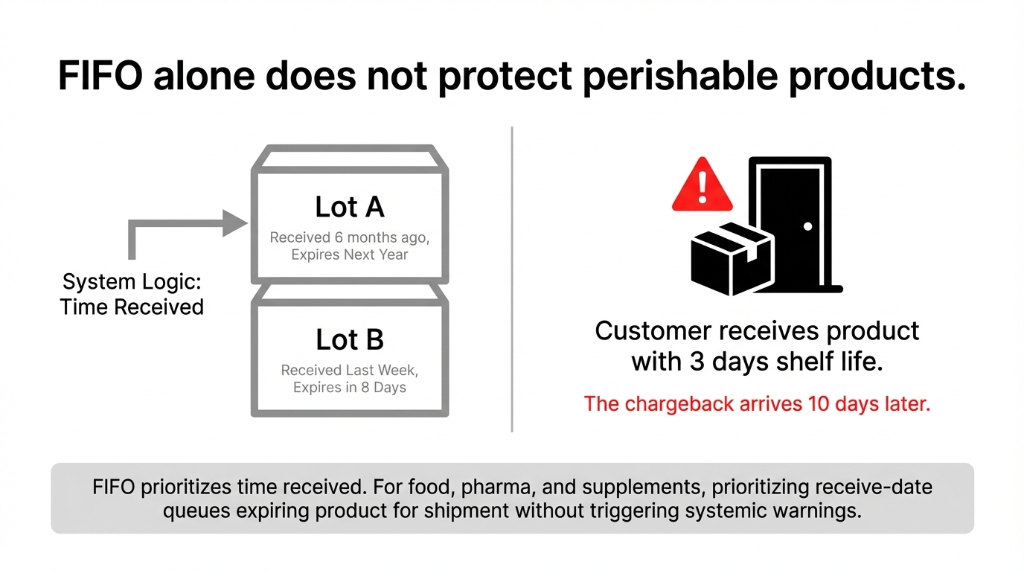
We constantly see clients who confidently say, “We are FIFO compliant,” while their system is quietly queuing product for shipment that expires in 8 days. Their customer gets it with 3 days left on the shelf. The chargeback comes in 10 days later.
FEFO Is What You Actually Need
The real logic you need is FEFO — First Expired, First Out — and the 30/15/7-day alert layer that sits on top of it. FEFO overrides receive-date sequencing entirely and prioritizes the lot with the nearest expiration date, regardless of when it arrived.
FIFO is about time received. FEFO is about time left. For perishables, only one of these matters.
The Four-Date System Odoo Actually Uses
Odoo does not just track one date per lot. It tracks four, and most implementations we inherit only have one or two configured. Here is what you are missing:
Expiration Date
The hard cutoff. Product is unsafe or legally unsellable after this date. Calculated as number of days after manufacturing/receipt.
Best Before Date
The quality cliff. Product starts degrading before full expiry. This is your last safe window for premium D2C orders.
Removal Date
The warehouse action date. Odoo flags this lot for physical removal from pickable stock. Set this to trigger before expiry — typically 7 to 15 days out.
Alert Date
The early warning. This fires 30 days (or your configured number) before expiry and sends a notification so your ops team can act, not react.
The 30/15/7-day logic is not a separate feature. It is what you get when all four of these dates are configured correctly and your alert thresholds match your actual sales velocity.
How to Configure the 30/15/7 Alert Logic in Odoo
This is the step-by-step that your implementation partner probably skipped. Follow it exactly.
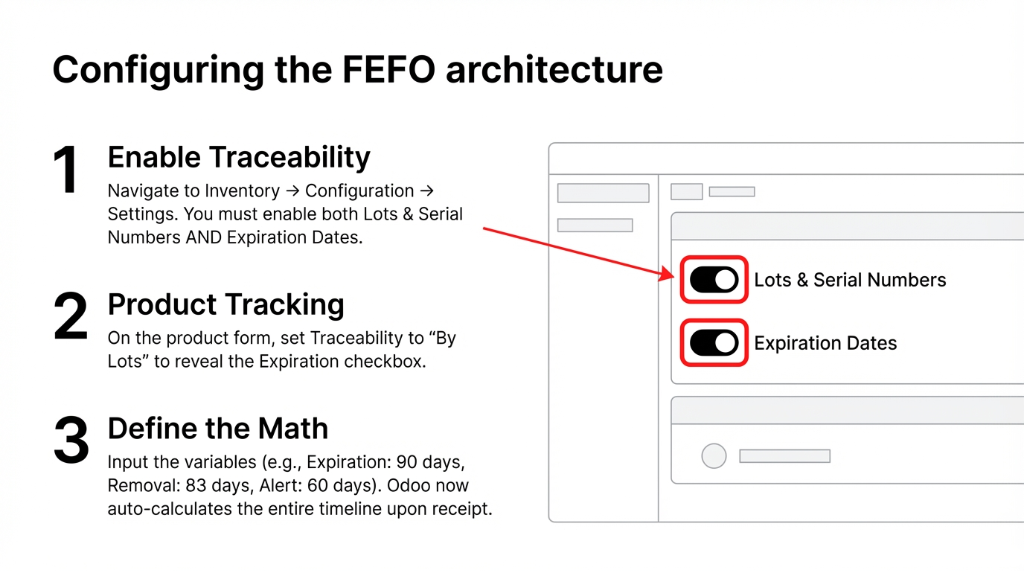
Step 1 — Enable the Right Settings
Go to Inventory → Configuration → Settings → Traceability. Enable both Lots & Serial Numbers AND Expiration Dates. You cannot see expiry fields without lots enabled — this catches people every time.
Step 2 — Set Your Product as Storable, Tracked by Lots
Open the product form → Inventory tab → set Traceability to “By Lots.” An “Expiration” checkbox appears. Enable it.
Step 3 — Configure the Dates Section on the Product
This is where your 30/15/7 logic lives. Enter:
Expiration Time: e.g., 90 days (product shelf life)
Best Before Time: e.g., 75 days (15 days before expiry)
Removal Time: e.g., 83 days (7 days before expiry — product pulled from pickable)
Alert Time: e.g., 60 days (30 days before expiry — early warning fires)
Step 4 — Set the Removal Strategy to FEFO
Go to Inventory → Configuration → Product Categories. Set Removal Strategy to First Expiry First Out (FEFO). This overrides FIFO for this category.
Step 5 — Assign Lot Numbers and Dates at Receipt
When a PO receipt comes in, your receiving team assigns lot numbers and Odoo auto-calculates all four dates based on the product’s configured time fields. They can also override individual lot expiry dates when vendor-stamped dates differ from your default calculation.
Step 6 — Monitor via the Expiration Alert Filter
In Inventory → Products → Lots/Serial Numbers, filter by Expiration Alert. Every lot that has crossed its alert date shows up here. This becomes your warehouse team’s daily 5-minute check.
Operationally, on a product manufactured today with a 90-day shelf life, Odoo auto-calculates that the alert fires on Day 60, removal happens on Day 83, and the lot is flagged as expired on Day 90. Your team gets notified at each stage without anyone looking at a spreadsheet.
The Alert Timeline That Actually Works for US Operations
Based on what we have configured for brands moving between $1M and $12M in perishable SKU revenue, here is the tiered alert logic that prevents both stockouts and expiry write-offs:
| Alert Tier | Trigger | Action Required |
|---|---|---|
| 30-Day Alert | Alert Date fires | Review slow-moving lots; push to promotions or redistribution channels |
| 15-Day Alert | Custom scheduled action or removal date | Move lot to “Last to Pick” zone; flag for priority fulfillment |
| 7-Day Alert | Removal Date fires | Auto-remove from pickable stock; initiate write-off or donation workflow |
| 0-Day | Expiration Date | Lot is blocked from all outbound operations in Odoo automatically |
The Texas Supplement Chargeback Story
Real client story: A supplement brand in Texas was getting chargebacks of $4,300 per shipment from a regional grocery chain because their delivery team was fulfilling orders from lots with fewer than 10 days remaining.
The 7-day removal buffer matters for legal reasons in the US, particularly for FDA-regulated products and items sold into retail chains that require minimum remaining shelf life on delivery.
Two hours of Odoo configuration fixed a $51,600 annual chargeback problem.
What Nobody Tells You About Odoo Expiry Alerts
(This is the insider detail that costs brands real money.)
Odoo’s standard alert fires as a visual flag in the lot/serial number list. It does not automatically send an email to your ops manager unless you build a scheduled action or use Odoo’s automated action module.
Out-of-the-box, your warehouse team has to actively check the filter. If they do not, the alert sits there silently.
⚠ The silent alert trap: Odoo’s expiry alert is visual-only by default. It will not email anyone unless you build an Automated Action. Your warehouse team has to actively check the filter. If they do not, the alert sits there silently while product expires.
What We Configure for Every Client
An Automated Action in Odoo that runs daily at 6 AM, checks for lots within the alert date threshold, and sends an email to the inventory manager and the relevant product category owner.
You can also build a custom Odoo module that pushes these alerts to Slack, which is what most ops teams actually live in. We have done this for brands where the warehouse manager checks Slack 40 times a day and Odoo twice a week.
Cost to set up: 2 hours of dev time. Value: $0 in surprise write-offs on the next quarterly count.
FEFO vs. FIFO: Stop Picking the Wrong One
| Scenario | Use FIFO | Use FEFO |
|---|---|---|
| Apparel / Electronics | ✓ | — |
| Food & Beverage | — | ✓ |
| Pharmaceuticals | — | ✓ |
| Supplements / Nutraceuticals | — | ✓ |
| Industrial Parts (non-perishable) | ✓ | — |
| Cosmetics with expiry | — | ✓ |
The $87,000 Configuration Error
The controversial reality: most Odoo implementations for food brands are running FIFO by default because nobody changed the product category setting. The system picked it up from the default configuration, and nobody questioned it.
We audited a $4.7M/year organic grocery brand last year and found 14 product categories that should have been FEFO were running FIFO. Their actual on-shelf expiry waste was running at 3.1% of COGS — about $87,000 a year in write-offs they thought was “just the cost of the business.”
It was not. It was a configuration error.
The Implementation Reality: What This Takes
If you are starting from scratch (Odoo already live, no expiry tracking configured):
Implementation Scope
Configuration
3–6 hours for a skilled Odoo consultant to set up all four date fields, FEFO removal strategy, and automated alert actions
Data Migration
If you have existing lot numbers in a spreadsheet, plan for an additional 4–8 hours of import work
Team Training
2 hours for your warehouse team on the new receive-and-date workflow
Go-Live Risk
Low. This is non-destructive configuration — it adds fields without breaking existing workflows
If you are on Odoo 16, 17, or 18, the expiry date module is built-in at no extra licensing cost. You are leaving $38,700 write-offs on the table because of a checkbox that is already in your system.
The first thing you will notice after going live: your warehouse team stops doing the “I think this lot is still good” conversation. Odoo tells them. The system decides. The Removal Date fires. The lot moves. It is not exciting. It is just operations running correctly.
Stop Treating Expiry Write-Offs as a Cost of Doing Business
You are not losing money because perishables are hard to manage. You are losing it because your Odoo setup is not using the 4-date system, is not running FEFO, and is not firing alerts 30 days before the problem becomes a write-off.
We have fixed this for brands from $800K to $14M in annual perishable revenue across the US, and the average recovery in Year 1 is between $31,000 and $94,000 in reduced write-offs and chargeback reversals. Contact Braincuber today — do not let expired inventory kill your margins.
FAQ
Can Odoo send automated email alerts when a product is nearing its expiry date?
Yes, but not out-of-the-box. Odoo’s native expiry alert flags lots visually in the lot/serial number list when the Alert Date is reached. To get email or Slack notifications, you need to configure an Automated Action in Odoo’s Technical settings. This takes roughly 2 hours of configuration and triggers daily without any manual effort from your team.
What is the difference between FIFO and FEFO in Odoo’s removal strategies?
FIFO picks the oldest-received stock first — based on receipt date. FEFO picks the soonest-to-expire stock first — based on expiration date. For perishables like food, pharma, and cosmetics, FEFO is the correct strategy. FIFO is default in Odoo; you must manually set FEFO per product category under Inventory → Configuration → Product Categories.
Do I need Odoo Enterprise to use expiry date tracking and FEFO?
No. Expiry date tracking, lot-level date management, and FEFO removal strategy are available in both Odoo Community and Enterprise editions starting from Odoo 15+. You do need to enable Lots & Serial Numbers and Expiration Dates under Inventory Settings. No paid add-on is required for the core functionality.
How many days should I set for the Alert Date vs. Removal Date?
This depends on your product’s shelf life and your sales velocity. A general rule: set Alert Date to 25–30% of total shelf life before expiry, and Removal Date to 7–10 days before expiry. For a 90-day perishable, that means a 30-day alert and a 7-day removal. Adjust based on how fast your slowest-moving SKUs turn over per week.
Can Odoo block an expired lot from being shipped to a customer?
Yes. Once a lot’s Expiration Date is reached, Odoo automatically blocks it from being used in outbound operations — delivery orders, picking, and transfers. The system will throw a warning or a hard block, depending on your configuration, if a warehouse team member tries to pick an expired lot, preventing compliance violations before they reach the customer.
Your Expiry Write-Offs Are Not Inevitable. They Are Configurable.
Book a free 15-Minute Operations Audit with Braincuber. We will pull up your Odoo config, find the exact setting that is costing you money on perishable inventory, and give you a fix on the call. No pitch. No fluff.