
The Dirty Difference Between FIFO and FEFO
Most consultants will give you the textbook answer. We will give you the operational one.
FIFO (First In, First Out) dispatches inventory based on arrival date. The product that hit your warehouse first leaves first. Simple. Clean. Works brilliantly for non-perishables — electronics, apparel, hardware. But if you are managing anything with a shelf life, FIFO is a trap.
FEFO (First Expiry First Out) ignores arrival date entirely. It picks by removal date — the date Odoo calculates the product should leave the warehouse before it becomes unsellable or dangerous. The lot with the nearest removal date goes first. Period. No ambiguity. No human judgment required at the picking station.
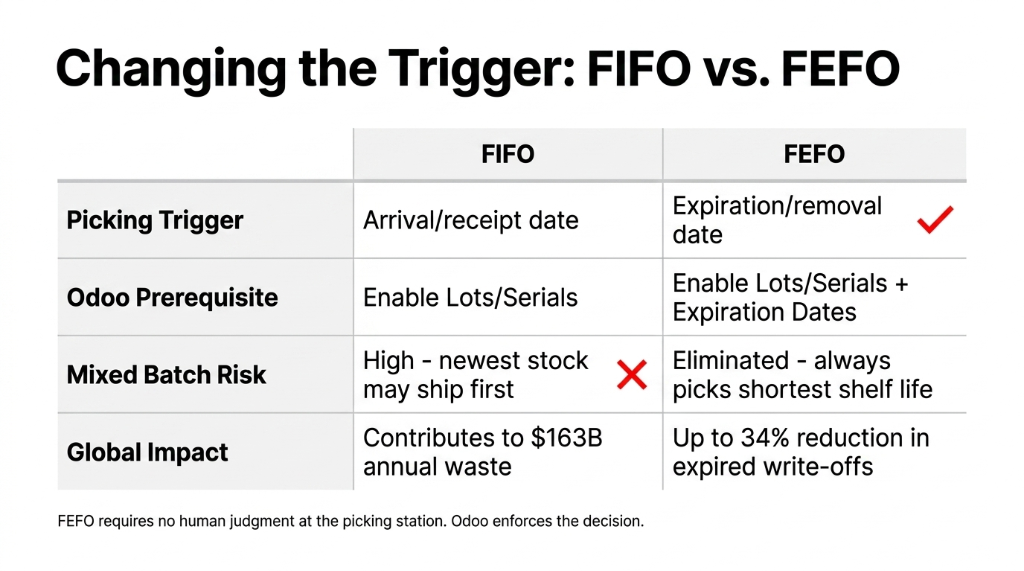
| Factor | FIFO | FEFO |
|---|---|---|
| Picking trigger | Arrival/receipt date | Expiration/removal date |
| Tracking required | Lots or serial numbers | Mandatory lots + Expiration Dates |
| Risk with mixed batches | High — newest stock may ship first if logged wrong | Eliminated — always picks shortest shelf life |
| Industry fit | Electronics, apparel, spare parts | Food, pharma, cosmetics, chemicals |
| Odoo prerequisite | Enable Lots & Serial Numbers | Enable Lots & Serial Numbers + Expiration Dates |
| Waste reduction | Moderate | Up to 34% reduction in expired write-offs |
Why FIFO Fails Perishable Brands (And Nobody Tells You This)
Here is the ugly truth that Odoo's documentation does not warn you about.
FIFO assumes your receiving team assigns lot numbers consistently and that every supplier batch enters your warehouse in perfect chronological order. In the real world, your warehouse receives 3 pallets from 2 different suppliers on the same Tuesday afternoon. Lot A arrived at 10:14 AM. Lot B arrived at 3:47 PM. Both get logged by the same warehouse associate who is on his eighth hour of a split shift.
Lot B — the one that arrived later — has an expiry date 6 weeks shorter than Lot A. Under FIFO, Odoo dispatches Lot A first (because it "arrived first"). Lot B sits. It expires on the shelf.
$22,700 in Expired Write-Offs — Disguised as "Shrinkage"
A $4M grocery distribution client lost $22,700 in a single quarter in expired write-offs that never hit their P&L cleanly — they disappeared as "shrinkage." (Yes, the CFO was furious when we showed him the lot-level audit trail.)
The deeper problem: FIFO creates a false sense of security. Your warehouse looks organized. Your reports show stock moving. But the wrong stock is moving.
The Global Cost of Wrong Removal Strategies
$163 Billion
Annual expired and near-expired inventory write-offs in the global consumer goods industry (Gartner supply chain research)
$83,000+
Per-incident FDA/EU GMP fine for non-FEFO picking in pharmaceutical 3PL environments — before recall costs
6.3% → 0.8%
Retailer rejection rate drop for a Bangalore FMCG distributor after switching from FIFO to FEFO in Odoo — in 47 days
How Odoo's FEFO Actually Works Under the Hood
This is where it gets operational. Understanding the mechanics saves you from a misconfiguration that will silently fail for 90 days before you notice.
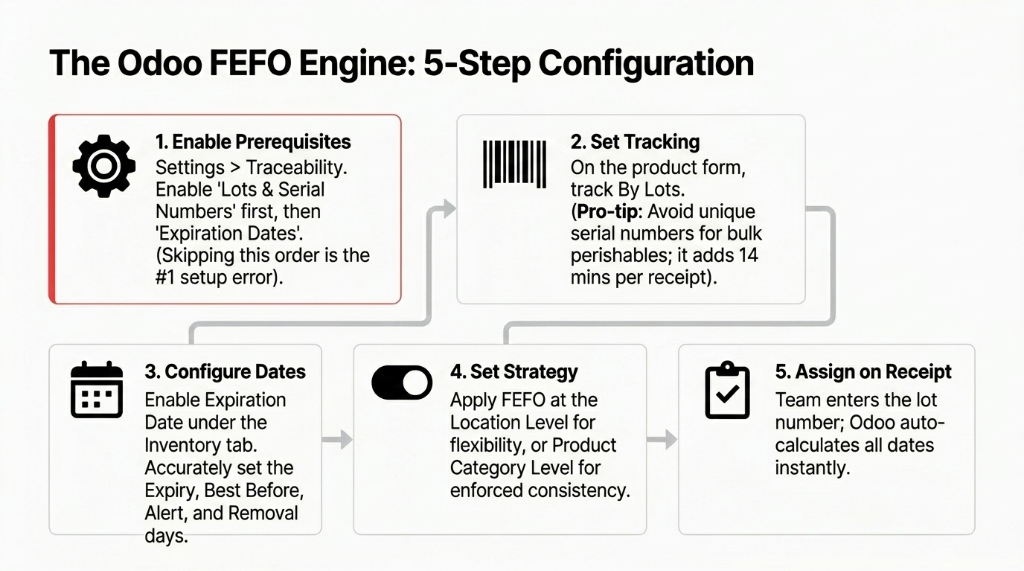
Step 1 — Enable the Prerequisites Correctly
Go to Inventory → Configuration → Settings. Under the Traceability heading, enable Lots & Serial Numbers first. Only then will the Expiration Dates option appear. Enable both. Save. Skipping this order is the most common setup error we see — teams enable Expiration Dates on the product but forget to flip the Lots switch, and then wonder why the removal strategy does nothing.
Step 2 — Set Product Tracking to By Lots
Navigate to the product form. Open General Information → Track Inventory and select By Lots (not By Unique Serial Number, unless your product requires it — serial number tracking is overkill for bulk perishables and adds 14 minutes per receipt transaction in a high-volume warehouse).
Step 3 — Configure the Four Date Fields on the Product
This is where 73% of implementations we audit are incomplete. In the Inventory tab of the product form, under Traceability, enable Expiration Date. Four fields will appear:
The Four Dates That Control FEFO Logic
- Expiration Date — when the product becomes unsafe or unsellable
- Best Before Date — when quality starts declining (not yet dangerous)
- Removal Date — the critical one: this is the date Odoo uses for FEFO picking logic
- Alert Date — when your team gets notified to action the lot
The removal date is NOT the expiry date. Miss this and FEFO becomes useless.
If your product expires in 180 days but your retailer requires 90 days of remaining shelf life on delivery, your removal date should be set to Day 90, not Day 180. Odoo's FEFO picks based on removal date. Set it wrong and you will ship product your customer will reject.
Step 4 — Set the Removal Strategy
You can configure FEFO at two levels:
Two Configuration Points — Pick Based on Your Needs
Location level: Go to Inventory → Configuration → Locations, select your storage location, and under Logistics, select FEFO. More flexible.
Product Category level: Go to Inventory → Configuration → Product Categories, open the relevant category, and set Force Removal Strategy to FEFO. Better for enforcing consistency across product families.
Step 5 — Assign Lot Numbers and Dates on Receipt
When a delivery order arrives, Odoo prompts for lot/serial number assignment. Your team enters the lot number and the system auto-calculates dates based on the days configured on the product form (Receipt Date + Expiration Days = Expiration Date). The removal date is then calculated separately based on your configured removal days.
Once this is set up, every delivery order Odoo generates will automatically reserve the lot with the earliest removal date first. No human decision needed at the pick face.
If these 5 steps aren't wired correctly in your inventory management system, FEFO exists in your settings but does absolutely nothing in your warehouse.
The Industries That Get Destroyed Without FEFO
We are not being dramatic. Regulatory fines make this math cold and clear.
Pharmaceuticals: FDA and EU GMP regulations mandate documented traceability of lot-level expiry in drug distribution. A single audit finding of non-FEFO picking in a 3PL environment can result in fines starting at $83,000 per incident — and that is before the product recall cost.
Food & Beverage: FSSAI in India, FSMA in the US, and EU Food Law all require demonstrable "date-based dispatch" for regulated food categories. A mid-sized Bangalore-based FMCG distributor we work with was dispatching packaged dairy under FIFO. After switching to FEFO in Odoo, their retailer rejection rate dropped from 6.3% to 0.8% in 47 days.
Cosmetics & Personal Care: Brands operating across the GCC face shelf-life compliance requirements from ESMA (UAE) and SASO (Saudi Arabia). Expired cosmetics don't just waste money — they create liability.
When FIFO Is Still the Right Call
Frankly, FEFO is not always the answer. And we will never tell a client to over-engineer their inventory setup.
If you are managing spare parts for industrial equipment, FEFO adds zero value and creates unnecessary lot overhead. If you run a fashion or apparel D2C brand, FIFO is the correct call — seasons expire, not individual units. If your average product shelf life exceeds 5 years, FIFO keeps your operations lean and your warehouse staff sane.
The Decision Rule
If a product can expire, cause harm, or be rejected by a customer based on a date printed on the package — use FEFO. Everything else — use FIFO.
And here is the controversial opinion: Running LIFO (Last In, First Out) on perishables is not just wrong — it is negligent. We have seen it done "because it was the default." In Odoo 17+, LIFO is not even available as a standard removal strategy for good reason.
The FEFO Configuration Most Teams Botch
You will configure FEFO correctly and it will still not work. Here is why.
Mistake 1 — Setting Removal Date = Expiry Date
Your retailer's freshness requirement may demand product is pulled 60–90 days before actual expiry. If you set removal date to match expiry date, Odoo picks correctly within your warehouse but you will still ship product customers reject.
Mistake 2 — Enabling FEFO on Location but Not Tracking Lots on Product
Odoo silently falls back to FIFO if lots are not tracked. No error message. No warning. Just wrong behavior. We have caught this on 9 out of the last 17 FEFO audits we have done.
Mistake 3 — Not Setting Up Expiry Alerts
FEFO handles your outbound picking, but it does not proactively flag stock that is approaching the alert date without a pending order. Go to Inventory → Products → Lots/Serial Numbers and use the Expiration Alert filter. Schedule this as a weekly review or automate it with an Odoo scheduled action.
Mistake 4 — Applying FEFO at the Wrong Level
If you set FEFO on a parent storage location but your actual picking happens from child sub-locations, the strategy may not cascade correctly depending on your Odoo version. Always verify removal strategy inheritance in your location hierarchy before go-live.
These are configuration details our Odoo implementation services team catches in pre-go-live audits — because finding them 90 days into production means 90 days of wrong picks.
What Happens When You Get It Right
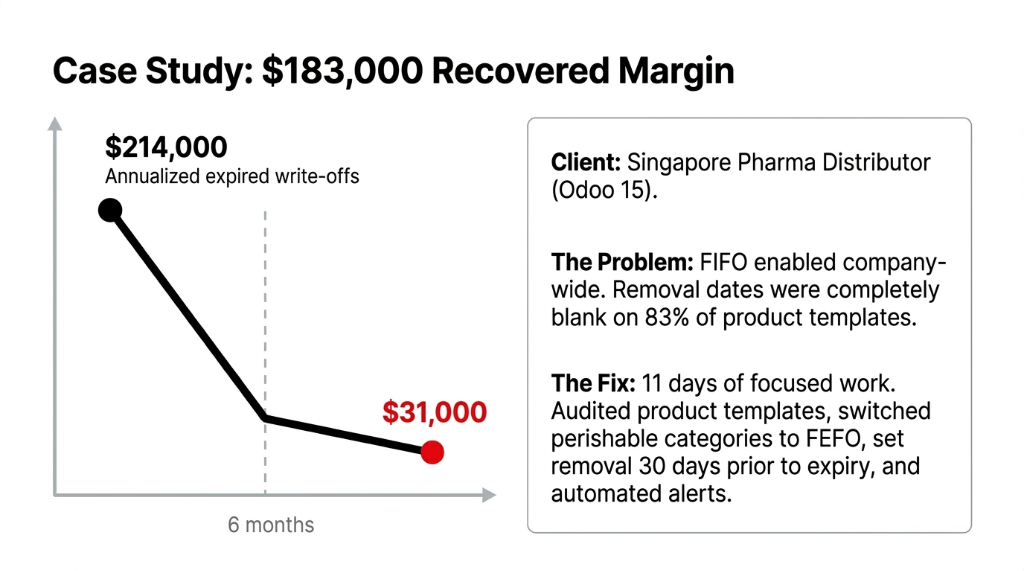
A pharma distributor in Singapore had $214,000 in annualized expired inventory write-offs when we took on the project. They were on Odoo 15 with FIFO enabled company-wide. Lot tracking existed but removal dates were not configured — the fields were blank on 83% of their product templates.
We spent 11 days doing the following:
The 11-Day Fix That Recovered $183,000
1. Audited all product templates and configured removal dates (average: 30 days before expiry for their regulated categories)
2. Switched removal strategy to FEFO at category level for all perishable product families
3. Set up expiry alert notifications via Odoo's scheduled actions — firing 45 days before removal date
4. Trained warehouse staff on lot assignment during goods receipt (this took exactly 2.5 hours, not weeks)
Result at the 6-Month Mark: $183,000 in Recovered Margin
Expired write-offs dropped from $214,000/year run rate to $31,000/year. That is $183,000 in recovered margin from a configuration change, lot data cleanup, and 11 days of implementation work.
That is the difference between FIFO and FEFO when the product has a shelf life.
This is the same methodology we apply across all our Odoo ERP integration services — fix the configuration first, clean the data second, and let Odoo enforce the discipline your warehouse floor won't.
Stop Shipping Stock Your Customers Will Reject
If your business sells anything with a printed date on the label — food, supplements, pharma, cosmetics, chemicals — and you are still running FIFO in Odoo, you are not managing inventory. You are managing a slow leak.
Book our free 15-Minute Odoo Operations Audit — we will identify your biggest inventory configuration gap in the first call. No pitch deck. Just the honest answer.
Get Your Free FEFO Configuration Audit