
Your Warehouse Is Probably Running Blind Between Counts
Let's paint the picture most operations managers don't want to see.
You run a full physical inventory count once a year — typically in December, when the whole warehouse shuts down for 2–3 days. Your team manually reconciles every single SKU. You find $19,200 worth of discrepancies. You adjust. You move on.
Then January arrives. Suppliers deliver. Sales reps push new product. Returns pile up on the wrong shelf. And for the next 364 days, your stock on-hand figures in Odoo are drifting further from reality with every missed scan, every mislabeled bin, and every phantom return that never got properly received.
The Real Cost of "One Clean Count Per Year"
67%
Inventory accuracy 6 months after a full count — meaning 33 out of every 100 SKUs had incorrect on-hand quantities in Odoo
$19,200
Discrepancies found during one annual count — ghost inventory causing stockouts, over-purchasing, and customer escalations all year
364 Days
Maximum discrepancy detection lag — errors from January aren't caught until the next December shutdown count
By June — six months after your "clean" count — a client at one of our recent implementations was running at 67% inventory accuracy. Meaning 33 out of every 100 SKUs had incorrect on-hand quantities in Odoo.
That's not a data problem. That's a revenue problem. Stockouts caused by phantom inventory. Over-purchasing because Odoo "thought" stock was lower than it was. Customer service escalations because orders were confirmed against stock that didn't exist.
A once-a-year full physical count gives you one day of accuracy.
The rest of the year, you're guessing.
What Cycle Counting in Odoo Actually Does (And Why Most Teams Set It Up Wrong)
Odoo's cycle counting feature — found under Inventory → Operations → Physical Inventory with the cycle counting configuration enabled — lets you count small subsets of your inventory on a rotating schedule without stopping operations.
You define count frequencies based on ABC classification:
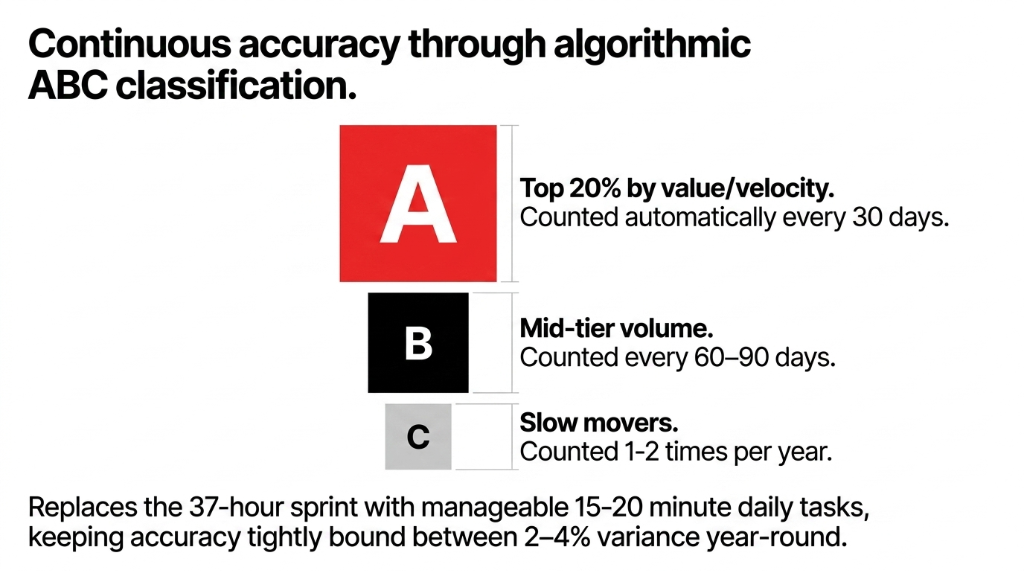
ABC Count Frequency Configuration
- A-class products (your top 20% by value or velocity) get counted every 30 days
- B-class products get counted every 60–90 days
- C-class products (slow movers, low value) get counted once or twice a year
Replaces the 37-hour sprint
Manageable 15–20 minute daily tasks keeping accuracy tightly bound between 2–4% variance year-round.
Here's the insider detail that most Odoo setup guides skip:
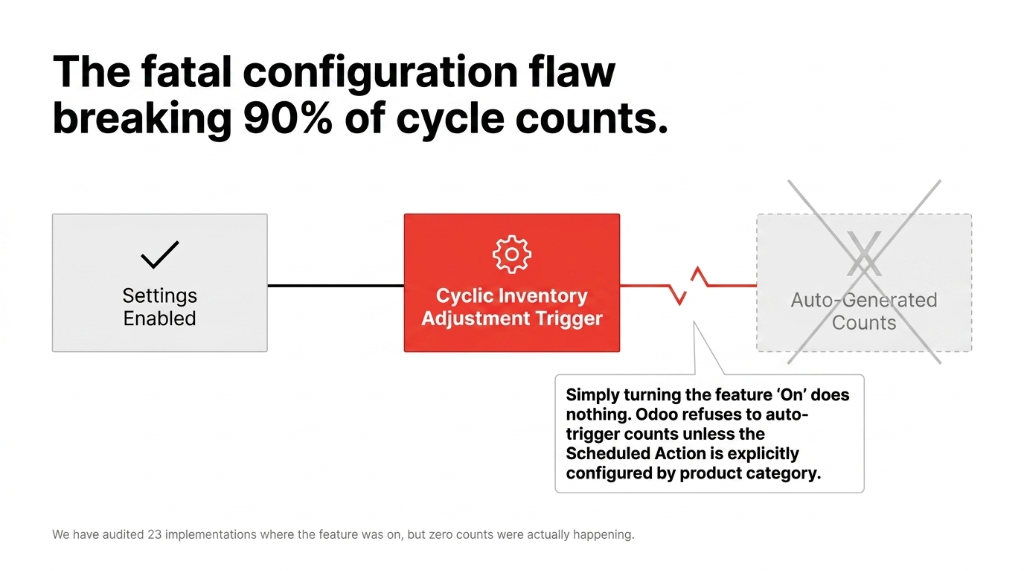
The Fatal Configuration Flaw Breaking 90% of Cycle Count Setups
Odoo won't automatically trigger cycle counts unless you set the "Cyclic Inventory Adjustment" scheduled action AND properly configure the count frequency per product or product category. We've walked into at least 23 implementations where someone had "enabled cycle counting" in settings but hadn't touched the scheduled action — meaning zero counts were ever auto-generated. The feature was on. The counts were not happening.
When configured correctly, Odoo generates count requests for warehouse staff, who validate quantities directly from the mobile app or desktop interface. Discrepancies get flagged immediately. Adjustments are made same-day. Your on-hand quantities stay within 2–4% accuracy continuously, instead of dropping to 67% accuracy by mid-year.
If you need help setting up the scheduled action and ABC tiers correctly, our Odoo implementation services team has built this exact configuration across implementations in 11 countries.
Why the "Annual Full Count" Is Not a Best Practice — It's a Risk
The traditional full physical inventory count is a legacy process from the era of paper ledgers and disconnected systems. Most accounting and compliance consultants still recommend it because it satisfies audit requirements. And look — we're not saying ditch the full count entirely.
But here's the controversial opinion: if you're running a full physical inventory count as your primary accuracy strategy in Odoo, you are transferring the cost of bad data onto your customers and your margins.
What a Full Shutdown Count Actually Costs (10,000 SKU Warehouse)
37 hours of labor for a team of 8 counters
$4,100–$6,800 in direct labor cost (depending on region and overtime)
$9,000–$22,000 in lost throughput if the warehouse freezes shipping during the count
11–14 hours of ops manager time for post-count reconciliation
Hidden cost: 0.5% typo rate on 10,000 lines = 50 wrong adjustments = $2,350 in ghost adjustments you won't catch for 12 months
That's before you factor in the data entry errors. When your warehouse team is manually entering counts against 10,000 line items, a typo rate of even 0.5% generates 50 wrong adjustments. At an average SKU value of $47, that's $2,350 in ghost adjustments you won't catch until the next annual count — a full 12 months later.
Cycle counting eliminates the shutdown. It eliminates the 37-hour sprint. It spreads the counting work across the entire year in 15–20 minute daily tasks. And it catches discrepancies within days, not months.
Head-to-Head: When to Use Which Method in Odoo
This isn't a binary choice. The smartest operations teams use both — but with very different purposes.
| Factor | Cycle Count | Full Physical Inventory |
|---|---|---|
| Frequency | Continuous (daily/weekly per zone) | Once or twice a year |
| Warehouse downtime | Zero | 1–3 days |
| Labor cost per year | ~$1,800–$3,200 (spread out) | $4,100–$6,800 (single event) |
| Inventory accuracy | 95–99% year-round | ~100% on count day, drifts after |
| Best for | High-velocity SKUs, A-class items | Year-end audit, compliance, new ERP go-live |
| Odoo setup complexity | Medium (requires ABC config + scheduled actions) | Low (one-time manual process) |
| Discrepancy detection lag | 1–30 days | Up to 364 days |
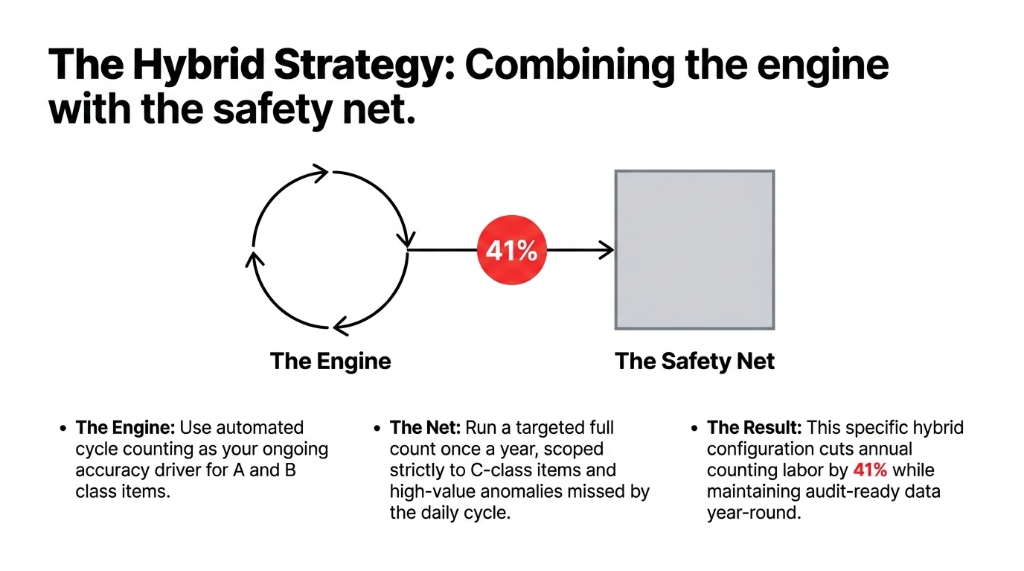
The Right Play: The Hybrid Strategy
Use cycle counting as your ongoing accuracy engine year-round, and run a targeted full count once a year — scoped only to C-class and high-value items that cycle counting may miss due to infrequent movement. This hybrid approach cuts your annual counting labor by 41% while keeping Odoo data accurate enough to trust for purchasing decisions, demand forecasting, and customer commitments.
The Odoo Setup Path That Actually Works
We've built this configuration across implementations in the US, UK, and Singapore. Here is the exact sequence:
Step 1 — Enable Cycle Counting in Odoo Settings
Go to Inventory → Configuration → Settings → Physical Inventory and enable the cyclic option. Disable "Annual Inventory Day" counting in favor of the cyclic approach. Confirm your journal is mapped correctly for inventory adjustments.
Step 2 — ABC Classify Your Products
In Odoo, navigate to each product (or use a bulk import) and assign counting frequency by product category. We recommend a minimum of 3 tiers. Don't skip this — without frequency assignments, Odoo generates no automatic count requests.
Step 3 — Activate the Scheduled Action
Go to Settings → Technical → Automation → Scheduled Actions, find "Cyclic Inventory Adjustment," and set the execution interval. We typically set this to run nightly at 2 AM. This generates count requests in the system each morning for your warehouse team.
Step 4 — Train Warehouse Staff on the Mobile Validation Flow
Odoo's WMS mobile app (or the browser interface) shows pending count requests per location. Staff count, enter quantities, and submit. Discrepancies above a threshold (we usually set $150 variance) trigger manager review before auto-adjustment.
Step 5 — Schedule Your Annual Targeted Full Count
At year-end, run a full count scoped to C-class items and high-value items with fewer than 6 cycle count verifications in the past year. This is your compliance net — not your primary accuracy tool.
Getting the data model right before running counts is critical. Our Odoo ERP integration services include pre-count data validation so you're not counting against corrupted baselines.
Singapore Health Supplement Distributor: 61% → 96.3% Accuracy in 11 Weeks
Managing 3,400 active SKUs, they went from 61% inventory accuracy to 96.3% after implementing this hybrid configuration. Annual stockout incidents dropped from 47 events to 9. That's approximately $31,700 in recovered revenue from orders that previously got cancelled due to false stockouts.
What Odoo Reports to Watch After You Go Live
Don't just set up cycle counting and forget it. Odoo gives you three reports that tell you immediately if your process is working:
Your Weekly 15-Minute Ops Review — Three Reports, Open Them Every Monday
1. Inventory Valuation Report — Check this weekly. A sudden spike or drop without corresponding POs or sales is a data integrity red flag.
2. Inventory Adjustments History — Filter by large adjustment values. If you're seeing frequent $500+ adjustments on A-class items, your count frequency is too low.
3. Product Moves Report — Cross-reference with your count results. If a product has 200 moves in 30 days but zero cycle count requests generated, your scheduled action is broken.
Frankly, most teams only look at these reports when something goes wrong. By then, the damage is already done. Build a 15-minute weekly ops review into your calendar with these three open. That's it. That's the difference between a warehouse that runs on real data and one that runs on hope.
Want your inventory management system to surface these reports automatically? We build custom dashboards in Odoo that flag anomalies before your team even opens the app.
Your Inventory Data Is Either Working for You or Lying to You
If you're running Odoo and you're not sure whether your cycle count configuration is actually generating count requests — or if your team just ran their third annual full count and still found $20,000+ in discrepancies — something in the setup is broken.
Book a free 15-Minute Operations Audit. We'll pull up your Odoo inventory configuration live, find the exact break in your counting process, and tell you what it's costing you per month.
Book Your Free 15-Minute Audit