
The Ugly Math of Quick Commerce That Nobody Shows You
Quick commerce lives on 10–30 minute delivery promises. Dense networks of dark stores and micro-fulfilment centres jammed inside residential clusters. Staff inside those hubs have roughly 1.5–2.5 minutes to pick and hand over an order if they want the rider to hit that 10–15 minute doorstep target.
Waste 6–8 minutes moving cartons into storage, updating stock, and then picking them again? Your SLA dies. Your rider fleet becomes a loss centre. Your app ratings collapse.
Quick Commerce: The Numbers That Hurt
1.5–2.5 min
Maximum pick-and-handover time per order if riders are going to hit 10–15 minute doorstep SLAs
3–5 pts
Gross margin points lost to unnecessary handling and storage for items that could fly straight through cross-dock
6–8 min
Time wasted per inbound batch when cartons go through putaway-to-stock instead of direct cross-dock flow
We have seen brands lose 3–5 percentage points of gross margin just to unnecessary handling and storage for items that could have flown straight through a cross-dock lane. That's not a rounding error. That's the difference between profitability and a VC-funded bonfire.
Where Most Quick Commerce Warehouses Break
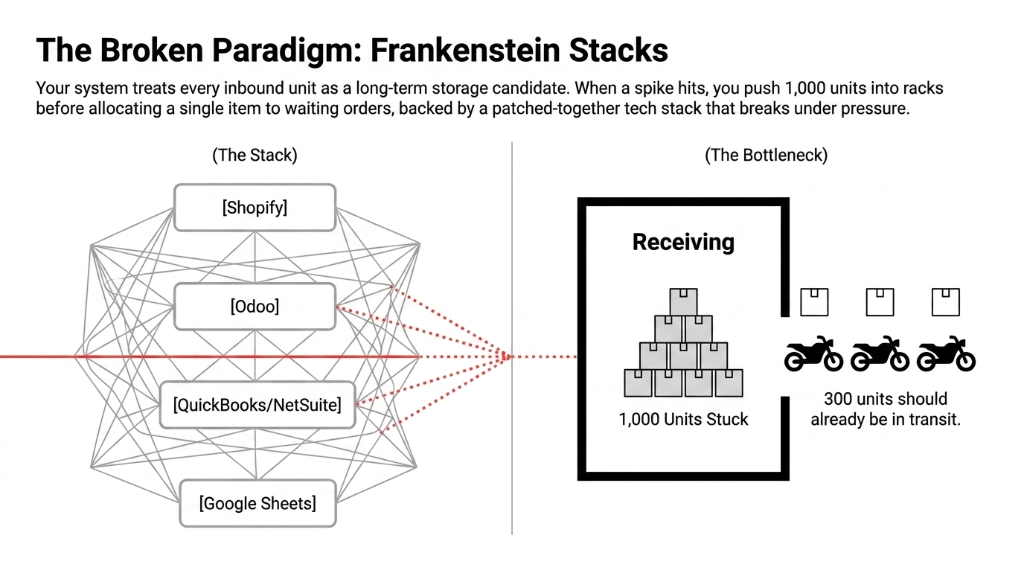
The pattern is painfully familiar. You receive 1,000 units of a fast-moving SKU, push them into stock, and only then start allocating to orders that were already waiting in your queue.
By the time your team finishes putaway, 300 units should already have been on the way to customers in those first vans or bikes. Instead they are sitting in racks because your system treats every inbound like a long-term storage candidate rather than a cross-dock candidate.
And then there's the tech stack. We see Frankenstein stacks of tools everywhere: Shopify or a custom app in front, Odoo in the middle, QuickBooks or NetSuite at the back, plus a few Google Sheets "for safety." That patchwork kills any chance of having a clean "vendor to input to output to customer" flow you can automate.
The Real Bottleneck Isn't Your Warehouse Team
It's your system architecture. When a spike hits, you push 1,000 units into racks before allocating a single item to waiting orders — backed by a patched-together tech stack that breaks under pressure. Fix the flow first. The speed follows.
What Cross-Docking Actually Means Inside Odoo
Odoo's cross-dock is not a buzzword. It is a very specific route configuration that sends received products directly to customers through an Input to Output to Customer chain without ever putting them into regular stock. The physical trucks unload into a dedicated Cross-Dock or Input area, you reorganize quantities per outbound shipment, and then load outbound vehicles from the Output dock.
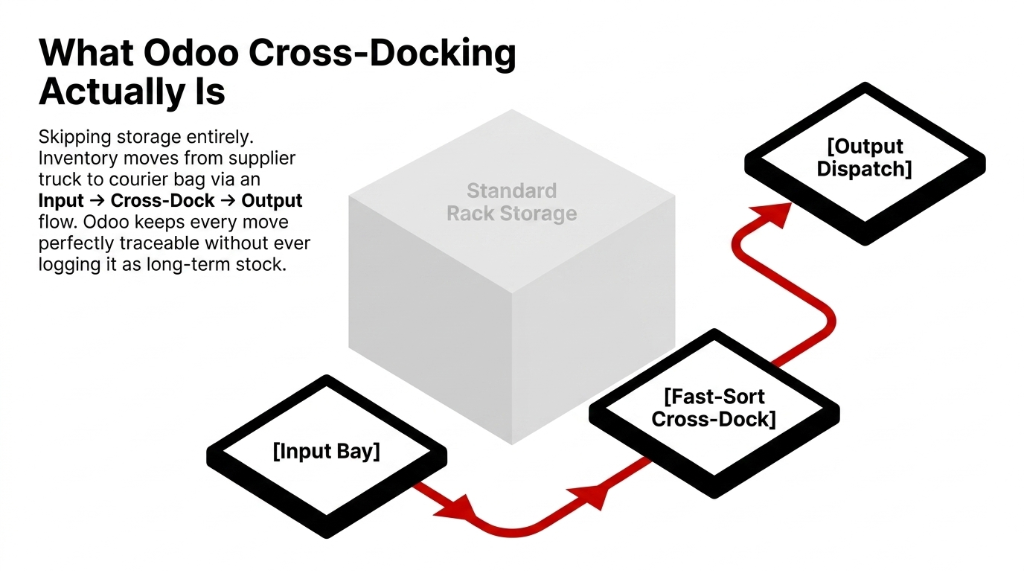
Technically, Odoo does this by creating a Cross-Dock route with at least two pull rules: one moving goods from Input to Output, and another moving from Output to the Customer location as a delivery order. For products assigned to this route with "Buy + Cross-Dock", Odoo automatically generates an internal transfer and a delivery linked to the same sale order and parks them in "Waiting Another Operation" until the purchase receipt is done.
Skipping storage entirely. Inventory moves from supplier truck to courier bag. Odoo keeps every move perfectly traceable without ever logging it as long-term stock. That's the point.
Mapping Cross-Dock to Quick Commerce Reality
In a quick commerce network, your "warehouse" in Odoo is often a virtual representation of a dark-store cluster: Input is the receiving bay, Cross-Dock is the fast-sort area, Output is the dispatch rack right next to rider staging. You do not want every inbound carton to go to stock; you want high-velocity SKUs to exit via cross-dock within 15–30 minutes of receipt.
We design flows where your upstream vendor lead time and downstream rider capacity decide which SKUs are always eligible for cross-dock and which must go to storage. Think of it as a routing brain: Odoo decides "this carton is for storage, this pallet is for direct cross-dock" — not your floor supervisor panicking at 7 pm.
If your inventory management system still treats every inbound unit identically, you're fighting physics. Fast movers need a fast lane. Everything else can wait.
The 4-Step Odoo Cross-Dock Setup That Actually Works
Step 1: Warehouse and Locations Setup
Odoo will not cross-dock anything until you enable Multi-Step Routes in the Inventory settings, which also activates internal Storage Locations in the background. Navigate to Inventory → Configuration → Settings → Warehouse and flip that switch.
Once that flag is on, configure your warehouse so that both Incoming and Outgoing shipments work in two steps: Supplier → Input and Output → Customer. We also define a dedicated transit-type location like "Cross-Dock Zone" or reuse Input/Output as the cross-dock corridor depending on site layout.
For Dense City Dark Stores
Keep it simple: one Input, one Output, no extra storage for cross-dock SKUs. Staff should never wonder where to park inbound trolleys. If the physical space is 1,200 sq ft, adding a third zone just creates confusion.
Complexity kills speed. In quick commerce, speed is the entire product.
Step 2: Route Configuration for Cross-Dock and Normal Stock
Use Odoo's auto-created Cross-Docking route for the warehouse or create your own route with explicit pull rules. The standard pattern: Pull from Supplier to Input, then Input to Output (internal transfer), then Output to Customer (delivery order).
We always configure this route to apply only to specific products, categories, or warehouses — not globally. Otherwise you accidentally try to cross-dock long-tail SKUs with erratic demand, and your entire inbound process chokes on unfulfilled reservations.
The SKU Split That Matters
Cross-Dock Candidates: Your top 50–100 SKUs that fuel 60–70% of quick commerce order lines. High velocity, reliable supplier lead times.
Stock Candidates: Long-tail SKUs with erratic demand. Keep them on traditional "Buy + Stock" routes. Mixing these into cross-dock creates reservation chaos.
Start with the short-tail.
Those are the items where cross-docking cuts the most wasted touches, and where a single stock-out generates hundreds of angry app reviews in one evening.
Step 3: Product and Vendor Configuration
For each SKU you want to cross-dock, mark the "Buy" and "Cross-Dock" routes on the product in the Inventory tab. In the Purchase tab, set the primary vendor, pricing, and lead time so Odoo can auto-generate the right purchase order in sync with the sale order demand.
*(Your vendor lead time accuracy determines whether cross-dock works or implodes. If your supplier shows up 4 hours late, your entire outbound queue is blocked. We build in a 90-minute buffer for new vendor relationships.)*
Step 4: How the Order Actually Flows Through Odoo
Customer places an order for a cross-dock SKU. Odoo generates two linked transfers: an internal transfer from Input to Output, and a delivery order from Output to the Customer. Both sit in "Waiting Another Operation" until the purchase receipt lands.
Because the product is on a Buy + Cross-Dock route, Odoo also auto-creates a purchase order to the mapped vendor. When the truck arrives, you receive into Input. That receipt unblocks the internal transfer. Your team validates the move from Input to Output. Then validates the delivery from Output to the rider or linehaul van.
From the Customer's Perspective
The order went straight from "placed" to "out for delivery" with very little delay. From your operations perspective, goods never "lived" in stock — but every move exists in Odoo for auditing and analytics. That's the magic: zero storage time, full traceability.
Tuning Cross-Dock for 10–15 Minute SLAs
The tech alone is not enough. Your timings must line up with the reality of quick commerce pick times. Dark stores that hit 10–15 minute delivery typically need packers to finish order preparation within 1.5–2 minutes, leaving only a few minutes for routing and rider dispatch.
We use Odoo lead times and route priorities to make sure cross-dock SKUs become available for reservation the second the Input receipt is validated — not 15 minutes later when someone does a manual stock adjustment in a Google Sheet that doesn't talk to the ERP.
Combined with decent slotting logic and barcoded locations, you can shave 3–4 minutes from your inbound-to-dispatch cycle on high-velocity SKUs. That's the difference between a 10-minute delivery and a refund.
The Batching Lever Nobody Uses
For some clients we configure wave picking from Output so that riders leave every 5 minutes with mixed baskets assembled directly from cross-dock and minimal touches on stored items. The rider doesn't wait for a full van. The van leaves when the timer hits.
Result: 23% fewer idle rider minutes per shift. That's $1,750/month in rider cost savings for a 15-rider fleet.
This is the same operational rigour we apply across all our Odoo ERP integration services — wire the physical flow to the digital flow, then let the system enforce the timing that humans can't maintain at 11 pm on a Friday.
Three Cross-Dock Failure Modes We Keep Seeing
We constantly see three patterns that kill Odoo cross-dock projects before they show any value.
The Three Ways Cross-Dock Dies
- Everything marked as cross-dock. Suddenly the system expects suppliers to be perfectly on time for thousands of SKUs. One missed truck and your entire order queue is blocked. We've seen this paralyze a 4,000 sq ft dark store for 3.5 hours.
- No real cross-dock location in the physical layout. The software thinks you have an Input and Output, but your warehouse still has one messy receiving corner and no dedicated fast lane. Odoo can't fix a floor plan.
- Excel and WhatsApp overriding Odoo. Supervisors "temporarily" park pallets in random spots, update a sheet, and skip validating transfers — so your Odoo data is lying before lunch. Then procurement re-orders stock you already have.
Fix these first. Or no amount of routing wizardry will save your SLA or your P&L.
Where Braincuber Fits Into This Picture
Braincuber Technologies exists exactly for this overlap of Odoo, AI, cloud, and high-pressure D2C operations. We have implemented Odoo ERP for 150+ brands across the US, UK, UAE, Singapore, and India — including dark-store and quick commerce operators that live and die by delivery time.
Because we also handle Shopify development, cloud infra, and AI agents, we can wire your e-commerce front end, Odoo inventory routes, and predictive demand models into a single, boringly reliable pipeline. That is how we get 40–60% cost reduction via automation instead of just another fancy dashboard that nobody trusts.
The Braincuber Quick Commerce Stack
Odoo Cross-Dock
Multi-step routes, pull rules, barcoded locations, wave picking — all configured for 10-minute delivery SLAs
AI Demand Prediction
Forecasting which SKUs qualify for cross-dock based on velocity, supplier reliability, and seasonal patterns
Cloud + Shopify Wire
Front-end app orders flow into Odoo in real time. No Zapier. No Google Sheets. No 3 am Slack messages from panicked ops.
If you are currently running quick commerce on a Shopify front-end, a few Odoo modules, QuickBooks, and three Zapier zaps... you already know that setup cracks the moment order volume spikes beyond 200 orders/hour. Cross-dock done properly in Odoo is one of the few ways to keep scaling without turning every Friday night into a firefight.
That's why our Odoo implementation services always start with the physical flow audit. We don't configure software in a vacuum. We walk your dark store floor, time your pick cycles, and then build the routes that match reality.
Your Cross-Dock Questions, Answered Without the Fluff
How does Odoo cross-docking help quick commerce SLAs?
It lets you move fast movers from Supplier to Input to Output to Customer without parking them in stock. For 10–30 minute delivery models, this removes several minutes of internal delay per order — often the difference between "on-time" and refund.
Do I need a separate warehouse for cross-dock?
No. We configure a single Odoo warehouse with Input, Cross-Dock, and Output locations and apply the Cross-Dock route only to selected products or categories. Other SKUs still use classic stock flows in the same warehouse.
Can I mix stored and cross-docked items in the same order?
Yes, and this is common in quick commerce. Odoo generates internal transfers and deliveries that include both cross-docked items and items from stock. The customer still receives one combined delivery as long as routes and locations are correctly configured.
What happens if the supplier truck is late?
The internal transfer and delivery stay blocked in "Waiting Another Operation" until the purchase receipt hits Input. You decide whether to split, delay, or cancel. We add alerts and AI-based ETA predictions so operations can adjust routing before the SLA breaks.
How does Braincuber typically start a cross-dock project?
We start with a 15-minute operations audit focused on your top 50–100 SKUs, dark-store layout, and current Odoo configuration. Then we design routes, locations, and product/vendor settings, run a live pilot, and only roll out cross-dock once data shows clear savings and SLA improvement.
Stop Bleeding Cash on Storage While Your Riders Race the Clock
Book Braincuber's free 15-Minute Operations Audit. We'll pinpoint exactly where Odoo cross-dock can give your quick commerce business real, measurable breathing room in the next 90 days. No fluff. No sales pitch. Just a real number.
Get Your Free Cross-Dock Audit