
The COD Settlement Mess Nobody Talks About Honestly
Here is the actual flow your money goes through before it hits your bank account:
A customer pays your delivery executive cash. That cash sits in the courier’s pocket until their next batch upload — typically 12–48 hours later. The courier then pools 7–10 days’ worth of deliveries into a single bulk bank transfer. Standard COD remittance from aggregators like Shiprocket runs on a 5–7 day cycle. Weekly settlement batches stretch to 7–10 days. Extended plans? You wait 10–15 days.
By the time that lump-sum transfer lands in your bank account, it represents orders from multiple dates, multiple courier zones, and multiple SKUs.
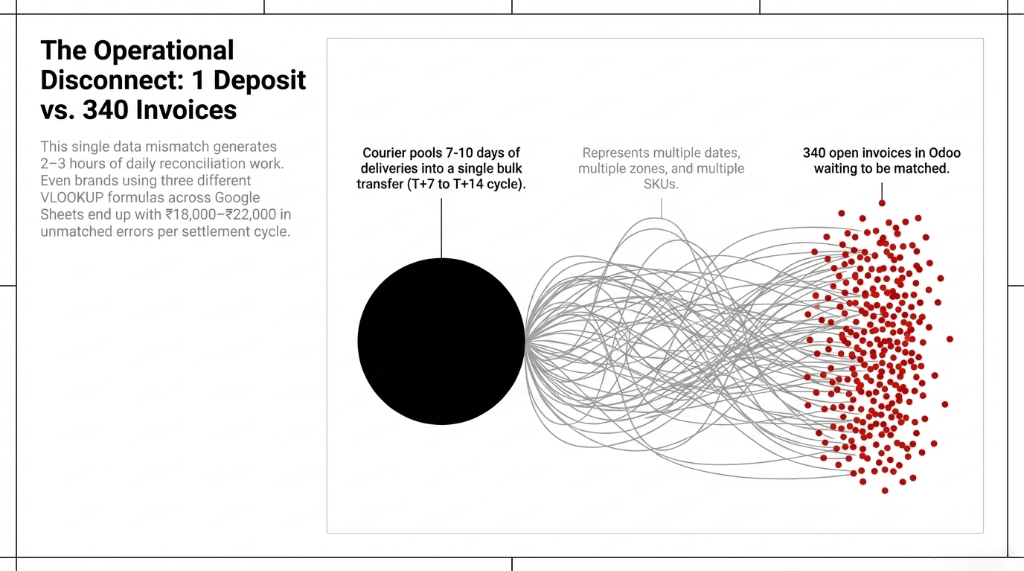
Your Bank Sees 1 Transaction. Your Odoo Sees 340 Open Invoices.
The Data Gap
That single mismatch generates 2–3 hours of daily reconciliation work for any brand processing 100+ COD orders a day.
The VLOOKUP Band-Aid
Brands at the $3M ARR mark still run this in Google Sheets with three different VLOOKUP formulas — and get it wrong by $2,200–$2,700 per settlement cycle.
The Real Cost
50–60 hours/month of manual entry. $11,200/year in financing charges from delayed cash-flow visibility. That is a junior hire — gone.
Why Your Accountant’s “Just Export the Report” Advice Is Costing You Money
Every accountant will tell you: “Download the settlement report from the courier portal and match it manually.”
That advice made sense in 2016 when you had 30 orders a week.
It is a really bad idea when you are processing 300+ COD orders daily across Delhivery, Blue Dart, and Xpressbees — each with their own settlement file format, their own remittance IDs, and their own fee deduction logic. When you manually key those numbers into QuickBooks or even a basic journal entry in Odoo, you are introducing human error at every step.
The AWB Number Trap
Insider detail: Courier settlement reports do not group by Order ID. They group by AWB number. And if your Shopify or WooCommerce store generated a split shipment — two AWB numbers for one order — your finance team is now reconciling one payment against two line items, and Odoo’s auto-suggest will fail unless you have configured it correctly.
We constantly see clients who have Odoo installed and still reconcile manually because the default reconciliation model is not configured for bulk COD batches. Hidden cost: $9,250/year.
How Odoo COD Settlement Matching Actually Works
Odoo’s accounting engine has Reconciliation Models — customizable rule sets that automatically identify incoming bank transactions and map them to open invoices or journal entries. The default install gives you two basic models. That is not enough for COD.
Here is how we configure it for bulk COD settlement:
Step 1: Build a Dedicated COD Transit Journal
Create a separate intermediate journal called “COD Transit” or “Courier Holding Account.” Every confirmed COD order posts a debit to this journal at the point of delivery confirmation — not at the point of payment receipt. This isolates your COD exposure from your live bank balance.
Why This Matters
Without a transit journal, your bank balance and your ERP show two entirely different numbers for 7–14 days. Your CFO sees “cash on hand” that does not actually exist yet. That is how brands accidentally overspend on ad budgets in Week 2 of the month.
Step 2: Configure the Bulk Reconciliation Model with Partner Mapping
Go to Accounting → Configuration → Reconciliation Models. Create a new automated model. Set the trigger to “Automatic.” Define matching rules: journal = Bank Account, transaction label contains courier partner name (e.g., “DELHIVERY,” “SHIPROCKET”), amount type = “Between” (to allow for fee deductions).
The Step 92% of Odoo Users Skip
Activate Partner Mapping. Map each courier company name variant from the bank statement label to the corresponding partner in Odoo. Without this, auto-match fails on every settlement where the bank reference says “DHL EXPRESS INDIA PVT” instead of the partner you saved as “DHL.”
(Yes, your bank does not care what you named your vendor in Odoo. It uses whatever the courier’s treasury department typed into their NEFT form.)
Step 3: Set the Date-Range Tolerance
COD bulk transfers cover 7–14 days of deliveries. In the reconciliation model, set the invoice matching tolerance to a 14-day date window. This tells Odoo: “When matching this bank deposit, look for open COD invoices confirmed in the last 14 days.”
Skip this and Odoo will only look at invoices from the deposit date. Your 340 invoices from last week? Invisible.
Step 4: Enable Auto-Validate for High-Confidence Matches
When two out of three elements — partner, amount, and date window — match, Odoo can auto-validate without human review. Enable this for transactions above $625 from known courier partners. For partial matches below that threshold, route to a review queue rather than bouncing the entire batch.
✓ Result: When we deployed this for a D2C apparel client processing $28,750/month in COD orders, 91–94% of settlement entries auto-matched with zero human input. The remaining 6–9% that needed manual review were all legitimate discrepancies — short-shipments, courier fee disputes, or RTO deductions — not data entry errors.
Step 5: Bulk Reconcile the Remainders
For any remaining unmatched entries: go to Accounting → Customers → Payments, group by Payment Type and Journal, select the relevant COD payments, click Action → Reconcile. This bulk action collapses what used to be 45 minutes of manual work into under 4 minutes per settlement batch.
The Hidden ROI Nobody Calculates
When reconciling manually, teams are just happy if the macro numbers roughly balance. They miss micro-leakage.
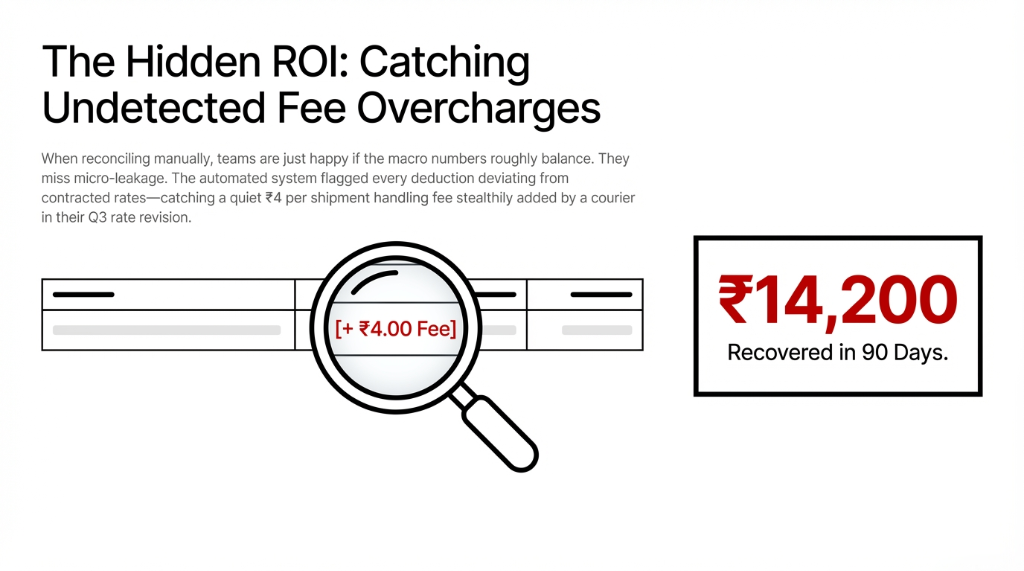
The automated system flagged every deduction deviating from contracted rates — catching a quiet $0.50 per shipment “handling fee” that a courier added stealthily in their Q3 rate revision. Nobody on the finance team noticed it for 11 weeks. The system caught it on Day 3.
What Changed After Go-Live (Real Client Data)
Reconciliation Time
Dropped from 3.5 hours/week to 23 minutes/week. The finance team now spends time on analysis, not data entry.
Auto-Match Rate
91–94% of settlement entries matched with zero human input. The rest were real discrepancies worth investigating.
Cash-Flow Visibility
Moved from T+14 (when the accountant finished the spreadsheet) to T+1 (when the bank feed synced).
Fee Overcharges Found
$1,780 recovered in 90 days from courier fee deductions that did not match the contracted rate. Previously invisible.
The Implementation Reality: No Sugarcoating
We are not going to lie to you. This does not take 15 minutes to set up.
A proper Odoo COD settlement matching configuration — with custom reconciliation models, courier partner mapping, COD transit journals, and integration with your existing Shopify or WooCommerce order data — takes 3–5 business days of Odoo consultant time when starting from a clean install.
If you are migrating from a QuickBooks or Tally setup where historical COD data is scattered across three different files, add another 2–3 days for data normalization.
| Phase | Duration | What Happens |
|---|---|---|
| COD Transit Journal | Day 1 | Intermediate holding journal isolates COD exposure from bank balance |
| Reconciliation Models | Day 1–2 | Custom rules for each courier partner with bank label matching |
| Partner Mapping | Day 2–3 | Map every bank statement label variant to Odoo vendor partners |
| Auto-Validate Rules | Day 3–4 | High-confidence thresholds, review queues for partial matches |
| Testing + Go-Live | Day 4–5 | Run against 2 real settlement cycles in parallel, validate, go live |
What gets easier immediately, even in Week 1: your team stops touching bulk settlement files manually. The moment the bank feed syncs and the courier name is recognized, Odoo’s reconciliation model fires and either auto-validates the match or queues it for a 30-second human review.
(Yes, we know your accountant will say “but what about the edge cases?” — there are always edge cases. That is why we build the review queue.)
The Number That Should Make You Move Today
Brands doing $125,000+ in annual COD are wasting $5,200–$5,600/year on manual reconciliation labor alone — 50–60 hours/month. Add $1,125 in working capital financing costs from delayed cash-flow visibility. Add the $1,780 in courier fee overcharges you will never catch manually.
The Math That Kills Manual Reconciliation
Reconciliation labor: $5,200–$5,600/year
Working capital drag: $1,125/year in financing charges
Undetected fee leakage: $1,780/year (conservative)
Total: $8,105–$8,505/year bleeding from a process Odoo automates in under a week.
That is not a rounding error. That is a junior operations hire.
Stop Reconciling COD Like It Is 2016
You are not losing money because COD is a bad payment method. You are losing money because the data pipeline between your courier’s bulk settlement file and your Odoo accounting module is held together by VLOOKUPs and hope.
Every week you run manual COD reconciliation, you are paying a $155 “human error tax” on a process that takes Odoo 23 minutes to do better than your team ever will.
FAQ
How long does Odoo COD settlement matching take to configure?
For a standard D2C setup with 1–3 courier partners and an existing Odoo accounting module, the full configuration — reconciliation models, partner mapping, COD transit journals, and auto-validate rules — takes 3–5 business days. If you are migrating historical COD data from Excel or QuickBooks, budget 2–3 additional days for data cleaning and normalization.
Will Odoo auto-reconcile work if the courier sends a net settlement after deducting fees?
Yes, but only if you configure it correctly. Odoo’s reconciliation model supports an amount tolerance setting, typically plus or minus 2–5%, that accounts for fee deductions. You also need a corresponding expense entry rule that auto-books the courier fee difference to your “Logistics Charges” account. Without this, every net settlement will flag as a mismatch.
What happens to COD orders returned before settlement?
RTO (Return-to-Origin) orders require a separate reconciliation rule. We configure a dedicated RTO journal entry that reverses the original COD delivery debit. When the courier’s settlement report arrives with the RTO deduction, Odoo’s model matches it to this reversal automatically — keeping your accounts receivable clean without any manual intervention.
Can Odoo handle multiple couriers with different settlement cycles?
Each courier partner (Delhivery at T+7, Shiprocket at T+5, Xpressbees at T+10) gets its own reconciliation model with a date-range tolerance matching their specific cycle. Odoo processes them independently, so a Shiprocket deposit does not accidentally get matched against a Delhivery invoice.
We have Odoo but still reconcile manually. Why is auto-match failing?
The most common reason: your bank statement labels contain courier name variants (e.g., “DLVRY IND PVTLTD”) that do not match the partner name saved in Odoo (saved as “Delhivery”). The fix is Partner Mapping inside the reconciliation model. The second most common reason: date-range tolerance is not set, so Odoo cannot match a bulk transfer covering orders from 14 days ago to current open invoices.
Check Your Last 3 Settlement Files. Right Now.
If the numbers do not match your bank statement to the penny — and they will not — book a free 15-Minute Operations Audit with Braincuber. We will show you exactly where your Odoo reconciliation configuration is broken and how much that gap is costing you every month. No pitch. Just the number.