
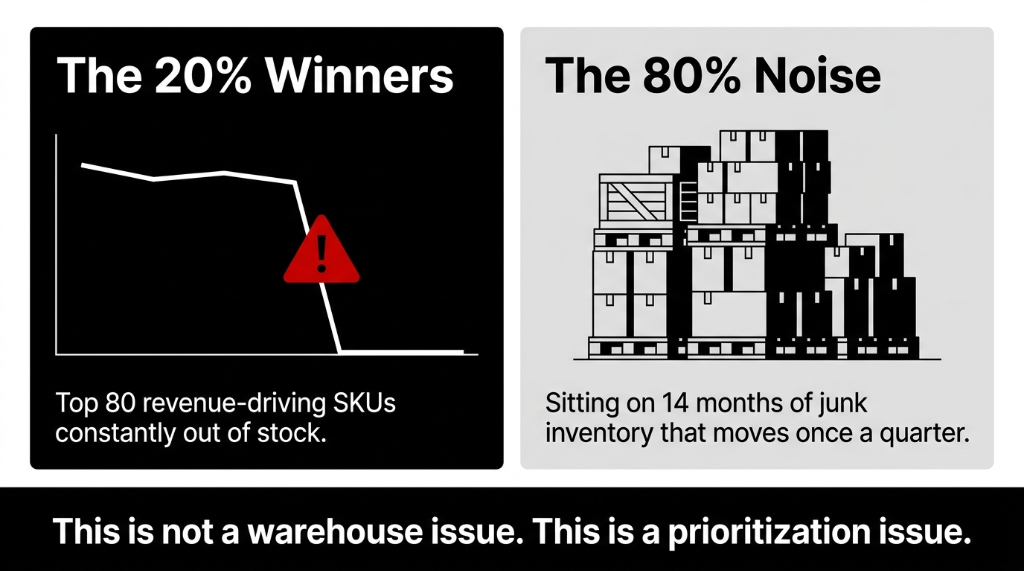
The Real Problem Behind Your Stockouts
Most brands we work with hit the same wall between 1,000 and 8,000 SKUs.
On paper, everything looks "fine" because the total stock value seems healthy. But 20% of SKUs quietly generate around 80% of revenue while the other half barely moves the needle.
When you do not separate those groups, three predictable failures show up:
Odoo itself is not the problem here. The problem is running Odoo like a giant spreadsheet without any selective control.
How ABC Classification Actually Helps
Some SKUs deserve obsessive attention, some deserve decent attention, and the rest should barely be on your radar. Once you run ABC on your data, you usually see this pattern:
| Class | % of SKUs | % of Revenue | Treatment |
|---|---|---|---|
| A Items | 10-20% | 70-80% | Never stock out. Daily review. Highest safety stock. |
| B Items | 20-30% | 15-25% | Keep healthy. Weekly review. Reasonable min/max. |
| C Items | 50-70% | 5-10% | Keep cheap and simple. Monthly review. On-demand OK. |
ABC is not about being neat. It is about deciding where your limited time, safety stock, and purchasing budget actually go.
How Odoo Supports ABC-Driven Inventory
Odoo's core reporting gives you the raw data for ABC — sales quantities, revenue, and inventory valuation by SKU. On top of that, the ecosystem offers ready-made ABC modules so you do not need to reinvent the math in Excel every month.
Three ABC Mechanisms in Odoo
Native + Manual Field
Calculate ABC in spreadsheet from Odoo exports, update custom x_abc_class field via import. Works but breaks at scale.
ABC Analysis Report Module
Auto-classifies products into A/B/C based on stock consumption. Filters by date range, exports to Excel or PDF.
ABC Classification Profiles
Define percentage cut-offs, assign to product categories, scheduled cron job populates levels automatically.
We usually push clients toward an app-based approach, because it keeps classification logic under one roof and avoids 19 broken spreadsheets floating around finance and operations.
How Do You Calculate ABC Inputs Inside Odoo?
Here is the ugly truth: most teams run ABC wrong by using "units sold" instead of "consumption value."
The consumption value trap:
Selling 10,000 units of a $1 SKU is not the same as selling 900 units of a $50 SKU. The second one matters more to your P&L. Using bare quantity over-promotes low-priced high-volume SKUs and underweights high-margin items.
The correct calculation in Odoo:
1. Pull 12 months of sales per SKU. Use Sales analysis to get SKU, units sold, and revenue for the last year.
2. Get unit cost or average cost. If you use AVCO or FIFO in Odoo, the system already maintains realistic cost prices in product valuation.
3. Calculate annual consumption value = units sold × unit cost. This tells you how much each SKU actually "consumed" in value, not just volume.
4. Sort SKUs by consumption value, highest to lowest. Calculate cumulative value and cumulative percentage across the list.
5. Apply ABC cut-offs. Most teams mark items up to ~80% of cumulative value as A, next 15% as B, last 5% as C.
Step-by-Step: ABC Setup in Odoo
1. Decide Your ABC Policy
Before you touch Odoo, agree on cut-offs and rules. Typical starting point: A = first 75-80% of total annual consumption value. B = next 15-20%. C = everything else.
You also need human rules: A items can never be allowed to stock out unless demand is truly freakish. C items can stock out occasionally without anyone panicking. Put this on one page and get leadership to sign it.
2. Choose Your Odoo ABC Mechanism
Pick from native reports + manual field, an Inventory ABC Analysis Report module, or Product ABC Classification profiles with scheduled cron jobs. We almost always recommend the app-based approach.
3. Configure the ABC App or Fields
Install the module, configure whether classification is based on cumulative consumption value or quantity consumed, set your A/B/C threshold percentages, and schedule the classification job — monthly or quarterly. Your goal: one reliable ABC flag on every SKU.
4. Connect ABC to Replenishment Rules
This is where most teams stop. Which is why they never get real value from ABC.
The result when you wire it correctly:
In one brand, A items reviewed daily with higher safety stock, B items weekly, C items monthly. That alone cut stockouts on A items by more than 30% without raising total inventory value.
Odoo's reordering rules, lead times, and procurement routes become the levers that enforce your ABC policy.
5. Use ABC in Warehouse and Counting
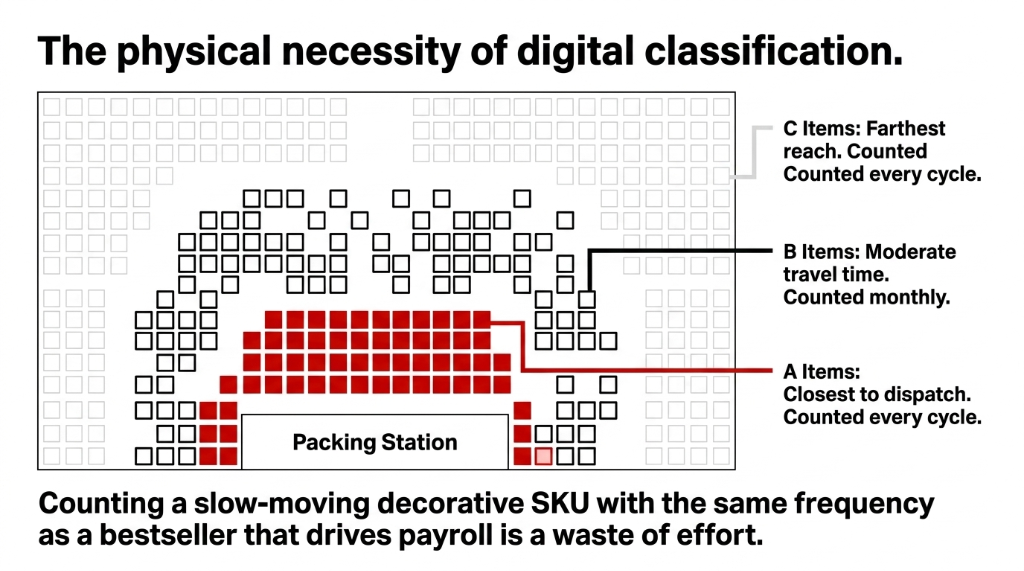
Place A items closer to packing stations to cut travel time per order. Count A items during every cycle-count round, B items monthly, C items quarterly or less.
If you run counts without ABC, you are wasting the same effort on a slow-moving decorative SKU as on your bestseller that drives payroll.
How ABC Drives SKU Prioritization Decisions
Once ABC is running in Odoo, SKU decisions start getting a lot less emotional.
Merchandising stops arguing based on gut feel and starts looking at A/B/C flags when deciding which SKUs deserve prime web real estate or campaign slots.
Procurement puts their best negotiation energy on A and critical B items instead of wasting time squeezing cents from marginal C items.
Finance sees which A items actually tie up the bulk of inventory value from ABC reports that combine quantity, cost, and consumption in one view.
SKU prioritization becomes a simple stack: Never let A items die. Keep B items healthy. Keep C items cheap and simple. Everything else is noise.
Common ABC Mistakes We Keep Fixing
Using unit sales instead of consumption value.
This over-promotes low-priced high-volume SKUs and underweights high-margin items. The exact opposite of what you want.
Freezing ABC forever.
Consumption patterns shift. Not recalculating ABC at least quarterly turns your A/B/C flags into ancient history.
Over-engineering categories.
We have walked into setups with A1/A2/B1/B2/C1/C2... a perfect way to confuse everyone and get zero adoption.
Treating ABC as a report, not a policy.
If your reordering rules, warehouse layout, and counting schedules ignore ABC, you have built a pretty dashboard and changed nothing.
Blind faith in textbook cut-offs.
If your catalog is heavily skewed or you run high-risk industries, adjust thresholds to match your real risk profile. Do not copy generic templates.
Where Braincuber Fits Into This
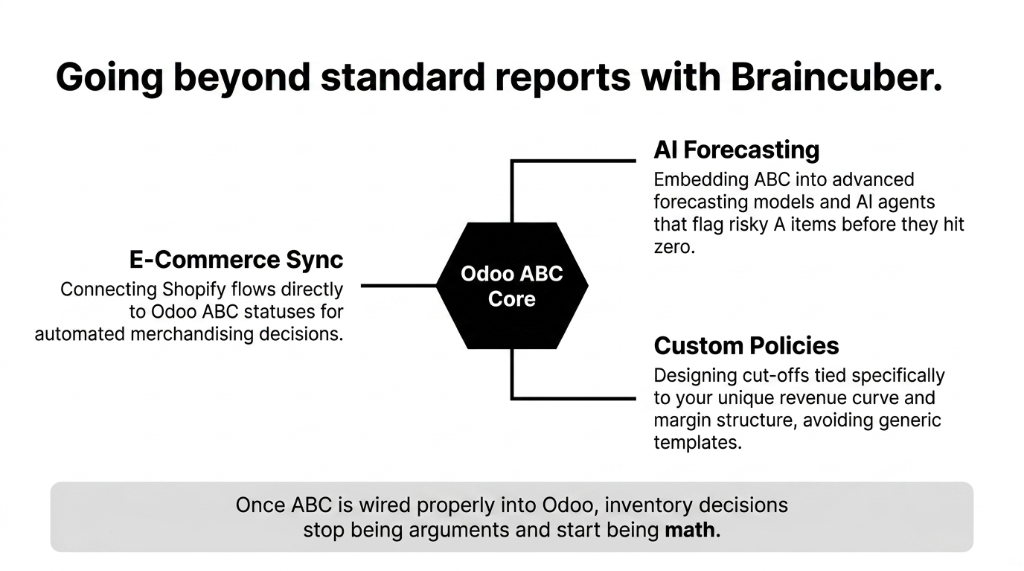
We implement Odoo for brands from the US to the UAE, and we keep seeing the same pattern: once ABC is wired properly into Odoo, inventory decisions stop being arguments and start being math.
Our ABC-Driven Odoo Work
Custom ABC Policy Design
Tied to your revenue curve and margin structure, not a generic template.
Module Selection & Configuration
The right ABC module or custom logic so classification stays automated and audit-friendly.
Replenishment Wiring
Connecting A/B/C levels to reordering rules, safety stock, supplier lead times, and warehouse strategies.
AI + E-Commerce Sync
ABC embedded into forecasting models, Shopify-Odoo flows, and AI agents that flag risky A items before they hit zero.
Related Resources:
▸ Odoo Implementation Services — Full ERP deployment for D2C brands
▸ Inventory Management System — Multi-channel stock sync and automation
▸ AI for D2C Brands — Machine learning demand forecasting and automation
Frequently Asked Questions
How often should we recalculate ABC classes in Odoo?
Most brands do well recalculating ABC monthly or quarterly, depending on demand volatility. If you run frequent promotions or seasonal spikes, monthly is safer so A/B/C labels actually reflect current consumption instead of last year's reality.
Should ABC be based on revenue, margin, or quantity?
If you can only pick one, use annual consumption value (units multiplied by cost) or revenue, not bare quantity. High-volume low-value items should not outrank lower-volume high-value ones, which is exactly why established guides and Odoo ABC tools prioritize value-based metrics.
Can standard Odoo run ABC without extra apps?
Yes, but you will rely on exports and custom fields. You can pull sales and valuation data, calculate ABC in a spreadsheet, then import an A/B/C field back to products. ABC modules make this continuous and automated, which is why we almost always recommend them.
How does ABC link to safety stock and reorder rules?
ABC is the lens; safety stock and reorder rules are the levers. A items get higher safety stock and tighter reorder points. B and C items get progressively looser rules. In Odoo, that means different min/max and lead time assumptions per class, wired into reordering rules.
What is the next step if our ABC is a mess?
If your ABC lives in a stale Excel file, treat that as a red flag. Move classification into Odoo via an ABC app or a repeatable export/import process, tie it to reordering and warehouse logic, and get one owner responsible for keeping A/B/C labels fresh.