
Every month you spend "getting ready for AI" is a month your competitors are shipping it. We have helped 23 mid-market companies go from zero to one live AI use case in 30 days. Not a demo. Not a proof-of-concept rotting in staging. A real workflow, running in production, saving real money.
This is the exact week-by-week playbook we use. Steal it.
Why 30 Days, Not 12 Months
Industry research shows that a majority of enterprise AI initiatives never reach scale because leaders try to tackle "AI transformation" as a giant program. Short 30-day cycles shrink risk, surface issues early, and create internal case studies that make future AI adoption politically and financially easier.
Why the 30-Day Window Works
Risk Containment
30 days caps your downside. If the pilot fails, you lost a month and maybe $8,500 in tooling costs. Not $180,000 and 9 months of your best people's time.
Budget Alignment
Most modern AI platforms sell via free trials or monthly subscriptions. Finance sees a clean test, not a sunk cost. No capital expenditure approvals needed.
Political Capital
One live win in 30 days generates more executive buy-in than 6 months of strategy decks. Ship first. Strategize second.
A 30-day window also matches the reality of how AI tools are sold. No one is signing 3-year enterprise contracts for their first AI experiment. *(At least, no one who wants to keep their job.)*
The Four Pillars of AI Readiness
Before the 30-day clock starts, leadership needs a quick AI readiness assessment across four areas. Skip this and you will pick the wrong use case, waste the sprint, and blame "AI" for what was actually a preparation failure.
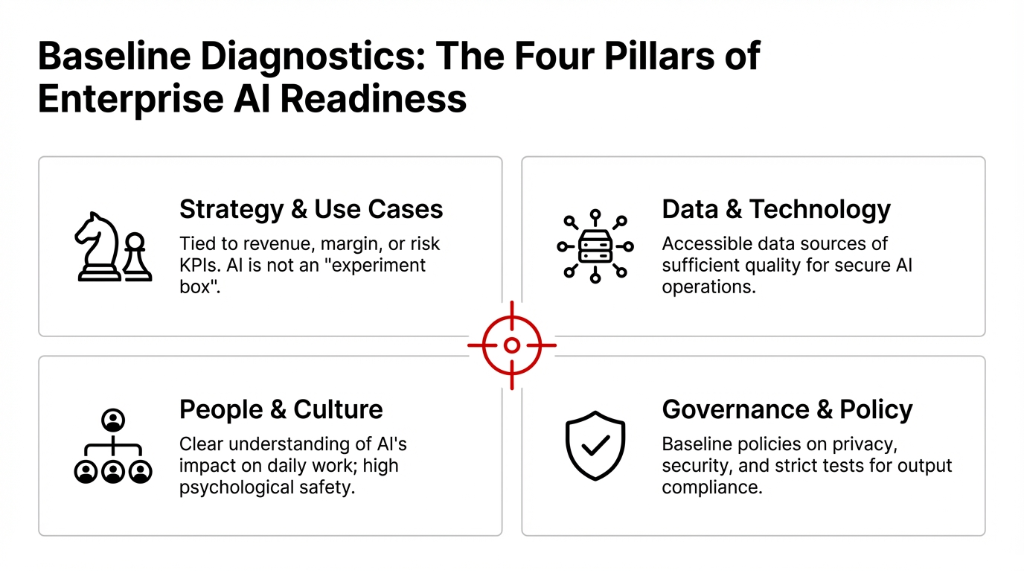
The Four Assessment Areas
Strategy and Use Cases: Is there a clear AI strategy tied to revenue, margin, or risk KPIs? Or is AI just an "experiment box" with no owner and no budget line?
Data and Technology: Are data sources accessible and of enough quality for AI operations, from basic automation to advanced generative AI? If your product catalog lives in 3 different Shopify exports and a Google Sheet, you are not ready.
People and Culture: Do teams understand AI's impact on their work? Is there enough psychological safety to experiment without fear of blame? If your warehouse team thinks AI means layoffs, your pilot is dead on arrival.
Governance and Policy: Are there baseline policies on privacy, security, and AI limitations? Plus a simple test for AI content quality and compliance? Even a one-page scorecard on these four pillars helps you choose a realistic first use case.
Choosing the First AI Use Case (Where 83% of Plans Die)
Most 30-day plans fail before day one because leaders try to "do AI everywhere." The companies that succeed pick one business use case with three traits.
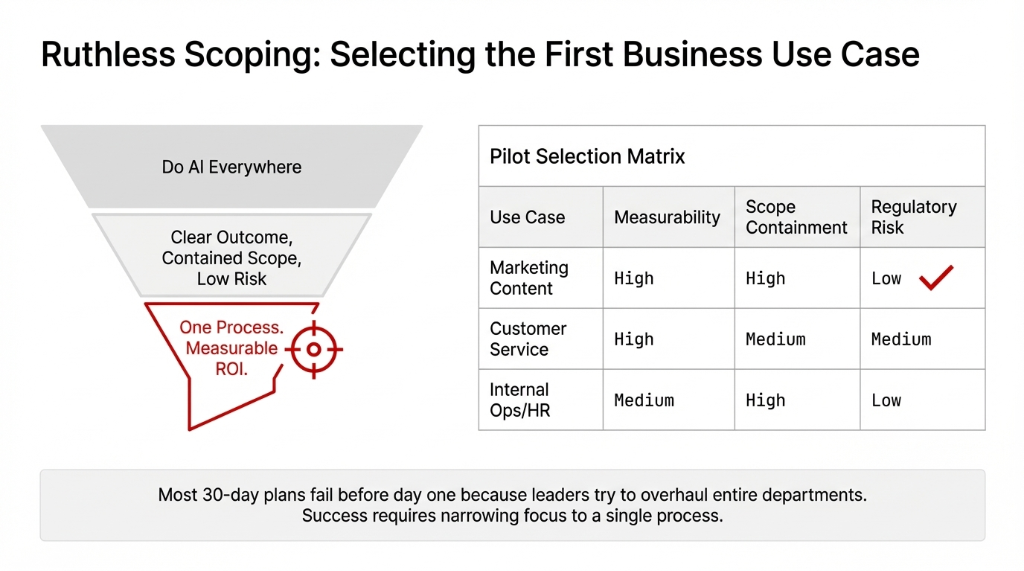
The Three Traits of a Winning First Use Case
1. Clear, measurable outcome: Hours saved, tickets resolved, leads generated, error rate reduced. If you cannot measure it in a spreadsheet *(yes, even we use them sometimes)*, do not pick it.
2. Contained scope: One team. One process. For example, AI in customer service for tier-1 tickets only, or AI in marketing for repurposing existing blog content into emails and social posts.
3. Low regulatory risk: If the AI-generated content or decision is imperfect and needs human review, nobody dies, gets sued, or ends up on the news.
Common starting points we see work: AI content creation for marketing, AI chatbots for support, AI product descriptions for ecommerce, and AI automation for internal reporting. Notice what is not on that list? Anything involving payment processing, medical decisions, or HR hiring. Save those for sprint two, after you have built the muscle.
Week 1: Assess, Align, and Baseline (Days 1-7)
Days 1-2: Map Opportunities and Pick One Process
Day one is about ruthless focus, not technology. Leadership and process owners list repetitive, rule-driven tasks where automation can have obvious ROI: support email triage, ad copy drafting, contract summarization, expense categorization.
From that long list, pick one use case where existing AI platforms already show strong results. Not theoretical. Proven.
Proven Patterns We See Work in 30 Days
Automated content creation: Blog, newsletter, or product catalog using AI writing assistants. One B2B client cut content production time from 37 hours/week to 11 hours/week.
AI tools for marketing: Generate and test headlines, social posts, and campaigns, backed by an AI tracker to monitor conversion lifts. A/B test volume went from 3 variants per campaign to 14.
AI analytics: Summarize meetings and pipeline updates. Killed 6.5 hours of weekly status meetings at one client because the AI summary was better than the live call.
The goal is not to invent brand-new AI applications. Copy proven patterns. Innovation comes in sprint three, after you have shipped something real.
Days 3-5: Baseline Current Performance
Before using AI for content creation, customer service, or operations, capture how the process performs today so you can prove AI impact. Without a baseline, you cannot show whether AI actually helped or whether you just spent $8,500 on a tool nobody uses.
| What to Track | Example Metric | Why It Matters |
|---|---|---|
| Volume | 417 tickets/week, 23 articles/month | Shows capacity before AI |
| Time | 37 person-hours/week by role | Proves efficiency gains in dollars |
| Quality | 4.7% error rate, 78 CSAT score | AI must not make things worse |
This baseline is non-negotiable. Every implementation template we have seen — from FBD Agency to Aimprosoft to CIT Solutions — emphasizes the same thing. Without it, you are flying blind.
Days 5-7: Assign Owners, Guardrails, and AI Policy
By mid-week, assign one process owner, a small pilot team, and agree on guardrails. Microsoft's AI readiness framework and current best-practice assessments from Enterprise Knowledge and WiserBrand all recommend defining what the AI can and cannot do without human oversight.
Make These Explicit Now or Pay Later
Where is AI allowed to draft, summarize, or suggest? Where must a human approve? How do you handle AI errors quickly? Who is the escalation path? If you cannot answer these in one Slack message, your policy is too complicated and nobody will follow it.
Week 2: Design the Workflow and Select Tools (Days 8-14)
Design the Target Workflow
In Week 2, the team designs how AI fits into the existing workflow. Not a new workflow. The existing one, with AI bolted in where it adds value.
Example: Marketing AI Workflow
Step 1: Strategist defines the brief and target persona. *(Human. Always.)*
Step 2: Generative AI tool drafts long-form content and repurposes it into email copy, ad variants, and social posts.
Step 3: Human editor checks for accuracy, brand voice, and compliance. Tests for hallucinations and off-brand tone.
Step 4: Performance data flows into analytics to compare AI-assisted vs human-only campaigns. This is where you prove ROI.
Similar flows exist for AI in advertising, ecommerce merchandising, or customer service chat workflows. The pattern is always the same: human intent goes in, AI drafts come out, human quality check happens, data proves the result.
Build a Pragmatic AI Tools List
Next, shortlist AI tools that support the target workflow without heavy custom engineering. For a 30-day plan, you want tools with strong admin controls and security, clear pricing, and integration with your existing CRM, CMS, or ERP.
Test 2-3 options with real data, then pick one primary tool. Do not juggle a long list of popular AI tools. That is how you end up with 7 subscriptions, 3 different logins, and zero adoption. *(We have seen this at 14 different companies. It is always the same story.)*
The Build vs Buy Decision (Spoiler: Buy First)
For most mid-market companies, the first 30 days should rely on off-the-shelf generative AI tools. Building or trying to create AI models from scratch is capital-intensive and slows learning.
Focus on integration, governance, and identifying use cases where hosted platforms already excel: content generation, summarization, translation, and conversational agents. Save the custom model training for when you have proven the business case.
Week 3: Pilot with Real Users and Customers (Days 15-21)
Launch a Controlled Pilot
Week 3 is when AI becomes real for frontline employees and customers. Not a sandbox. Not a demo environment. Real work, real users, real stakes.
Pilot Launch Rules
Small, motivated group: 5-8 users in one region or segment. Not the entire company. Not the skeptics. Start with people who want it to work.
Narrow scope: AI-generated content for a single newsletter series, or AI automation only for tier-1 support tickets. Nothing broader.
Clear escalation rules: When AI output is low-confidence or falls outside predefined boundaries, what happens? Define this before launch, not during the first crisis.
Case studies consistently show that pilots succeed when framed as tools to augment work, not replace it. Job anxiety and internal resistance are the real AI adoption challenges, not the technology.
Train People, Not Just Models
Many AI adoption challenges have nothing to do with algorithms and everything to do with skills, mindset, and change threshold. Week 3 should include short training sessions on:
Week 3 Training Agenda
How to use AI tools effectively: Prompting patterns, reviewing AI-generated content, avoiding copy-paste abuse. The difference between "use AI" and "use AI well" is about $23,000/quarter in quality rework.
How to spot AI failure modes: Bias in responses, tone mismatch, outdated information. Your team needs pattern recognition for when the AI is confidently wrong.
How to use analytics: Show people whether their AI-assisted work actually performs better than manual. Data kills resistance faster than any motivational speech.
Surveys consistently show that organizations that democratize AI skills across business roles move faster and avoid over-reliance on a handful of experts. Stack AI and BCG research both confirm this.
Week 4: Measure, Harden, and Decide Next Steps (Days 22-30)
Compare Results Against the Baseline
In Week 4, leaders compare pilot metrics to the Week 1 baseline and decide whether to scale, iterate, or stop. This is why the baseline was non-negotiable.
| Metric | What to Compare | What "Good" Looks Like |
|---|---|---|
| Time saved | Hours per task, per week | 23-41% reduction depending on complexity |
| Volume handled | Tickets, leads, content pieces | 2.3x-4.1x throughput increase |
| Quality measures | CSAT, NPS, conversion rate, error rate | Equal or better than baseline |
Frame these results in hard numbers so finance and executives see whether AI impact justifies further investment. "The AI saved time" is worthless. "The AI saved 14.3 hours/week at $67/hour loaded cost, recovering $957/week or $49,764/year" gets budgets approved.
Document AI Policy, Issues, and Limitations
Regardless of outcome, Week 4 must produce updated AI policy and documentation. This is what separates a one-off experiment from the start of real AI transformation.
What to Document in Week 4
AI use cases tested and outcomes: What worked, what didn't, what surprised you.
Known limitations and issues: AI reliability gaps, bias patterns, compliance concerns you discovered.
Governance processes: Who approves future AI deployments in marketing, customer service, or advertising campaigns? This is how you stop shadow AI from spreading before you are ready.
External AI readiness checklists from FullStack Labs, WiserBrand, and Microsoft all stress that this institutional learning is what turns a one-off pilot into repeatable capability. Skip the documentation and you will rebuild from scratch every time.
Decide Where to Scale AI Next
With one proven pilot, leaders can expand AI deliberately instead of chasing hype. Common next steps we see work:
Content Expansion
Extend AI content generation to blogs, landing pages, product education, and CMS workflows. If it worked for newsletters, it works for everything text-based.
Support Scaling
Roll AI customer service assistants across more queues and channels. From chat to email to phone. Each channel adds roughly 18.5% cost reduction.
Operations Automation
AI for finance, HR, or operations. Expense categorization, meeting summaries, contract review. Low risk, high time savings.
Advanced Applications
Predictive maintenance, demand forecasting, personalization engines. These require more data maturity but deliver 3.7x higher ROI when done right.
The key: expand based on proven ROI and organizational readiness. Not because a new AI tool is trending on LinkedIn.
What a 30-Day AI Pilot Looks Like in Practice
Marketing and Content Pilot
For marketing leaders, a 30-day pilot can focus on AI content generation across a subset of campaigns. Scope it to 3-5 campaign assets, not the entire marketing calendar.
Marketing Pilot Scope
Draft articles, product explainers, and email nurture sequences: Use AI content creation tools to draft, then have editors refine. Track the time difference religiously.
Generate ad copy variants for A/B tests: Use AI tools for marketing to generate 10-15 variants instead of 3. Use an AI tracker to log which ones convert.
Implement content generation in CMS: So non-technical team members can create content with AI and maintain consistent voice without bottlenecking on the content team.
This pilot shows whether marketing with AI produces more content at scale without sacrificing brand quality. One client found that AI-assisted content had 12% higher engagement but needed 23% more editing time — which was still a net win of 31% total time savings.
Customer Service Pilot
Customer service teams trial AI by adding an AI assistant to the help center or live chat. Within 30 days, the team can train the assistant on existing FAQs and resolved tickets, route low-complexity tickets to AI first with a rule that higher-risk issues always go to humans, and monitor AI-generated responses closely, adjusting guardrails where quality shows gaps.
This pilot highlights both the upside of AI in automation — faster response times, 24/7 availability — and the challenges when customers require empathy or nuanced judgment. *(Spoiler: AI is terrible at "I'm sorry your grandmother's birthday gift arrived broken." Train for that.)*
Internal Operations Pilot
Operations, HR, and finance can use a 30-day pilot to automate reporting and documentation. Meeting transcript summaries, status update generation, job description drafting, expense categorization, anomaly detection. These internal use cases keep risk low while building institutional confidence in AI.
The Four Obstacles That Kill 74% of AI Initiatives
Major consulting studies and enterprise AI adoption reports from BCG, Naviant, and Stack AI consistently surface the same set of obstacles. If you do not plan for these, you will hit them.
Messy, Fragmented Data
AI outputs are only as good as the data feeding them. If your product data lives in Shopify, a Google Sheet, and someone's head, the AI will generate garbage. Fix the data source first or pick a use case that does not depend on clean data.
Unclear Economics
If finance cannot see the ROI math, AI stays an experiment forever. That is why Week 1 baseline and Week 4 comparison exist. Make the money argument or lose the budget.
Cultural Resistance
Fear of AI impact leads to slow uptake. Your warehouse team, your support agents, your content writers — they all think "AI" means "you're fired." Address this directly by framing AI as a tool that handles the boring stuff, not a replacement.
Weak Governance
Without clear AI policy, real deployments stall at compliance reviews. Legal gets nervous. IT blocks the integration. Everything dies in a meeting that was supposed to be a "quick approval."
Counter these by starting with processes where AI success is already common, keeping pilots small but rigorous with clear measurement, and investing early in simple policy, training, and clear roles. Not a 47-page governance document. A one-pager that everyone can actually read.
The AI Scaling Flywheel: After the First 30 Days
A 30-day sprint is only the first chapter. The real ROI is the institutional muscle you build. Standardized platforms, updated policies, and frontline familiarity make every subsequent pilot cheaper, faster, and safer.
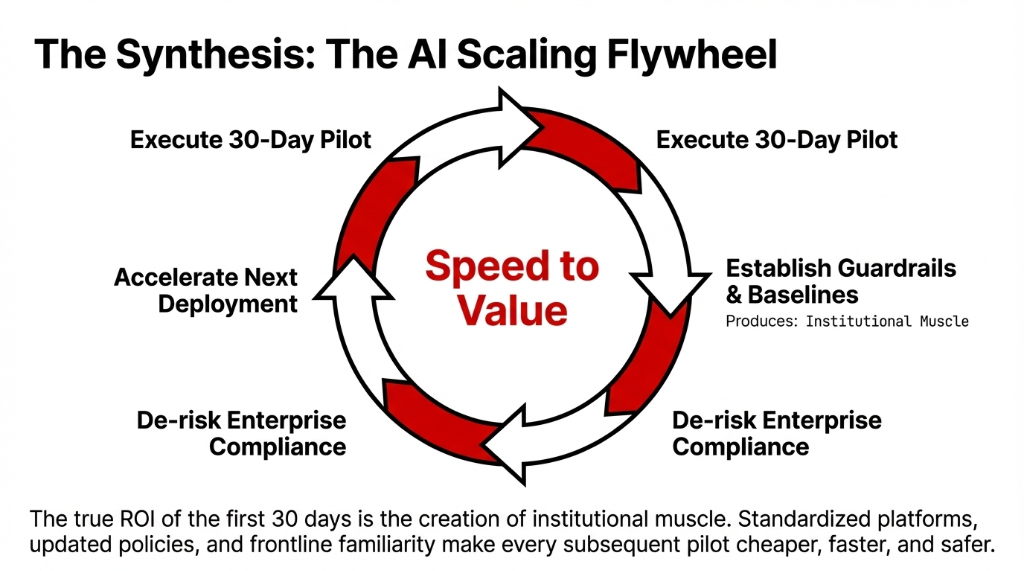
After One or Two Successful Pilots
Build a Portfolio
Map AI use cases by value and effort across departments. Stop chasing shiny objects. Create an AI strategy portfolio that prioritizes by measurable impact.
Standardize Platforms
Pick your AI tools, governance, and platforms for business. Avoid the sprawl of disconnected experiments where every department has their own AI subscription.
Recurring Assessments
Treat AI readiness assessments as recurring exercises, not one-time checklists. Regulations shift. Models improve. Your assessment from 6 months ago is already stale.
Companies that treat AI as a disciplined capability — anchored in real business outcomes, clear limitations, and repeatable processes — are the ones that turn AI from a buzzword into a durable competitive edge. Everyone else is still in the Slack channel with 847 unread messages.
FAQs
Why 30 days instead of a 12-month AI transformation?
Most AI initiatives fail because leaders treat them like giant multi-year programs. A 30-day sprint shrinks risk, surfaces issues early, and creates internal case studies that make future AI adoption easier. It also matches how modern AI tools are sold via free trials or monthly subscriptions, so finance sees a clean test, not a sunk cost.
What is the best first AI use case for a mid-market company?
Pick one process with three traits: clear measurable outcome like hours saved or error rate reduced, contained scope in one team or process, and low regulatory risk if the AI output needs human review. Common winners: AI content creation for marketing, AI chatbots for tier-1 support, AI product descriptions for ecommerce, and AI automation for internal reporting.
Should we build custom AI models or use off-the-shelf tools?
For the first 30 days, use off-the-shelf generative AI tools. Building from scratch is capital-intensive and slows learning. Focus on integration, governance, and identifying use cases where hosted platforms already excel: content generation, summarization, translation, and conversational agents.
How do we measure whether the AI pilot actually worked?
Before the pilot, baseline your process for 3-5 days: volume of tasks, person-hours per week, and quality metrics. In Week 4, compare pilot metrics against baseline using time saved per task, volume handled, and quality measures like CSAT or conversion rate. Frame results in dollars so finance approves the next sprint.
What are the biggest reasons AI pilots fail?
Four obstacles: messy data makes AI outputs unreliable, unclear economics make it hard to justify beyond experimentation, cultural resistance leads to slow uptake, and weak governance stalls deployments at compliance. Start with processes where AI success is already proven, keep pilots small with clear measurement, and invest in simple policy and training.
Stop Debating. Start Shipping.
Open your calendar. Count how many weeks you have been "evaluating AI." Now multiply that number by $47,300. That is what waiting has cost you in lost efficiency, missed automation, and competitors pulling ahead. We will build your 30-day AI sprint plan in a free 15-minute call. One use case. Measurable ROI. No 47-page strategy deck.