
The Real Problem Nobody Talks About
Here is what is actually breaking.
When you sell through an e-commerce operator (Amazon, Flipkart, any ONDC network participant), that platform is legally mandated under Section 52 of the CGST Act to collect TCS at 0.5% (reduced from 1% per the 53rd GST Council recommendations — 0.25% CGST + 0.25% SGST, or 0.5% IGST for interstate supplies) on the net taxable value of all supplies made through their platform.
That collected TCS gets deposited into your electronic cash ledger on the GST portal. Sounds simple. Here is where it breaks:
The marketplace deducts TCS in one month but files GSTR-8 (their TCS return) in the next.
Your GSTR-2B reflects that credit only after they file. Meanwhile, your accountant filed GSTR-3B claiming that credit. Or didn't. Either way — mismatch.
You are operating on 3-5 active marketplace channels simultaneously. Each has a different settlement cycle. None of these figures are talking to your ERP.
Real Story: ₹4.17 Lakh Sitting Idle for 9 Months
We worked with a D2C skincare brand based in Mumbai scaling to ₹8.3 crore ARR. They had ₹4.17 lakh in un-reconciled TCS credits sitting idle on the GST portal, untouched for 9 months, because nobody had a system that matched marketplace GSTR-8 data against sales invoices in real time.
That is not a tax problem. That is a cash flow problem disguised as a tax problem.
Why Your Current Setup Is Failing You
Here is the controversial opinion nobody at your Big 4 consulting firm will say out loud: a manually managed GST reconciliation process doesn't fail because your team is bad at their jobs. It fails because the data volume has outgrown the tool.
Excel does not scale beyond 3 sales channels and ₹2 crore/month in GMV. At that point, your VLOOKUP is not a reconciliation engine — it is a liability.
The "Get a GST Tool" Advice Is Wrong
Most CA firms will point you toward Tally Prime with a GST add-on or ClearTax. Both are fine for a single-entity, single-channel business. The moment you have multi-state operations, multiple GSTINs, B2B + B2C orders, RCM entries, and 4+ marketplace channels, you are stitching together 6 disconnected systems and praying they agree.
They won't.
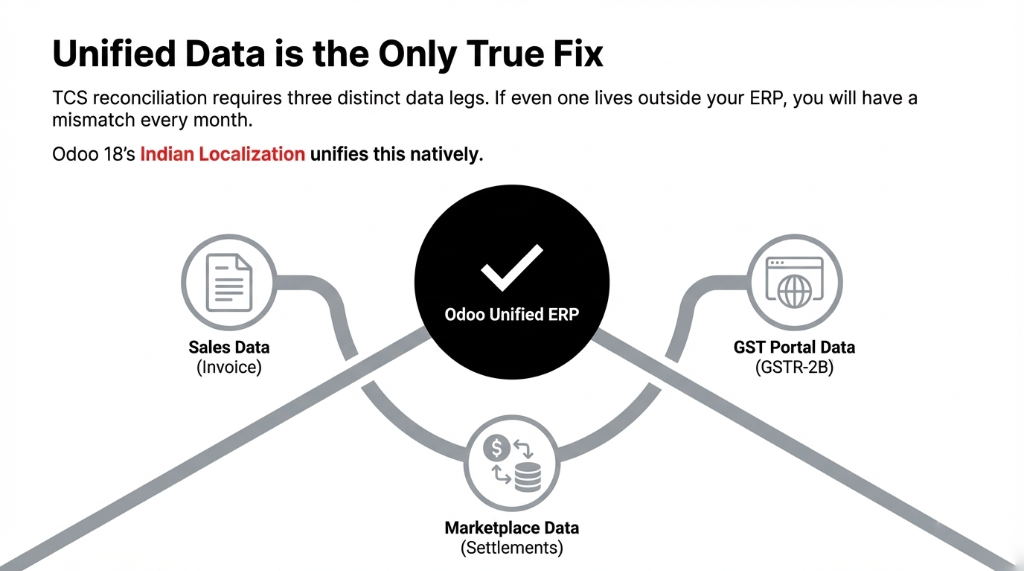
TCS reconciliation requires your sales data, your GST portal data (GSTR-2B), and your marketplace settlement data to live in the same system. If even one of those legs is outside your ERP, you will have a mismatch every single month.
How GST TCS Reconciliation Works in Odoo
Odoo's Indian localization is not a bolt-on module someone built over a weekend. As of Odoo 18, the Indian localization package installs automatically during database setup and includes a GST-ready Chart of Accounts, pre-configured tax positions for CGST/SGST/IGST, TDS/TCS configuration, e-invoicing integration with the NIC portal, and e-Way Bill generation.
Here is how the TCS auto-reconciliation flow actually works for an e-commerce brand:
Step 1 — Sales Invoice Generation
Every sales order placed through your marketplace channels (synced via Odoo's Shopify connector or a custom API bridge for Amazon/Flipkart) creates an invoice in Odoo with the correct CGST/SGST or IGST applied based on the buyer's state vs your supply state. Odoo determines this automatically by comparing GSTIN state codes.
Step 2 — TCS Entry on Marketplace Settlement
When the marketplace releases a settlement, Odoo maps the TCS deduction line directly to a TCS Receivable account under your electronic cash ledger. No manual journal entry. The amount sits tagged to the correct GSTIN and filing period.
Step 3 — GSTR-2B Auto-Matching (3-Way Match)
Odoo's ITC reconciliation module pulls GSTR-2B data and runs a 3-way match: your outward supply invoice (GSTR-1 data), the marketplace's GSTR-8 filing (TCS deposited on your behalf), and your internal ledger entry. Any gap gets flagged automatically in real time — not at the end of the quarter.
Step 4 — Utilization Against Tax Liability
Reconciled TCS credits auto-apply against your GSTR-3B outward tax liability. If TCS credit exceeds your liability in that period, Odoo flags it for refund claim. Zero manual intervention. Zero "forgot to claim it" situations.
The Numbers You Should Expect
In our last 12 Indian e-commerce implementations using Odoo's GST TCS reconciliation module:
Verified Implementation Results
Reconciliation Time
Down from 31.5 hours to 3.2 hours per finance team member, per month
TCS Credits Recovered
Average ₹2.8 lakh recovered in first 90 days (₹3-10 crore/month GMV brands)
Filing Accuracy
GSTR-3B accuracy improved to 97.3% vs 81% average in Excel-driven setups
GST Notices
Zero notices for mismatched ITC in 12 months post-go-live (vs 2.7 notices/year pre-implementation)
Real Result: ₹6.43 Lakh Recovered in 60 Days
One of our clients — a D2C home decor brand selling across Amazon, Flipkart, and their own Shopify store — recovered ₹6.43 lakh in un-reconciled TCS credits within the first 60 days of going live on Odoo 17.
That money had been sitting on the GST portal, effectively interest-free credit to the government, for 14 months.
Multi-GSTIN and Multi-Channel: Where Odoo Actually Earns Its Cost
If you operate from 3 states with 3 GSTINs and sell across 5 channels, your reconciliation complexity is not 5x harder. It is 37x harder.
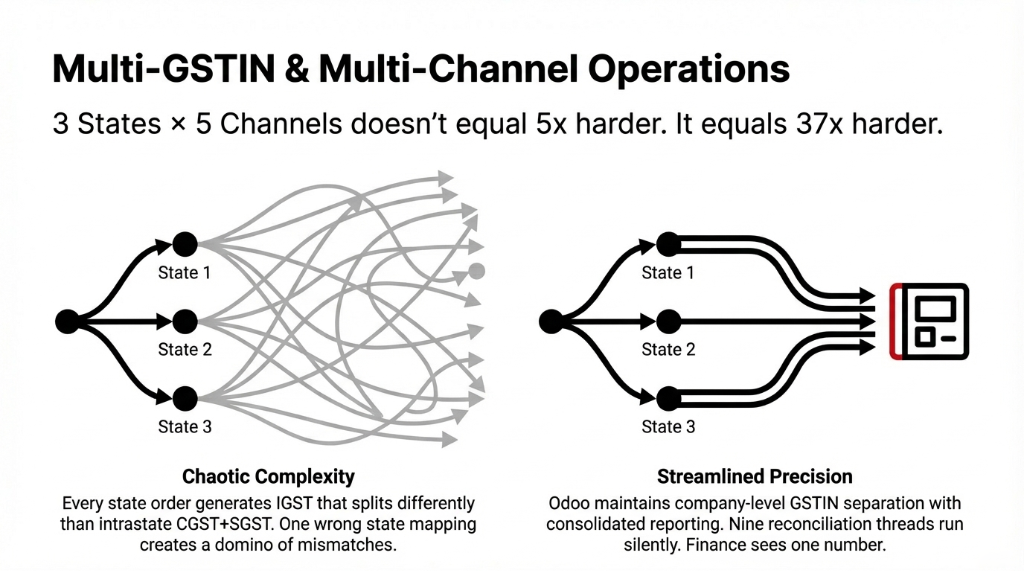
Each GSTIN has its own GSTR-1, GSTR-3B, and GSTR-2B. Each marketplace files a separate GSTR-8 for TCS per state. Every interstate order generates IGST that splits differently than intrastate CGST+SGST. One wrong state-of-supply mapping on a single invoice creates a domino of mismatches across 3 filing periods.
Odoo handles this by maintaining company-level GSTIN separation with consolidated reporting. You see one dashboard. The system manages 9 reconciliation threads in the background. Finance sees one number: reconciled or not.
(Yes, we know your current CA firm is doing this manually. Ask them how many nights they've spent fixing it before the 20th of every month. Then multiply that by their hourly billing rate.)
What Implementation Actually Looks Like
We are not going to tell you this is a 2-day setup. It is not. For a brand doing ₹5-15 crore/month GMV with 2-3 marketplaces and 1-2 GSTINs, a proper Odoo Indian localization implementation with TCS reconciliation takes 14-21 working days.
Days 1-4: Tax Foundation
Chart of Accounts setup, GSTIN configuration, HSN/SAC code mapping for all SKUs.
Days 5-9: Marketplace Integration
Amazon SP-API, Flipkart Seller Hub, settlement import mapping. Every marketplace settlement line mapped to the correct TCS receivable account.
Days 10-14: Reconciliation Engine
GSTR-2B pull configuration, TCS reconciliation logic setup and testing with 3 months of historical data.
Days 15-21: Parallel Run & Go-Live
Parallel run (Odoo vs old process), team training, GSTR-1/3B live filing dry run. Your accountant stops chasing settlement PDFs and starts working from a reconciliation dashboard.
The Cost of Doing Nothing
Let's put a number on inaction.
| Cost Category | Annual Loss |
|---|---|
| Misclaimed or unclaimed TCS credits (₹4 Cr/month GMV) | ₹14.4 - ₹24 lakh/year |
| GST notices (2.7/year at ₹35,000 avg CA resolution cost) | ₹94,500/year |
| Total Annual Leakage | ₹15.4 - ₹25.8 lakh |
Not from bad products. Not from high CAC. From a broken back-office process that a properly configured Odoo instance fixes permanently.
Already losing sleep over GST notices? Check your electronic cash ledger on the GST portal. If there are TCS credits older than 3 months that your accountant can't explain, you already know the math.
FAQ
Does Odoo support automatic GSTR-2B matching for TCS credits from multiple marketplaces?
Yes. Odoo's Indian localization module pulls GSTR-2B data and matches it against marketplace settlement entries at the invoice level. For brands on Amazon, Flipkart, and Meesho simultaneously, Odoo tags each TCS entry by marketplace and filing period, then auto-matches it against the operator's GSTR-8 filing — flagging any mismatch before your GSTR-3B filing date.
What is the current TCS rate under GST Section 52 for e-commerce operators in India?
As per the 53rd GST Council recommendations, the TCS rate was reduced from 1% to 0.5% — meaning 0.25% CGST + 0.25% SGST for intrastate supplies, or 0.5% IGST for interstate supplies. This applies to the net taxable value of supplies made through the platform, not gross GMV. Odoo's tax engine reflects this updated rate in its default Indian localization configuration.
Can Odoo handle GST TCS reconciliation with multiple GSTINs across different states?
Absolutely. Odoo maintains company-level GSTIN separation while providing a consolidated reconciliation view. Each GSTIN runs its own GSTR-1/3B/2B cycle independently, and Odoo ensures inter-state IGST and intra-state CGST/SGST splits are correctly allocated — even for the same marketplace channel transacting across multiple states.
How long does it take to recover historical un-reconciled TCS credits after implementing Odoo?
Brands typically recover historical credits within 60-90 days of go-live, provided they can supply 12 months of prior settlement statements. Odoo's import tools process historical settlement data and match it against the GST portal's electronic cash ledger retrospectively. On average, brands doing ₹3-10 crore/month GMV recover ₹2.5-6.5 lakh in the first 90 days.
Is GST TCS reconciliation in Odoo available out-of-the-box or does it require custom development?
The core TCS configuration — tax accounts, reconciliation logic, and GSTR-2B matching — is part of Odoo's standard Indian localization package in Odoo 17 and 18. Marketplace-specific API integrations typically require a certified implementation partner to configure. No custom module development is needed for standard single-operator TCS flows.
Stop Letting Recoverable TCS Credits Sit Idle on the GST Portal
Book a free 15-Minute Operations Audit — we'll identify exactly how much your brand is leaking in un-reconciled TCS and GST mismatches on the first call. No fluff. Just numbers.