
This is not a lecture on what the AWS cloud system is. You know AWS. You are already using amazon aws cloud services. The problem is not awareness. The problem is that your AWS architecture has never been formally reviewed against real cost benchmarks.
That ends today. We are offering a free AWS AI Architecture Review — no slide decks, no upsell theater — for qualifying US companies before midnight, March 31st. Here is exactly what we find, why it happens, and what the fix looks like.
Your AWS AI Bill Has 4 Bleeding Points
We run every review against the AWS Well-Architected Framework, which covers six pillars: Operational Excellence, Security, Reliability, Performance Efficiency, Cost Optimization, and Sustainability. The cost optimization pillar is where most companies are quietly hemorrhaging money — not because they are doing something wrong, exactly, but because the aws cloud compute decisions made 18 months ago have not been touched since.
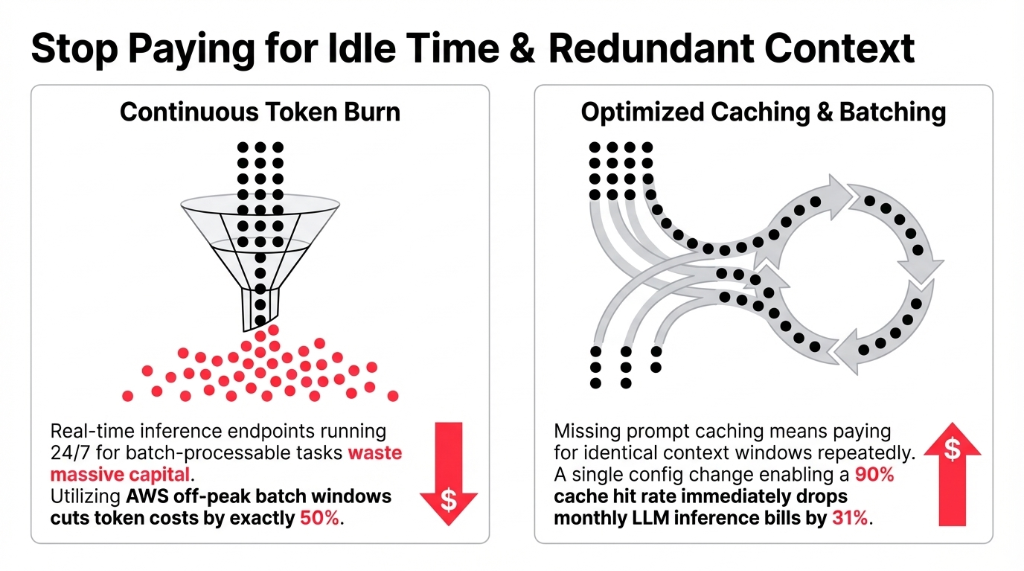
The 4 Most Common Bleeding Points
1. Wrong inference strategy.
Real-time inference endpoints running 24/7 for workloads that are actually batch-processable. Switching to batch inference cuts token costs by 50% with zero quality trade-off. Not 50% approximately — exactly 50%, because you are using AWS's off-peak pricing windows.
2. Prompt caching turned off.
If you are running any LLM-based feature — summaries, classifications, doc parsing — and prompt caching is disabled, you are paying for the same context window tokens over and over. A 90% cache hit rate drops monthly inference bills by 31%. One config change. Most teams have not made it.
3. Vector storage on the wrong service.
We consistently find clients running OpenSearch Serverless for knowledge bases that have under 5 million vectors. Migrating to pgvector on Aurora Serverless v2 cuts vector storage costs by 87%. (Yes, 87%. We audited a $4M ARR SaaS company last quarter and found exactly this — they cut $3,200/month with a three-day migration.)
4. SageMaker where Bedrock would do.
The moment a team builds a custom SageMaker endpoint for a task a foundation model already handles well, they are spending 40–70% more than they need to. Using SageMaker for tasks Bedrock can handle is one of the fastest ways to burn through AWS credits.
Combined? A single architecture review regularly recovers $8,000–$20,000 per month.
Why "AWS Is Paying Attention to This at re:Invent" Is Not a Strategy
Look, amazon reinvent 2025 had an entire track dedicated to AI-powered FinOps and cloud cost savings. The content was great. The sessions were packed. And then everyone flew home and did not change a single IAM policy or savings plan.
Here is the uncomfortable truth: AWS is not your financial advisor. The aws console shows you usage. Amazon CloudWatch shows you metrics. AWS Trusted Advisor flags idle resources. None of these tools proactively fix your architecture. They surface data. Acting on that data requires an engineer who understands cloud cost economics at the workload level — not a generalist DevOps hire who is already fighting fires in three other services.
The well-architected framework aws built was exactly for this gap. It is not a theoretical checklist. It is a structured way to stress-test your aws architecture against six operating dimensions. The cost optimization pillar alone covers model selection, inference paradigm optimization, aws savings plan coverage, and right-sizing decisions.
What AWS AI Services Actually Cost at Production Scale
Let us get specific, because "aws price" is a question that deserves a real answer, not a link to the aws dashboard.
| Workload Type | Default Approach | Optimized Approach | Savings |
|---|---|---|---|
| LLM Inference (batch) | Real-time endpoint, always-on | Batch inference, scheduled | ~50% |
| Prompt-heavy apps | No caching | Prompt caching, 90% hit rate | ~31% |
| Vector search | OpenSearch Serverless | pgvector / Aurora Serverless v2 | ~87% |
| Custom model training | On-demand SageMaker | SageMaker Spot Instances | 60–90% |
| Pro SageMaker endpoints | On-demand instances | Savings Plans (1-year) | Up to 64% |
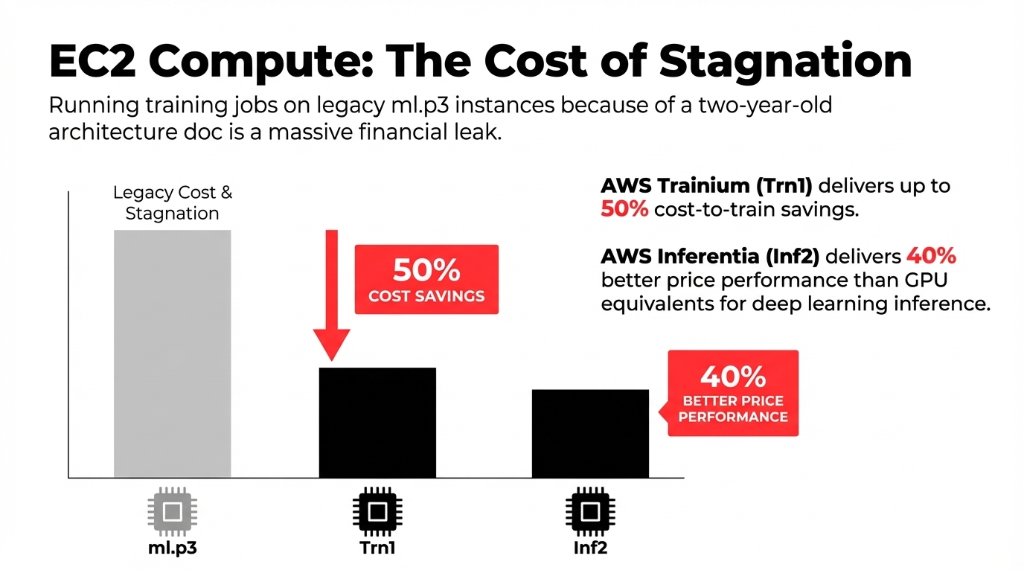
EC2 pricing deserves a separate note. AWS Trainium-based EC2 Trn1 instances deliver up to 50% cost-to-train savings over comparable EC2 instances. AWS Inferentia Inf2 instances deliver up to 40% better price performance than GPU equivalents for deep learning inference. If your team is still running training jobs on ml.p3 instances because that is what the original architecture doc specified two years ago, you are overpaying by an amount your CFO would find genuinely upsetting.
Why Q1 Is the Worst Time to Leave This Unreviewed
Every Q1, US companies lock budgets, finalize cloud spend projections, and try to predict what AI workloads will cost for the next 12 months. The problem? Those projections are based on current aws billing patterns — which, as we have now established, are probably 30–60% higher than they need to be.
Clients who come to us after a failed or bloated AWS AI project typically recover 40–60% of their compute spend in the first 90 days through architecture corrections alone. That is not a consulting pitch — that is what happens when someone applies the well-architected framework aws built for exactly this purpose to a production workload for the first time.
AWS credits, savings plans, and reserved instance coverage are also most impactful when structured at the start of a budget cycle. If you are using aws organizations across multiple accounts, the savings plan coverage math changes. Miss this window and you are back to on-demand pricing for another quarter.
The Braincuber Free Review: Exactly What Happens
We are not selling you a discovery call that turns into a three-month engagement. Here is what the free AWS AI Architecture Review actually covers in 45 minutes:
Current Workload Mapping
Every AI service running in your aws cloud system: SageMaker, Bedrock, EC2 GPU, Lambda AI triggers, Amazon CloudFront delivery for AI endpoints, Amazon CloudWatch alerting gaps.
Cost Gap Analysis
EC2 pricing against current instance types, savings plan coverage ratio, idle resource identification, batch vs. real-time inference audit.
Security Pillar Check
IAM permission sprawl, aws security configuration gaps, data boundary compliance for US-regulated industries. Preventing the next aws outage incident.
One-Page Action Plan
Three changes you can make in the next 14 days that will move your AWS billing number immediately.
Why Not Just Use AWS Native Tools?
Fair question. AWS Trusted Advisor, AWS Cost Explorer, and Amazon CloudWatch are all real tools that surface real data. The gap is interpretation and prioritization.
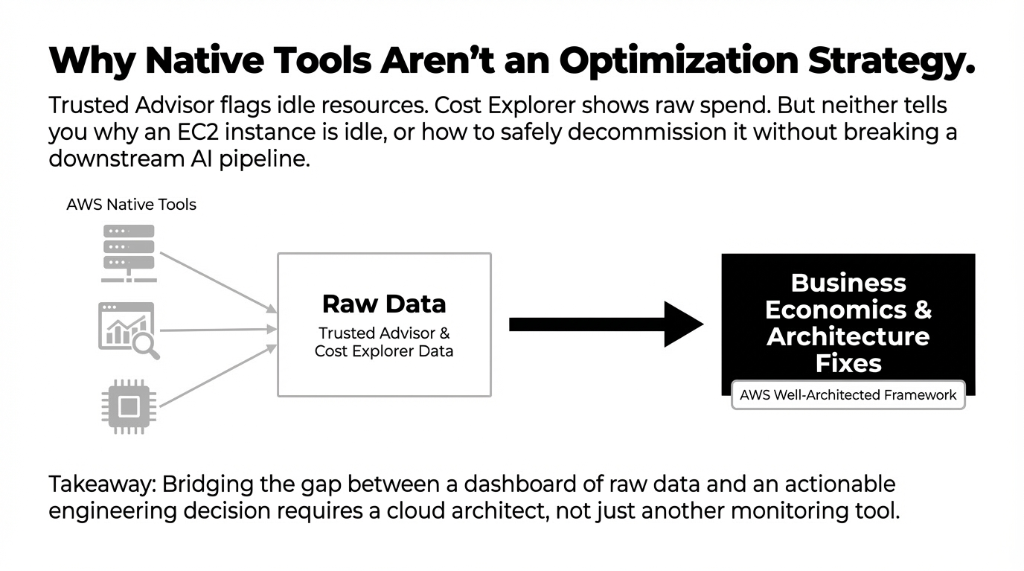
Trusted Advisor will flag that you have idle EC2 instances. It will not tell you why they are idle, whether they are connected to a SageMaker inference pipeline, or how to safely decommission them without breaking a downstream aws cloud based saas application.
Cost Explorer will show your spend by service. It will not cross-reference your inference volume against Bedrock's batch pricing tier to tell you that you are $6,000/month over what you should be paying. That gap — between raw AWS data and an actionable engineer cloud decision — is what a trained aws partner fills.
FAQs
What does a free AWS AI Architecture Review actually include?
We review your active AWS AI workloads — SageMaker, Bedrock, EC2 GPU instances, and CloudWatch configuration — against the AWS Well-Architected Framework. You get a written cost gap analysis and a three-point action plan with specific changes, estimated savings per change, and implementation order. Most clients see $8,000–$20,000/month in recoverable costs identified in the first session.
How long does the review take, and what do we need to prepare?
The review runs 45 minutes. You need your AWS account ID, read access to AWS Cost Explorer and CloudWatch dashboards, and roughly 15 minutes beforehand to export last month's billing breakdown by service. No architecture diagrams, no presentations required. We navigate your aws console live with you and ask direct questions about your inference patterns.
We are already on AWS Savings Plans — do we still need this review?
Yes, and here is why: Savings Plans cover compute costs but do not address inference strategy, model selection, or vector storage decisions. A client last quarter had Compute Savings Plans covering 78% of their EC2 spend but was still overpaying $4,100/month on Bedrock because they were using Claude Sonnet for classification tasks that Haiku handles at one-third the price.
How is Braincuber different from AWS's own support team?
AWS support diagnoses technical issues and answers service questions. We optimize business economics. Our engineers have run 60+ AWS AI cost reviews and know specifically where the aws well architected framework recommendations translate to immediate billing reductions.
What if our AWS architecture is already optimized?
We will tell you directly, with data. If your batch inference is configured, your model tiers are right-sized, your prompt caching hit rate is above 85%, and your SageMaker Savings Plans are fully committed, we will confirm that in writing and give you the one or two forward-looking items to watch as you scale. Roughly 1 in 12 reviews comes back clean.
Don't Let Q2 Start With Q1's Architecture Mistakes.
This offer closes March 31st. We have 11 review slots left for US companies. Book the free 15-Minute AWS AI Architecture Review — we will find your biggest cost leak on the first call. No prep work required. Just bring your AWS account ID and an honest answer to "when did you last review your inference strategy?"