
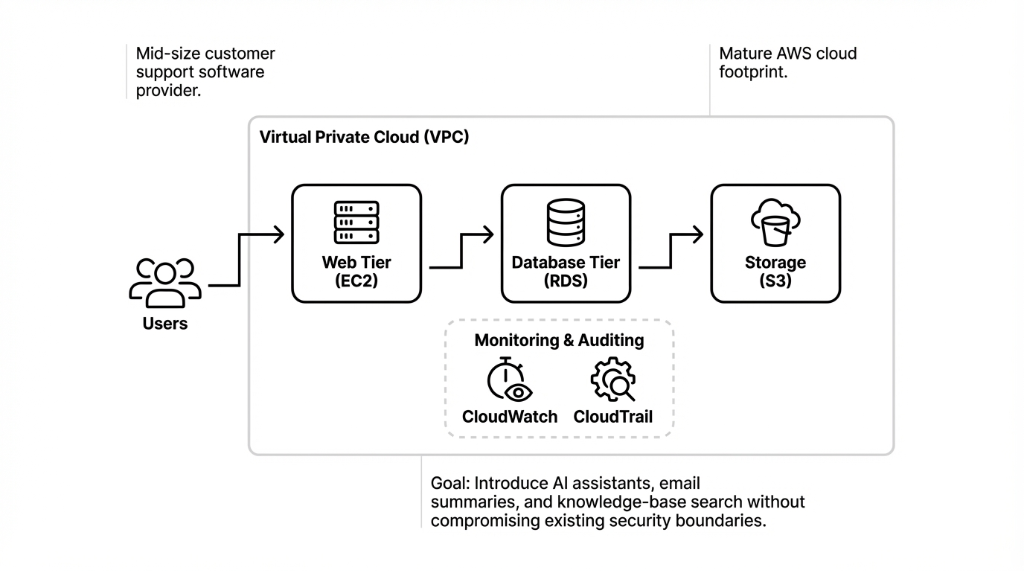
Amazon Bedrock is a fully managed generative AI service from AWS that lets teams build and deploy applications using foundation models through a unified API, without managing underlying infrastructure. It integrates natively with core AWS cloud services — S3, Lambda, IAM, KMS, and CloudWatch — which simplifies building end-to-end AI workflows on the Amazon AWS cloud.
This client interview walks through common deployment patterns and best practices for AWS Bedrock, particularly for companies operating in US regions like US East (N. Virginia) and US West (Oregon), where the service is generally available.
Why Amazon Bedrock and AWS?
The CTO explained that the company evaluated several cloud AI providers, including other cloud platforms and private cloud deployments, before deciding to stay with AWS. Bedrock's positioning as a managed service for foundation models, with native security and compliance controls, aligned well with their existing AWS security and cloud infrastructure standards.
Why They Picked Bedrock Over Self-Hosting
Fully Managed
No need to manage clusters, GPUs, or model servers. In contrast to running models on generic cloud offerings or self-managed Kubernetes clusters, Bedrock abstracts all infrastructure. You call an API. You get AI responses. That is it.
Native Security
AWS IAM for identity, IAM roles for least-privilege access, AWS KMS for encryption at rest and in transit. All the security controls they already knew and used. No new security framework to learn. No vendor-specific compliance headaches.
Rich Integrations
Lambda for serverless orchestration, S3 for storing prompts and outputs, CloudWatch for monitoring, Step Functions for complex workflows, EventBridge for event-driven patterns. Same AWS services they already ran in production.
Predictable Pricing
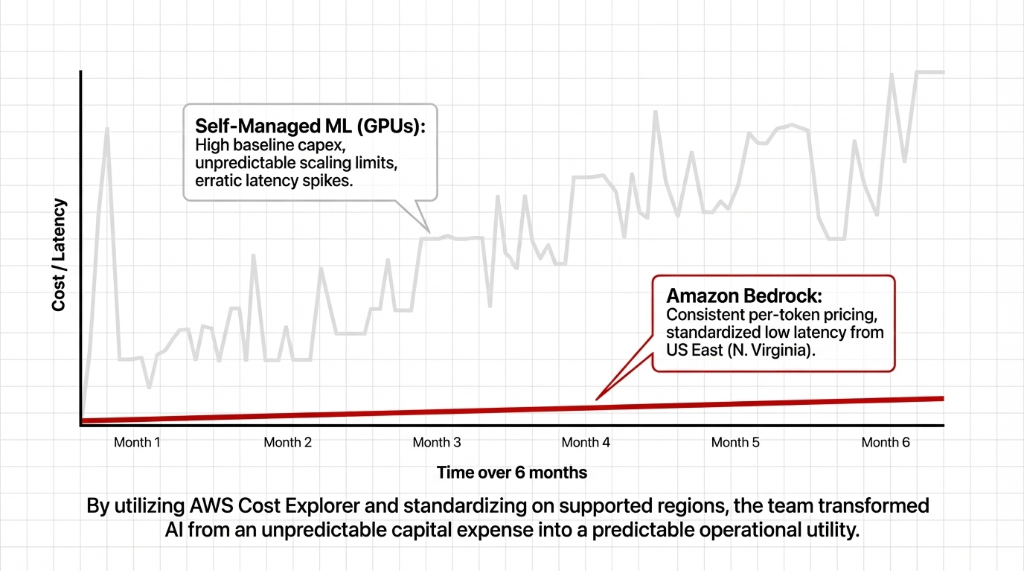
Per-token Bedrock billing instead of provisioning dedicated hardware. No upfront capex. No idle GPU costs. Aligned with their existing AWS Cost Explorer monitoring, so finance could track AI spend alongside every other AWS service.
They also appreciated that Amazon Bedrock is now generally available to all AWS account holders in supported regions. No extended preview process. No waitlist. They simply enabled the service in their existing AWS account in a supported region.
How They Enabled Bedrock (6 Steps, No Drama)
From a hands-on perspective, the actual enablement inside the AWS cloud environment surprised the team with how straightforward it was. The lead cloud engineer described the process:
The Enablement Process (Their Words)
1. Log into the AWS console.
2. Choose the target region — US East (N. Virginia) to minimize latency to their primary US users.
3. Search for "Bedrock" under AWS services and open the service page.
4. Click Get started and go to Manage model access.
5. Select foundation models (Anthropic Claude for text, Amazon Titan for embeddings) and request access.
6. Wait a few minutes for access approvals. That was it. No GPU provisioning. No Docker clusters. No Kubernetes tutorials. Done.
Integrating Bedrock With Existing Services
The core of the deployment focused on integrating AWS Bedrock with their existing cloud application and microservices. For the first use case, they wanted a serverless workflow: when a user asks the AI assistant a question, a backend function calls Bedrock, then stores the conversation for analytics.
The Lambda Orchestration Pattern
Accept user input via API Gateway — classic API management pattern they already used for their SaaS product.
Call the Bedrock InvokeModel API from within their AWS region. Same SDK, same authentication, same error handling patterns as every other AWS service call.
Store the prompt and response in S3 storage buckets. Full audit trail. Replayable if needed.
Emit logs and metrics to CloudWatch for observability. Same dashboards, same alerting, same on-call rotation. The engineer noted this pattern looked identical to other Lambda workflows they already ran in production.
Security, Compliance, and Data Protection
A major concern for the client's legal and security teams was cloud computing data security when sending user conversations to an external AI service. Bedrock's design as an AWS managed service reassured them — it runs entirely inside AWS's secured infrastructure and does not train foundation models on customer data by default.
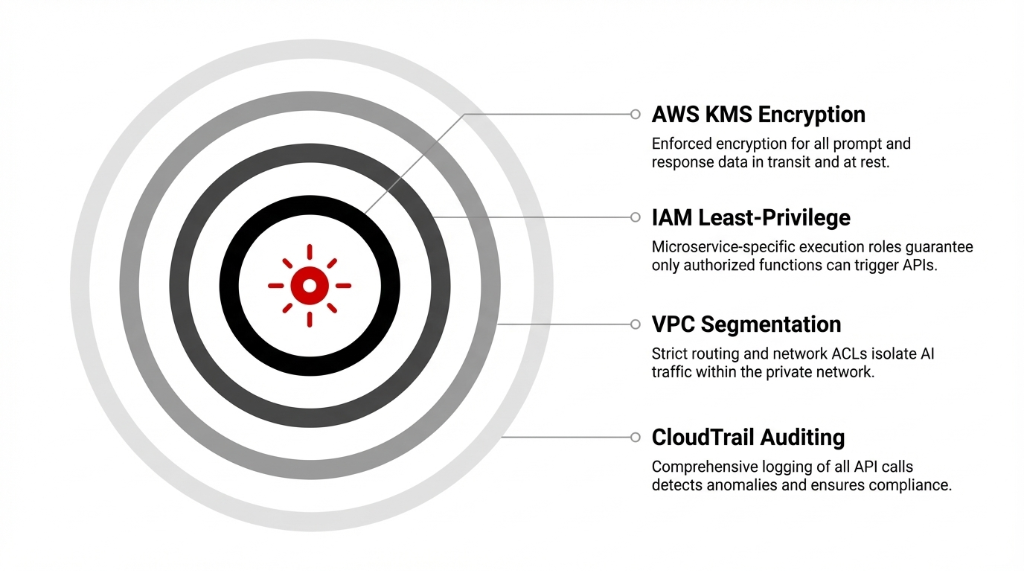
IAM Least-Privilege
Only specific microservices could call Bedrock APIs. IAM roles scoped to individual Lambda functions. No shared credentials. No wildcard permissions. Every API call authenticated and authorized through the same IAM framework they used for every other AWS service.
KMS Encryption
All data in transit and at rest encrypted using AWS KMS. Consistent with their existing key management governance. Same key rotation policies, same audit trails, same compliance reports their security team already produced quarterly.
VPC Segmentation
Traffic between their app and Bedrock kept private via VPC endpoints. Strict routing and network ACLs. AI traffic isolated within the same private network boundaries that protected their production database and customer data.
CloudTrail Auditing
Comprehensive logging of all API calls through CloudTrail. Metrics via CloudWatch to detect anomalies. Same observability stack, same alerting rules, same incident response playbooks. Bedrock treated as a first-class component in their cloud security model.
Performance, Regions, and Cost
During the pilot, the team tested Bedrock models in multiple AWS regions across North America. They standardized on US East (N. Virginia) as primary, with US West (Oregon) as backup, because Bedrock offers low latency and consistent pricing there.
| Factor | Self-Managed GPUs | Amazon Bedrock |
|---|---|---|
| Upfront Cost | High (GPU instances, reserved capacity) | $0 (pay-per-token) |
| Scaling | Manual provisioning, capacity planning | Automatic (AWS managed) |
| Latency Consistency | Erratic spikes under load | Predictable (standardized regions) |
| Ops Overhead | Docker, Kubernetes, rolling upgrades, GPU monitoring | Zero (API calls only) |
| Idle Cost | Paying for GPUs sitting idle 70% of the time | $0 when not in use |
Reliability and Outage Concerns
During vendor selection, the team researched AWS outage history because they wanted to be realistic about availability. While AWS has experienced outages like any major cloud provider, core services in well-architected deployments maintain strong uptime, especially when using multi-AZ and multi-region patterns.
How They Designed for Reliability
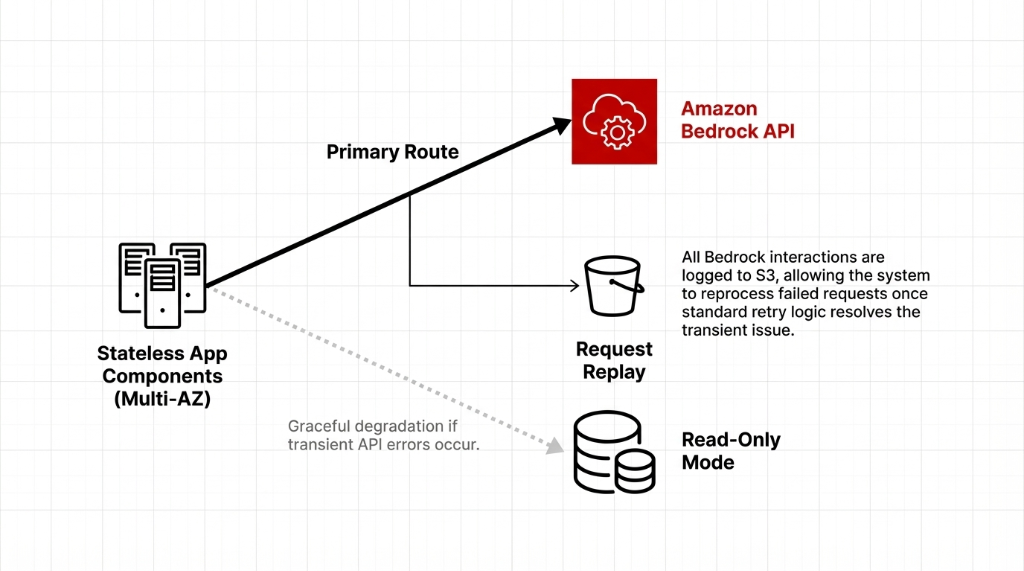
Stateless service components that could fail over between availability zones. No sticky sessions. No local state. If one AZ goes down, requests route to the next one automatically.
Read-only fallback mode for the AI assistant if Bedrock API calls temporarily failed. The app degrades gracefully — users still see historical data, just without new AI responses.
Full request logging to S3 so they could replay or reprocess requests if necessary. In practice, during their first months in production, they did not encounter Bedrock-specific downtime beyond occasional transient errors that standard retry logic resolved.
Expanding to More AI Use Cases
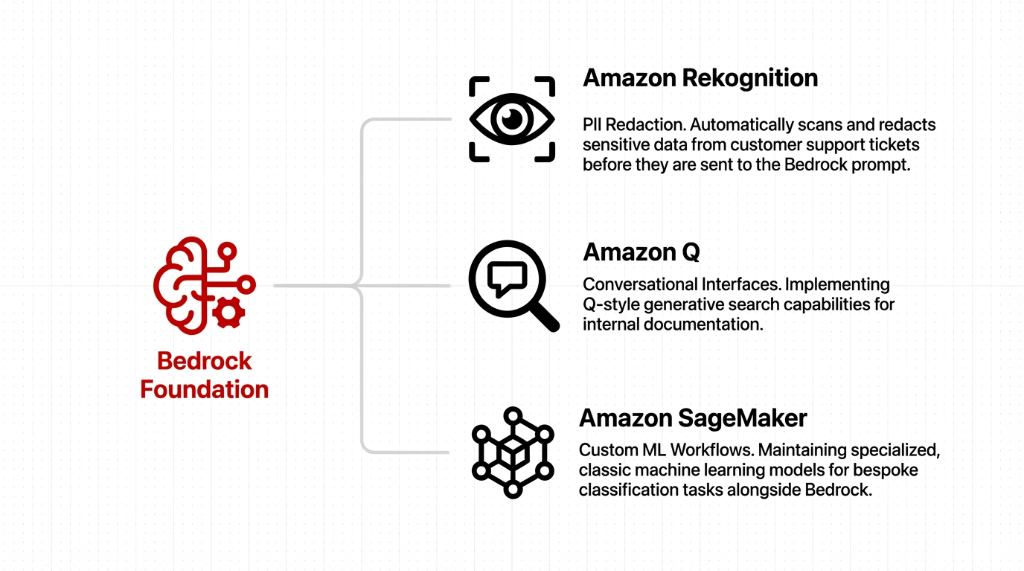
Once the initial assistant went live, the company started exploring other AWS AI service capabilities to enrich its product. These expansions followed the same architectural patterns established for Bedrock, so each new capability felt like an incremental step rather than a major re-architecture.
The Expansion Roadmap
Amazon Rekognition: Automatically redacting sensitive data from support tickets before sending them to Bedrock. PII never hits the foundation model. Improved cloud computing data security without adding a separate redaction pipeline.
Amazon Q-style interfaces: Conversational search for internal documentation. Engineers ask questions in plain language and get answers from their own knowledge base instead of digging through Confluence for 23 minutes.
Amazon SageMaker: Classic ML workflows where custom models were still required — bespoke classification tasks, anomaly detection on support ticket patterns, churn prediction. SageMaker for the specialized stuff. Bedrock for the general stuff. Clean separation.
Lessons Learned: Why It Was Smoother Than Expected
Familiar Patterns
Because they already used VPC, IAM, Lambda, and S3, Bedrock felt like "just another service" instead of a whole new platform. Same SDKs. Same error handling. Same deployment pipelines.
Strong Governance
Existing managed service practices meant security and compliance were not bolted on at the last minute. They applied the same IAM, KMS, and VPC controls they used for everything else. No special exceptions.
Clear Responsibility Split
AWS handled foundation model hosting and scaling. The client focused on business logic and user experience. Neither team stepped on the other's toes. That clarity killed 90% of the deployment anxiety.
Gradual Rollout
Starting with a single AI assistant feature let the team learn Bedrock's quirks before expanding. No big-bang launch. No all-or-nothing bet. One feature, one pilot, then expand.
How Other Teams Can Replicate This
The 5-Step Replication Playbook
1. Start from architecture, not demos. Map how Bedrock fits into your cloud application, networking, and data flows before enabling anything. Architecture first. Excitement second.
2. Reuse existing controls. Integrate Bedrock into your current AWS security, IAM, and key management frameworks instead of inventing new ones.
3. Keep it simple. Use serverless patterns with Lambda and event-driven designs rather than over-engineering with unnecessary platforms.
4. Monitor from day one. Turn on detailed logs and metrics in CloudWatch so you understand latency, errors, and costs before anyone asks.
5. Invest in people. Encourage AWS cloud learning, certifications, and practical labs that combine Bedrock with related services. The biggest risk is not the technology. It is the team not knowing how to use it.
By treating Bedrock as an extension of existing AWS services rather than a separate experimental stack, teams can make AI feel like a natural part of their cloud strategy instead of a fragile pilot.
FAQs
What is Amazon Bedrock in simple terms?
A managed AWS AI platform that exposes multiple foundation models via API. Teams build generative AI apps without managing infrastructure. You call an API, you get AI responses. No GPUs to provision, no Docker containers to babysit.
Which AWS regions support Bedrock for US customers?
US East (N. Virginia) and US West (Oregon) among other regions. Most US companies standardize on US East for lowest latency and use US West as failover.
How does Bedrock integrate with other AWS services?
Bedrock works with Lambda for orchestration, S3 for storage, CloudWatch for monitoring, IAM for access control, and KMS for encryption. It plugs into existing AWS architectures like any other managed service.
Is Bedrock more secure than hosting models yourself?
Security depends on configuration, but Bedrock removes a large part of the infrastructure attack surface and plugs into mature AWS security controls. It runs inside AWS secured infrastructure and does not train foundation models on customer data by default.
How does the cost of Bedrock compare to self-hosting?
Pay-as-you-go per 1,000 tokens. No upfront capex. No idle GPU costs. For most mid-market workloads, significantly more economical than provisioning dedicated hardware that sits idle 70% of the time.
Still Running AI on Self-Managed GPUs? Do the Math.
Pull up your AWS Cost Explorer right now. Check how many GPU hours you provisioned last month versus how many you actually used. If the idle rate is above 40%, you are burning money that Bedrock would have saved. We will do a 15-minute architecture review and show you exactly where Bedrock fits into your existing VPC, IAM, and monitoring stack. No slide deck. Just your console, your data flows, and the math.