
$47,000 flash sale. 37% of those orders are stuck in a broken synchronous loop.
Your e-commerce store just did $47,000 in sales on a Tuesday afternoon. Now here is the part nobody talks about: 37% of those orders are sitting in a broken synchronous processing loop — waiting for your payment service to respond, your warehouse API to acknowledge, and your inventory system to update. All in a straight line, one after another. One service hiccups, and the entire chain collapses.
That is not a scaling problem. That is an architecture problem. And AWS SQS is how you fix it before Black Friday turns into a $214,000 customer service nightmare.
The Order That Never Gets Processed
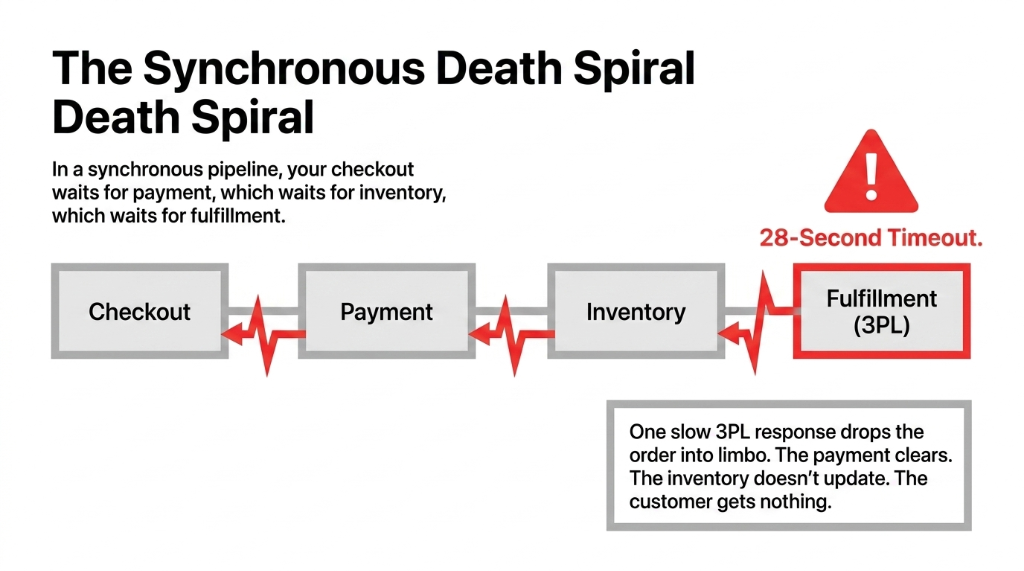
A customer in Dallas places a $280 order at 11:47 PM. Your application fires off three synchronous calls — charge the card, reserve the inventory, push the fulfillment request to your 3PL's API. The 3PL's server is slow. Response time hits 28 seconds. Your gateway throws a timeout. The payment goes through. The inventory does not update. The order sits in limbo.
You just created a ghost order.
We see this exact failure mode in 6 out of 10 Shopify-plus stores that come to us at Braincuber after scaling past $2M ARR. The founder is using a synchronous order pipeline that worked fine at $500K/year and is actively bleeding money at $3M/year. The architecture that got you here will not get you to $10M. Not without a message queue sitting between your services.
Why Your Current Pipeline Breaks at Scale
When you process orders synchronously, you are building a chain of dependencies. Your checkout service waits for your payment service. Your payment service waits for your inventory service. Your inventory service waits for your fulfillment API. One slow response anywhere in that chain — and the whole order stalls.
During a traffic spike — say, a flash sale you promoted on Instagram that pulled 4,300 sessions in 11 minutes — your backend services get hammered. You either over-provision servers that cost you $18,000/month at idle, or you under-provision and drop orders.
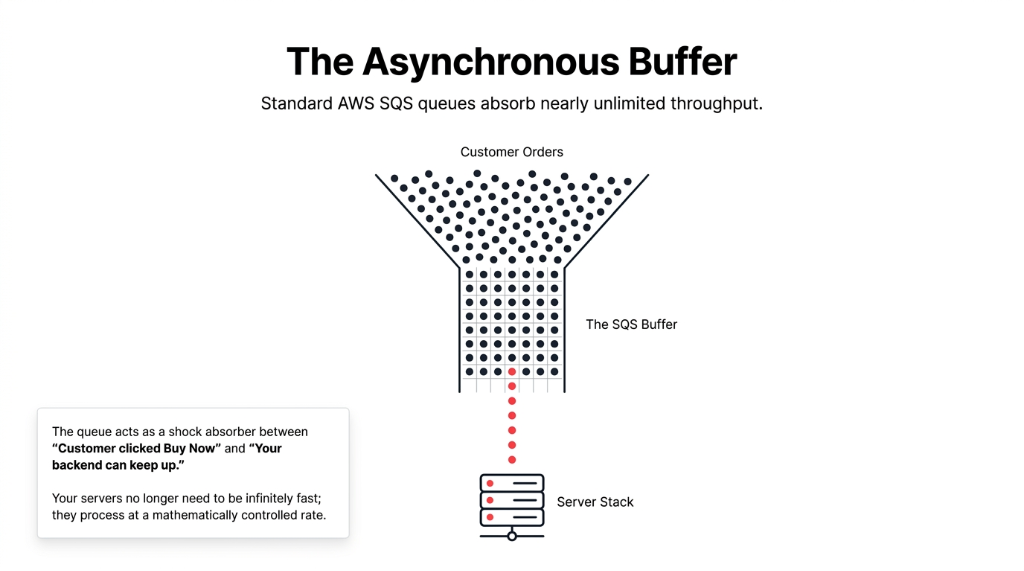
Standard AWS SQS queues support nearly unlimited throughput. Your EC2 instances, your Lambda workers, your RDS database do not need to be infinitely fast because the queue absorbs every incoming order and feeds it to your processors at a rate they can actually handle. The queue is the buffer between "customer clicked Buy Now" and "your backend can keep up."
The Real SQS Architecture for Order Processing
Here is how we build it for e-commerce clients scaling between $2M and $15M ARR in the US. This is not a textbook diagram. This is the actual topology.
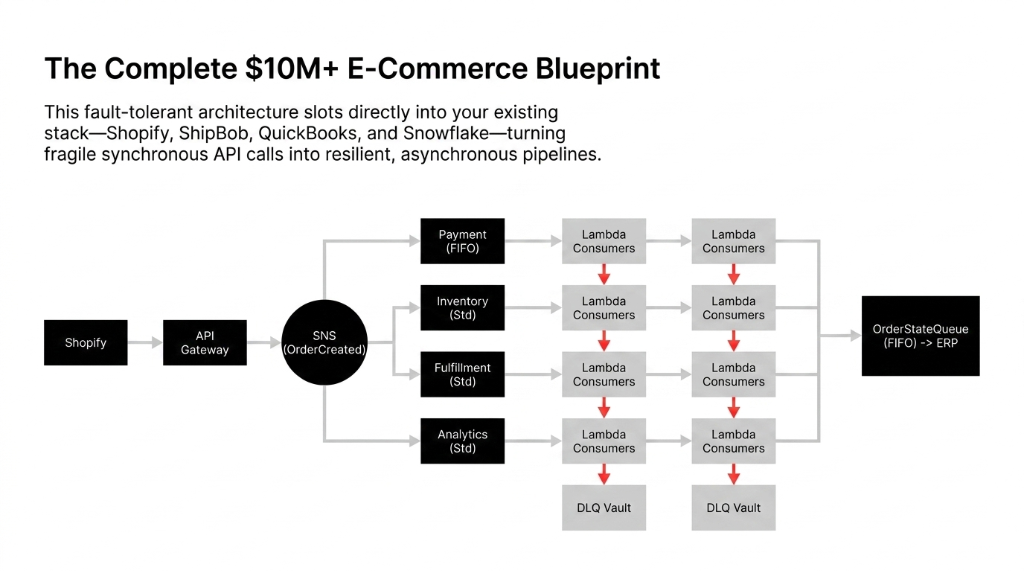
When a customer places an order, your application publishes an OrderCreated event to an Amazon SNS topic. That SNS topic fans out to three separate SQS queues simultaneously:
The SNS + SQS Fan-Out Pattern
PaymentQueue (FIFO)
Handles Stripe/Braintree charge processing. Exactly-once delivery. No double-charging.
InventoryQueue (Standard)
Decrements stock levels, triggers reorder alerts, updates Shopify inventory via API.
FulfillmentQueue (Standard)
Pushes pick-pack-ship instructions to ShipStation, ShipBob, or your 3PL's API.
Each queue is independent. If ShipStation's API is down at 2 AM, your FulfillmentQueue holds the message. It retries. It does not take down your payment processing or your inventory updates. Your customer never sees a failed order. You do not get a chargeback from a ghost transaction.
This is the SNS + SQS fan-out pattern, and it is the difference between a $4M/year business and a $4M/year business with 18.3% of orders requiring manual intervention every quarter.
Standard Queue vs. FIFO Queue: Pick the Wrong One and You Will Pay for It
This is where most engineers make a $60,000-a-year mistake.
Standard SQS Queues
Near-unlimited throughput. Delivers messages at least once — meaning the same order could theoretically be processed twice. No strict ordering.
For payment processing, that is a disaster. Double-charging a customer $280 for a single order earns you a chargeback, a 1-star review, and a call from your payment processor about fraud thresholds.
FIFO SQS Queues
Guarantee exactly-once processing and strict First-In-First-Out ordering. Cap out at 3,000 TPS with batching, or 300 TPS without.
For a store doing 200 orders per hour on a normal Tuesday, that is more than enough headroom.
| Feature | Standard Queue | FIFO Queue |
|---|---|---|
| Throughput | Unlimited | 3,000 TPS (batched) |
| Message Order | Best-effort | Strict FIFO |
| Delivery | At-least-once | Exactly-once |
| Best For | Inventory, analytics, notifications | Payment processing, order state |
Our Recommendation
Run a FIFO queue for PaymentQueue and OrderStateQueue. Use Standard queues for InventoryQueue, AnalyticsQueue, and NotificationQueue. You get exactly-once guarantee where money moves, and raw throughput everywhere else.
Dead-Letter Queues: The Safety Net You Are Not Using
Every SQS implementation needs a Dead-Letter Queue (DLQ). Full stop.
When a message fails to process — your fulfillment API throws a 503, or your Lambda function hits a cold start timeout during a traffic spike — SQS will retry it. You configure the maxReceiveCount. We typically set it to 5 retries for payment-adjacent queues and 3 for fulfillment queues. After the threshold, the message moves to the DLQ automatically.
The DLQ Is Your Audit Trail
Without a DLQ
Failed messages vanish after the retention period expires (max 14 days). That is $14,200 worth of unprocessed orders that fell through the cracks last quarter.
With a DLQ + CloudWatch
Your ops team gets an alarm the moment a message lands. You recover it before the customer even files a dispute. One client recovered $31,700 in a single quarter just by implementing proper DLQ monitoring.
Lambda + SQS: Auto-Scaling That Actually Works
When you connect a Lambda function to an SQS queue as an event source, Lambda polls the queue automatically. It starts with 5 concurrent batches. If messages keep arriving, Lambda adds up to 60 new concurrent functions per minute, scaling all the way to 1,000 concurrent executions.
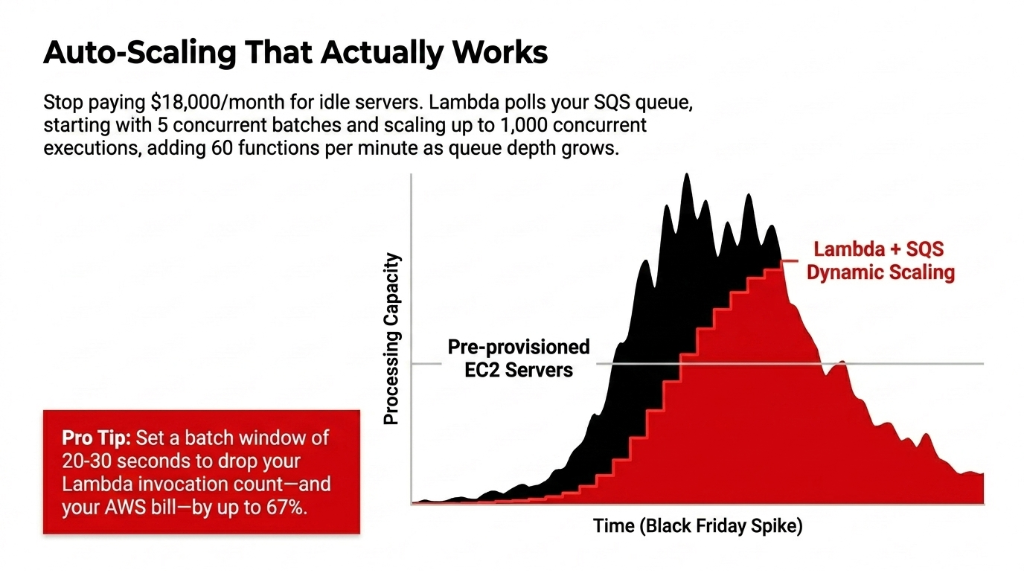
That is your Black Friday plan. You do not pre-warm servers. You do not buy reserved EC2 capacity in October. You build the SQS + Lambda architecture in September, and AWS handles the rest on November 29th.
Batch Window = 67% Cost Reduction
We configure a batch window of 20-30 seconds for inventory and analytics queues, which groups messages and drops your Lambda invocation count — and your bill — by up to 67% compared to processing one message at a time. Stop paying $18,000/month for idle servers.
The Visibility Timeout Trap (Most Teams Get This Wrong)
SQS uses a visibility timeout — the window during which a message being processed is hidden from other consumers. If your Lambda does not finish within that window, SQS assumes the job failed and makes the message visible again. Another Lambda picks it up. You just processed the same order twice.
The Rule: Set your visibility timeout to at least 6x your average Lambda processing time. If your payment webhook takes 4 seconds on average, set visibility timeout to 30 seconds minimum. For order state machines that touch your ERP or warehouse API, we set it between 90-120 seconds and pair it with heartbeat extensions via the ChangeMessageVisibility API call. Nobody tells you this until you find a $5,400 duplicate fulfillment on a Friday afternoon.
Long Polling vs. Short Polling: Stop Burning Money on Empty Responses
Default SQS behavior uses short polling — your consumer hits the queue, gets zero messages, bills you anyway. At scale, this turns into thousands of empty API calls burning $340/month in pure waste.
Fix: Enable long polling by setting WaitTimeSeconds to 20. SQS holds the connection open for up to 20 seconds, waiting for a message to arrive before responding. You cut empty responses by up to 92%, reduce cost proportionally, and decrease the load on your consumer. It is a one-line configuration change that every production SQS queue should have turned on by default.
Integrating SQS with Your Existing Stack
If you are running Shopify with QuickBooks or Xero for accounting, and ShipStation or ShipBob for fulfillment — this architecture slots right in without replacing your existing tools.
Your SQS consumers call the same APIs you already use — Shopify's Admin API, ShipStation's Order API, QuickBooks' transaction endpoint. The difference is that now those calls are async and fault-tolerant instead of synchronous and fragile. If ShipStation is down, the message waits. If QuickBooks rate-limits you at 500 calls/minute, your queue backs up gracefully instead of dropping data.
We also use this architecture to feed real-time order events into data warehouses like Redshift or Snowflake via an AnalyticsQueue — so your business intelligence dashboards stop being 24 hours behind your actual sales. Talk to our cloud team about the exact integration for your stack.
Frequently Asked Questions
What is AWS SQS used for in e-commerce order processing?
SQS acts as a buffer between your storefront and backend services. When a customer places an order, SQS holds the event and delivers it to payment, inventory, and fulfillment processors independently. This prevents one slow service from blocking the entire order pipeline during high-traffic periods like flash sales or Black Friday.
Should I use SQS Standard or FIFO queue for order processing?
Use FIFO queues for payment processing and order state changes — anywhere a duplicate or out-of-order message causes a real-dollar problem. Use Standard queues for inventory updates, analytics, and notifications where throughput matters more than strict ordering. FIFO handles up to 3,000 TPS with batching, covering most stores up to ~$20M ARR.
How does a Dead-Letter Queue protect my order pipeline?
A DLQ captures messages that fail processing after a configured number of retries — typically 3 to 5. Instead of silently dropping failed orders, the DLQ holds them for inspection and reprocessing. Pair it with a CloudWatch alarm and you will know within seconds when an order fails, not three days later when the customer files a chargeback.
How does SQS scale during peak traffic like Black Friday?
SQS itself scales to nearly unlimited throughput without any configuration. When paired with Lambda as a consumer, Lambda auto-scales from 5 concurrent executions to 1,000 in minutes, adding up to 60 new functions per minute as queue depth grows. You do not pre-provision anything — the architecture absorbs the spike automatically.
What does AWS SQS cost for a mid-size e-commerce store?
SQS costs $0.40 per million requests. A store processing 50,000 orders per month with roughly 5 SQS messages per order generates 250,000 messages per month — a total SQS bill of approximately $0.10 per month. The cost of not having it? One bad flash sale can cost $40,000 in refunds and lost customer lifetime value.
Stop Building Order Pipelines That Fall Apart the Moment You Get the Traffic You Earned
We find the broken synchronous calls, the missing DLQs, and the visibility timeout misconfigurations that are costing you real money right now — before your next traffic spike exposes them.
Free audit. Order pipeline reviewed. Biggest processing risk identified on the first call.