
Your AWS bill does not lie. You are overpaying by 40%.
If you are running an e-commerce store on AWS and still paying On-Demand rates because you "are not sure" whether to buy Reserved Instances or Savings Plans, you are burning approximately $18,000-$45,000 a year in avoidable compute spend.
We worked with a $3M/year DTC brand running on EC2 On-Demand for two years. They had left $67,400 on the table by the time they came to us. This is not a pricing philosophy debate. This is a cash flow problem.
The Cost of Doing Nothing
AWS On-Demand rates for a standard m5.xlarge instance in US East (N. Virginia) run at roughly $0.192/hour — or $1,680/month per instance. A mid-size e-commerce brand running 10-15 such instances for their application layer, background jobs, and recommendation engines pays $25,200/month just in compute. Before RDS, CloudFront, or S3 even enter the conversation.
The On-Demand vs. Committed Pricing Gap
On-Demand
$0.192/hour per m5.xlarge
$25,200/month for 10-15 instances
3-Year Standard RI
$0.048/hour (75% off)
$6,300/month — saves $18,900/month
3-Year Difference
$680,400 total savings
Goes into your pocket or your competitor's growth budget
Still "thinking about it"?
What Standard Reserved Instances Actually Lock You Into
Here is what the AWS documentation conveniently buries in footnotes.
Standard Reserved Instances give you up to 75% savings compared to On-Demand rates, but they handcuff you to a specific instance type, region, tenancy, and operating system for the entire 1- or 3-year term. You commit to an m5.2xlarge in us-east-1 running Linux. That is it. If your engineering team decides to migrate to m6i instances for better price-performance next quarter — which they absolutely will, because AWS refreshes instance families every 18 months — your Standard RI discount stops applying.
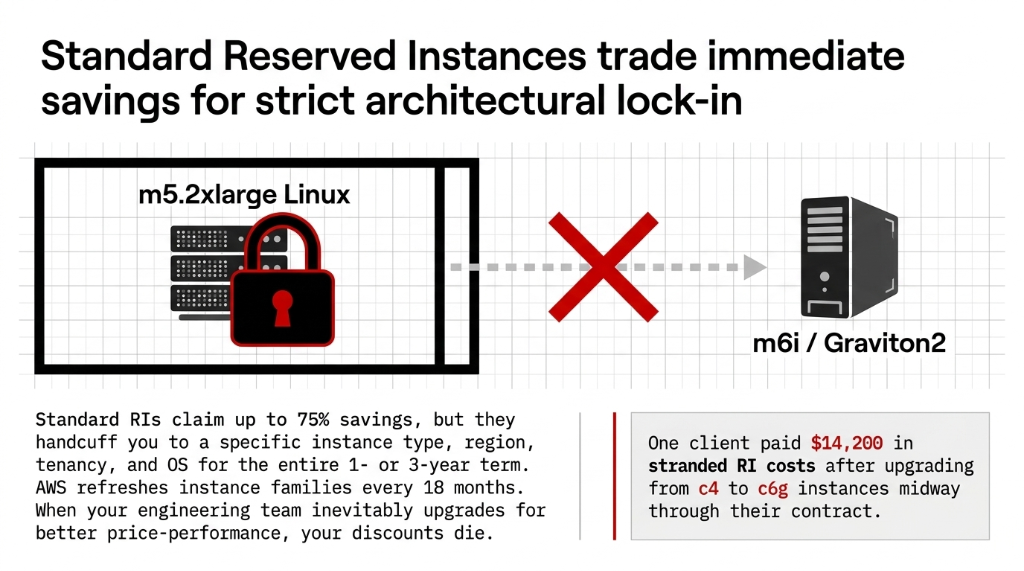
Real Client Disaster: $14,200 in Stranded RI Costs
We worked with an e-commerce client running a Magento stack that locked into Standard RIs for c4 instances. By mid-year, their team had migrated workloads to c6g (Graviton2) for 20% better performance. Their RI discounts? Dead weight.
They paid $14,200 in stranded RI costs for instances they no longer used
Convertible RIs solve this partially — they allow you to change instance families, operating systems, and regions, but the maximum discount drops to 54% on a 3-year term versus 75% for Standard. That trade-off matters.
How Savings Plans Actually Work (And Why AWS Recommends Them)
AWS itself recommends Savings Plans over Reserved Instances on their own EC2 pricing page. That should tell you something.
Savings Plans flip the commitment model. Instead of reserving a specific instance, you commit to a fixed dollar spend per hour — say, $2.50/hour — for 1 or 3 years. AWS then automatically applies discounts across EC2, Fargate, and Lambda, regardless of instance family, size, region, or OS. You can start on m5, move to c6g, push workloads to Lambda during traffic spikes, and your Savings Plan discount follows you the entire time.
Three Types of Savings Plans
Compute Savings Plans
Up to 66% off. Maximum flexibility across EC2, Fargate, Lambda, any region. The go-to for e-commerce.
EC2 Instance Savings Plans
Up to 72% off. Tied to a specific instance family within a region, but flexible across size and OS.
SageMaker Savings Plans
Specific to ML workloads. Irrelevant for most e-commerce teams. Skip it.
For a Shopify-Plus brand running a headless commerce stack on AWS — with EC2 for the API layer, Fargate for containerized microservices, and Lambda for checkout webhooks — a Compute Savings Plan is the only option that covers all three under one commitment.
The E-Commerce Traffic Problem That Changes Everything
Here is the dirty truth nobody tells e-commerce CTOs: your traffic is not flat, and your AWS bill should not be priced like it is.
Black Friday, Cyber Monday, Prime Day, back-to-school peaks — a typical DTC brand on AWS sees 3x-7x traffic spikes for 11-14 days per year. The rest of the year, those extra EC2 instances you launched for peak season sit idle, running On-Demand at full price. The average e-commerce brand wastes $8,300-$19,700/year on idle On-Demand instances between peak seasons.
Standard Reserved Instances make this worse. You have committed capacity that you use 100% during peak and maybe 35% during off-peak. AWS charges you for 100% regardless. Savings Plans solve this differently — your commitment is a dollar-per-hour floor. When you scale down, AWS credits the difference forward.
The Blended Strategy That Actually Works for E-Commerce
Frankly, choosing only one is the wrong question. The right architecture uses both.
Here is the exact framework we recommend for e-commerce brands doing $1M-$20M in annual revenue on AWS:
Layer 1: The Stable Baseline (Reserved Instances)
Identify your absolute minimum compute — the instances that run 24/7/365 no matter what. This is typically your RDS database layer, Redis cache cluster, and core application servers. Cover 100% of this with Standard RIs (1-year term, partial upfront) for a ~40% discount with manageable commitment risk. Do not go 3-year here unless your stack is frozen — it never is.
Layer 2: The Variable Compute Layer (Compute Savings Plans)
Everything above your baseline — auto-scaling EC2 groups, ECS/Fargate tasks, Lambda functions for order processing — goes under a Compute Savings Plan at your average non-peak spend level. This gives you up to 66% off with zero flexibility penalty. Move from m5 to c7g mid-year. Your discount follows.
Layer 3: True Burst Capacity (On-Demand)
Accept that 3-5% of your compute will always be On-Demand during spikes. This is correct and intentional. Budget for it. Do not try to over-commit Reserved Instances to cover Black Friday — you will pay for capacity all year to use it 4 days.
This three-layer model is how enterprises running $200k-$500k/month in AWS spend structure their commitments. You can implement it at $10k/month. It typically delivers $47,000-$73,000 in annualized savings for a brand at the $2M revenue tier.
The 2025-2026 Marketplace Changes You Need to Know
AWS made a change in 2025 that kills one of the historical escape hatches: Standard RIs purchased at discounted rates through Private Pricing Agreements can no longer be resold on the AWS Marketplace. If you bought too many Standard RIs expecting to offload them — you are stuck.
This makes the case for Savings Plans even stronger for new commitments in 2026. The inability to exit an over-committed RI position makes the lower but flexible Savings Plan a lower-risk entry point — particularly for brands that do not have a dedicated FinOps team managing AWS spend daily.
Direct Comparison: What Gets You the Best ROI
| Factor | Standard Reserved Instances | Compute Savings Plans |
|---|---|---|
| Max Discount | Up to 75% | Up to 66% |
| Flexibility | Locked to instance/region/OS | EC2, Fargate, Lambda, any region |
| Commitment Unit | Specific instance config | $/hour of compute spend |
| Resale Option (2026) | No (killed in 2025) | N/A |
| Capacity Reservation | Yes (Zonal RIs only) | No |
| Best For | Static databases, core app servers | Variable e-commerce workloads |
| Risk if Over-Committed | High — stranded cost | Low — applies to any usage |
The Insider Truth About Capacity Reservations
One thing almost nobody talks about: only Zonal Reserved Instances guarantee actual EC2 capacity in a specific Availability Zone. Savings Plans and Regional RIs give you billing discounts — they do not guarantee AWS will have capacity available when you try to launch 50 new instances at 11 PM on Black Friday.
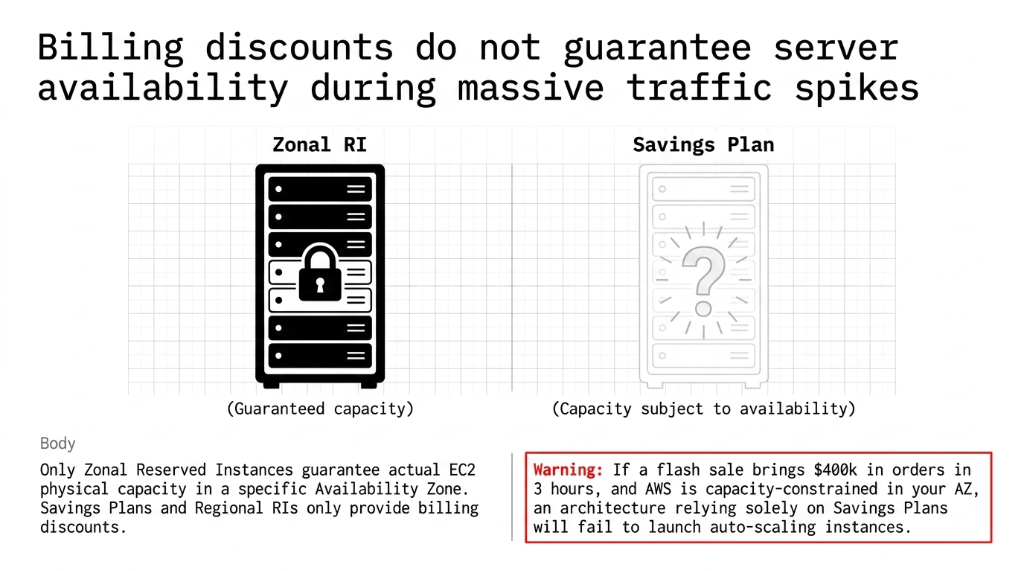
If you are running a sale that will bring $400k in orders in 3 hours and AWS is capacity-constrained in your AZ, your auto-scaling group will fail to launch new instances. We have seen this happen. The fix is to combine Zonal RIs for your core capacity floor plus Savings Plans for everything elastic — not to rely on Savings Plans alone and assume capacity will be there.
What a $2M E-Commerce Brand Should Buy Right Now
If you are doing $2M/year in e-commerce revenue with a $12,000-$18,000/month AWS bill, here is the specific playbook:
Step 1: Pull 90 days of Cost Explorer data
Look at your EC2 usage by instance family and region. This is your ground truth — not what your DevOps lead thinks is running.
Step 2: Identify compute at >85% consistent utilization
This is your RI candidate. RDS, Redis, core app servers that never turn off.
Step 3: Purchase 1-year Standard RIs (partial upfront)
For that stable layer only. Expect to save $3,200-$5,400/month immediately.
Step 4: Set a Compute Savings Plan at 60-65% of remaining variable spend
This gives you room to scale without over-committing. Covers EC2, Fargate, and Lambda under one commitment.
Step 5: Leave 10-15% of compute budget as On-Demand burst buffer
This is intentional, not a failure. Budget for it. Do not over-commit RIs to cover 4 days of Black Friday traffic across 361 off-peak days.
Expected Outcome
This approach typically delivers $47,000-$73,000 in annualized savings for a brand at the $2M revenue tier — without locking you into configurations that will break when your engineering team inevitably migrates instance families next year.
No migration. No code change. No downtime required.
Savings Plans and Reserved Instances apply to your billing immediately once purchased. Your next hourly billing cycle reflects the discounted rate.
Frequently Asked Questions
Can I use both Reserved Instances and Savings Plans at the same time?
Yes, and you should. AWS applies RI discounts first, then Savings Plans cover remaining eligible usage. Running Standard RIs for stable database workloads and a Compute Savings Plan for variable EC2/Lambda is the standard FinOps approach for e-commerce brands spending over $8,000/month on AWS.
Which saves more money — Reserved Instances or Savings Plans?
Standard Reserved Instances offer up to 75% off versus 66% off for Compute Savings Plans. However, the higher RI discount only pays off when utilization stays above 85% for the committed instance type. If your workload shifts even moderately, the Savings Plan's flexibility delivers better net savings despite the lower headline discount.
What happens if I over-commit on a Savings Plan?
Your Savings Plan discount applies up to your committed $/hour. Any usage above that commitment is billed at standard On-Demand rates. There is no penalty for exceeding your commitment — you simply pay full price for the excess. This is far less punishing than an over-committed Reserved Instance that charges you for unused capacity.
Do Savings Plans cover RDS databases?
No. Compute Savings Plans and EC2 Instance Savings Plans cover EC2, Fargate, and Lambda only. For RDS (MySQL, PostgreSQL, Aurora), you need RDS Reserved Instances — a separate commitment purchased independently. Most e-commerce brands should purchase 1-year RDS RIs for their production database since DB workloads are highly predictable.
How long does it take to see savings after purchasing?
Savings Plans and Reserved Instances apply to your billing immediately once purchased. Your next hourly billing cycle reflects the discounted rate. For a brand spending $15,000/month on EC2, a properly structured commitment can reduce that bill by $6,000-$9,000 starting in month one — no migration, no code change, no downtime required.
Stop Paying Full Price for Compute You Use Every Day
Every month you run On-Demand on stable workloads costs you exactly (On-Demand Rate - RI Rate) x Hours x Instance Count. For most e-commerce brands, that math lands between $4,000 and $22,000/month in avoidable spend. We will find your biggest leak on the first call.
No pitch. No fluff. Your Cost Explorer data reviewed. Commitment risk modeled. Exact dollar savings identified.