
A five-star average can hide a rotten pattern, and your team is reading reviews one by one while customers spell out exactly why they are returning products.
Review text usually contains early warnings about returns, damaged packaging, misleading product descriptions, sizing issues, and support failures long before those problems show up in a board meeting. You are treating reviews like marketing proof while ignoring the operational goldmine.
Impact: $14,200/month in preventable returns and reputation drift.
How the Pipeline Actually Works
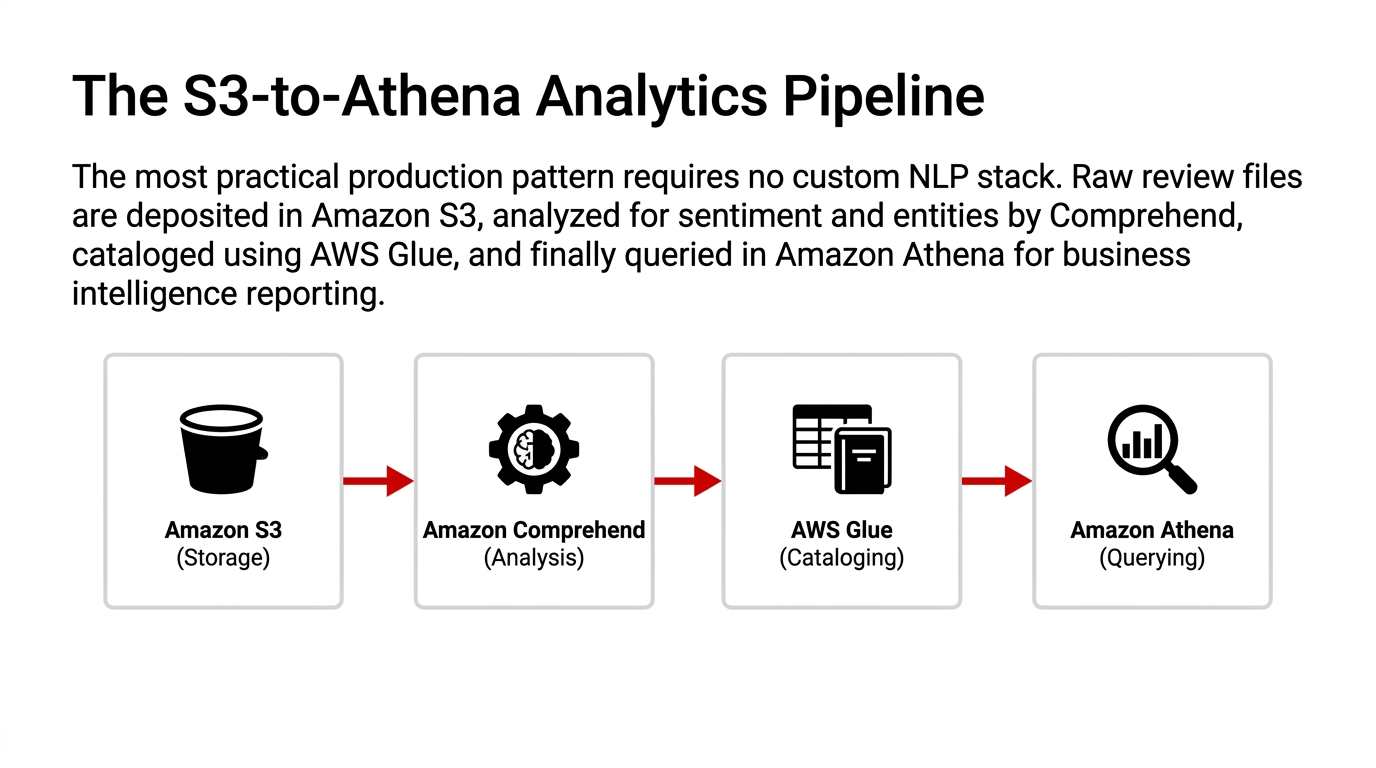
The simplest production pattern is not glamorous, and that is why it works. AWS's own tutorial lays out a practical flow: put review files in Amazon S3, run Amazon Comprehend sentiment and entity analysis, catalog the output with AWS Glue, and query the results in Amazon Athena for reporting.
For smaller, immediate use cases, your app can call DetectSentiment when a review is submitted and write the result beside the review record. AWS says DetectSentiment inspects text and returns the prevailing sentiment plus sentiment scores, which is enough to power live dashboards, moderation rules, or instant flags for review monitoring.
For larger workloads, BatchDetectSentiment and StartSentimentDetectionJob let you process many documents together. AWS notes that async jobs produce output files with sentiment and score objects for each document in the job. This is where the story gets better for e-commerce teams. Reviews are not only website assets; they are operational telemetry.
A basic architecture can split incoming review text by marketplace, storefront, region, or language, send it through Comprehend, store the result in a queryable table, and then surface weekly trends by product, shipping method, seller, or return reason. And yes, language matters. AWS documentation says sentiment analysis is available for documents in supported primary languages, but all documents in one job must be in the same language. If you operate across countries, you should separate review streams by language before batch processing, or your "global dashboard" will turn into a data-quality problem wearing a cloud badge.
What Comprehend Does Well
For e-commerce review analysis, Amazon Comprehend is attractive because it removes the hardest early step: building and training your own sentiment model from scratch. AWS states that its sentiment APIs return one of four labels and confidence scores, so you can move quickly from raw review text to measurable categories without hiring a full NLP team first.
Three Places Speed Matters
Product Quality Monitoring
Negative or Mixed spikes often point to defects, bad fit, misleading descriptions, or packaging issues buried inside written reviews.
Customer Experience Tracking
Sentiment grouped by order journey can reveal whether pain starts before checkout, after delivery, or during support interactions.
Marketplace Reputation Control
Review sentiment can be summarized by SKU, brand, or seller to catch drift before ratings collapse and paid traffic burns money.
There is also a practical advantage in API choice. AWS provides DetectSentiment, BatchDetectSentiment, and StartSentimentDetectionJob, so teams can start with a lightweight real-time check and move to large-scale batch analysis when review volume grows. You are not redesigning the whole system each time your catalog expands; you are choosing the right processing mode for the workload.
Cost is another reason Comprehend gets attention from engineering managers. AWS's pricing page lists sentiment analysis on a per-unit basis rather than as a permanently running cluster. Walkthrough material notes that Comprehend request units are measured in blocks of 100 characters with a minimum charge of three units per request. That means early-stage teams can test sentiment workflows without first funding an oversized machine learning platform that sits idle half the week.
Where Teams Get It Wrong
Now for the part vendors usually soften. Sentiment analysis is useful, but it is not magic, and if you treat it like a magic button, your dashboards will look clever while your decisions stay dumb. AWS is clear that the service returns the most likely sentiment and a score representing the likelihood that the sentiment was correctly detected, which means you still need thresholds, review rules, and business context.
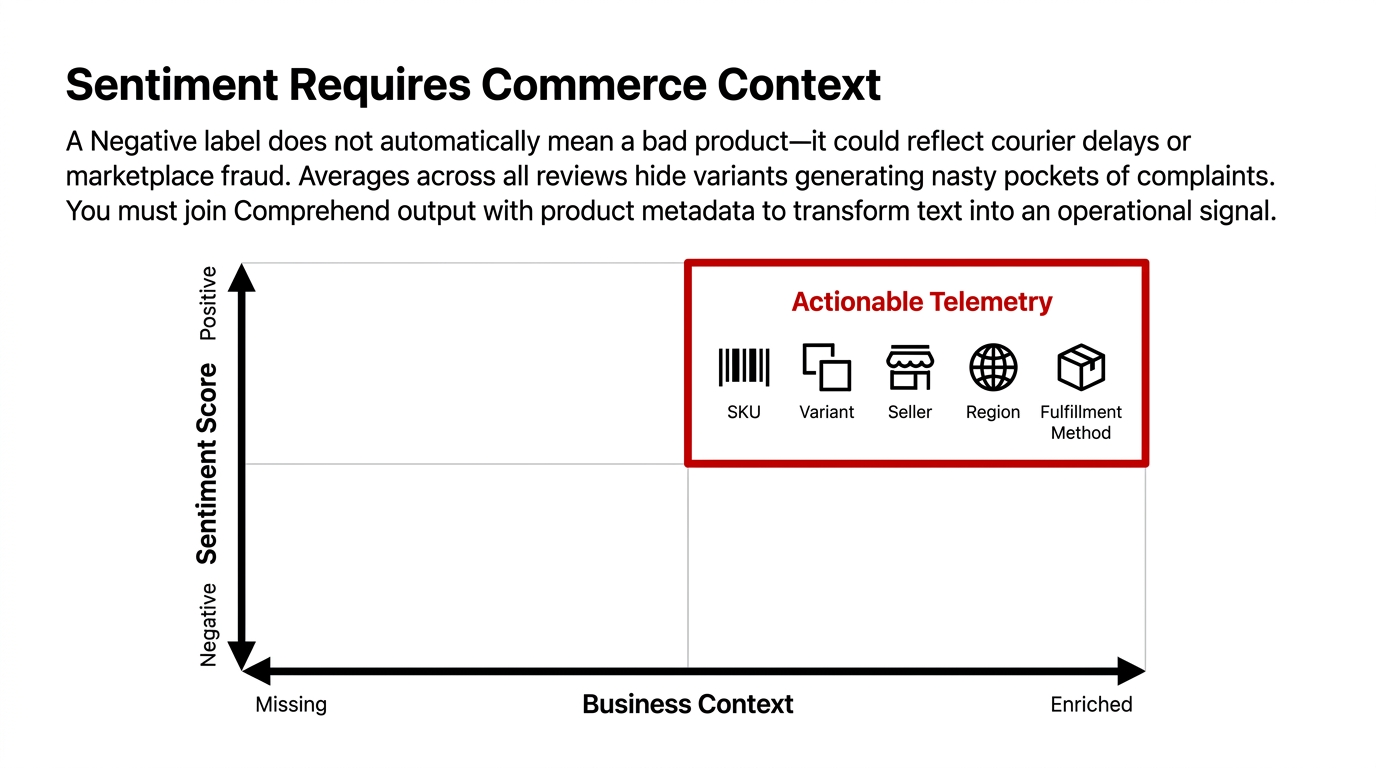
A Negative label does not automatically mean "bad product." It might reflect courier delays, wrong expectations created by ad copy, marketplace fraud, a return dispute, or even a customer who loved the item but hated the box. AWS's tutorial pairs sentiment with entity extraction, and that combination matters because sentiment without context tells you how the customer feels, while entities help tell you what they are talking about.
The Dashboard Trap
Teams average sentiment across every review, celebrate a comfortable positive percentage, and miss that one variant of one bestseller is generating a nasty pocket of Mixed and Negative comments.
Since Comprehend returns document-level sentiment and scores, you should join that output with product metadata such as SKU, variant, seller, region, campaign, and fulfillment method before trusting any trend line.
Another common mistake is overreacting to Neutral. AWS defines Neutral as text that does not express either positive or negative sentiment, and that bucket often includes short, factual reviews with low emotional intensity.
If you treat Neutral as hidden dissatisfaction, you will end up "fixing" products that are merely described in plain language by customers who do not write like influencers.
A Better E-Commerce Playbook
Here is the playbook we would actually trust for an online retail operation.
Collect: Gather review text from your storefront, app, and marketplaces into Amazon S3 or a central event stream. AWS already documents S3-based review analysis as a workable starting point.
Process: Run Comprehend sentiment analysis either in real time through DetectSentiment or in scheduled batches through BatchDetectSentiment or StartSentimentDetectionJob, depending on whether the business needs immediate action or weekly reporting.
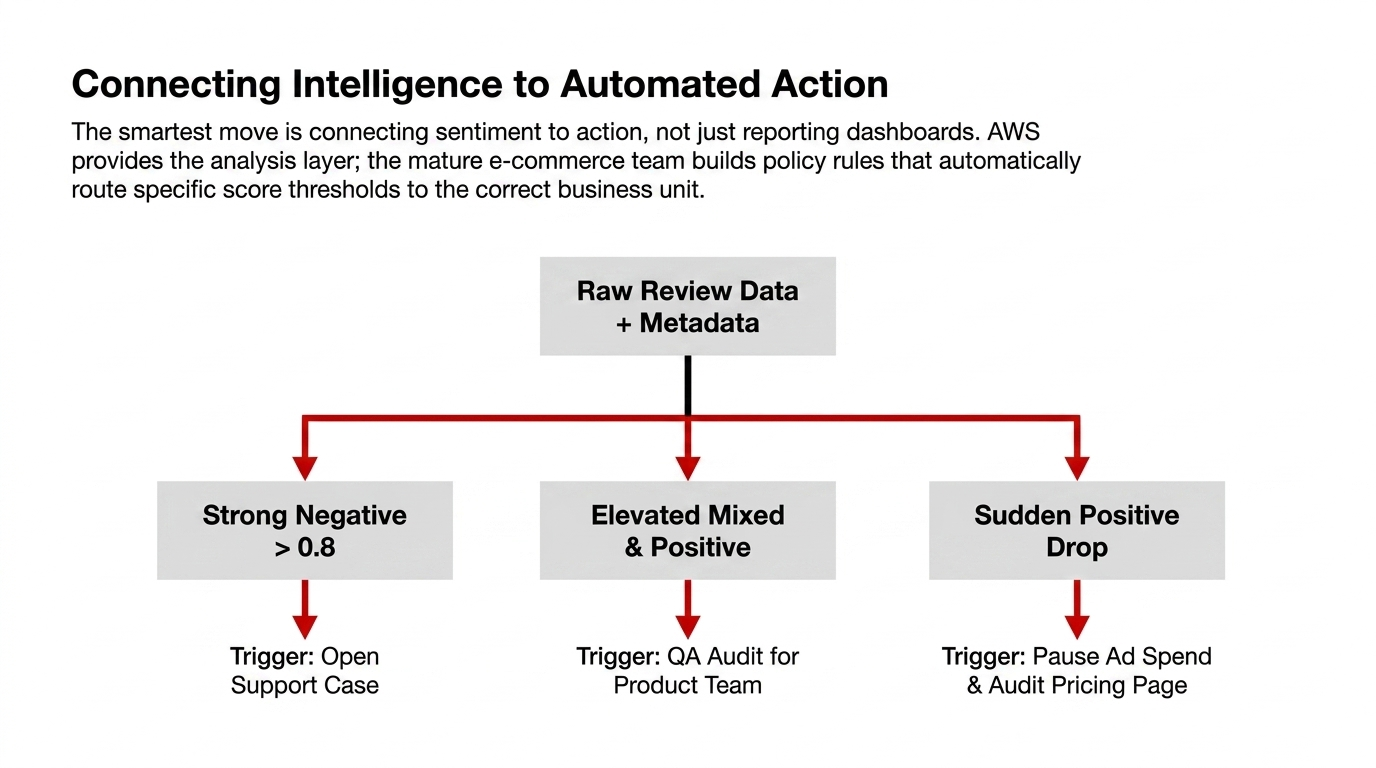
Store Scores: Keep the sentiment label and all four confidence scores, not just the winning label. AWS explicitly exposes SentimentScore, and those scores are useful for rules like "send to manual review if Negative exceeds 0.72" or "flag as ambiguous when Mixed and Positive are both elevated."
Enrich: Attach business fields such as product category, order date, return status, shipping provider, and country to every review. Sentiment without commerce context is just interesting text, not an operational signal.
Query: Use Athena to query trends and feed them into BI dashboards. AWS's tutorial already shows that pattern. At that point, you can answer the questions that actually move revenue and margin.
The smartest move is to connect sentiment to action, not just reporting. A strong Negative score can open a support case, a Mixed score can trigger quality review for a product team, and a sudden weekly drop can force a pricing-page or product-description audit before paid traffic burns more money. AWS provides the analysis layer; your job is to attach it to business decisions quickly.
Security and Governance Angle
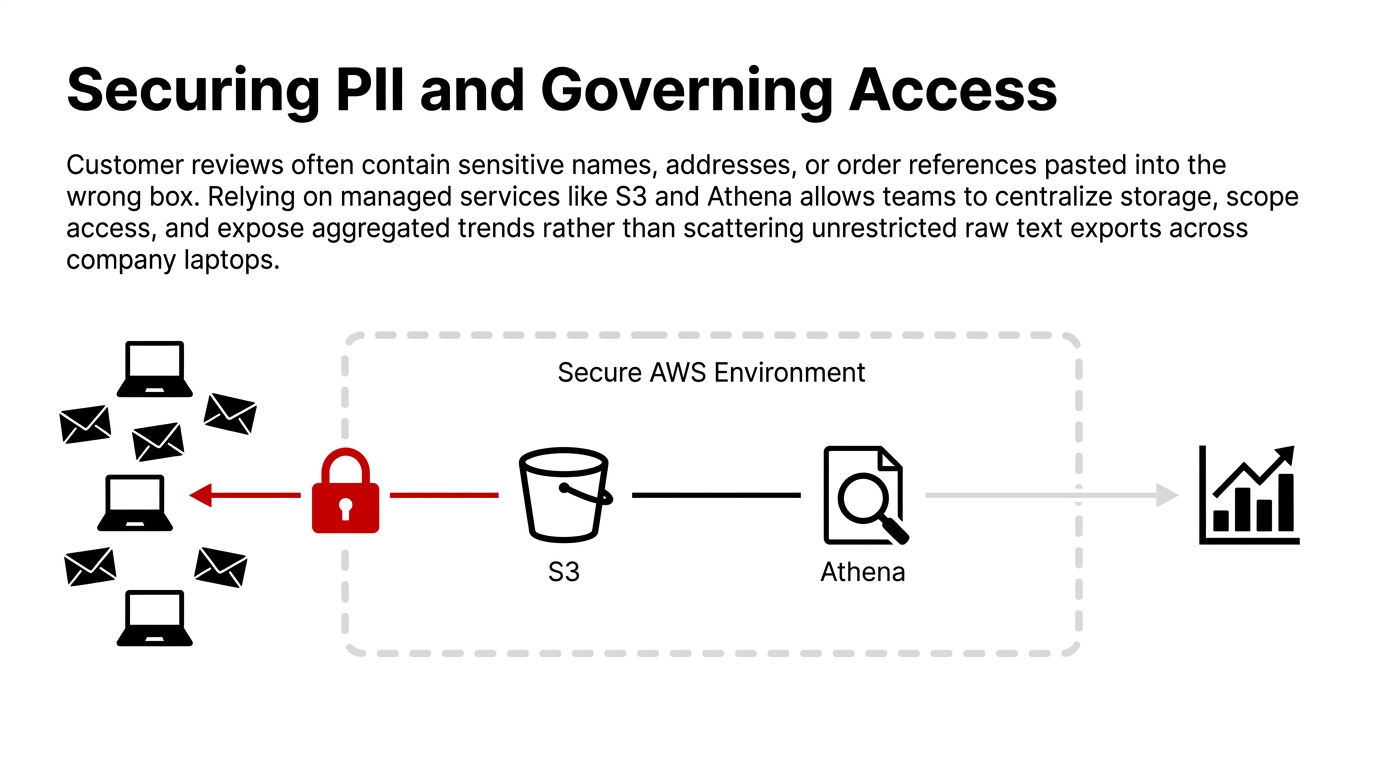
Because this sits in the AWS Security Deep Dives category, we should not pretend review analytics is only a marketing topic. Review text can contain customer names, addresses, order references, or other sensitive details pasted into the wrong box, so the data path matters as much as the sentiment result.
AWS's review tutorial is built around managed services like S3, Glue, Athena, and Comprehend, which gives teams a path to centralize storage and analysis instead of scattering review exports across laptops and inboxes. That does not mean you should dump raw review data everywhere. The safer pattern is controlled ingestion, access-limited storage, and a reporting layer that exposes trends rather than unrestricted raw text for everyone in the company.
The Boring Part Protects You
Look, the flashy part of sentiment analysis is the AI label. The boring part is the part that protects you: structured pipelines, language separation, scoped access, traceable outputs, and clear thresholds for automation. AWS gives you the core APIs and batch jobs for sentiment detection; the mature e-commerce team builds policy around them instead of throwing customer text into an untracked script.
Your Reviews Are Either Making You Money or Costing You Money. There Is No Neutral.
If you are running an e-commerce operation above $50K/month and your review analysis is still a support lead reading spreadsheets, you are likely losing $8,700–$22,000/month in unrealized operational insights. Book our free 15-Minute AWS Operations Audit — we will show you exactly where your current stack is leaking revenue on AWS. No pitch deck. Just data.
Frequently Asked Questions
Is Amazon Comprehend good for product reviews?
Yes. AWS specifically documents a customer review analysis workflow and supports sentiment detection for unstructured text, which fits product reviews, post-purchase comments, and marketplace feedback well.
What sentiment labels does Amazon Comprehend return?
Amazon Comprehend returns four labels: Positive, Negative, Neutral, and Mixed, along with confidence scores for each one. This allows you to measure how strongly a review leans in a specific direction before triggering workflows.
Can Amazon Comprehend process reviews in bulk?
Yes. AWS offers BatchDetectSentiment and StartSentimentDetectionJob for larger document sets, while DetectSentiment handles single-text requests. You can choose the processing mode based on whether you need immediate action or weekly reporting.
Does Amazon Comprehend support multiple languages for reviews?
It supports sentiment analysis for supported primary languages, but AWS says all documents in one job must be in the same language. If you operate across countries, you should separate review streams by language before batch processing.
How is Amazon Comprehend pricing measured?
AWS lists Comprehend sentiment analysis pricing by text units. One unit equals 100 characters with a three-unit minimum per request. This usage-based model allows early-stage teams to test sentiment workflows without funding an oversized ML platform.
Talk to a practice lead
Getting hit by surprise AWS bills?
Free AWS cost audit. Send your last 3 invoices and your Cost Explorer view; we return a written report with the top 3 cost leaks and projected savings in 48 hours.
Founder and CEO of Braincuber. Scopes Odoo, AI, and cloud projects for growing brands in India and abroad. Takes every founder call personally — no SDR layer between buyers and the people building the system.