
One misconfigured trail. One missed audit. $100,000/month in fines.
A $3.2M/year Shopify brand running on AWS. One misconfigured CloudTrail trail. One missed PCI DSS v4.0 audit. Suddenly they are staring at $100,000/month in potential fines starting March 2025. The fix took us 4 days. The damage to their audit score took 6 months to repair.
If your e-commerce store is processing payments on AWS and you do not have CloudTrail configured correctly, you are handing a compliance auditor a loaded gun pointed at your business.
Here is the full story of what breaks, why, and exactly how to fix it.
The Real Cost of Getting This Wrong
Most e-commerce teams treat CloudTrail as a "set it and forget it" checkbox. It is not.
CloudTrail, by default, only retains event data for 90 days. After that, it is gone. PCI DSS v4.0 — mandatory since March 2025 — requires a full 12-month log retention for any system touching cardholder data. If you are running Stripe or Braintree through an AWS-hosted checkout, every API call to your payment environment must be logged, retained, and provably untampered.
The Fine Structure You Need to Know
$5,000-$100,000/month
PCI DSS non-compliance fines, scaling with your transaction volume. Not a one-time hit — recurring monthly.
$4.88 Million
Average breach cost for mid-sized businesses per IBM's 2024 Cost of a Data Breach Report. That is the number if you get hit.
$35/month
Cost of a properly configured multi-region CloudTrail trail. The math is not close.
Frankly, most e-commerce founders do not even know their CloudTrail is misconfigured until a security audit or, worse, a breach surfaces it.
Why "Default CloudTrail" Is Actively Dangerous for E-Commerce
Here is something your AWS account rep will never tell you: the default CloudTrail setup protects AWS, not you.
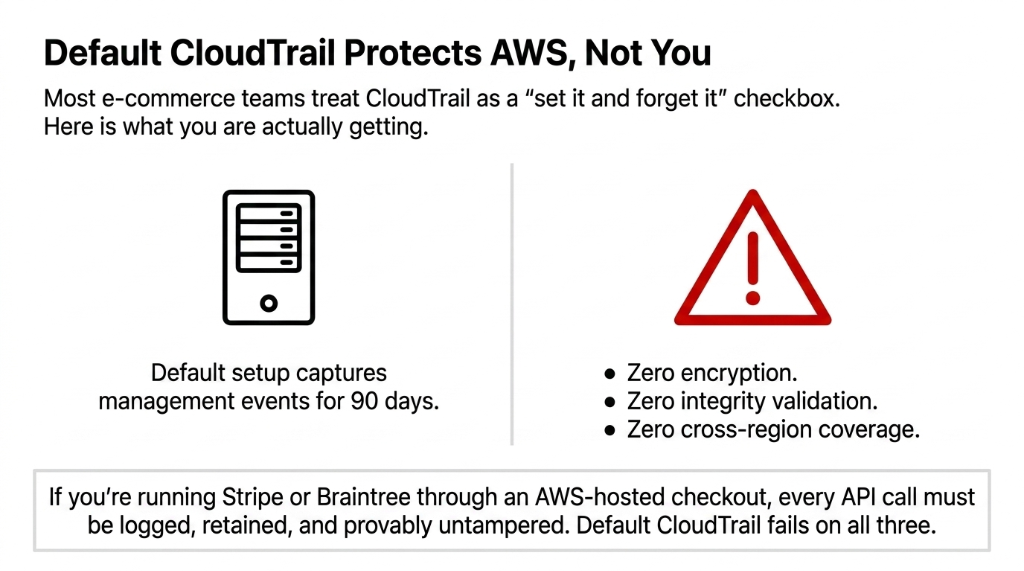
The free-tier default trail captures management events for 90 days and delivers them to a default S3 bucket with no encryption, no integrity validation, and no cross-region coverage. For a brand running a multi-region storefront — think us-east-1 for your main app and eu-central-1 for European customers — that default trail has zero visibility into what is happening in your EU region.
Real Incident: We had a client running a flash sale campaign across three AWS regions. A rogue IAM policy change happened in eu-central-1 during peak traffic. Their default single-region trail in us-east-1 captured nothing. They discovered it 11 days later during a manual review. By then, $27,400 in fraudulent orders had already been processed. A single multi-region trail — configured in under 45 minutes — would have caught that IAM change in real time via CloudWatch.
The 7 Non-Negotiable CloudTrail Configurations for E-Commerce
Stop reading blog posts that tell you to "monitor your logs regularly." Here is what you actually need to configure, in order of priority:
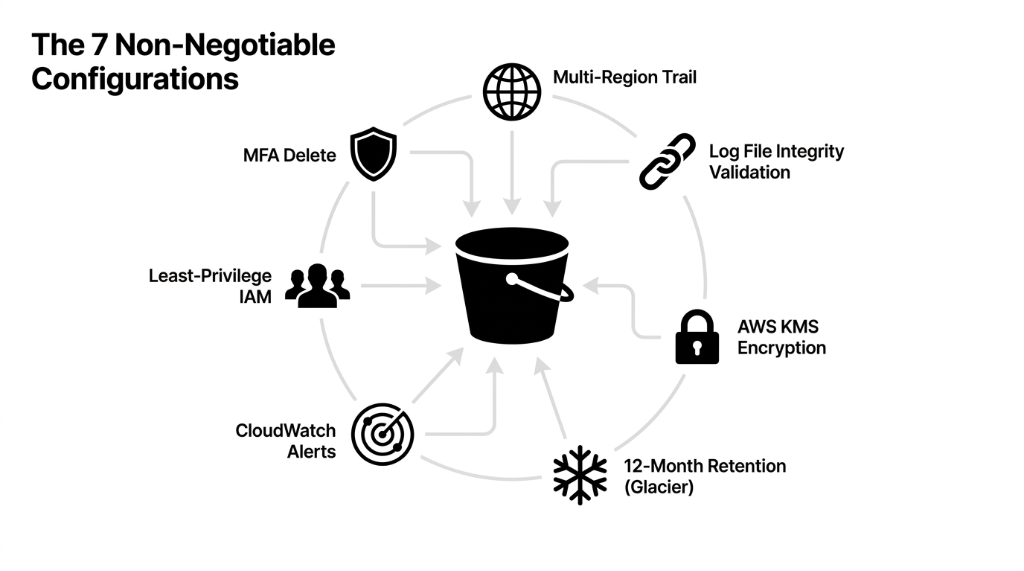
1. Enable a Multi-Region Trail — Not Multiple Single-Region Trails
One multi-region trail logging to a single S3 bucket is not just simpler — it is cheaper. Running three separate single-region trails (us-east-1, us-west-2, eu-central-1) at 10 million events each costs $105/month. One consolidated multi-region trail for the same coverage costs $35/month. That is 66.67% savings with better coverage.
2. Enable Log File Integrity Validation — Today, Not Tomorrow
CloudTrail uses SHA-256 hashing and RSA signatures to create hourly digest files that chain together cryptographically. If anyone — including your own team — deletes or modifies a log file, the chain breaks and you will know exactly when. Without this, a log file becomes inadmissible in a legal dispute. We watched one e-commerce brand lose an insurance claim on a $185,000 data breach because their logs had no integrity validation.
3. Encrypt Logs with AWS KMS — Not the Default S3 Encryption
Default S3 server-side encryption (SSE-S3) is not sufficient for PCI DSS or HIPAA. You need AWS KMS encryption (SSE-KMS) on your CloudTrail S3 bucket. Even if someone gets access to your S3 bucket, they cannot read the logs without the KMS key. Rotate that key every 90 days and restrict access via IAM to a maximum of 3 named roles.
4. Set Log Retention to 12 Months — Not 90 Days
Create an explicit S3 lifecycle policy pushing logs older than 90 days to S3 Glacier. Glacier storage costs approximately $0.004/GB per month, so retaining 500GB of annual logs costs you about $24/year — not thousands. There is zero reason to delete logs before 12 months if you are in e-commerce.
5. Integrate CloudTrail with CloudWatch for Real-Time Alerts
CloudTrail delivers events within 5 minutes of an API call. That near-real-time data is useless if no one is watching. Configure CloudWatch metric filters and alarms for at minimum: root account login, MFA being disabled, CloudTrail itself being stopped, security group changes, and IAM policy modifications. (Yes, we know setting up 17 CloudWatch alarms sounds like a Thursday afternoon you do not have. But a single alert on root account usage has saved clients from account takeovers that would have cost $50K+ in incident response.)
6. Enable MFA Delete on Your CloudTrail S3 Bucket
Any attacker who compromises an admin IAM role can delete your CloudTrail logs before you notice the breach — eliminating all evidence. MFA Delete on the S3 bucket means deleting logs requires a physical MFA device, not just credentials. This is a 10-minute configuration that closes one of the most commonly exploited attack vectors in AWS e-commerce environments.
7. Apply Least-Privilege IAM Policies to Log Access
Your CloudTrail S3 bucket should be accessible to exactly three types of principals: the CloudTrail service itself (write), your security/compliance team (read), and your SIEM tool if you use one (read). Nobody else. Not your DevOps engineers. Not your data analysts. Not the AWS root account used for billing. We constantly see clients give developers s3:* permissions on buckets "because it was easier during setup." That is not easier — that is how you fail a SOC 2 audit.
The E-Commerce Compliance Map: CloudTrail by Standard
Most e-commerce brands in the US touch at least PCI DSS and GDPR (if they sell to EU customers). That means CloudTrail is not optional — it is a legal requirement.
| Compliance Standard | CloudTrail Requirement | Minimum Retention |
|---|---|---|
| PCI DSS v4.0 | Log all changes to cardholder data systems; 12-month retention | 12 months |
| GDPR | Track access to personal data; demonstrate lawful processing | Varies by data type |
| SOC 2 Type II | Continuous monitoring; immutable audit trail | 12 months |
| HIPAA | Track access to PHI across all AWS services | 6 years |
What a Real E-Commerce CloudTrail Attack Looks Like
Let us make this concrete, because "monitor API calls" sounds abstract until it hits your P&L.
Black Friday, 11:47 PM. Your site is processing $43,000/hour.
A threat actor who compromised a contractor's AWS credentials — through a phishing email 3 weeks earlier — has been quietly enumerating your S3 buckets where you store customer PII.
Without CloudTrail S3 data events enabled: You see nothing. The breach continues for 23 days.
With data events logging enabled: CloudWatch fires an alert within 5 minutes of the enumeration attempt. Your on-call engineer gets a PagerDuty notification, revokes the compromised key, and the attack is contained in 23 minutes instead of 23 days.
The difference: $0 in breach costs vs. $4.88 million average breach cost.
Data Event Pricing Reality Check
Data events in CloudTrail are not free — they cost $0.10 per 100,000 events. For a high-traffic e-commerce store, budget $80-$150/month for data event logging on critical buckets.
That is not a cost. That is insurance. A typical brand processing 5 million S3 data events/month pays roughly $5/month in data event charges plus $24/year in Glacier storage — well under $100/month total for full compliance coverage.
The One Thing Most AWS Guides Get Wrong
Every generic AWS blog tells you to "use AWS Organizations for centralized logging." That is correct but incomplete.
Here is what they do not tell you: Organization-level CloudTrail trails do not automatically include new AWS accounts added to your Organization. If your developer spins up a new AWS account for a microservice — which happens constantly at fast-moving e-commerce brands — that account has zero CloudTrail coverage until you explicitly add it to the org trail.
Real Incident: A $7M ARR DTC brand had a new accounts payable microservice running in an untracked AWS account for 61 days before anyone noticed. No logs. No audit trail. Complete compliance gap. Fix: Set up an AWS Config rule or Lambda function that auto-enrolls new accounts into your organization trail within 15 minutes of creation.
Braincuber's 11-Point CloudTrail Audit Checklist
When we onboard a new e-commerce client on AWS, here is the 11-point CloudTrail audit we run in the first 48 hours:
The 48-Hour Audit Checklist
✓ Multi-region trail active and writing to a centralized S3 bucket
✓ Log file integrity validation enabled
✓ SSE-KMS encryption with a dedicated KMS key
✓ S3 lifecycle policy: 90 days standard, then Glacier, delete at 13 months
✓ CloudWatch Logs integration with metric filters on root login, MFA disable, trail deletion
✓ MFA Delete enabled on the CloudTrail S3 bucket
✓ Bucket policy blocks all public access and enforces HTTPS
✓ Data event logging enabled on S3 buckets containing PII, payment data, or order history
✓ IAM roles with CloudTrail access limited to 3 named principals max
✓ AWS Security Hub PCI DSS v4.0 standard enabled and showing green on CloudTrail controls
✓ Org-level trail auto-enrollment Lambda deployed and tested
The Verdict
If your current setup fails more than 3 of these checks, you are not compliant and you are not secure. Period. The 11-point audit takes 4-6 hours to implement correctly. Most teams do not have that bandwidth — and they also do not want to discover the gaps during a PCI audit or a breach investigation.
Your e-commerce store is generating thousands of API calls every hour — IAM role assumptions, S3 reads, DynamoDB queries, Lambda invocations. Without a properly configured CloudTrail, you have no idea who did what, when, or whether your customer data was accessed without authorization.
Do not let a $35/month multi-region trail be the thing standing between your brand and a $100,000 compliance fine. Talk to our AWS team.
Frequently Asked Questions
Does AWS CloudTrail log everything by default?
No. By default, CloudTrail logs management events for only 90 days with no long-term storage. Data events — like S3 object reads that expose customer PII — are off by default and cost $0.10 per 100,000 events to enable. For e-commerce compliance, you need both management and data events configured explicitly.
How much does CloudTrail cost for a mid-size e-commerce brand?
The first copy of management events per region is free. Data events cost $0.10 per 100,000 events. A typical e-commerce brand processing 5 million S3 data events per month on customer-facing buckets pays roughly $5/month in data event charges plus $24/year in Glacier storage — well under $100/month total for full compliance coverage.
Is CloudTrail enough for PCI DSS v4.0 compliance?
CloudTrail covers PCI DSS Requirement 10 (Logging and Monitoring), but you also need CloudWatch for real-time alerting, AWS Security Hub for automated compliance scoring, and a documented incident response process. CloudTrail alone gets you roughly 60% of Requirement 10 — the rest requires integration with other AWS services.
What is log file integrity validation and do I really need it?
Yes. Integrity validation uses SHA-256 and RSA to create hourly cryptographic digest files linking every log. If a log is deleted or modified — by an attacker or accidentally — the digest chain breaks and you have provable evidence of tampering. Without it, your logs are inadmissible in a legal or insurance dispute.
Can CloudTrail detect a breach in real time?
CloudTrail delivers events within 5 minutes of an API call, but it only detects in real time when integrated with CloudWatch alarms or a SIEM like Datadog or Splunk. CloudTrail alone is a record-keeper. CloudTrail plus CloudWatch is a detection system. You need both.
Your Audit Trail Is Either Complete or It Is Evidence Against You
If your CloudTrail is still running the default 90-day config with no encryption and no integrity validation, every API call in your stack is unverifiable. We will run the full 11-point audit on the first call — and show you exactly what is exposed.
Free audit. CloudTrail config reviewed. Compliance gaps flagged on the first call.