
If your AP team is still manually keying vendor data into SAP or QuickBooks, you are paying $20.11 per invoice when the industry’s automated rate sits at $2.36. At 1,000 invoices a month, that’s a $17,750 gap bleeding out of your finance department every 30 days. And nobody’s talking about it.
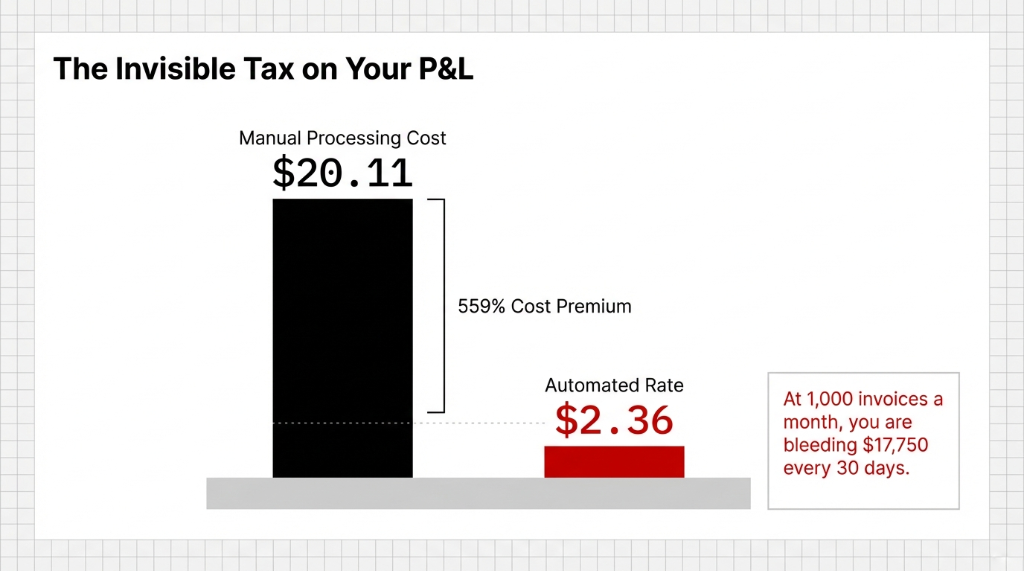
We built a Finance AI Agent specifically to stop that leak — and in this post, we’re walking you through exactly how it works, frame by frame.
Your AP Team Is Doing $8/Hour Work With $80/Hour People
A 2025 PayStream Advisors report confirmed that 68% of US companies still manually enter invoice data, with cycle times stretching toward 14 days per invoice. That means your AP specialist — the one you’re paying $55,000 a year — spends the bulk of their workweek doing this: opening a PDF email, reading the vendor name, typing it into SAP, scrolling to find the PO number, cross-referencing a spreadsheet, routing a PDF for approval, waiting three days for a manager to click "approve," then re-entering payment terms into your ERP.
That’s not accounting. That’s data entry.
And the error rate on that manual workflow runs between 5% and 10% per invoice batch. When your AP clerk miskeys a vendor code — typing "VND-00l2" instead of "VND-0012" because the lowercase "L" looks like a "1" — that invoice sits in exception status for 4.1 to 16.3 days.
In that window, you miss early payment discounts that vendors offer for paying within 10 days. Those discounts typically run 1–2% of invoice value. On a $500,000 monthly AP volume, that’s $5,000 to $10,000 in discounts you forfeit every single month because your data entry couldn’t move fast enough.
Why RPA Alone Doesn’t Solve This
Everyone in 2021 bought into UiPath RPA or SAP Automation bots and thought they’d fixed the problem. They didn’t.
RPA is deterministic. Invoices are not. A UiPath robot trained on one vendor’s PDF template breaks the moment that vendor changes their invoice layout, updates their logo, or starts sending invoices via a portal instead of email. We’ve seen clients spend $47,000 setting up a UiPath Document Understanding workflow only to watch it fail on 23% of their invoices because three vendors switched to Ariba or Coupa.
An AI Finance Agent doesn’t follow rules. It understands context. It reads an invoice the way a human would — regardless of font, format, orientation, or layout — and extracts the correct fields with 94%+ accuracy on structured data and 99%+ accuracy on header fields.
What the Finance Agent Actually Does: Frame-by-Frame
The 6-Step Processing Pipeline
Step 1 — Invoice Ingestion (0–3 seconds)
Monitors a dedicated email inbox and SFTP folder simultaneously. The moment an invoice arrives — PDF, scanned image, or digital format — the agent pulls it into the processing queue. No human touches it.
Step 2 — Intelligent Document Processing (3–8 seconds)
Using OCR, LLM reasoning, and contextual extraction: vendor name, invoice number, date, line items, quantity, unit price, tax, currency, payment terms, and total due. 94% overall accuracy, 91% on complex multi-row invoices.
Step 3 — 3-Way PO Matching (8–20 seconds)
Queries your ERP (SAP, Oracle, or Odoo), pulls matching PO and goods receipt, runs 3-way match: invoice amount vs. PO amount vs. GR quantity. If all three align within tolerance (±2%), auto-approved and queued for payment.
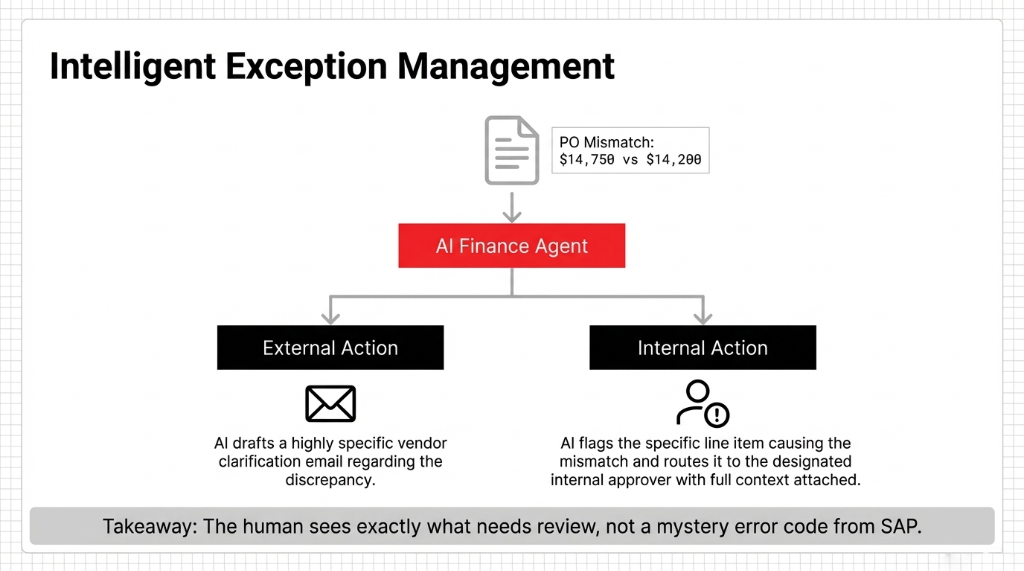
Step 4 — Exception Handling (20–45 seconds)
If mismatch detected — e.g., vendor billed $14,750 but PO says $14,200 — the agent drafts a vendor clarification email, flags the specific line item, and routes to the correct approver with full context.
Step 5 — ERP Posting (45 seconds)
Posts directly to SAP MIRO, Odoo, or your AP platform. Vendor code, GL account, cost center, payment terms, due date — all entered without a human touching a keyboard.
Step 6 — Audit Trail & Confirmation
Timestamps every action, logs the decision path (why it approved, why it flagged, what it matched), sends confirmation email with summary. Full audit trail your external auditors will love. (Yes, your CFO will love this too.)
The Numbers You Should Hold Us To
| Metric | Manual Process | AI Finance Agent |
|---|---|---|
| Cost per invoice | $20.11 | $2.36–$3.05 |
| Processing time | 10–30 minutes | 30–45 seconds |
| Error rate | 5–10% | Under 0.5% |
| Cycle time | 4.1–16.3 days | Same day |
| No-touch processing rate | ~10% | Up to 85% |
At 1,200 Invoices/Month
$24,132
Manual cost/month
$2,832
AI-automated cost/month
$255,600
Annual savings to P&L
One real-world implementation showed a team spending 600 hours annually on 1,200 invoices — hand-processing each one. After AI deployment, that same volume was handled in under 40 hours a year, freeing 560 hours for cash flow forecasting and vendor negotiation.
Agentic AI deployments in accounts payable are now delivering an average 80% ROI — outperforming general AI projects (which average 67% ROI) specifically because AP is rules-based, high-volume, and measurable.
Why This Works Inside SAP, Odoo, and ERP Systems You Already Own
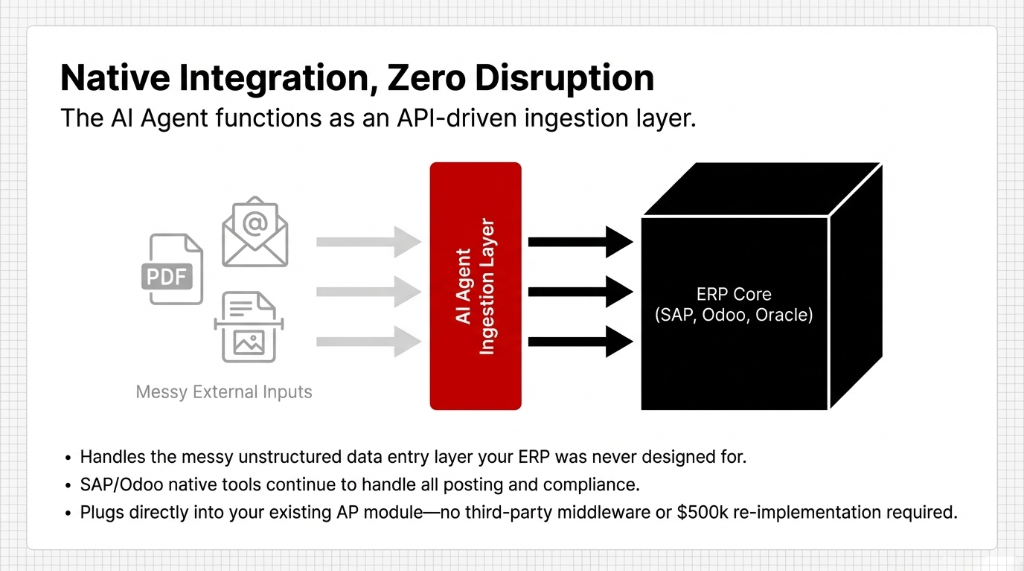
You don’t need to rip and replace your ERP to get this.
Our AI Finance Agent integrates via API into SAP, Odoo, Oracle, and NetSuite. It doesn’t replace your ERP — it plugs into the AP module and handles the data entry layer that your system was never designed to automate by itself. SAP’s native AP tools handle posting and compliance. The AI agent handles ingestion, extraction, matching, and exception management.
(This is the integration stack that saves clients from the $500,000 NetSuite re-implementation nightmare. Don’t go that route.)
For Odoo users specifically, we’ve built this directly into Odoo’s accounting module with embedded AI that handles invoice data capture and approval routing natively — no third-party middleware required.
What the Rollout Actually Looks Like
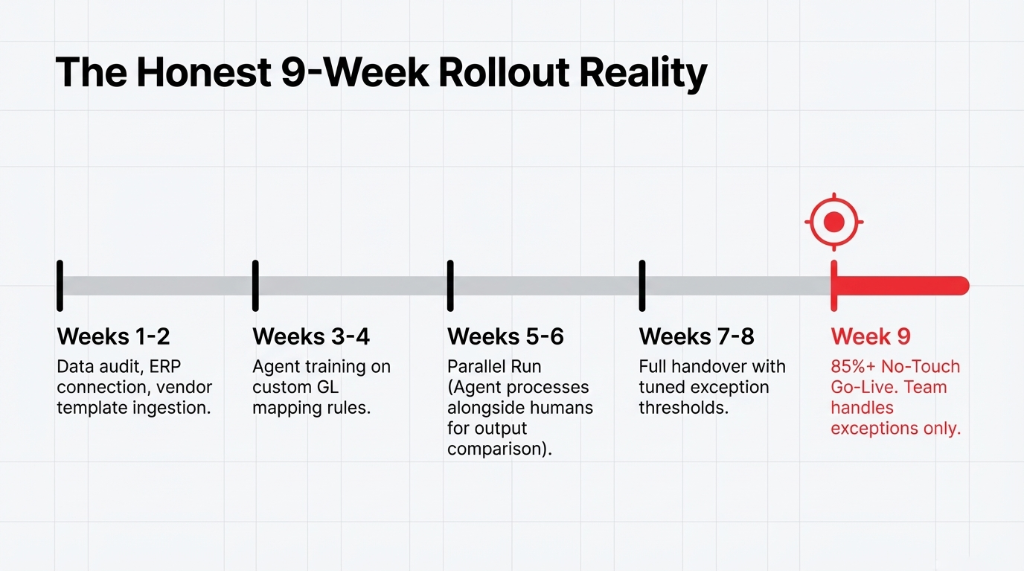
We won’t tell you "implementation takes a few weeks." That’s a lie. Here’s the honest timeline for a mid-size US business processing 500–2,000 invoices per month:
The Honest 9-Week Timeline
Data audit, ERP connection setup, vendor template ingestion
Agent training on your invoice formats and GL mapping rules
Parallel run — agent processes invoices alongside your manual team so you can compare outputs
Full handover with exception thresholds tuned to your approval workflow
Go-live. Team handles exceptions only. 85%+ runs without human touch.
Frequently Asked Questions
Does the AI Finance Agent work with formats other than PDFs?
Yes. It handles PDFs, scanned images (including low-resolution scans), digital HTML invoices, email body invoices, and EDI formats. Scanned paper hits ~91% extraction accuracy; digital PDFs reach 94–99%. Anything below confidence threshold gets flagged for human review automatically.
How is this different from UiPath RPA for invoice processing?
RPA bots follow pre-built rules and break when invoice templates change. Our AI Finance Agent uses LLM reasoning to understand invoice content contextually — adapting to new vendors and format changes without re-programming. Think RPA as a rigid script; the AI Agent as a trained AP analyst.
What happens when the AI gets it wrong?
The agent flags any extraction below a set confidence threshold (typically 85%). Those invoices route to your AP team with extracted fields highlighted and the specific uncertainty flagged. Your team reviews 8–15% of invoices instead of 100%, and every human review improves accuracy going forward.
Can the AI Finance Agent handle multi-currency invoices?
Yes. It identifies currency codes, applies your exchange rate policy, and flags invoices where invoice currency doesn’t match PO currency. For US companies with offshore suppliers in EUR, GBP, or INR, this catches FX mismatches that cost AP teams $8,000 to $22,000 per year in reconciliation labor.
What’s the ROI timeline — when do we break even?
Companies processing 500+ invoices/month break even within 6–9 months. At 1,000+ invoices/month, positive ROI in as little as 3–4 months. Savings compound because early payment discount capture accelerates as cycle time drops from 14 days to same-day.