
The grace period is over. You are being fined right now.
If your e-commerce store is processing card payments on AWS and you haven't audited your stack against PCI DSS v4.0 since March 2025, you are sitting on a live fine. Not a risk. A fine. Every "best practice" requirement that your QSA previously marked as "Not Applicable" is now fully mandatory. Penalties start at $5,000-$10,000/month for the first 90 days, scaling to $50,000-$100,000/month by month seven.
A breach while non-compliant? One-time penalty of $500,000 to $5,000,000 — plus full fraud liability on every compromised card. Target's 2013 breach (largely tied to PCI gaps) cost $292 million total.
We work with e-commerce brands on AWS every week. What we keep seeing is not deliberate ignorance — it is founders and CTOs who think they are covered because AWS is a PCI Level 1 Service Provider. That assumption has already cost more than one company tens of thousands of dollars in emergency remediation.
The Trap Everyone Falls Into: AWS Shared Responsibility
AWS being a PCI DSS Level 1 Service Provider does not mean your application is PCI compliant. It means AWS has secured the physical data centers, the hypervisor layer, and the hardware infrastructure. That is AWS's half.
Your Half of the Responsibility
Your EC2 operating systems, your IAM policies, your S3 bucket permissions, your application code, your encryption configuration, your access logs, and your network topology.
We have seen clients leave an S3 bucket public for 11 months — storing order receipts with truncated PANs — because they assumed the AWS PCI attestation covered it.
It does not. The moment you misconfigure a security group and expose your payment processing layer to the public internet, you own that audit finding entirely.
What Actually Changed in v4.0 (The Parts Your Team Is Missing)
PCI DSS v4.0 introduced 47 new requirements on top of the existing 12-requirement framework. Here are the five that e-commerce teams on AWS get wrong most often.
Req 6.4.2 — WAF on Every Payment Page. You now need a Web Application Firewall detecting and blocking web-based attacks on your checkout flow. Not optional. Not "best practice." Mandatory. On AWS, this maps directly to AWS WAF in front of your ALB or CloudFront distribution serving the checkout page.
Req 6.4.3 — Payment Page Script Authorization. Every JavaScript running on your payment page must be inventoried, authorized, and integrity-verified. Direct response to Magecart-style skimming attacks that stole card data from 380+ e-commerce sites in a single 2019 campaign. Running Google Tag Manager with 14 third-party scripts and no Content Security Policy? You fail this requirement on day one.
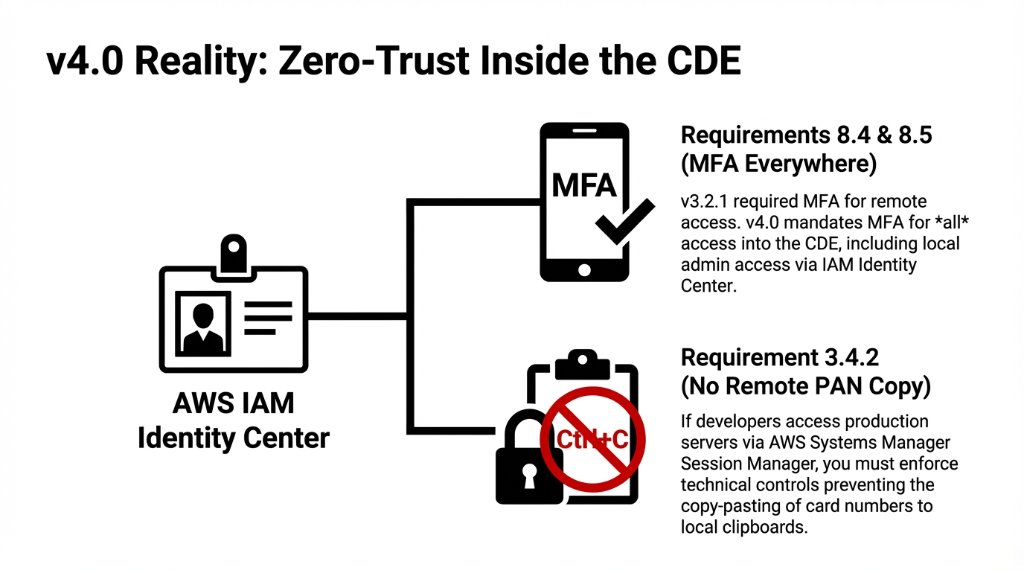
Req 8.4 & 8.5 — MFA Everywhere in the CDE. v3.2.1 only required MFA for remote access. v4.0 requires MFA for all access into the Cardholder Data Environment — local admin access included. AWS IAM with hardware MFA tokens or virtual authenticators via AWS IAM Identity Center covers this, but only if you have correctly scoped your CDE boundary first.
Req 3.4.2 — No PAN Copy via Remote Access. If your developers use AWS Systems Manager Session Manager to access production servers that touch PAN data, you now need technical controls preventing copy-paste of card numbers to local clipboards. Most teams have zero controls here.
Req 10.7.3 — Respond to Critical Control Failures Promptly. Now mandatory for all entities. If your AWS CloudTrail goes silent for 6 hours because someone accidentally disabled it, you need a documented, tested response process — not a Slack message saying "hey, our logs stopped."
The Full PCI-DSS v4.0 Checklist on AWS
This maps all 12 PCI DSS requirements to the specific AWS services that fulfill them. If you can't map a requirement to an active, configured service — you have a gap.
Req 1 — Network Security Controls (Firewalls)
Req 2 — Secure Configurations
Req 3 — Protect Stored Account Data
Req 4 — Protect Cardholder Data in Transit
Req 5 — Protect Against Malicious Software
Req 6 — Develop and Maintain Secure Systems
Req 7 & 8 — Access Control & Authentication
*:* wildcard policies on any CDE accountReq 9 — Physical Access
Req 10 — Logging and Monitoring
Req 11 — Test Security Systems Regularly
Req 12 — Security Policies & Procedures
The 5 Scoping Mistakes That Blow Up Your Audit
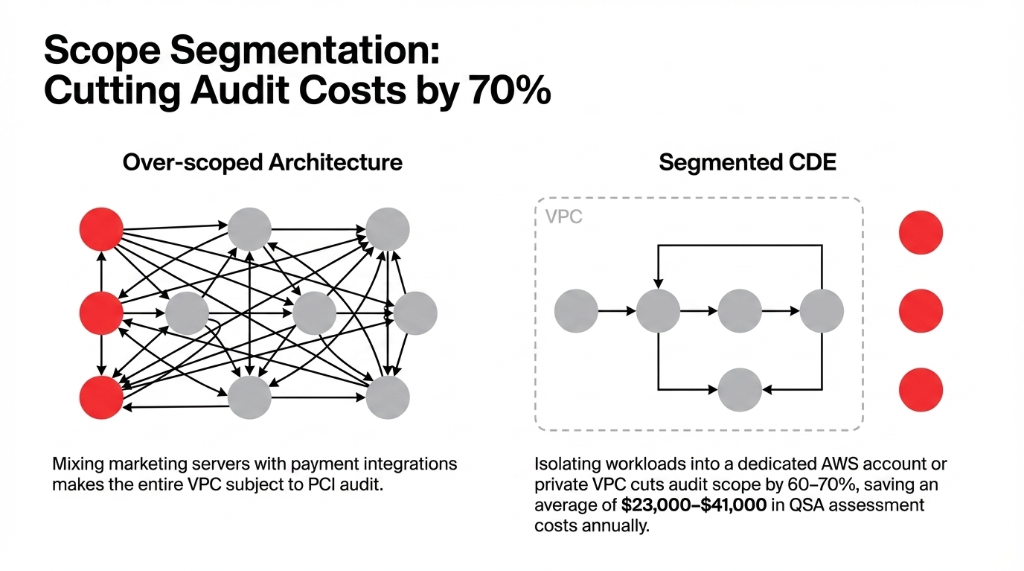
Mistake 1: Over-Scoping Kills Your Audit Budget
The problem: If your marketing EC2 instance sits in the same VPC as your payment processor integration, congratulations — your marketing server is now in scope for PCI.
We segment the CDE into its own VPC (or dedicated AWS account) from day one
Cuts audit scope by 60-70%. Saves $23,000-$41,000 in QSA costs annually.
Mistake 2: Ignoring the Payment Page Even With Stripe
Using Stripe.js or Braintree's hosted fields reduces your scope but does not eliminate Requirement 6.4.3. Every script tag on that checkout page is still your responsibility.
We have seen teams with 23 active third-party scripts on checkout pages — pixels, heatmaps, A/B testing tools — none of them inventoried.
Mistake 3: Multi-Account AWS Organizations With No SCPs
Developers with admin access in your dev account can often escalate privileges into production if your AWS Organization has no guardrails.
One misconfigured IAM trust policy and your entire CDE is one assume-role call away from a developer's laptop.
Mistake 4: Treating AWS Config as "Nice to Have"
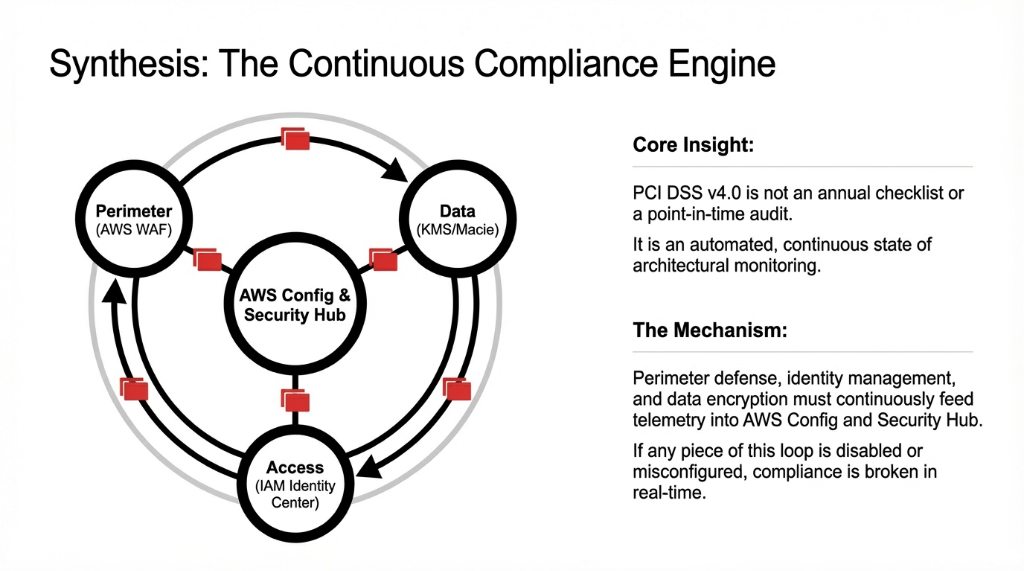
AWS Config is not optional for PCI. It is your continuous compliance audit trail. Without it, your QSA will ask how you detect configuration drift.
"We check manually" is not an acceptable answer at any merchant level.
Mistake 5: Forgetting Lambda and Containers Are in Scope
If your Lambda function processes a webhook from your payment gateway, that Lambda is in your CDE. Its execution role, its environment variables, and its VPC placement are all audit findings waiting to happen.
Secrets get hard-coded in Lambda environment variables 73% of the time, in our experience.
The 12-Week Implementation Sequence That Works
Most teams try to implement all 12 requirements simultaneously and end up with a half-finished compliance project 8 months later. Here is the sequence that works.
| Timeline | What Happens | AWS Services Activated |
|---|---|---|
| Week 1-2 | Scope and Segment. Define CDE boundary. Move CDE workloads to isolated VPC/dedicated account. | CloudTrail, Config, Security Hub, GuardDuty |
| Week 3-4 | Identity and Access Hardening. Enforce MFA via IAM Identity Center. Rotate creds. Kill every *:* policy. |
IAM Identity Center, Secrets Manager, SCPs |
| Week 5-6 | Data Protection Layer. Scan S3 for PAN data. Enable KMS encryption on RDS, DynamoDB, EBS. Confirm tokenization. | Macie, KMS, Certificate Manager |
| Week 7-8 | Payment Page Hardening. Deploy WAF with managed rules. Implement CSP headers. Inventory every checkout JS. | AWS WAF, CloudFront, ALB |
| Week 9-10 | Monitoring and Alerting. Build CloudWatch dashboards. Route Security Hub findings to ticketing within 15 minutes. | CloudWatch, Security Hub, EventBridge |
| Week 11-12 | QSA Readiness. Run Security Hub PCI standard. Resolve critical findings. Commission external scan. Prepare documentation. | Security Hub PCI Standard, Inspector |
Reality check: A well-staffed team on AWS can achieve a fully documented, audit-ready CDE in 11-13 weeks on a first implementation. Teams that skip the scoping step in Week 1 typically spend 37 additional hours untangling the mess before their QSA assessment.
Why "We Use a Hosted Payment Page" Is Not a Strategy
This is the most dangerous misconception we encounter. Using Stripe's hosted checkout or PayPal's redirect drops you to SAQ A — the lightest compliance tier covering 22 requirements. But it does not mean you ignore the other requirements for your AWS environment.
Insider Warning
If your order management system, customer data, or any part of the post-payment workflow runs on AWS and touches cardholder names, emails connected to transactions, or order identifiers linked to payment records — you still have a scope. Your QSA will find it. Your acquirer will find it. And if a breach finds it first, the "but we use Stripe" defense costs you exactly $0 in protection.
Frequently Asked Questions
Is AWS automatically PCI DSS compliant for my e-commerce store?
No. AWS holds a PCI DSS Level 1 Service Provider certification covering the physical infrastructure and managed services layer. Your application configurations, IAM policies, network architecture, and data handling practices are your responsibility under the shared responsibility model.
Which AWS services are in scope for PCI DSS v4.0?
Over 100 AWS services are in scope, including EC2, RDS, S3, Lambda, API Gateway, CloudFront, AWS WAF, GuardDuty, Security Hub, KMS, Secrets Manager, CloudTrail, VPC, and IAM. Any service storing, processing, or transmitting cardholder data — or impacting the security of systems that do — falls within your CDE audit boundary.
What is the biggest new v4.0 requirement for e-commerce on AWS?
Requirements 6.4.2 and 6.4.3. Requirement 6.4.2 mandates a WAF on all payment pages, and 6.4.3 requires every script executing on your payment page to be inventoried and integrity-verified. These two alone require AWS WAF deployment plus a full audit of every third-party JavaScript tag on your checkout flow.
How long does PCI DSS v4.0 compliance take on AWS from scratch?
For a mid-size e-commerce business with a properly scoped CDE, expect 11-13 weeks to reach QSA-ready status with a structured implementation sequence. The most common delay is scope definition — teams that skip proper CDE segmentation spend an extra 4-6 weeks reworking their AWS architecture.
What happens if we have a breach while non-compliant?
Beyond recurring monthly fines ($5,000-$100,000/month), a breach while non-compliant triggers a one-time fine from card brands of $500,000 to $5,000,000. You also assume full fraud liability, face mandatory forensic investigation costs ($50,000-$200,000), and risk having your card processing ability terminated by your acquiring bank.
Stop Running a Compliant-Looking Stack That Isn't
PCI DSS v4.0 on AWS is not a one-time project. It is a continuous state. If CloudTrail, Config, Security Hub, or GuardDuty are disabled, misconfigured, or unmonitored — you are non-compliant right now, regardless of what last year's SAQ says. We will identify your three most critical gaps in 15 minutes.
Free 15-minute audit • No sales pitch • Just findings