
Quick Answer
Use odoo studio for simple field additions and basic automations on forms — data capture only. Custom modules are non-negotiable for multi-step approval logic, external API integrations, complex order management rules, and any configure price quote software workflow. AI add-ons (OCR, lead scoring, demand forecasting) require clean custom data models to function accurately. Building AI on top of messy Studio configurations produces actively misleading results. The decision is not budget — it is complexity level.
We just wrapped an odoo implementation audit for a mid-size manufacturing industry client in Ohio. They had spent $22,400 in Odoo Studio customizations over 18 months — custom fields, automation rules, report layouts, modified menus.
Then they upgraded from Odoo 16 to Odoo 17. Forty-three percent of their Studio changes broke. Three months of firefighting. $14,700 in unplanned developer rework. All because they used the wrong tool for the wrong job.
This is not a horror story. This is Tuesday in our inbox at Braincuber Technologies. Erp implementation done wrong is the most expensive recurring line item in any business management software budget.
The Wrong Tool Is Already Costing You
Here is the ugly truth about the odoo erp ecosystem that no vendor in your sales cycle will volunteer: Odoo Studio is built for convenience, not complexity.
The moment you try to embed multi-step approval logic, connect to an external API, handle dynamic configure price quote software workflows, or build real order management rules through Studio — you are building on a database that has no version control, no Git history, and no clean rollback. It erp system architecture demands version-controlled code. Erp its own worst enemy when Studio handles logic it was never designed for.
We see this pattern constantly. A software company in the US buys into the no code pitch. They spend 3-6 months shaping their odoo erp system in Studio. Then a version upgrade hits, or a new odoo integration requirement arrives from their sales team (think a ShipStation connector or a Salesforce API sync), and the whole architecture cracks. Best erp system conversations end here. Best erp software decisions get made after the mess.
In our last 47 US-based odoo implementation projects, clients who over-relied on Studio for complex logic spent an average of $19,300 in unplanned rework within 24 months of go-live. That is not a configuration fee. That is a tax on using the wrong tool. Erp system implementation failures start here. Customization software decisions made on day one haunt you at month 18.
The Honest Breakdown: Studio vs. Custom Module
Both tools live inside the same odoo erp software, but they solve fundamentally different problems. The decision is not about budget — it is about the complexity level of the requirement. Best customization starts with asking the right question.
Use Odoo Studio When
• You need a new field on a sales order form (done in under 5 minutes, clean, no risk)
• You want a basic automated email trigger when a sales order reaches a stage
• Your team needs a simple PDF report layout with zero conditional logic
• You are piloting the odoo system with limited budget and want to validate fit before committing to customized software development services
Custom Module Is Non-Negotiable When
• Your order management logic has 4+ conditions across linked models
• You need deep odoo accounting automation — multi-entity reconciliation, intercompany journals
• Your manufacturing erp workflow requires custom stock reservation off real-time BOM changes in odoo manufacturing
• You are connecting odoo inventory to a 3PL API, EDI system, or WMS
The line is logic. Configuration handles what your business management software captures. Custom modules handle how your erp system behaves under real-world conditions. Business process complexity determines the tool. Product management workflows with conditional pricing demand code. Crm customization with territory routing demands code. Order processing with multi-warehouse split logic demands code.
The insider detail most implementation partners won't share: Studio changes are stored in the database, not in code files. No Git commits, no pull requests, no version-controlled rollback. When your team of three all make Studio edits in production simultaneously — which happens at more odoo company implementations than anyone admits — you will spend a full Friday unraveling who changed what and why server downtime happened Thursday night. It best practices demand version control. Studio does not have it.
Why "No-Code ERP" Is a Half-Truth
Frankly, the no code movement in erp software is real and useful — but it has a hard ceiling. Gartner estimates that by 2026, 65% of enterprise application development will involve low-code or no-code tools. That number sounds impressive until you realize enterprise apps with genuine complexity still require code at the integration and logic layer. Management systems with real conditional logic will always need code. Company management software that scales past $5M needs proper architecture.
For a small business running erp software small business needs — under $3M revenue, single warehouse, no API dependencies — odoo studio is genuinely the right call. It keeps odoo cost down and gets you live in 3-6 weeks. Business management app simplicity works at that scale. Management app basics covered.
But if you are running a manufacturing erp software operation at $8M-$30M annual revenue with manufacturing operations across multiple sites, or a retail brand doing retail operations at scale with order processing across Shopify, Amazon, and wholesale channels — Studio will become your bottleneck, not your productivity tool. Erp for manufacturing industry at that scale is a code problem. Erp software for manufacturing industry cannot run on database-stored configurations.
We helped a D2C brand in Texas migrate 11 Studio customizations into a properly structured custom module. Before: every minor field change took 2-3 days of back-and-forth because of cross-module dependency conflicts. After: the same change requests resolved in under 4 hours. That is an 83% reduction in change-request cycle time. Not because magic happened — because the right architecture tool was finally used. Time efficient operations start with the right customization services decision. Efficient operations depend on better practices.
Where AI Add-Ons Change the Entire Equation
Here is where it gets interesting for any US business running odoo erp and seriously considering the next phase of scaling in business.
Since Odoo 17, and now accelerating in Odoo 18/19, AI has stopped being an optional add-on and has become embedded core functionality across the entire erp platform. We are talking measurable, operational-level capabilities. AI-powered OCR in odoo accounting cuts invoice processing from 14 minutes to under 2 minutes. Lead scoring in odoo crm reranks deals based on real close-probability signals. Demand forecasting in odoo manufacturing reads 18 months of historical data and adjusts reorder points dynamically — reducing overstock by 25-30%. Management solution capabilities that actually move the P&L. Business solutions with measurable ROI.
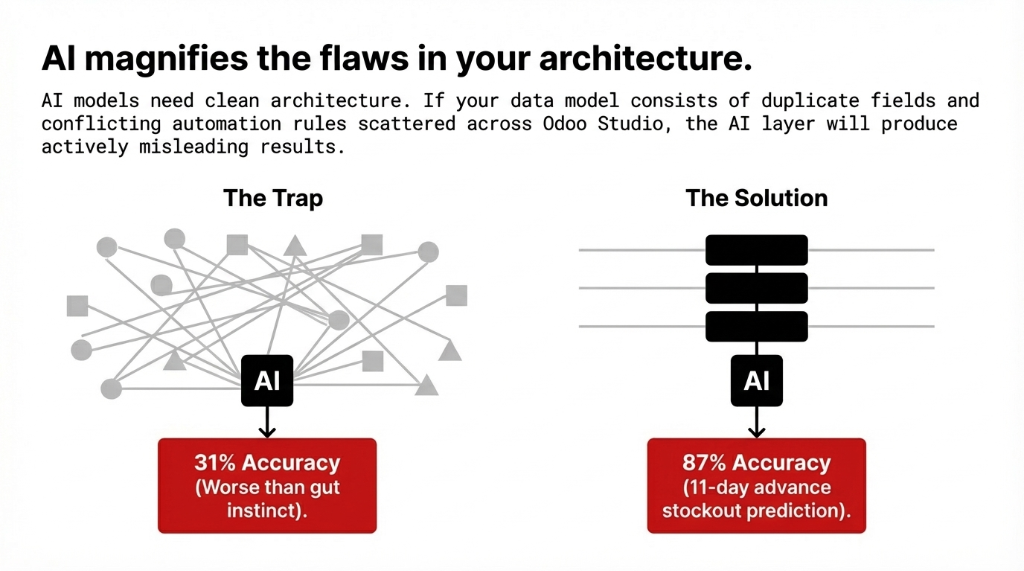
AI add-ons built on top of messy Studio customizations will inherit all of Studio's architectural fragility. We audited a distribution odoo company in Chicago last quarter that had deployed a third-party AI forecasting add-on on top of a heavily Studio-modified Odoo 16 instance. Their forecast accuracy landed at 31% — worse than their warehouse manager's gut instinct. Why? Fourteen duplicate product management fields created in Studio over three years, with the AI model unable to determine which field held authoritative data. AI add-ons need clean architecture. Clean architecture requires proper custom module development. There is no shortcut. Optimal solutions start with clean data. Best solutions built on structured models.
What Proper AI-Integrated Odoo Looks Like at $5M-$30M Revenue
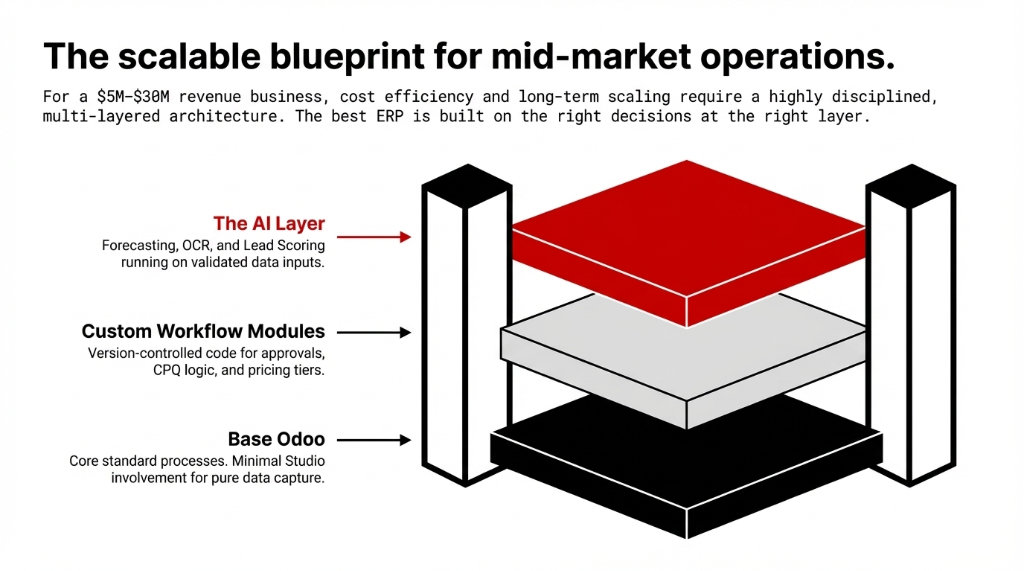
For a mid-market US manufacturer or distributor running on odoo erp software, the architecture that actually delivers cost efficiency and long-term scaling in business looks like this:
Layer 1: Base Odoo
Core standard processes running on native odoo modules with minimal Studio involvement — field additions only, nothing involving conditional logic. App odoo defaults. Odoo pricing at standard tier. Crm pricing within plan. Odoo crm pricing included.
Layer 2: Custom Workflow Modules
Multi-step approvals, order management rules, configure price quote software logic, dynamic product pricing tiers — built as version-controlled custom modules with full documentation. Sale pricing logic in code. Price quote automation in code. Customization product rules in code.
Layer 3: The AI Layer
Demand forecasting, OCR document processing, CRM lead scoring — installed on top of the clean custom data model where inputs are validated and structured. Odoo integration with external tools via proper custom API modules with error handling, never via Studio webhooks. Erp solutions built to last.
A distribution client we work with in Atlanta runs odoo manufacturing, odoo inventory, odoo crm, and odoo accounting on exactly this architecture. Their AI forecasting add-on now predicts stockouts 11 days in advance with 87% accuracy. Their odoo training time for new warehouse staff dropped from 3 weeks to 6 days because workflows are clean, predictable, and fully documented. That is what efficient operations looks like when the architecture is built right. Best management software outcome from it best practices. Top erp system result from proper odoo implementation decisions.
The Vendor Lock-In Nobody Talks About
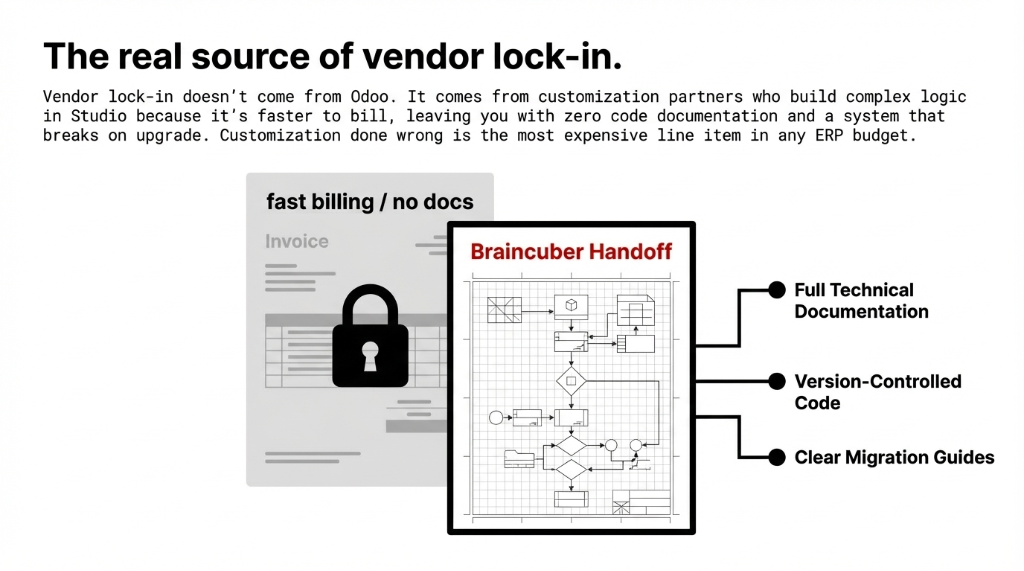
Vendor lock in in the odoo erp world does not come from Odoo itself — it comes from customization company partners who build everything in Studio because it is faster to bill, or who write custom modules with zero documentation and no code handoff plan. Software and business alignment fails at the vendor layer. Company it solutions that trap you are not solutions.
At Braincuber Technologies, every customized software development services engagement ships with full technical documentation, a migration guide for the next Odoo version, and clean code that any certified Odoo developer can read and extend. We have cleaned up enough $40,000+ Studio messes built by other software company vendors to know: customization done wrong is the single most expensive line item in any ERP budget. Service it support that includes documentation. Odoo support that includes migration guides. Support service that prevents vendor lock in. Managed services it support with code handoff. It consultation services with transparency. Align company ops with architecture that you own.
If your current implementation partner cannot explain why they chose Studio over a custom module for a specific feature — push them. Hard. The answer should never be "it was faster for us." It should be "it fits the exact complexity level of your requirement." If you do not get that answer, you are on the path to that $22,400 Ohio story. Odoo career veterans know this. Process for business stability requires architectural honesty. Product and company alignment starts at the code layer. Customized solutions that scale. Industry software built right. Business it software that survives upgrades. Software inc accountability. Best software erp decisions made on complexity, not convenience. App best practices applied. System for business longevity. Business erp architecture that lasts. Crm business logic in code, not Studio. Odoo inc partner standards enforced. Business management system integrity maintained. Manufacturing erp workflows documented and version-controlled.
5 FAQs: Odoo Studio vs Custom Module
Is Odoo Studio enough for a small manufacturing business starting with ERP?
Yes — with hard limits. Under $3M revenue, single site, and 80%+ alignment with standard Odoo workflows, Studio handles field additions and basic automations well. The moment you add third-party integrations, complex manufacturing logic, or any AI forecasting layer, you need custom modules.
How much does a custom Odoo module cost vs. Studio customization?
Studio changes run $500-$3,000 per feature. Custom modules for equivalent scope run $4,000-$15,000. However, the 24-month total cost of ownership frequently flips — Studio rework and upgrade fixes add $12,000-$22,000 in unplanned costs on average. Build it right once, or pay twice.
Can AI add-ons work on top of Studio customizations?
Technically yes. Practically dangerous. AI models reading Studio-generated fields with no naming convention or data validation consistently produce low-accuracy outputs. One Chicago distributor hit 31% forecast accuracy on a heavily Studio-modified instance. Clean custom development is required for reliable AI results.
How long does building a custom module take vs. using Studio?
Studio changes deploy in hours to days. A custom module for a specific workflow takes 2-6 weeks depending on scope. The timeline gap is real. So is the durability gap: properly built custom modules survive version upgrades with predictably less breakage than database-stored Studio configurations.
What should I ask a potential Odoo implementation partner before signing?
Three non-negotiables: Do they deliver version-controlled, documented custom modules or rely primarily on Studio for complex requirements? Do they provide a migration path tested against the next Odoo version? Have they integrated AI add-ons into live production ERP environments with real client examples?
Stop Letting the Wrong Tool Choice Burn Your ERP Budget
If you are unsure whether your current Odoo ERP setup is built on the right foundation for AI add-ons and real business scaling, book a free 15-Minute Operations Audit with Braincuber Technologies. We will identify your biggest architectural risk in the first call — no fluff, no sales pitch, just the truth.
Free audit • No obligation • Studio vs. Custom decision included