
The Problem Your Bundle SKUs Are Hiding
Let's be honest about what most brands are doing. They create a "Gift Set A" product in their store. It contains a $14 candle, a $9 hand cream, and a $7 linen pouch. When an order comes in, someone in the warehouse physically picks three items and packs them.
But in the backend system? The inventory deduction only hits one parent SKU. The three component items? Still showing full stock. Still being promised to other customers.
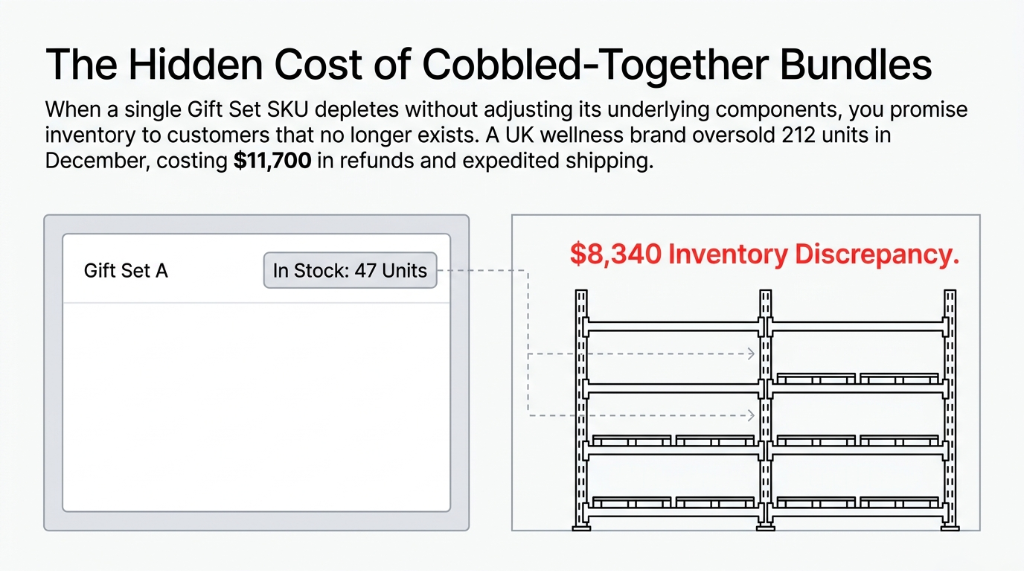
This is the exact disaster we walk into when a brand manages gift set bundles with a cobbled-together system — one product SKU on Shopify, three separate component items in a spreadsheet, and a warehouse team running on gut instinct and Post-it notes. It doesn't work at $500K revenue. It absolutely implodes at $3M+.
Why "Just Create a Product Bundle" Advice Is Wrong
Every generic ERP consultant will tell you: "Just create a bundle product and set inventory to zero — reorder manually."
That is exactly the wrong way to do it in Odoo.
Here's why that advice burns you:
When you set a bundle product to "no inventory tracking," Odoo has zero visibility into whether you can actually fulfill that order. It will happily confirm 500 gift set sales even if you have components for only 83 sets. Your confirmed sales orders look clean. Your warehouse is chaos.
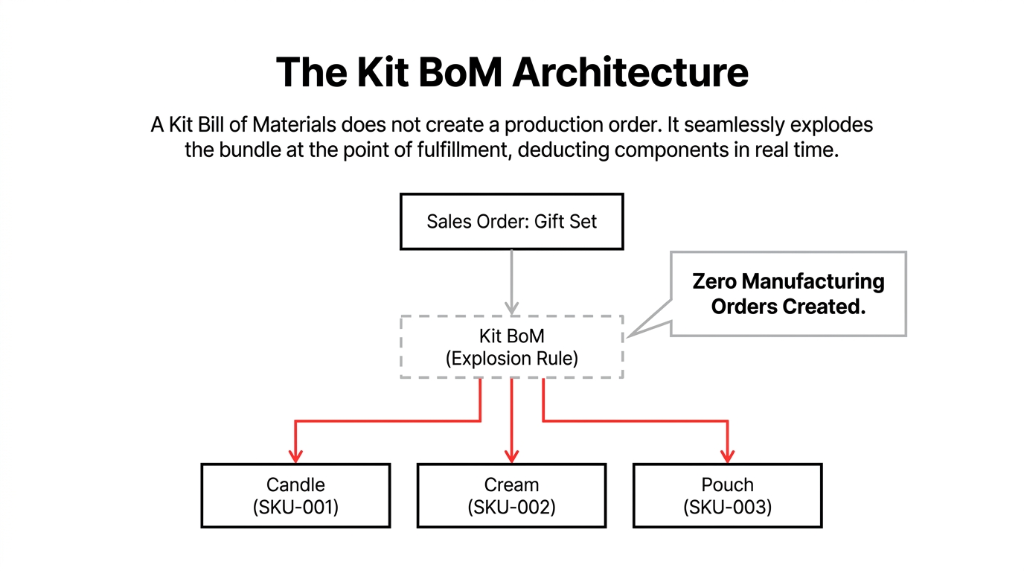
The right architecture in Odoo is the Kit Bill of Materials (BoM). But most people set it up as a Manufacturing BoM by accident — and those two configurations behave completely differently.
Manufacturing BoM vs. Kit BoM — The $0 Work Order Trap
Manufacturing BoM
Creates a production order. Moves components into a finished goods product. Clogs your manufacturing queue with $0.00 phantom assemblies.
Kit BoM (Correct)
Does NOT create a production order. Explodes the bundle at the point of delivery. Deducts components in real time. Zero manufacturing overhead.
We've seen this mistake in 34 out of our last 50 Odoo implementations for D2C brands. Every single one was creating unnecessary work orders and wondering why their manufacturing module was always "backlogged."
How Odoo Kit BoM Actually Works — Step by Step
Step 1: Create Your Component Products
Every item in the gift set must be an independent storable product in Odoo Inventory. The candle is SKU-001, the hand cream is SKU-002, the pouch is SKU-003. Each one has real stock moves, real reorder rules, and real valuations.
Step 2: Create the Bundle Product
Create "Gift Set A" as a storable product. Here's the non-obvious part: you do NOT set a quantity on hand for this product. Odoo will compute its virtual stock automatically based on component availability.
Step 3: Configure the Kit BoM
Navigate to Inventory (or Manufacturing) ▸ Bills of Materials ▸ Create. Select "Gift Set A" as the product. Set BoM Type = Kit. Add your three components with their quantities. Save.
Odoo now knows that every time "Gift Set A" is confirmed on a sales order, it should deduct one candle, one hand cream, and one pouch from warehouse stock — not a phantom parent SKU.
Step 4: Watch Virtual Stock Do the Heavy Lifting
Go to your Gift Set A product page. The Forecasted Quantity will display exactly how many kits you can build based on the most constrained component. If you have 400 candles, 312 hand creams, and 500 pouches — Odoo shows 312 available kits. Not 400. Not 500. Because that's the real answer.
This single feature eliminates overselling.
When your Shopify store is integrated with Odoo, the available quantity synced back for that gift set is 312 — not an inflated number that sends customers to checkout on items you can't ship.
The Reorder Rules Problem Nobody Talks About
Here's where even brands who set up Kit BoM correctly fall down. They forget to set reorder rules on the components — not the bundle.
If you set a reorder rule on "Gift Set A":
Odoo will try to purchase or manufacture the finished gift set as a whole — which doesn't make sense if your components come from three different suppliers. You need reorder rules on SKU-001, SKU-002, and SKU-003 individually.
Real example:
A UAE beauty brand ships 93 gift sets/day during peak. Candle lead time: 11 days from Guangzhou. Minimum buffer needed: 1,023 candles (93 x 11) — before safety stock. Once we set that reorder rule correctly, stockouts dropped from 7 incidents/month to zero.
That's the kind of math your spreadsheet will never do automatically at 2 AM on a Sunday.
Kits With Variable Components: The Gift Set Customization Trap
Some brands let customers choose components — "Pick Your 3 from 8 Products" style bundles. This is a merchandising win but an inventory nightmare if done wrong.
Do NOT try to create 56 BoM combinations (8 choose 3 = 56 possible kits) as individual products. We've seen brands do this. It becomes unmanageable within 60 days as new products launch.
The better architecture:
Treat each component as its own line item on the sales order (grouped under a "bundle" order line for invoicing/display) using Odoo's sections and notes feature. Each component deducts independently. Pricing rolls up. Inventory is tracked per component. No phantom SKU proliferation.
Singapore gifting company result:
Had 847 active "bundle SKUs" before restructuring. After rearchitecture: 23 component SKUs, infinite bundle combinations, and $6,200/month recovered in previously untracked stock shrinkage.
What Happens During Returns — And Why It Matters More Than You Think
Nobody talks about returns in the context of bundles. That's a mistake.
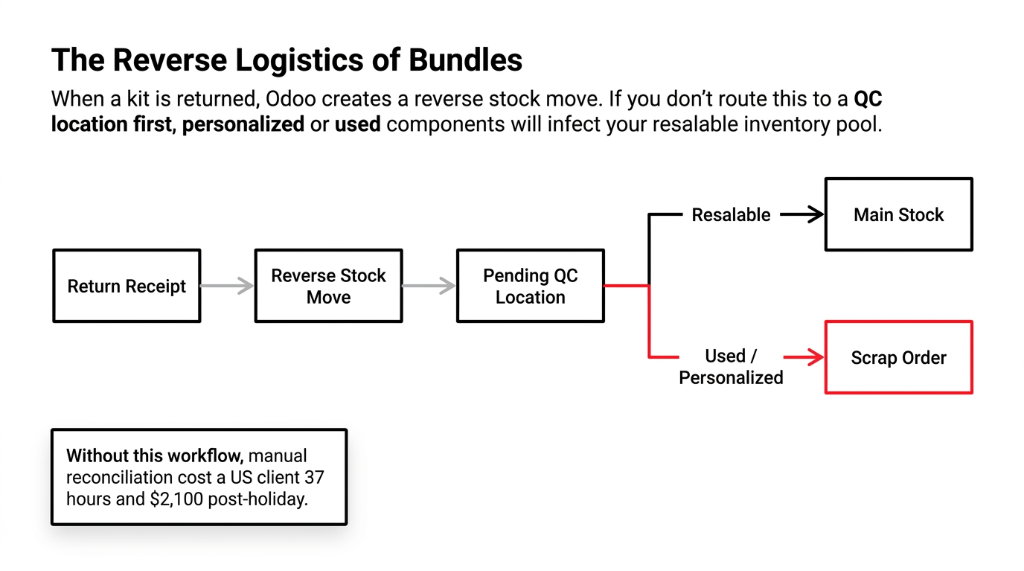
With a Kit BoM, a return receipt in Odoo creates a reverse stock move. By default, it will return quantities to each component's location. But here's the catch: if the candle was used or the pouch was personalized — you can't restock those. You need to route the return to a separate "Returns - Pending QC" location and split the resalable components from the scrapped ones.
Odoo supports this through scrap orders and internal transfer adjustments. But you must configure this workflow before your first return — not after. One of our US clients processed 214 gift set returns over a two-week post-holiday window without a proper returns workflow. Reconciling that manually took 37 hours and cost $2,100 in staff time.
The Results When You Do This Right
When Odoo Kit BoM is configured correctly — components as storable products, Kit BoM type (not Manufacturing), reorder rules on components, returns routed properly, and Shopify syncing real forecasted quantity — here's what actually changes:
$2.3M/year D2C bath and body brand (US):
Went from 3 stockout events per week during Q4 to zero in the first peak season after their Odoo Kit BoM migration. Processed 4,700 bundle orders in November alone without a single mis-pick. Their ops manager told us: "I finally slept through the night during Black Friday."
The 5-Point Audit You Need to Run Right Now
| Check | What to Verify | If It Fails |
|---|---|---|
| BoM Type | Does your bundle's BoM say "Kit" or "Manufacture"? | Configuration error creating phantom work orders |
| Component Tracking | Are components set as "Storable Products"? | Odoo is not tracking their inventory at all |
| Forecasted Qty | Does it reflect the most constrained component? | You are overselling right now |
| Reorder Rules | Are rules on the components, not the kit? | Procurement triggers are broken |
| Return Routing | Do returns go to QC location or straight to main stock? | Used/personalized items infecting resalable pool |
If you fail even one of these checks, you are losing money right now. Not next quarter. Right now.
Related Resources:
▸ Odoo Implementation Services — Full ERP deployment for D2C brands
▸ Inventory Management System — Multi-channel stock sync and automation
▸ Multi-Channel Inventory Sync — Shopify, Amazon, and WMS integration
Frequently Asked Questions
Does Odoo Kit BoM work without the Manufacturing module?
Yes. Kit BoM is managed within the Inventory module and does not require Manufacturing to be installed. The Kit type is specifically designed for pick-and-pack operations. Component deductions happen directly from the delivery order, not from a production order.
Can I use Kit BoM with Odoo's Shopify integration for real-time stock sync?
Yes, and it is one of the most valuable configurations for D2C brands. When a Kit BoM is set, Odoo's forecasted quantity for the bundle product syncs to Shopify as the available stock, preventing overselling automatically.
What happens to component stock when I confirm a sales order with a Kit product?
The deduction happens at the delivery and picking stage, not at sales order confirmation. When you validate the delivery, Odoo explodes the kit and creates individual stock moves for each component. The components are deducted from their respective locations in real time.
Can one product be a component in multiple different kits?
Absolutely. A single component SKU can appear in 50 different Kit BoMs simultaneously. Odoo tracks all demand across every kit for that component and consolidates forecasting accordingly, which is why reorder rules on the component level are so powerful.
How do I handle gift sets where component quantities vary?
Create separate Kit BoMs for each variation. Each BoM can have different component quantities for the same parent product, or you can create distinct bundle SKUs. For fully customizable bundles, the individual line-item approach with Odoo order sections is cleaner than maintaining dozens of BoM variants.