
The Real Problem Nobody Talks About
Most skincare founders we meet have three things in common: they are running Shopify on the front end, they have Odoo half-configured somewhere in the middle, and they have never once opened the Inventory Aging Report.
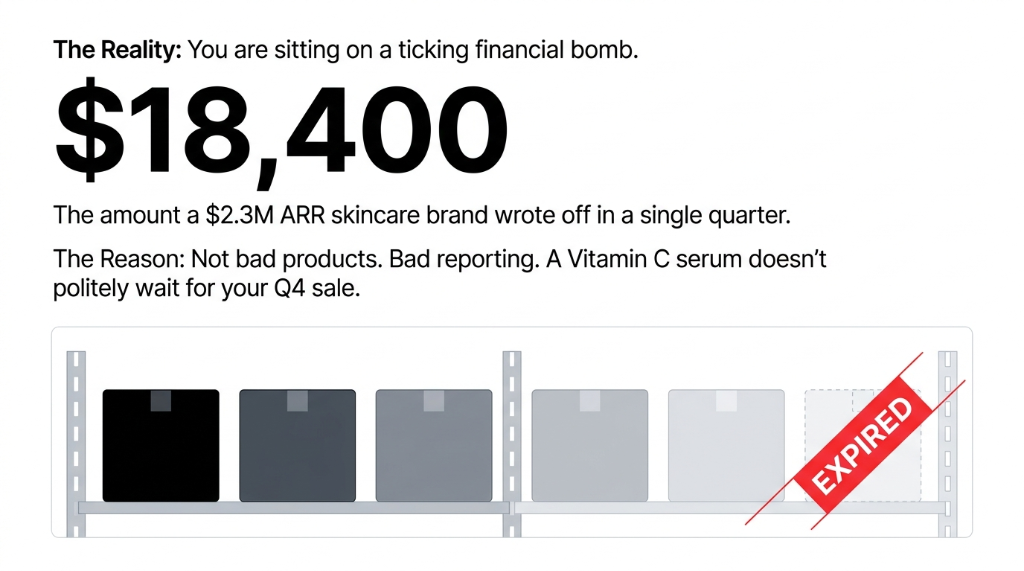
When 300 units of a retinol face cream sit in your warehouse for 180 days and your purchasing team reorders because the dashboard shows "low stock" on the system — *(yes, that actually happens when lot tracking is not tied to aging buckets)* — you now have 600 units with 45 days left on the clock. At $14 cost-per-unit, that is $8,400 of stock you will either discount by 60% or write off entirely.
The root cause is almost always the same: the aging report is never configured to group by product AND expiry date simultaneously. Teams look at quantities. They do not look at when those quantities were received and how long they have left.
The Skincare Aging Crisis: By The Numbers
$18,400
Written off in expired serums, toners, and SPF moisturizers by a $2.3M ARR brand — in a single quarter
97.3%
FEFO compliance rate hit within 8 weeks of enabling the route setting — after proper lot tracking configuration
23.4%
Drop in purchasing over-order rate once ops teams could finally see aging data before placing reorders
Why Your "Standard" Inventory Setup Is Failing You
Here is a controversial opinion most Odoo consultants will not say out loud: a default Odoo implementation without lot/serial number tracking enabled is basically useless for a skincare brand. It is the ERP equivalent of buying a fire alarm and never wiring it to the electricity.
The default Odoo Inventory Aging Report evaluates all items in stock and gives you insights into purchase costs and profitability delays. That sounds great on a sales call. In practice, if you have not turned on Traceability → Expiration Dates in your Inventory settings, the report shows you nothing about which batch of your niacinamide serum expires in 30 days versus 18 months. Every unit looks identical.
The Pattern We See Everywhere
From UAE-based luxury skincare labels to UK indie brands scaling past £1M — they all made the same mistake: implemented Odoo, turned on the warehouse module, and assumed the aging report would just work for time-sensitive stock. It does not. Not unless someone who has done this 50+ times configures it correctly from the start.
How the Odoo Inventory Aging Report Actually Works for Skincare
The Inventory Aging Report in Odoo lives at Inventory → Reporting → Inventory Aging. It is a pivot table that, when built right, shows you every product in your warehouse grouped by the date it was received, with columns for Remaining Qty and Remaining Value broken down by Day, Week, Month, Quarter, or Year.
Step 1 — Enable Lot Tracking and Expiration Dates
Navigate to Inventory → Configuration → Settings and under Traceability, tick both Lots & Serial Numbers and Expiration Dates. Without this, you are flying blind. Every batch of your face wash needs a lot number — not optional.
Step 2 — Assign Shelf Life Rules Per Product
In each Product record, go to the Inventory tab. You will find fields for Expiration Time (configurable in days, months, or years). A brand selling a retinol serum with a 24-month shelf life should have that baked in at the product level — so every received batch auto-calculates its expiry date from the receipt date.
Step 3 — Build the Aging Pivot Table
Open the Aging Report. Click the caret-down icon in the Search bar. Under Group By, select Product. Then click the plus (+) icon next to the date column and expand by Month. Now every row is a product, and every column is a reception month. You can immediately see that your SPF50 moisturizer — 400 units — was received in November 2024 and has not moved.
Step 4 — Cross-Reference with Lot Expiry Data
The aging report tells you when stock arrived. Your lot tracking tells you when it expires. Run both simultaneously. A product received 6 months ago with an 18-month shelf life has 12 months left. Fine. A product received 6 months ago with an 8-month shelf life is expiring in 8 weeks and you have 200 units. That is a $4,600 problem you need to act on today.
Step 5 — Save as a Favorite Filter
Build your skincare-specific view (grouped by product, monthly columns, filtered to products with lot-based expiry), then save it as a Favorite in the search bar. Your ops team can open it every Monday morning in under 30 seconds — no reconfiguration needed.
If your inventory management system cannot tell you which batches expire this month vs. which ones have 18 months left, it's not managing anything — it's just counting boxes.
The Aging Buckets That Matter for Skincare Specifically
Not all industries use aging the same way. For an apparel brand, 90-day-old stock is slow-moving. For a skincare brand, 90-day-old stock might be fine — or it might be a brand partnership gift set with a 120-day total shelf life that is now at 75% capacity. Context is everything.
| Aging Bucket | Risk Level | Recommended Action |
|---|---|---|
| 0 – 30 days | Low | Monitor normally |
| 31 – 60 days | Medium | Flag for sales team attention |
| 61 – 90 days | High | Trigger discount or bundle campaign |
| 91 – 120 days | Critical | Liquidation pricing, flash sale, or donate before write-off |
| 120+ days | Write-off Zone | Accounting write-off, waste disposal compliance check |
The 61–90 Day Window Is Your Last Real Chance
That 30-day window between "high risk" and "critical" is where brands consistently lose money. It's your last real chance to recover $0.40 on the dollar instead of $0.00.
The fix:
Build an SLA into your ops playbook. When stock hits 60 days in aging, someone owns the clearance plan within 48 hours. No exceptions. If your Odoo aging report is not generating an automated alert when stock crosses into that bucket, you are relying on someone remembering to check — and in a warehouse team of 4–6 people managing 300+ SKUs, nobody remembers.
What Braincuber Configures That Most Consultants Skip
Most Odoo implementations are rushed. The consultant sets up warehouses, products, and maybe a reorder rule. Then they call it done. Here is what we add that makes the difference for skincare brands specifically.
Automated Expiry Alerts
Configure the system to auto-send email alerts to your purchasing and ops manager 30, 60, and 90 days before batch expiry. Not a manual task. A system-triggered email with the lot number, product name, quantity, and expiry date — every time. No human memory required.
FEFO (First Expired, First Out) Removal Strategy
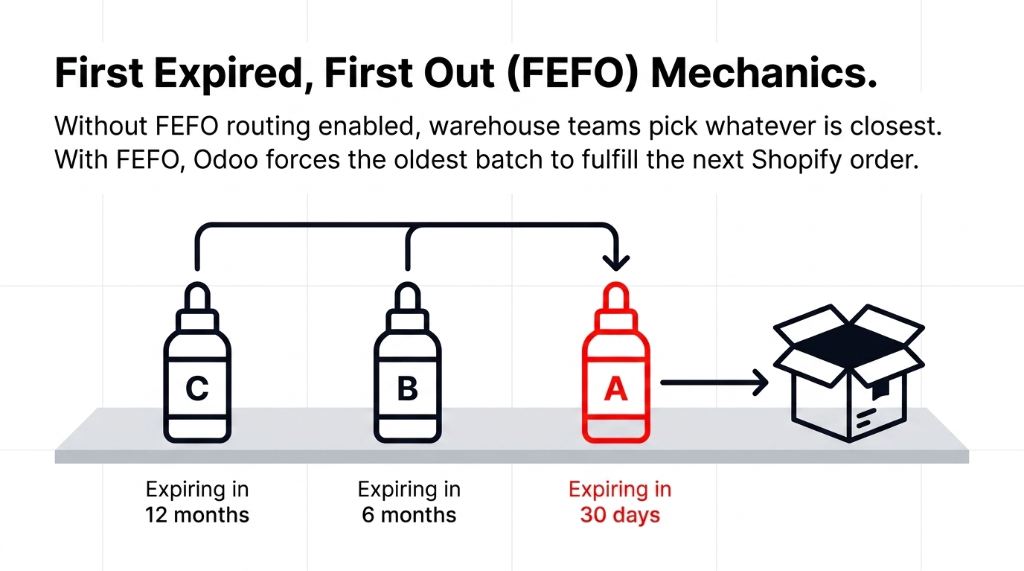
In Inventory → Configuration → Settings, enable First Expiry First Out under the Routes section. This forces Odoo to pick the oldest batch first during picking operations — so your warehouse team never accidentally ships a newer batch while a near-expiry batch gathers dust.
Most consultants do not turn this on. We always do.
Custom Aging Dashboard for Brand Ops Teams
Instead of making your ops manager run a pivot table manually, we build a simple Odoo dashboard widget that shows — in real time — the total value of stock in each aging bucket. One number: $X currently in 61–90 day zone. That is the number your COO needs to see every morning, not a full pivot table.
Shopify-Odoo Lot Sync
If you are selling on Shopify and fulfilling through Odoo, your lot data does not automatically flow. We build a sync that ensures every Shopify order triggered fulfillment in Odoo respects the FEFO logic — so the oldest batches ship first, every time, without your warehouse team making manual decisions.
This is the same level of operational wiring we bring to all our Odoo ERP integration services — connect Shopify, Odoo, and your warehouse floor into a single system that enforces the rules humans forget.
The Numbers You Should Expect After Proper Configuration
We ran this full setup for a UK-based clean beauty brand scaling from £800K to £2.1M ARR over 18 months. Before the Odoo aging report configuration, they were writing off an average of £11,700 per quarter in expired stock. After:
Results After 6 Months of Go-Live
- Write-offs dropped to £1,200/quarter — down from £11,700. That is a 90% reduction from a reporting module that was already sitting inside their existing Odoo license, unused.
- Discount-driven clearance sales recovered £6,800 from the 61–90 day bucket in Q1 alone — money they would have written off entirely without aging visibility.
- Purchasing over-order rate dropped by 23.4% because the ops team could finally see aging data before placing reorders.
- FEFO compliance hit 97.3% across all pick operations within 8 weeks of enabling the route setting.
That is £40,000+ in recovered value over 12 months — from proper configuration, not new software.
The Implementation Reality
Setting this up is not a 3-hour job if you want it done right. Expect 5–7 business days for a full skincare inventory configuration — including lot migration if you have existing stock, product-level shelf life rule setup, FEFO routing, Shopify sync, and dashboard build.
What Gets Easier Immediately (Week 1)
You stop flying blind on expiring batches. Your purchasing team stops double-ordering near-expiry SKUs. Warehouse picks start following FEFO automatically.
What Improves Over 60–90 Days
Write-off value drops measurably. Your Q4 markdown budget stops being an emergency fund for expired stock. Supplier negotiations get sharper because you have batch-level cost data tied to sell-through rates.
The One Post-Implementation Mistake We Keep Seeing
Brands set up the aging report and then never act on the 61–90 day bucket aggressively enough. The report is useless if your commercial team sees "high risk" and does nothing for 3 weeks. Build an SLA: when stock hits 60 days, someone owns the clearance plan within 48 hours. No exceptions.
This is why our Odoo implementation services always include the ops playbook alongside the technical setup — because a perfectly configured aging report means nothing if nobody acts on it.
Your Aging Report Questions, Answered
Does Odoo's built-in Inventory Aging Report work for skincare without customization?
The native report works for basic aging analysis, but for skincare — where lot-level expiry, FEFO routing, and automated alerts matter — you need proper configuration. Enabling Expiration Dates under Traceability, setting product-level shelf life rules, and building saved pivot views are non-negotiable steps that the default setup does not include.
How do I enable expiration date tracking for skincare products in Odoo?
Go to Inventory → Configuration → Settings, scroll to the Traceability section, and tick Expiration Dates. Then assign lot numbers to each product and enter shelf life values (in days/months/years) in the product's Inventory tab. Every received batch auto-calculates its expiry date from that point.
What is FEFO and why does it matter for skincare inventory?
FEFO means First Expired, First Out — Odoo picks batches closest to expiry first during warehouse picks. For skincare, this prevents newer batches from shipping while older ones expire on the shelf. Enable it under Inventory → Configuration → Settings → Routes. Without it, your warehouse team makes manual batch decisions, and they will get it wrong at scale.
Can the Odoo Aging Report trigger automatic alerts before stock expires?
Not natively — but with the Smart Inventory and Product Expiry Management module from the Odoo App Store, you can configure automated email alerts sent to designated users 30, 60, or 90 days before batch expiry, with lot number, product name, quantity, and expiry date included.
How is the Inventory Aging Report different from the Stock Valuation Report?
The Aging Report shows how long stock has been sitting and groups it by reception date — essential for expiry management. The Valuation Report shows what your current stock is worth based on costing method (FIFO, average cost). For skincare brands, you need both: aging to catch expiry risk, valuation to understand the financial exposure of that risk.
Stop Writing Off Expired Batches as a "Cost of Doing Business"
Every $1 you write off in expired skincare stock was preventable with a properly configured aging report. Book our free 15-Minute Operations Audit — we will find your biggest inventory leak on the first call. No pitch. No fluff. Just data.
Get Your Free Aging Report Audit