
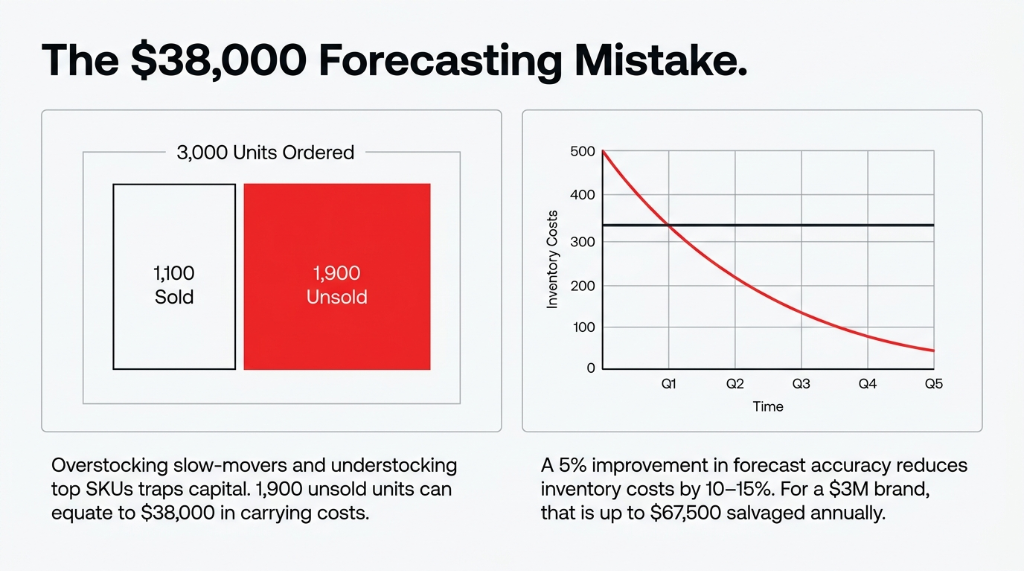
The Real Cost of Bad Forecasting
A 5% improvement in forecast accuracy reduces inventory costs by 10-15%. For a brand doing $3M in product revenue, that is $45,000 to $67,500 per year sitting in bad forecasting decisions.
The symptoms are predictable: you overstock slow-movers because they had one big month 14 months ago. You understock your top SKUs in peak season because your reorder rule was set manually in January and never updated. You buy based on supplier MOQs, not actual demand signals.
This is not a people problem. It is a data infrastructure problem. And Odoo has the infrastructure to fix it — if you set it up correctly.
How Odoo Actually Reads Historical Sales Data
Let us be specific about what Odoo does under the hood, because most implementation partners gloss over this part.
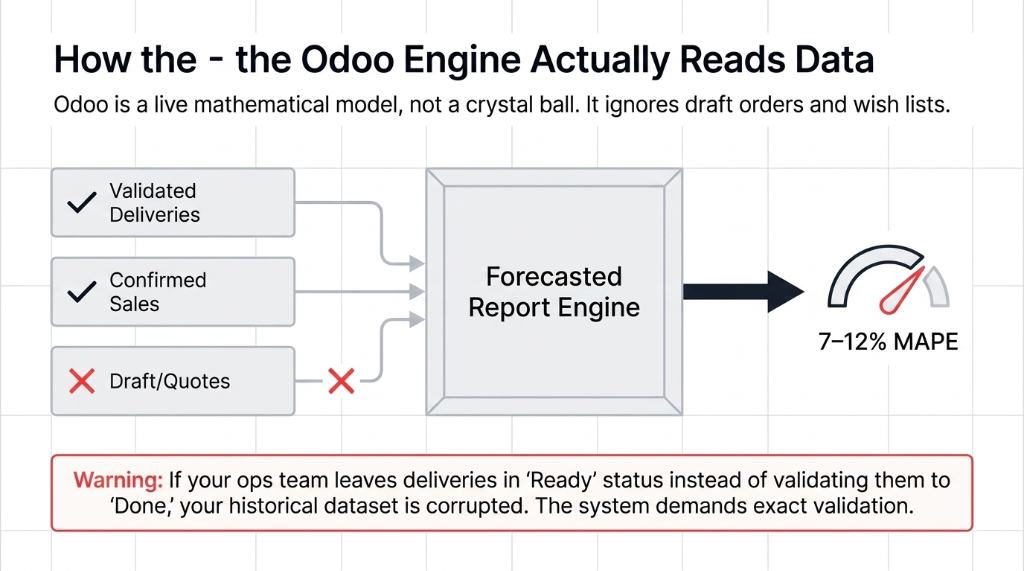
Odoo's demand forecasting engine works off validated delivery orders, confirmed sales orders, and inventory movements — not draft orders, not quotes, not wish lists. That distinction matters because if your team is sloppy about validating deliveries (leaving orders in "ready" status instead of "done"), your historical dataset is corrupted and your forecast will be garbage.
Odoo's Forecasted Report in the Inventory module gives you a real-time projected stock level based on confirmed inflows and outflows. It accounts for purchase orders in transit, manufacturing orders in progress, and open sales orders that will draw down inventory. Feed it clean data, and it is accurate within 7-12% MAPE (Mean Absolute Percentage Error) for most SKUs.
The Master Production Schedule (MPS) takes this further. Instead of reacting when stock hits zero, the MPS lets you input sales forecasts by period — week, month, or quarter — and Odoo calculates the delta between forecasted demand and current stock, then recommends PO or MO quantities automatically. This is the tool your planning team should be living in, not a Google Sheet.
The Three Replenishment Modes — And Which One You Are Probably Using Wrong
Odoo gives you three replenishment mechanisms. Most brands we onboard are using reordering rules for everything. That is a mistake.
| Mode | Best For | Critical Warning |
|---|---|---|
| Reordering Rules (Min/Max) | High-velocity, predictable SKUs where you always want a buffer | Only works if min/max is updated based on rolling 90-day velocity — not set once and forgotten |
| MTO (Make-to-Order) | High-value, low-demand, or customizable products | Adds 7-14 days to fulfillment. Do NOT use for same-day-ship products |
| MPS (Master Production Schedule) | Seasonal patterns, promotional calendars, planned launches | Cannot run simultaneously with reordering rules on the same product |
The $22,000 duplicate order trap:
MPS and reordering rules cannot run on the same product simultaneously. If you try, Odoo's automated replenishment will override your manual MPS inputs and create duplicate POs. A UAE food brand lost $22,000 in a duplicate packaging order in their first month post-go-live because of this.
Setting Up "Suggest Quantities" Correctly
Odoo 17+ has a feature most brands never activate: Suggest Quantities Based on Historical Demand. This feature analyzes validated delivery orders over a defined lookback period and auto-populates suggested order quantities when you run a replenishment.
Step-by-step activation:
1. Validate your historical data first. Go to Inventory ▸ Reporting ▸ Inventory Moves. Filter by the last 12 months. Every delivery order should be in "Done" status. If more than 3% are stuck in "Ready" or "Waiting," stop and fix that before enabling forecasting.
2. Navigate to Inventory ▸ Configuration ▸ Settings. Enable "Replenishment" and activate "Suggest quantities based on historical demand."
3. Set the lookback window deliberately. For seasonal products, use 365 days and weight by seasonality flags. For evergreen products with flat demand, 90 days is more predictive than 180.
4. Run a test replenishment for 5 SKUs. Compare Odoo's suggestions against your actual purchase history. If the variance is greater than 18%, your sales data has gaps — missing return records, unvalidated deliveries, or a warehouse location split Odoo is not counting.
Why Your Current Forecasting Method Costs More Than You Think
Here is the controversial opinion we give every new client: Excel-based demand forecasting is not a temporary bridge — it is the problem.
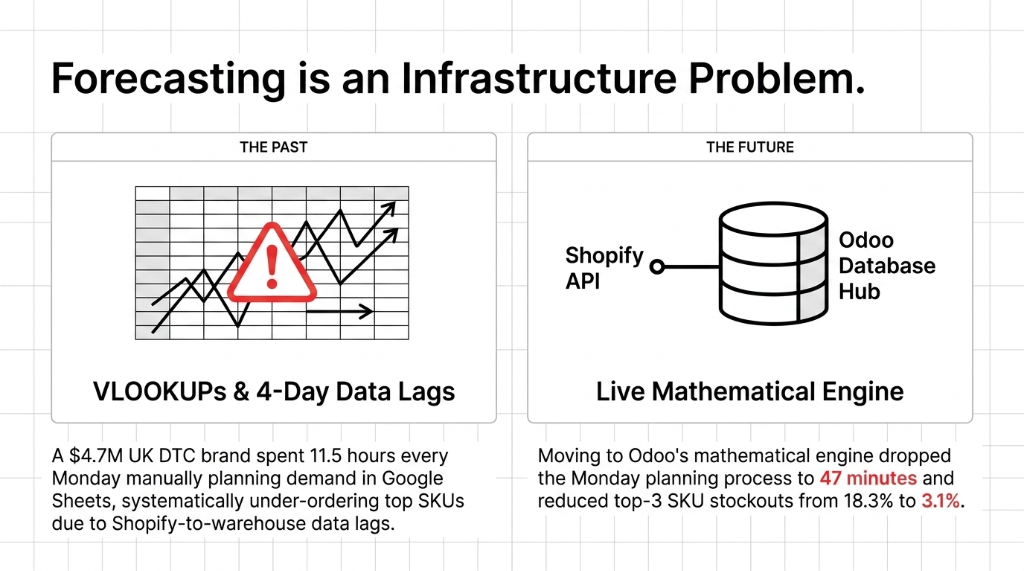
We worked with a $4.7M DTC brand in the UK doing weekly demand planning in a shared Google Sheet. Their ops lead spent 11.5 hours every Monday pulling Shopify sales reports, updating formulas, and emailing PO suggestions. By Thursday, when the PO was approved, the data was already 4 days stale. They were systematically under-ordering their top 3 SKUs because their sheet did not account for the 3-day Shopify-to-warehouse data lag.
After migrating to Odoo's MPS with Shopify-Odoo integration, that same Monday process dropped to 47 minutes. Their top-3 SKU stockout rate went from 18.3% to 3.1% in the first quarter.
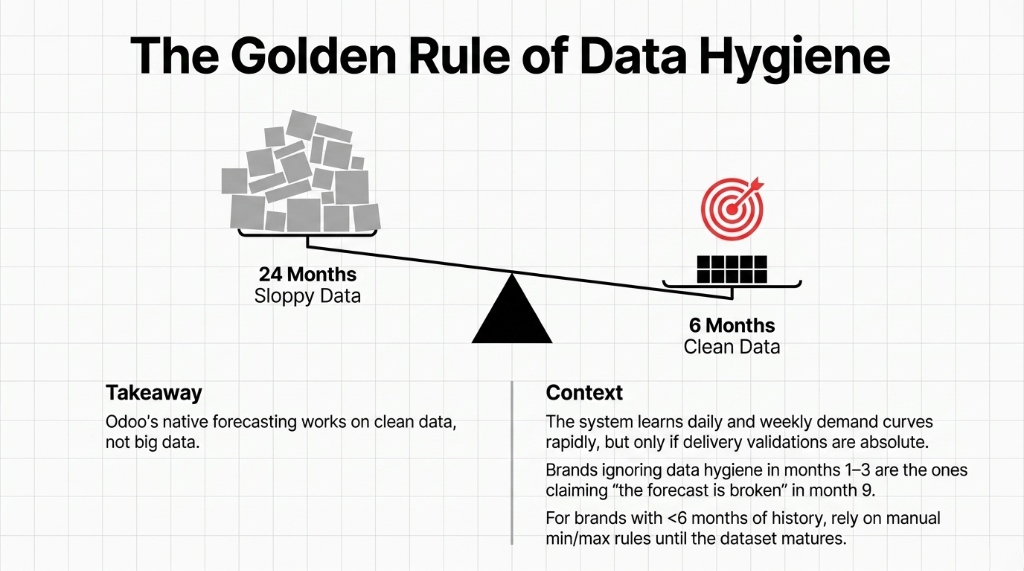
Odoo's native forecasting works on clean data, not big data. If you have 24 months of sales history in Odoo, your forecast is sharper than a brand with 6 months — but only if the underlying delivery validations are complete and consistent. The brands that ignore data hygiene in months 1-3 are the ones calling us in month 9 with "the forecasting isn't working."
Adding Machine Learning to Odoo's Forecast Layer
Odoo's native forecasting is deterministic — it reads what happened and extrapolates linearly. It does not natively handle sudden demand spikes, external trend signals, or multi-variable seasonality.
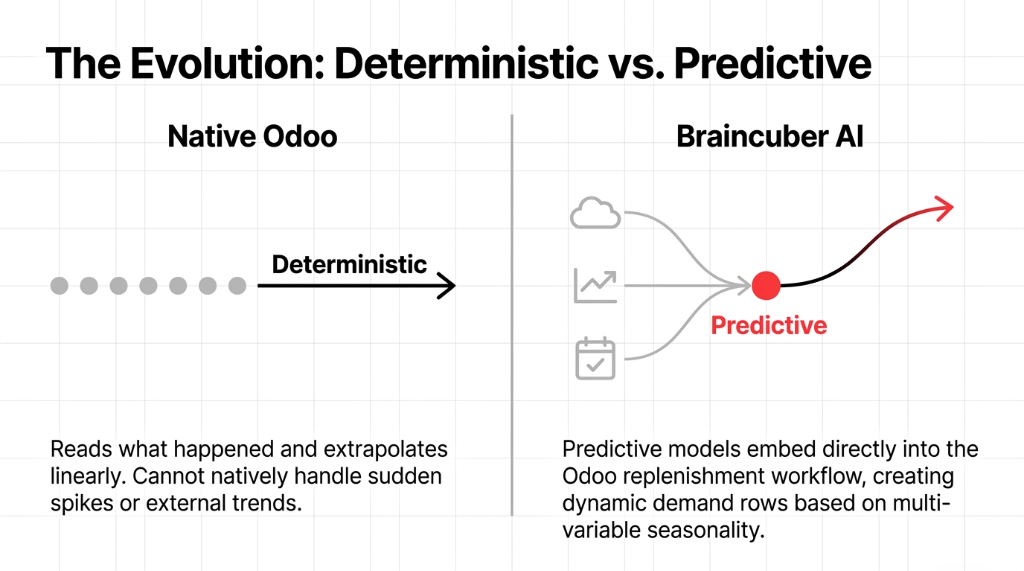
That is where Braincuber's AI-augmented Odoo layer changes the equation. We embed predictive ML models — built on scikit-learn and statsmodels — directly into the Odoo replenishment workflow. The model ingests:
What Our ML Layer Ingests
36 months of Odoo history
Delivery orders, return rates, customer segments
External signals
Weather data for weather-sensitive SKUs, Google Trends for fashion/seasonal
Promotional calendar
40% discount in week 1 of month? Model adjusts demand expectations
$6M consumer goods brand (Singapore):
ML-augmented forecast reduced excess inventory carrying costs by $91,400 in the first 8 months — against an implementation cost of $28,000. Average time-to-PO dropped from 3.2 days to 6 hours.
What Goes Wrong in Month 1 (The Stuff No One Tells You)
The MPS dashboard feels overwhelming at first.
Sixty SKUs, 12 weeks of columns, four different demand rows. New planning teams freeze. The fix: start with your top-20 SKUs by revenue. Get those dialed in for 60 days. Then expand.
Reordering rules will fire during your MPS transition period.
When you first enable MPS, your existing reordering rules are still active. You will get duplicate PO drafts. Go into Inventory ▸ Replenishment ▸ Reordering Rules and archive rules for every SKU you move to MPS. Failing to do this cost a US fashion client $14,200 in a duplicate fabric order.
Lead times are the ghost in the machine.
Odoo's forecast calculates backward from your expected delivery date using supplier lead times + security lead time. If your lead time is set to 7 days but your supplier consistently delivers in 14, Odoo will suggest reorders that are always one week too late. Audit your supplier lead times quarterly.
The Results You Should Expect — In Real Numbers
| Metric | Before Odoo Forecasting | After (Correct Setup) |
|---|---|---|
| Dead stock | Baseline | 28-34% reduction within first 2 quarters |
| Stockout rate (top-20 SKUs) | 14-22% | 3-6% |
| Planning time | 8-12 hours/week | 2-3 hours/week (67-73% reduction) |
| PO overrun | 22% average | Under 7% |
These are not marketing numbers. These are averages across implementations in the US, UK, UAE, and India over the last 4 years.
Related Resources:
▸ Odoo Implementation Services — Full ERP deployment for D2C brands
▸ Inventory Management System — Multi-channel stock sync and automation
▸ AI for D2C Brands — Machine learning demand forecasting and automation
Frequently Asked Questions
Does Odoo demand forecasting work if I have less than 6 months of sales history?
Technically yes, but practically no. Odoo's suggest-quantities feature and MPS both produce unreliable outputs with fewer than 90 days of validated delivery data. With under 6 months of history, use conservative min/max reordering rules manually, and invest those first 6 months in validating every delivery and return move so your historical dataset is clean when forecasting kicks in.
What is the difference between Odoo's Forecasted Report and the Master Production Schedule?
The Forecasted Report is reactive. It shows projected stock levels based on confirmed orders already in the system. The MPS is proactive. You input anticipated future demand, and Odoo tells you what to order and when. Use the Forecasted Report for daily ops visibility. Use MPS for weekly or monthly planning cycles.
Can Odoo forecasting handle seasonal demand spikes automatically?
Not natively. Odoo's built-in tools extrapolate from recent history linearly. If Q4 always spikes 3x for you, you need to either manually adjust MPS demand rows for those weeks or integrate an ML layer like Braincuber's AI module that reads historical seasonality patterns and adjusts forward projections automatically. Do not rely on native Odoo to catch your Christmas spike.
How often should we update reordering rules and MPS inputs in Odoo?
Reordering rule min/max values should be reviewed and updated every 90 days, based on your most recent 90-day rolling average daily sales. MPS demand inputs should be refreshed weekly if your business is high-velocity, or bi-weekly for slower-moving product lines. Leaving them static for 6 or more months is the single biggest reason brands get duplicate POs or stockouts despite having Odoo running.
Will Odoo demand forecasting integrate with our Shopify store automatically?
Yes. With the correct Shopify-Odoo integration, every confirmed Shopify order flows into Odoo as a validated sales order in real time, directly feeding the forecasting engine. However, Shopify's API has rate limits that can cause 15 to 30 minute data lags during high-traffic events like flash sales. Build a 48-hour minimum data validation window into your forecasting refresh cycle to account for it.